介绍
原理
部署要求
您需要至少三个Sentinel实例才能实现强大的部署。
应将三个Sentinel实例放入被认为以独立方式失败的计算机或虚拟机中。例如,在不同的可用区域上执行的不同物理服务器或虚拟机。(需要配置三个单独的哨兵.)
Sentinel + Redis分布式系统不保证在故障期间保留已确认的写入,因为Redis使用异步复制。但是,有一些方法可以部署Sentinel,使窗口丢失限制在某些时刻的写入,同时还有其他不太安全的方式来部署它。
您需要在客户端获得Sentinel支持。流行的客户端库具有Sentinel支持,但不是全部。
如果您不在开发环境中不时进行测试,则没有HA设置是安全的,如果可以,在生产环境中,如果它们可以工作,则更好。您可能有一个错误的配置,只有在为时已晚(凌晨3点,当您的主人停止工作)时才会变得明显。
Sentinel,Docker或其他形式的网络地址转换或端口映射应谨慎使用:Docker执行端口重新映射,中断其他Sentinel进程的Sentinel自动发现以及主服务器的从属列表。有关详细信息,请查看本文档后面有关Sentinel和Docker的部分。
过程
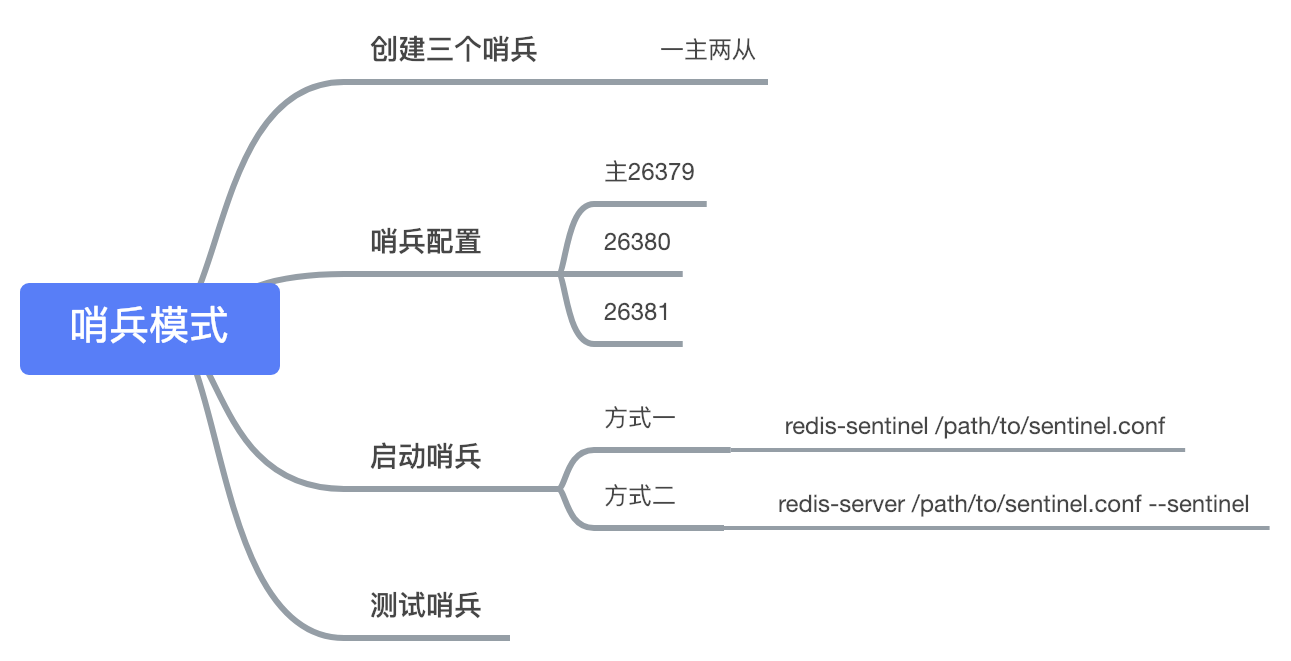
新建三个哨兵宝宝文件
主哨兵
[root@redis01 ~]# mkdir -p /var/redis/data/
[root@redis01 ~]# redis-sentinel /opt/redis/sentinel/redis-26379.conf
[root@redis01 ~]# vim /opt/redis/sentinel/redis-26379.confport 26379dir /var/redis/data/logfile "26379.log"sentinel monitor mymaster 127.0.0.1 6379 2sentinel down-after-milliseconds mymaster 60000sentinel failover-timeout mymaster 180000sentinel parallel-syncs mymaster 1daemonize yes
两个从哨兵
从1
[root@redis01 ~]# vim /opt/redis/sentinel/redis-26381.confport 26380dir /var/redis/data/logfile "26380.log"sentinel monitor mymaster 127.0.0.1 6379 2sentinel down-after-milliseconds mymaster 30000sentinel parallel-syncs mymaster 1sentinel failover-timeout mymaster 180000daemonize yes
从2
[root@redis01 ~]# vim /opt/redis/sentinel/redis-26381.confport 26381dir /var/redis/data/logfile "26381.log"sentinel monitor mymaster 127.0.0.1 6379 2sentinel down-after-milliseconds mymaster 30000sentinel parallel-syncs mymaster 1sentinel failover-timeout mymaster 180000daemonize yes
创建相应的日志文件夹,不创建就会报错😂
[root@redis01 ~]# mkdir -p /var/redis/data/
首先启动6380 6381 对应的服务
[root@redis01 ~]# redis-server /opt/redis/redis-6381.conf[root@redis01 ~]# ps -ef |grep redisroot 7638 1 0 17:53 ? 00:00:00 redis-sentinel *:26379 [sentinel]root 7643 1 0 17:53 ? 00:00:00 redis-sentinel *:26380 [sentinel]root 7648 1 0 17:53 ? 00:00:00 redis-sentinel *:26381 [sentinel]root 7664 1 0 17:57 ? 00:00:00 redis-server *:6379root 7669 1 0 17:57 ? 00:00:00 redis-server *:6380root 7676 1 0 17:57 ? 00:00:00 redis-server *:6381root 7683 7584 0 17:57 pts/0 00:00:00 grep --color=auto redis
启动哨兵
[root@redis01 ~]# redis-sentinel /opt/redis/sentinel/redis-26379.conf[root@redis01 ~]# redis-sentinel /opt/redis/sentinel/redis-26380.conf[root@redis01 ~]# redis-sentinel /opt/redis/sentinel/redis-26381.conf
查看哨兵状态
[root@redis01 ~]# redis-cli -p 26379 info sentinel# Sentinelsentinel_masters:1sentinel_tilt:0sentinel_running_scripts:0sentinel_scripts_queue_length:0sentinel_simulate_failure_flags:0master0:name=mymaster,status=ok,address=127.0.0.1:6379,slaves=2,sentinels=3
从1
[root@redis01 ~]# redis-cli -p 26380 info sentinel# Sentinelsentinel_masters:1sentinel_tilt:0sentinel_running_scripts:0sentinel_scripts_queue_length:0sentinel_simulate_failure_flags:0master0:name=mymaster,status=ok,address=127.0.0.1:6379,slaves=2,sentinels=3
测试
先关闭 主库6379
[root@redis01 ~]# redis-cli -p 6379 shutdown[root@redis01 ~]# ps -ef |grep redisroot 7638 1 0 17:53 ? 00:00:01 redis-sentinel *:26379 [sentinel]root 7643 1 0 17:53 ? 00:00:01 redis-sentinel *:26380 [sentinel]root 7648 1 0 17:53 ? 00:00:01 redis-sentinel *:26381 [sentinel]root 7669 1 0 17:57 ? 00:00:00 redis-server *:6380root 7676 1 0 17:57 ? 00:00:00 redis-server *:6381root 7688 7584 0 17:59 pts/0 00:00:00 grep --color=auto redis# 查看从1 状态[root@redis01 ~]# redis-cli -p 6380 info replication# Replicationrole:slave # 还没有想当大哥的心master_host:127.0.0.1master_port:6379 # 但是并没有切换呢master_link_status:down # 只获取到老领导已经挂的消息,...# 在查看一下从2吧[root@redis01 ~]# redis-cli -p 6381 info replication# Replicationrole:master # 已经当上了大哥connected_slaves:1slave0:ip=127.0.0.1,port=6380,state=online,offset=24296,lag=1 # 已经有一个小弟了 6380.....# 再次查看6380的状态[root@redis01 ~]# redis-cli -p 6380 info replication# Replicationrole:slave # 已经又变成小弟了master_host:127.0.0.1master_port:6381 # 新任老大 当年的小兄弟master_link_status:up....
哎 善变的6380
要是重启6379呢?
[root@redis01 ~]# redis-server /opt/redis/redis-6379.conf
[root@redis01 ~]# redis-cli -p 6379 info replication
# Replication
role:master # 还不接受现在的事实
connected_slaves:0
master_replid:92ace1e1fd3a0756d90c07ff0b1fe31889f437d2
master_replid2:0000000000000000000000000000000000000000
master_repl_offset:0
second_repl_offset:-1
repl_backlog_active:0
repl_backlog_size:1048576
repl_backlog_first_byte_offset:0
repl_backlog_histlen:0

# 再次查看昔日的主库6379
[root@redis01 ~]# redis-cli -p 6379 info replication
# Replication
role:slave # 已经当6381的小弟了
master_host:127.0.0.1
master_port:6381
master_link_status:up
master_last_io_seconds_ago:1
master_sync_in_progress:0
slave_repl_offset:45354
slave_priority:100
slave_read_only:1
connected_slaves:0
....
从上面的实验中,我们得出以下结论
- 主库挂掉,哨兵会进行仲裁,判断剩下的从库谁当大哥.
- 通过确定选举了某一个从库当主库,并且另一个从库服从于他.
- 曾经的主库再次回归,只能臣服于现在的从库变成主库的事实.

若有收获,就点个赞吧
0 人点赞


