前言
首次登录dashboard界面的时候需要获取token,但如果每次都要在服务器上抓去token会很麻烦,影响用户体验.那么就需要使用常用的用户名密码形式
dashboard安装方式 :
1. 在所有master节点生成一个存放用户密码的文件
用户, 密码 需保持一致, 否则会报错, ID需要唯一
[root@hdss7-21 ~]# mkdir /opt/kubernetes/pki-- 创建admin用户[root@hdss7-21 ~]# echo "admin,admin,1" >> /opt/kubernetes/pki/basic_auth_file-- 创建test用户 (实验未用)[root@hdss7-21 ~]# echo "test,test,2" >> /opt/kubernetes/pki/basic_auth_file
2. apiserver启动文件添加参数basic-auth-file
[root@hdss7-21 ~]# vim /opt/kubernetes/server/bin/kube-apiserver-startup.sh/opt/kubernetes/server/bin/kube-apiserver \......--basic-auth-file=/opt/kubernetes/pki/basic_auth_file[root@hdss7-21 ~]# supervisorctl restart kube-apiserver-7-21
3. 对dashboard资源配置清单修改
新增:
- -authentication-mode=basic,token 新增basic验证方式,即用户密码验证
- —token-ttl=43200 token登录超时时间 (可忽略)
- – –auto-generate-certificates
- – –namespace=kubernetes-dashboard
containers:- name: kubernetes-dashboardimage: kubernetesui/dashboard:v2.0.1imagePullPolicy: Alwaysports:- containerPort: 8443protocol: TCPargs:- --auto-generate-certificates- --namespace=kubernetes-dashboard# Uncomment the following line to manually specify Kubernetes API server Host# If not specified, Dashboard will attempt to auto discover the API server and connect# to it. Uncomment only if the default does not work.# - --apiserver-host=http://my-address:port- --auto-generate-certificates- --namespace=kubernetes-dashboard- --token-ttl=43200- --authentication-mode=basic,tokenvolumeMounts:- name: kubernetes-dashboard-certs
4. 更新配置信息
[root@hdss7-21 ~]# kubectl apply -f dashboard/dashboard.yaml
5. 将用户和权限绑定
[root@hdss7-21 ~]# kubectl create clusterrolebinding  login-on-dashboard-with-cluster-admin  –clusterrole=cluster-admin –user=admin

[root@hdss7-21 ~]# kubectl get clusterrolebinding login-on-dashboard-with-cluster-admin
NAME                                    AGE
login-on-dashboard-with-cluster-admin   6d18h
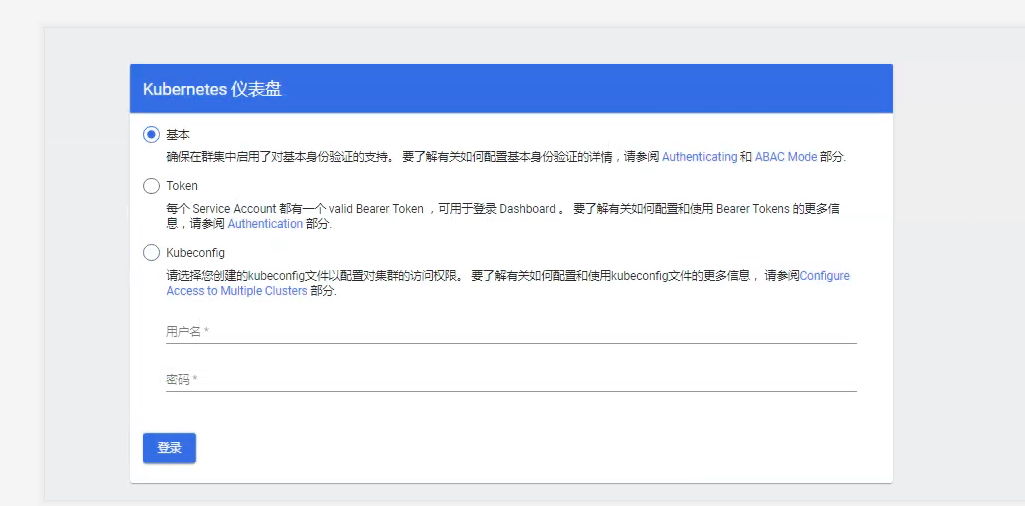
6. 查看dashboard界面
使用admin账号登录

若有收获,就点个赞吧
0 人点赞


