红黑树主要是对2-3树进行编码,红黑树背后的基本思想是用标准的二叉查找树(完全由2-结点构成)和一些额外的信 息(替换3-结点)来表示2-3树。
我们将树中的链接分为两种类型:
红链接:将两个2-结点连接起来构成一个3-结点;
黑链接:则是2-3树中的普通链接。
确切的说,我们将3-结点表示为由由一条左斜的红色链接(两个2-结点其中之一是另一个的左子结点)相连的两个2- 结点。这种表示法的一个优点是,我们无需修改就可以直接使用标准的二叉查找树的get方法。 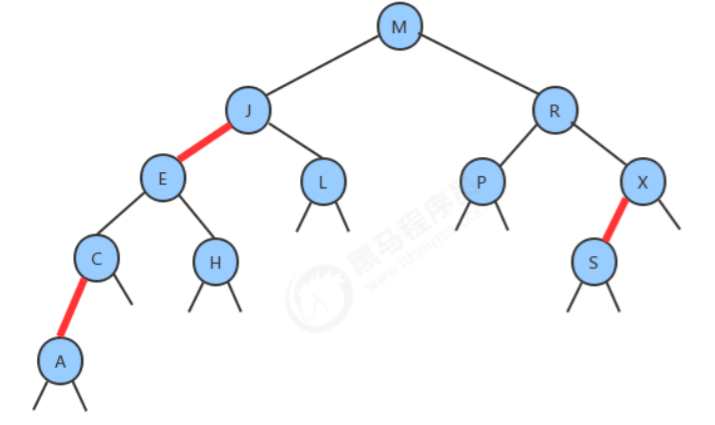
1.定义
红黑树是含有红黑链接并满足下列条件的二叉查找树:
- 红链接均为左链接;
- 没有任何一个结点同时和两条红链接相连;
- 该树是完美黑色平衡的,即任意空链接到根结点的路径上的黑链接数量相同;
如下是红黑树与2-3树的对应关系: 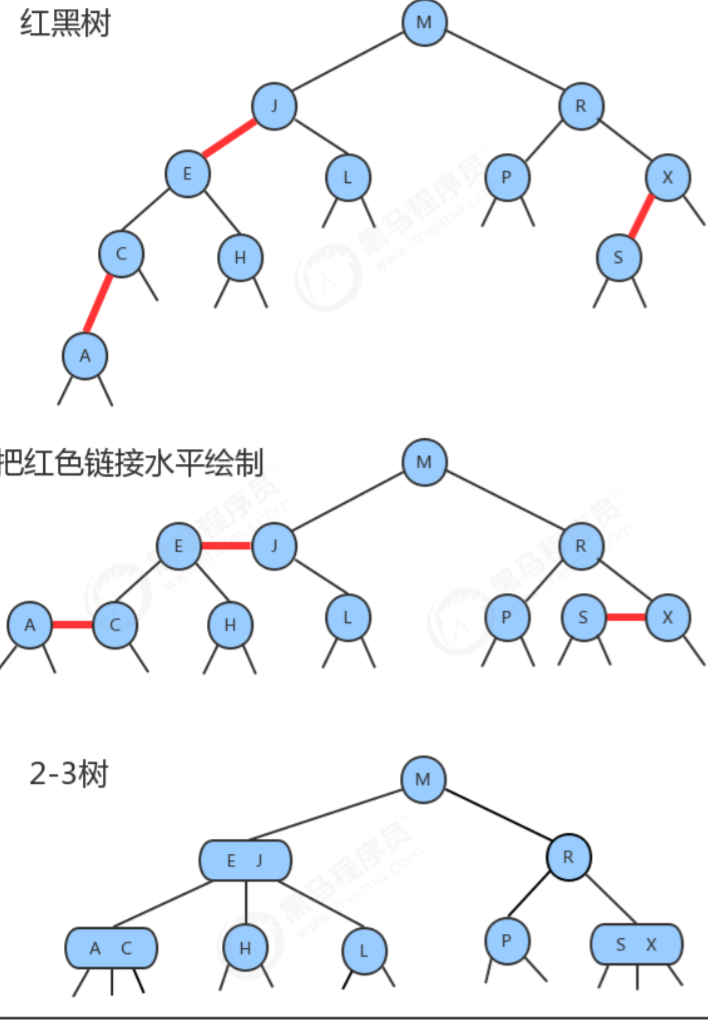
结点API: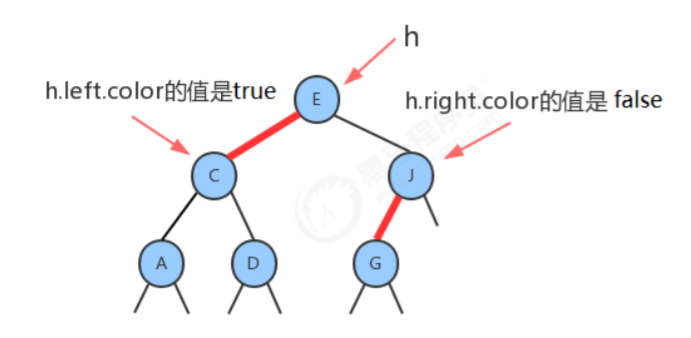
private class Node<Key, Value> {//存储键public Key key;//存储值private Value value;//记录左子结点public Node left;//记录右子结点public Node right;//由其父结点指向它的链接的颜色public boolean color;public Node(Key key, Value value, Node left, Node right, boolean color) {this.key = key;this.value = value;this.left = left;this.right = right;this.color = color;}}
2.平衡化
在对红黑树进行一些增删改查的操作后,很有可能会出现红色的右链接或者两条连续红色的链接,而这些都不满足 红黑树的定义,所以我们需要对这些情况通过旋转进行修复,让红黑树保持平衡。
2.1.左旋
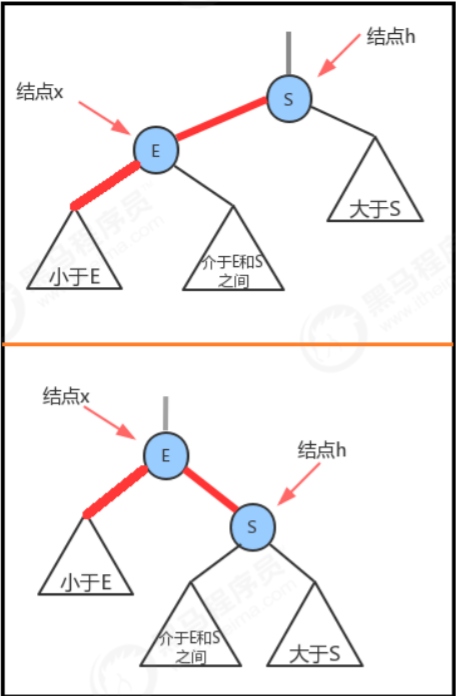
当某个结点的左子结点为黑色,右子结点为红色,此时需要左旋。
前提:当前结点为h,它的右子结点为x;
左旋过程:
- 让x的左子结点变为h的右子结点:h.right=x.left;
- 让h成为x的左子结点:x.left=h;
- 让h的color属性变为x的color属性值:x.color=h.color;
- 让h的color属性变为RED:h.color=true;
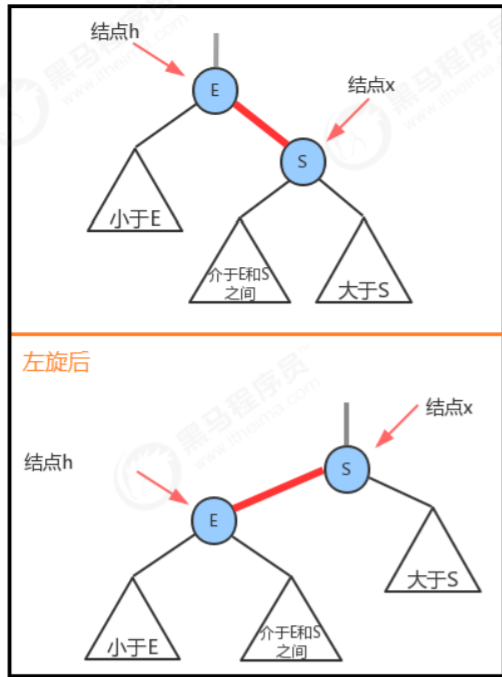
2.2.右旋
当某个结点的左子结点是红色,且左子结点的左子结点也是红色,需要右旋
前提:当前结点为h,它的左子结点为x;
右旋过程:
- 让x的右子结点成为h的左子结点:h.left = x.right;
- 让h成为x的右子结点:x.right=h;
- 让x的color变为h的color属性值:x.color = h.color;
让h的color为RED;
3.平衡过程
3.1.向单个2-结点中插入新键
一棵只含有一个键的红黑树只含有一个2-结点。插入另一个键后,我们马上就需要将他们旋转。
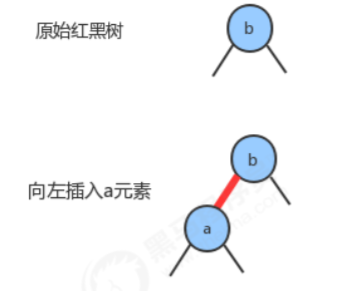
- 如果新键小于当前结点的键,我们只需要新增一个红色结点即可,新的红黑树和单个3-结点完全等价。
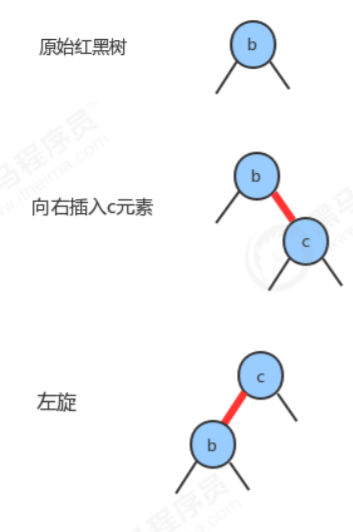
- 如果新键大于当前结点的键,那么新增的红色结点将会产生一条红色的右链接,此时我们需要通过左旋,把 红色右链接变成左链接,插入操作才算完成。形成的新的红黑树依然和3-结点等价,其中含有两个键,一条红 色链接。
3.2.向底部的2-结点插入新键
用和二叉查找树相同的方式向一棵红黑树中插入一个新键,会在树的底部新增一个结点(可以保证有序性),唯一 区别的地方是我们会用红链接将新结点和它的父结点相连。如果它的父结点是一个2-结点,那么刚才讨论的两种方式仍然适用。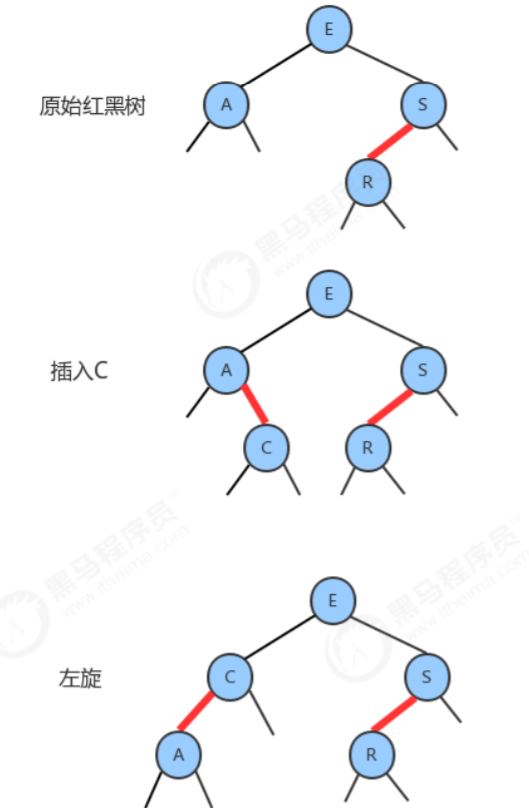
3.3.颜色反转
当一个结点的左子结点和右子结点的color都为RED时,也就是出现了临时的4-结点,此时只需要把左子结点和右子 结点的颜色变为BLACK,同时让当前结点的颜色变为RED即可。 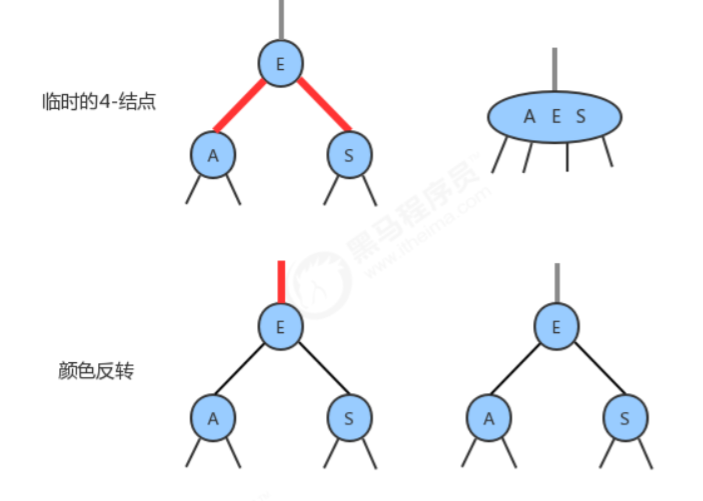
3.4.向一棵双键树(即一个3-结点)中插入新键
这种情况有可以分为三种子情况:
1. 新键大于原树中的两个键 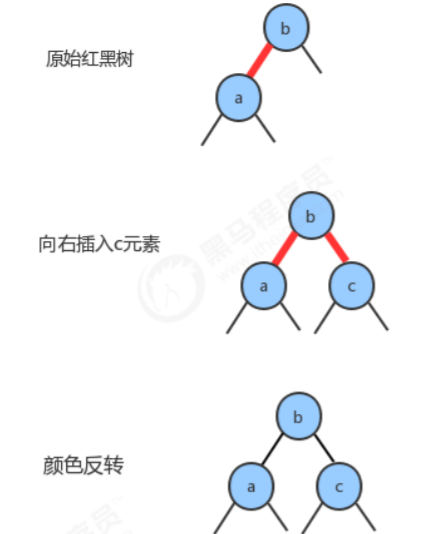
2. 新键小于原树中的两个键 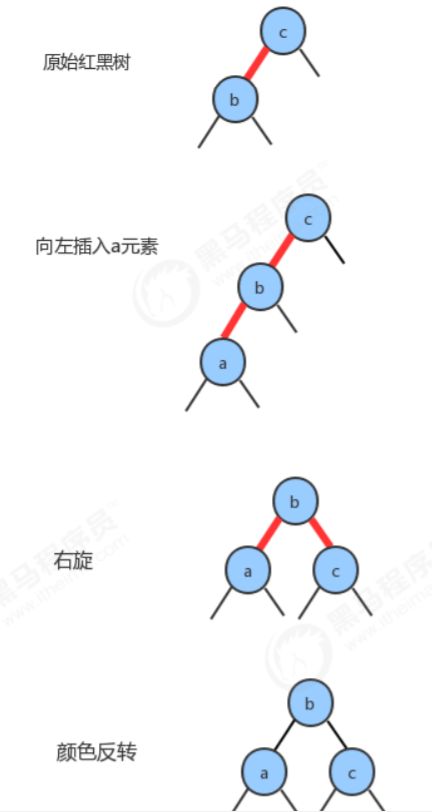
3. 新键介于原数中两个键之间 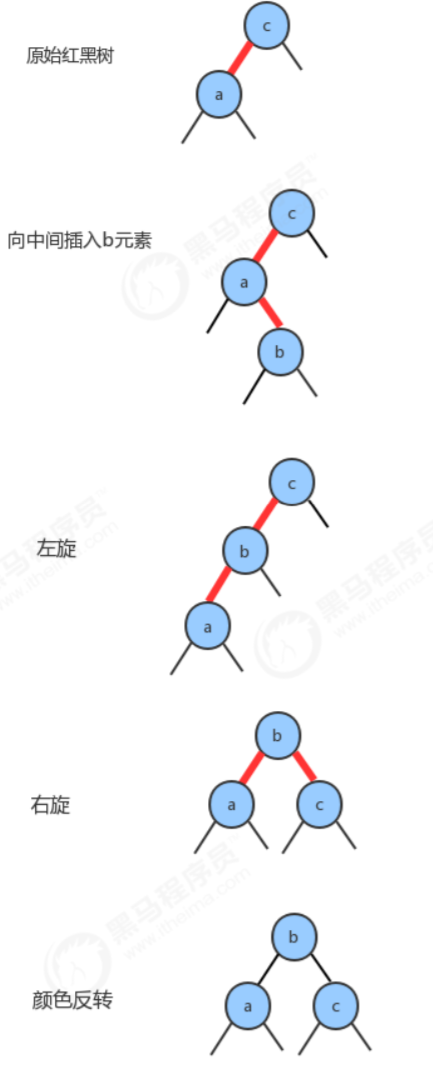
3.5.根结点的颜色总是黑色
之前介绍结点API的时候,在结点Node对象中color属性表示的是父结点指向当前结点的连接的颜色,由于根结点不存在父结点,所以每次插入操作后,我们都需要把根结点的颜色设置为黑色。
3.6.向树底部的3-结点插入新键
假设在树的底部的一个3-结点下加入一个新的结点。前面我们所讲的3种情况都会出现。
指向新结点的链接可能是3-结点的右链接(此时我们只需要转换颜色即可),
或是左链接(此时我们需要进行右旋转然后再转换),
或是中链接(此时需要先左旋转然后再右旋转,最后转换颜色)。
颜色转换会使中间结点的颜色变红,相当于将它送入了父结点。这意味着父结点中继续插入一个新键,我们只需要使用相同的方法解决即可,直到遇到一个2-结点或者根结点为止。
4.红黑树的实现
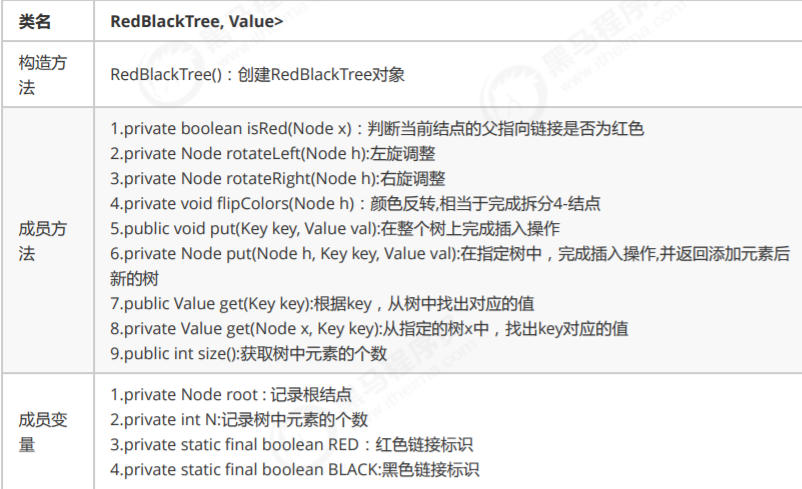
代码实现:
package 树;public class RedBlackTree<Key extends Comparable<Key>, Value> {//根节点private Node root;//记录树中元素的个数private int N;//红色链接private static final boolean RED = true;//黑色链接private static final boolean BLACK = false;/*** 判断当前节点的父指向链接是否为红色** @param x* @return*/private boolean isRed(Node x) {//空结点默认是黑色链接if (x == null) {return false;}//非空结点需要判断结点color属性的值return x.color == RED;}/*** 左旋** @param h* @return 改变父结点的链接指向 由h变为x*/private Node rotateLeft(Node h) {//找出当前结点h的右子结点Node x = h.right;//让当前结点h的右子结点的左子结点成为当前结点的右子结点h.right = x.left;//让当前结点h称为右子结点的左子结点x.left = h;//让当前结点h的color编程右子结点的colorx.color = h.color;//让当前结点h的color变为REDh.color = RED;//返回当前结点的右子结点return x;}/*** 右旋** @param h* @return 改变父结点的链接指向 由h变为x*/private Node rotateRight(Node h) {//找出当前结点h的左子结点Node x = h.left;//让当前结点h的左子结点的右子结点称为当前结点的左子结点h.left = x.right;//让当前结点称为左子结点的右子结点x.right = h;//让当前结点h的color值称为左子结点的color值x.color = h.color;//让当前结点h的color变为REDh.color = RED;//返回当前结点的左子结点return x;}/*** 颜色反转,相当于完成拆分4-节点** @param h*/private void flipColors(Node h) {//当前结点的color属性值变为RED;h.color = RED;//当前结点的左右子结点的color属性值都变为黑色h.left.color = BLACK;h.right.color = BLACK;}/*** 在整个树上完成插入操作** @param key* @param val*/public void put(Key key, Value val) {//在root整个树上插入key-valroot = put(root, key, val);//让根结点的颜色变为BLACKroot.color = BLACK;}/*** 在指定树中,完成插入操作,并返回添加元素后新的树** @param h* @param key* @param val*/private Node put(Node h, Key key, Value val) {if (h == null) {//标准的插入操作,和父结点用红链接相连N++;return new Node(key, val, null, null, RED);}//比较要插入的键和当前结点的键int cmp = key.compareTo(h.key);if (cmp < 0) {//继续寻找左子树插入h.left = put(h.left, key, val);} else if (cmp > 0) {//继续寻找右子树插入h.right = put(h.right, key, val);} else {//已经有相同的结点存在,修改节点的值;h.value = val;}//如果当前结点的右链接是红色,左链接是黑色,需要左旋if (isRed(h.right) && !isRed(h.left)) {h = rotateLeft(h);}//如果当前结点的左子结点和左子结点的左子结点都是红色链接,则需要右旋if (isRed(h.left) && isRed(h.left.left)) {h = rotateRight(h);}//如果当前结点的左链接和右链接都是红色,需要颜色变换if (isRed(h.left) && isRed(h.right)) {flipColors(h);}//返回当前结点return h;}//根据key,从树中找出对应的值public Value get(Key key) {return get(root, key);}//从指定的树x中,查找key对应的值public Value get(Node x, Key key) {//如果当前结点为空,则没有找到,返回nullif (x == null) {return null;}//比较当前结点的键和keyint cmp = key.compareTo(x.key);if (cmp < 0) {//如果要查询的key小于当前结点的key,则继续找当前结点的左子结点;return get(x.left, key);} else if (cmp > 0) {//如果要查询的key大于当前结点的key,则继续找当前结点的右子结点;return get(x.right, key);} else {//如果要查询的key等于当前结点的key,则树中返回当前结点的value。return x.value;}}//获取树中元素的个数public int size() {return N;}//结点类private class Node {//存储键public Key key;//存储值private Value value;//记录左子结点public Node left;//记录右子结点public Node right;//由其父结点指向它的链接的颜色public boolean color;public Node(Key key, Value value, Node left, Node right, boolean color) {this.key = key;this.value = value;this.left = left;this.right = right;this.color = color;}}}//测试代码class Test {public static void main(String[] args) throws Exception {RedBlackTree<Integer, String> bt = new RedBlackTree<>();bt.put(4, "二哈");bt.put(1, "张三");bt.put(3, "李四");bt.put(5, "王五");System.out.println(bt.size());bt.put(1, "老三");System.out.println(bt.get(1));System.out.println(bt.size());}}

若有收获,就点个赞吧
0 人点赞


