在上篇教程中我们分别介绍了如何将Sentinel的限流规则存储到Nacos中。同时这套整合方案存在一个不足之处:不论采用什么配置中心,限流规则都只能通过Nacos界面来完成修改才能得到持久化存储,而在Sentinel Dashboard中修改限流规则虽然可以生效,但是不会被持久化到配置中心。而在这两个配置中心里存储的数据是一个Json格式,当存储的规则越来越多,对该Json配置的可读性与可维护性会变的越来越差。所以,下面我们就来继续探讨这个不足之处,并给出相应的解决方案。
代码实现
下面直接来看看如何实现的具体改造步骤,这里参考了Sentinel Dashboard源码中关于Nacos实现的测试用例。但是由于考虑到与Spring Cloud Alibaba的结合使用,略作修改。
第一步:修改pom.xml中的sentinel-datasource-nacos的依赖,将
<dependency><groupId>com.alibaba.csp</groupId><artifactId>sentinel-datasource-nacos</artifactId><!--<scope>test</scope>--></dependency>
第二步:找到resources/app/scripts/directives/sidebar/sidebar.html中的这段代码:
<li ui-sref-active="active" ng-if="!entry.isGateway"><a ui-sref="dashboard.flowV1({app: entry.app})"><i class="glyphicon glyphicon-filter"></i> 流控规则</a></li>
更换为
<!-- dashboard.flow 更换到V2接口-->
<li ui-sref-active="active" ng-if="!entry.isGateway">
<a ui-sref="dashboard.flow({app: entry.app})">
<i class="glyphicon glyphicon-filter"></i> 流控规则</a>
</li>
第三步:在com.alibaba.csp.sentinel.dashboard.rule包下新建一个nacos包,用来编写针对Nacos的扩展实现。
@Configuration
public class NacosConfig {

    @Bean
    public Converter<List<FlowRuleEntity>, String> flowRuleEntityEncoder() {
        return JSON::toJSONString;
    }

    @Bean
    public Converter<String, List<FlowRuleEntity>> flowRuleEntityDecoder() {
        return s -> JSON.parseArray(s, FlowRuleEntity.class);
    }

    @Bean
    public ConfigService nacosConfigService() throws Exception {
        Properties properties = new Properties();
        //1.6.~中properties.put(PropertyKeyConst.SERVER_ADDR, "localhost");即可
        properties.put(PropertyKeyConst.SERVER_ADDR, "localhost:8848");
//        properties.put(PropertyKeyConst.NAMESPACE, "130e71fa-97fe-467d-ad77-967456f2c16d");
        return ConfigFactory.createConfigService(properties);
    }
}
注意:在1.8.~的SentinelDashboard中 如果出现
Incorrect serverAddr address : localhost, example should like ip:port or domain:port异常,需要加入端口号。
如果用到了namespace隔离环境,可以在nacosConfigService方法中再加入配置,比如:properties.put(PropertyKeyConst.NAMESPACE, “130e71fa-97fe-467d-ad77-967456f2c16d”);
第五步:实现Nacos的配置拉取。
@Component("flowRuleNacosProvider")
public class FlowRuleNacosProvider implements DynamicRuleProvider<List<FlowRuleEntity>> {

    @Autowired
    private ConfigService configService;
    @Autowired
    private Converter<String, List<FlowRuleEntity>> converter;

    public static final String FLOW_DATA_ID_POSTFIX = "-sentinel";
    public static final String GROUP_ID = "DEFAULT_GROUP";

    @Override
    public List<FlowRuleEntity> getRules(String appName) throws Exception {
        String rules = configService.getConfig(appName + FLOW_DATA_ID_POSTFIX, GROUP_ID, 3000);
        if (StringUtil.isEmpty(rules)) {
            return new ArrayList<>();
        }
        return converter.convert(rules);
    }
}
- getRules方法中的appName参数是Sentinel中的服务名称。
configService.getConfig方法是从Nacos中获取配置信息的具体操作。其中,DataId和GroupId分别对应客户端使用时候的对应配置。具体如下:
spring.cloud.sentinel.datasource.ds.nacos.groupId=DEFAULT_GROUP spring.cloud.sentinel.datasource.ds.nacos.dataId=${spring.application.name}-sentinel第六步:实现Nacos的配置推送。
@Component("flowRuleNacosPublisher")
public class FlowRuleNacosPublisher implements DynamicRulePublisher<List<FlowRuleEntity>> {

  @Autowired
  private ConfigService configService;
  @Autowired
  private Converter<List<FlowRuleEntity>, String> converter;

  public static final String FLOW_DATA_ID_POSTFIX = "-sentinel";
  public static final String GROUP_ID = "DEFAULT_GROUP";

  @Override
  public void publish(String app, List<FlowRuleEntity> rules) throws Exception {
      AssertUtil.notEmpty(app, "app name cannot be empty");
      if (rules == null) {
          return;
      }
      configService.publishConfig(app + FLOW_DATA_ID_POSTFIX, GROUP_ID, converter.convert(rules));
  }
}
这里的大部分内容与上一步中的实现一致。主要就是Nacos中存储配置的DataId和GroupId不要弄错。
第七步:修改com.alibaba.csp.sentinel.dashboard.controller.v2.FlowControllerV2中DynamicRuleProvider和DynamicRulePublisher注入的Bean,改为上面我们编写的针对Nacos的实现:
@Autowired
@Qualifier("flowRuleNacosProvider")
private DynamicRuleProvider<List<FlowRuleEntity>> ruleProvider;
@Autowired
@Qualifier("flowRuleNacosPublisher")
private DynamicRulePublisher<List<FlowRuleEntity>> rulePublisher;
第八步:如果大家启动后,欣喜的发现未生效,是因为前端的改动还未打包。
- 安装 node npm gulp环境
- 在webapp目录下执行 npm install
- 若报错
gulp 报错:ReferenceError:primordials is not defined在pagejson同级目录下新建 npm-shrinkwrap.json 重新执行 npm install - 执行 gulp build
- 可以观察到 webapp/resources/dist里面文件更新了,我们再访问sentinel试试

可以看到,url上面的版本已经更换成了v2
- 在sentinel上修改流控规则配置, 查看nacos配置。
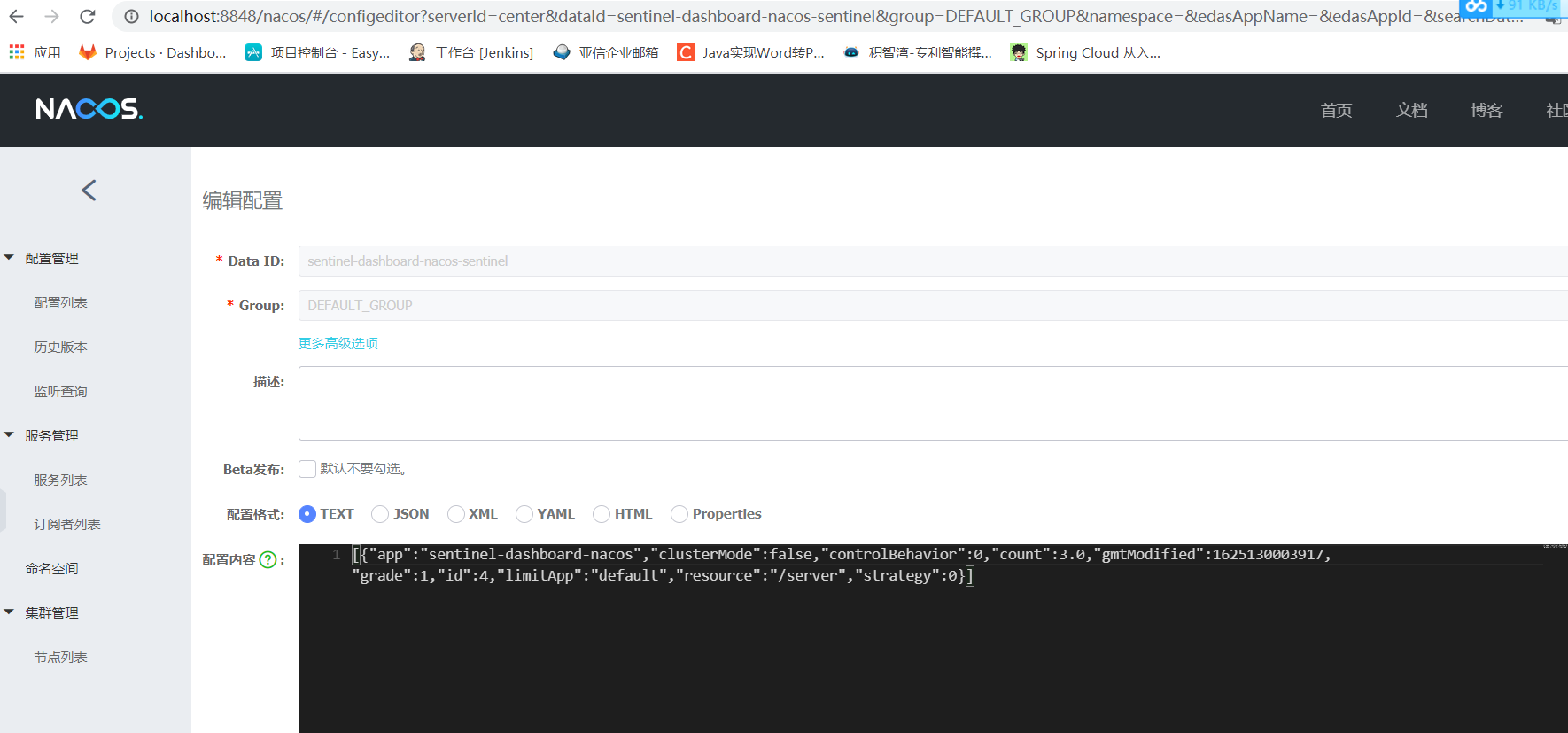
可以看到修改成功了
启动应用拉取nacos配置时,异常处理
convert error: convert 0 rules but there are 1 rules from datasource. RuleClass: FlowRule
- 从nacos拉取配置的时候会进行规则转换,我们看看converRule里面

nacos上的规则 ruleStr如下
{"app":"sentinel-dashboard-nacos",
"gmtModified":1625204049062,
"resource":"/server",
"grade":1,"controlBehavior":0,
"count":5.0,"id":4,
"limitApp":"default",
"strategy":0,
"clusterMode":false}
错误提示如下,表示未知的 “app”属性
com.fasterxml.jackson.databind.exc.UnrecognizedPropertyException: Unrecognized field "app"
(class com.alibaba.csp.sentinel.slots.block.flow.FlowRule), not marked as ignorable
(12 known properties: "warmUpPeriodSec", "refResource", "rater", "strategy", "limitApp",
"grade", "maxQueueingTimeMs", "clusterConfig", "clusterMode", "resource", "count", "controlBehavior"])
at [Source: (String)"{"app":"sentinel-dashboard-nacos","gmtModified":1625204049062,"
resource":"/server","grade":1,"controlBehavior":0,"count":5.0,"id":4,
"limitApp":"default","strategy":0,"clusterMode":false}"; line: 1, column: 9]
(through reference chain: com.alibaba.csp.sentinel.slots.block.flow.FlowRule["app"])
解决方法 : 修改sentinel代码,推送到nacos上的无用属性不再序列化为json
public class FlowRuleEntity implements RuleEntity {
 @JSONField(serialize = false)
 private Long id;
 @JSONField(serialize = false)
 private String app;
 @JSONField(serialize = false)
 private String ip;
 @JSONField(serialize = false)
 private Integer port;
 private String limitApp;
......
 @JSONField(serialize = false)
 private Date gmtCreate;
 @JSONField(serialize = false)
 private Date gmtModified;
可以对比一下上文中的配置
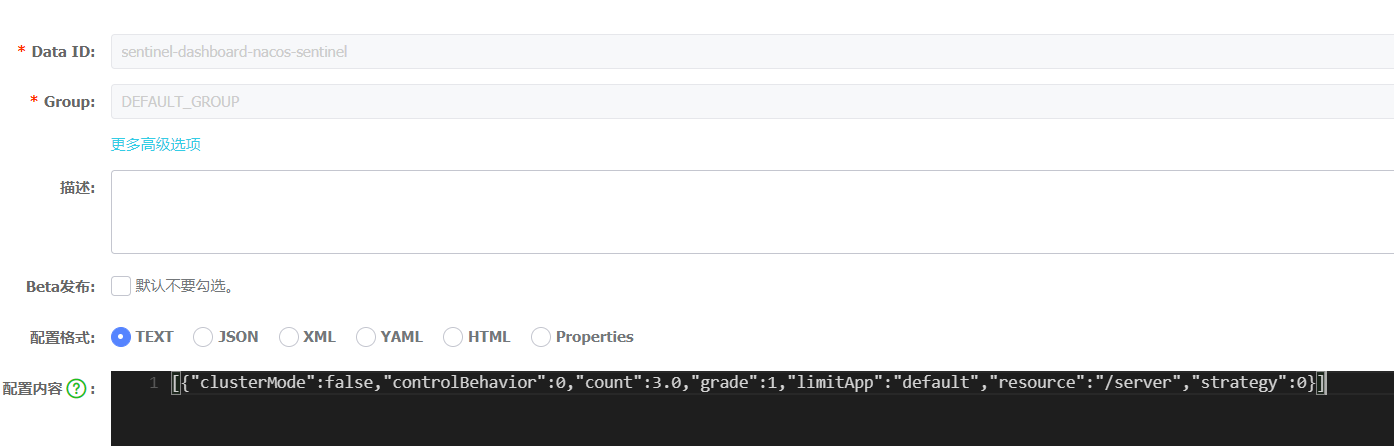
同样的集群配置里面也会出现属性不匹配情况
public class ClusterFlowConfig {
......
 @JSONField(serialize = false)
 private long resourceTimeout = 2000;

 @JSONField(serialize = false)
 private int resourceTimeoutStrategy = RuleConstant.DEFAULT_RESOURCE_TIMEOUT_STRATEGY;

 @JSONField(serialize = false)
 private int acquireRefuseStrategy = RuleConstant.DEFAULT_BLOCK_STRATEGY;

 @JSONField(serialize = false)
 private long clientOfflineTime = 2000;

若有收获,就点个赞吧
0 人点赞


