新增主题
- 随便复制一个主题到test文件夹
- test主题文件cnpm I
npm i 失败的可以使用淘宝镜像 cpm i - 热更新
主题介绍
test目录下的style.css
/*Theme Name: 主题名Text Domain: 由来(哪个团队)Version: 1.0Requires at least: 4.7Requires PHP: 5.2.4Description: 简介Author: 作者Author URI: https://wordpress.org/Theme URI: https://wordpress.org/themes/twentytwenty/License: GNU General Public License v2 or laterLicense URI: http://www.gnu.org/licenses/gpl-2.0.htmlAll files, unless otherwise stated, are released under the GNU General PublicLicense version 2.0 (http://www.gnu.org/licenses/gpl-2.0.html)This theme, like WordPress, is licensed under the GPL.Use it to make something cool, have fun, and share what you've learnedwith others.*/
替换主题封面
主题封面是红色框内的图片,只要替换主题目录下的图片screenshot.png(1200*900)

部署到线上
WordPress站需要转https,各种配置都配了,前台、登录页也显示正常,但就是登录不了后台页面!!
问题1: “抱歉,您不能访问此页面”
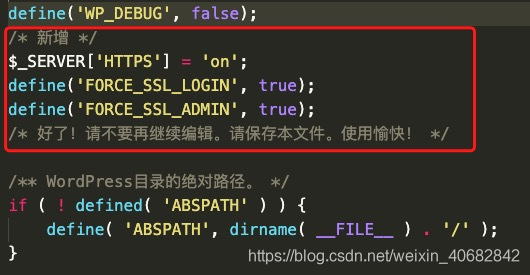
- 在根目录wp-config.php这个文件中,添加代码:
$_SERVER['HTTPS'] = 'on';define('FORCE_SSL_LOGIN', true);define('FORCE_SSL_ADMIN', true);
注:一定要放在if ( ! defined( ‘ABSPATH’ ) ) 之前
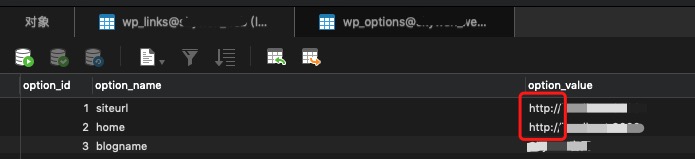
- 数据库修改数据 http 改成 https
更新主题
只需要更换该主题文件 wp-content/themes/主题名

若有收获,就点个赞吧
0 人点赞


