配置Maven
<build>...<pluginManagement>...</pluginManagement><!-- 必须要在新的一个 plugins 标签下才有--><plugins><plugin><!-- 添加mybatis.generator的插件依赖 --><groupId>org.mybatis.generator</groupId><artifactId>mybatis-generator-maven-plugin</artifactId><version>1.4.0</version><executions><execution><id>Generate MyBatis Artifacts</id><goals><goal>generate</goal></goals></execution></executions><configuration><verbose>true</verbose><overwrite>true</overwrite><!- 将scope 为 compile, provided, system 的依赖添加进来--><!- 这样就不用在 generatorConfig.xml 中手动配置驱动的位置 --><includeCompileDependencies>true</includeCompileDependencies></configuration></plugin></plugins></build>
配置文件
在 resources 下新建 generatorConfig.xml 。 当然你也可以在别的地方创建,不过还是默认就好
<?xml version="1.0" encoding="UTF-8"?>
<!DOCTYPE generatorConfiguration
        PUBLIC "-//mybatis.org//DTD MyBatis Generator Configuration 1.0//EN"
        "http://mybatis.org/dtd/mybatis-generator-config_1_0.dtd">

<generatorConfiguration>
    <!--导入属性配置-->
    <properties resource="jdbc.properties"></properties>

    <context id="default" targetRuntime="MyBatis3">

        <!-- optional,旨在创建class时,对注释进行控制 -->
        <commentGenerator>
            <property name="suppressDate" value="false"/>
            <property name="suppressAllComments" value="true"/>
        </commentGenerator>

        <!--jdbc的数据库连接 -->
        <jdbcConnection
                driverClass="${db.driverClassName}"
                connectionURL="${db.url}"
                userId="${db.username}"
                password="${db.password}">
        </jdbcConnection>


        <!-- 非必需,类型处理器,在数据库类型和java类型之间的转换控制-->
        <javaTypeResolver>
            <property name="forceBigDecimals" value="false"/>
        </javaTypeResolver>


        <!-- Model模型生成器,用来生成含有主键key的类,记录类 以及查询Example类
            targetPackage     指定生成的model生成所在的包名
            targetProject     指定在该项目下所在的路径
        -->
        <!--<javaModelGenerator targetPackage="com.mmall.pojo" targetProject=".\src\main\java">-->
        <javaModelGenerator targetPackage="com.example.pojo" targetProject="./src/main/java">
            <!-- 是否允许子包,即targetPackage.schemaName.tableName -->
            <property name="enableSubPackages" value="false"/>
            <!-- 是否对model添加 构造函数 -->
            <property name="constructorBased" value="true"/>
            <!-- 是否对类CHAR类型的列的数据进行trim操作 -->
            <property name="trimStrings" value="true"/>
            <!-- 建立的Model对象是否 不可改变  即生成的Model对象不会有 setter方法,只有构造方法 -->
            <property name="immutable" value="false"/>
        </javaModelGenerator>

        <!--mapper映射文件生成所在的目录 为每一个数据库的表生成对应的SqlMap文件 -->
        <!--<sqlMapGenerator targetPackage="mappers" targetProject=".\src\main\resources">-->
        <sqlMapGenerator targetPackage="mappers" targetProject="./src/main/resources">
            <property name="enableSubPackages" value="false"/>
        </sqlMapGenerator>

        <!-- 客户端代码,生成易于使用的针对Model对象和XML配置文件 的代码
                type="ANNOTATEDMAPPER",生成Java Model 和基于注解的Mapper对象
                type="MIXEDMAPPER",生成基于注解的Java Model 和相应的Mapper对象
                type="XMLMAPPER",生成SQLMap XML文件和独立的Mapper接口
        -->

        <!-- targetPackage:mapper接口dao生成的位置 -->
        <!--<javaClientGenerator type="XMLMAPPER" targetPackage="com.mmall.dao" targetProject=".\src\main\java">-->
        <javaClientGenerator type="XMLMAPPER" targetPackage="com.example.dao" targetProject="./src/main/java">
            <!-- enableSubPackages:是否让schema作为包的后缀 -->
            <property name="enableSubPackages" value="false" />
        </javaClientGenerator>


        <table tableName="mmall_shipping" domainObjectName="Shipping" enableCountByExample="false" enableUpdateByExample="false" enableDeleteByExample="false" enableSelectByExample="false" selectByExampleQueryId="false"></table>
        <table tableName="mmall_cart" domainObjectName="Cart" enableCountByExample="false" enableUpdateByExample="false" enableDeleteByExample="false" enableSelectByExample="false" selectByExampleQueryId="false"></table>
        <table tableName="mmall_cart_item" domainObjectName="CartItem" enableCountByExample="false" enableUpdateByExample="false" enableDeleteByExample="false" enableSelectByExample="false" selectByExampleQueryId="false"></table>
        <table tableName="mmall_category" domainObjectName="Category" enableCountByExample="false" enableUpdateByExample="false" enableDeleteByExample="false" enableSelectByExample="false" selectByExampleQueryId="false"></table>
        <table tableName="mmall_order" domainObjectName="Order" enableCountByExample="false" enableUpdateByExample="false" enableDeleteByExample="false" enableSelectByExample="false" selectByExampleQueryId="false"></table>
        <table tableName="mmall_order_item" domainObjectName="OrderItem" enableCountByExample="false" enableUpdateByExample="false" enableDeleteByExample="false" enableSelectByExample="false" selectByExampleQueryId="false"></table>
        <table tableName="mmall_pay_info" domainObjectName="PayInfo" enableCountByExample="false" enableUpdateByExample="false" enableDeleteByExample="false" enableSelectByExample="false" selectByExampleQueryId="false"></table>
        <table tableName="mmall_product" domainObjectName="Product" enableCountByExample="false" enableUpdateByExample="false" enableDeleteByExample="false" enableSelectByExample="false" selectByExampleQueryId="false">
            <columnOverride column="detail" jdbcType="VARCHAR" />
            <columnOverride column="sub_images" jdbcType="VARCHAR" />
        </table>
        <table tableName="mmall_user" domainObjectName="User" enableCountByExample="false" enableUpdateByExample="false" enableDeleteByExample="false" enableSelectByExample="false" selectByExampleQueryId="false"></table>
        <!--  mybatis插件的搭建 -->

    </context>
</generatorConfiguration>
运行
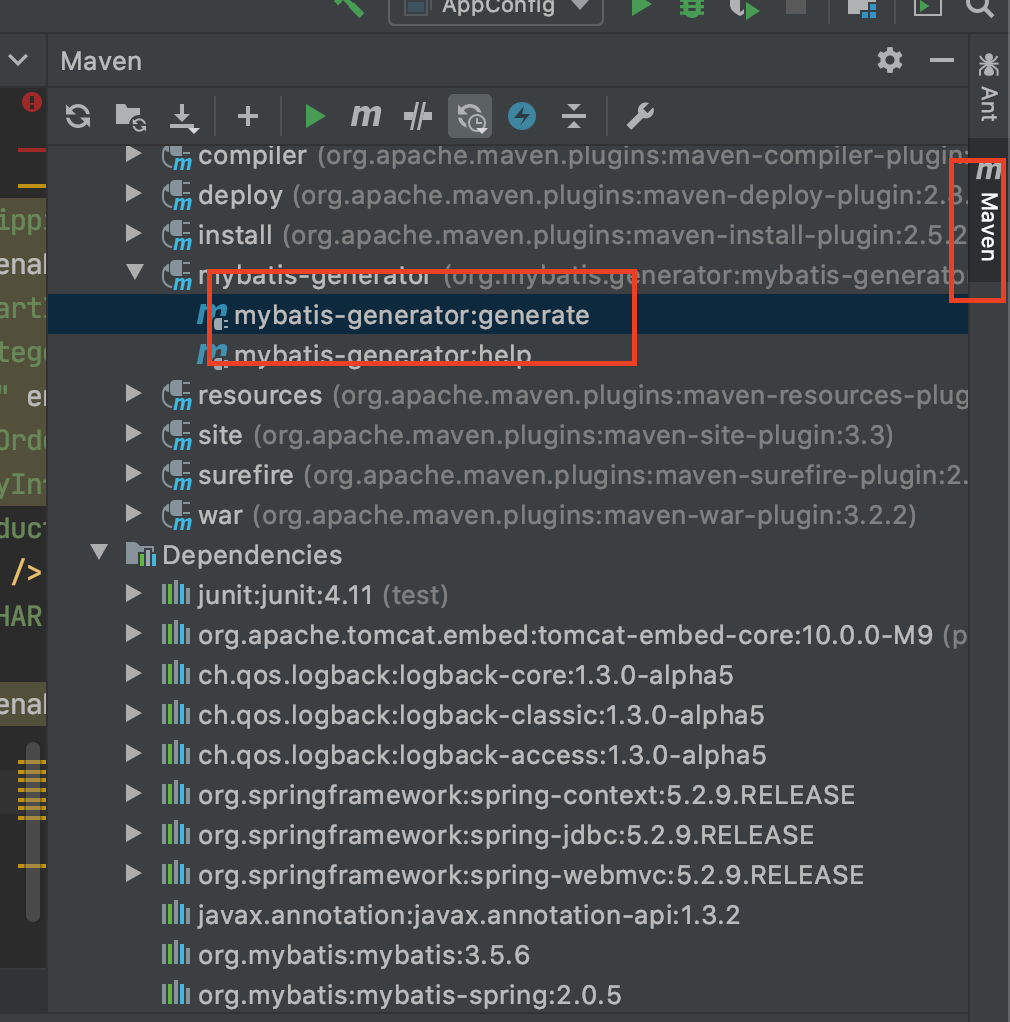
双击运行即可生成对应的 pojo 和 DAO 以及 Mapper
Appendix
Maven 中 configuration 详细参数: http://mybatis.org/generator/running/runningWithMaven.html
| Parameter | Expression | Type | Comments | ||||||||||||
|---|---|---|---|---|---|---|---|---|---|---|---|---|---|---|---|
| configurationFile | ${mybatis.generator.configurationFile} | java.io.File | The location of the XML configuration file.Default value:${basedir}/src/main/resources/generatorConfig.xml | ||||||||||||
| contexts | ${mybatis.generator.contexts} | java.lang.String | A comma delimited list of contexts to use in the current run. Any id specified in the list must exactly match the value of the id attribute of an |
||||||||||||
| jdbcDriver | ${mybatis.generator.jdbcDriver} | java.lang.String | If you specify a sqlScript, then this is the fully qualified JDBC driver class name to use when connecting to the database. | ||||||||||||
| jdbcPassword | ${mybatis.generator.jdbcPassword} | java.lang.String | If you specify a sqlScript, then this is the password to use when connecting to the database. | ||||||||||||
| jdbcURL | ${mybatis.generator.jdbcURL} | java.lang.String | If you specify a sqlScript, then this is the JDBC URL to use when connecting to the database. | ||||||||||||
| jdbcUserId | ${mybatis.generator.jdbcUserId} | java.lang.String | If you specify a sqlScript, then this is the JDBC user ID to use when connecting to the database. | ||||||||||||
| outputDirectory | ${mybatis.generator.outputDirectory} | java.io.File | The directory where files generated by MBG will be placed. This directory is used whenever a targetProject in the configuration file is set to the special value “MAVEN” (case sensitive).Default value:${project.build.directory}/generated-sources/mybatis-generator | ||||||||||||
| overwrite | ${mybatis.generator.overwrite} | boolean | If true, then existing Java files will be overwritten if an existing Java file if found with the same name as a generated file. If not specified, and a Java file already exists with the same name as a generated file, then MBG will write the newly generated Java file to the proper directory with a unique name (e.g. MyClass.java.1, MyClass.java.2, etc.). Important: MBG will always merge and overwrite XML files.Default value:false | ||||||||||||
| sqlScript | ${mybatis.generator.sqlScript} | java.lang.String | Location of a SQL script file to run before generating code. If null, then no script will be run. If not null, then jdbcDriver, jdbcURL must be supplied also. In addition, jdbcUserId and jdbcPassword may be supplied if the database requires authentication.Value can be specified as a location in the file system or, if prefixed with “classpath:” a location on the build classpath. | ||||||||||||
| tableNames | ${mybatis.generator.tableNames} | java.lang.String | If specified, then this is a comma delimited list of tables to use in the current run. Any table specified in the list must exactly match the fully qualified table name specified in a configuration element. Only tables specified in this list will be active for this run. If this argument is not specified, then all tables will be active. Specify table names as:table schema.table catalog..table etc.
|

若有收获,就点个赞吧
0 人点赞


