在前后端开发中,数据统一响应可以实现规范化的开发。接下来我们定义两个类,来实现数据的统一响应
自定义响应体
@JsonInclude(JsonInclude.Include.NON_NULL)@Getter@Setterpublic class GeneralResponse<T> {@JsonProperty("status_code")private int statusCode;@JsonProperty("message")private String message;@JsonProperty("data")private T data;GeneralResponse(int statusCode) {this.statusCode = statusCode;}GeneralResponse(int statusCode, String message){this(statusCode);this.message = message;}GeneralResponse(int statusCode, T data){this(statusCode);this.data = data;}GeneralResponse(int statusCode, String message, T data){this(statusCode, message);this.data = data;}// success responsepublic static <T> GeneralResponse<T> success(int statusCode){return new GeneralResponse<T>(statusCode);}public static <T> GeneralResponse<T> success(int statusCode,String message){return new GeneralResponse<T>(statusCode,message);}public static <T> GeneralResponse<T> success(int statusCode, T data){return new GeneralResponse<T>(statusCode,data);}public static <T> GeneralResponse<T> success(int statusCode,String message, T data){return new GeneralResponse<T>(statusCode,message,data);}// Fail responsepublic static <T> GeneralResponse<T> fail(int statusCode){return new GeneralResponse<T>(statusCode);}public static <T> GeneralResponse<T> fail(int statusCode,String message){return new GeneralResponse<T>(statusCode,message);}public static <T> GeneralResponse<T> fail(int statusCode, T data){return new GeneralResponse<T>(statusCode,data);}public static <T> GeneralResponse<T> fail(int statusCode,String message, T data){return new GeneralResponse<T>(statusCode,message,data);}}
这里我们使用了注解 @JsonInclude(JsonInclude.Include.NON_NULL) 也就是说如果数据没有内容就会 显示为 null. @JsonProperty("xxx") 用于定义 JSON 内容的 KEY 值
枚举响应内容
为了使代码更具有可读性,我们可以定义一个枚举类来表示一些响应内容,如下
package com.example.demo01.common;import jdk.nashorn.internal.objects.annotations.Getter;import jdk.nashorn.internal.objects.annotations.Setter;/*** @DATA: 2020/11/19*/public enum CustomResult {SUCCESS(200, "Success!"),FAILED(300, "Failed"),ERROR(500, "ERROR");private int statusCode;private String message;CustomResult(int statusCode, String message) {this.statusCode = statusCode;this.message = message;}public int getStatusCode() {return statusCode;}public String getMessage() {return message;}public void setMessage(String message) {this.message = message;}public void setStatusCode(int statusCode) {this.statusCode = statusCode;}}
测试
我们在 controller 层测试一下效果
@RestController@RequestMapping("/api/v1")public class HomeController {@GetMapping("/index")public GeneralResponse<String> Home(){return GeneralResponse.success(CustomResult.SUCCESS.getStatusCode(),"Hello Spring boot");}}
得到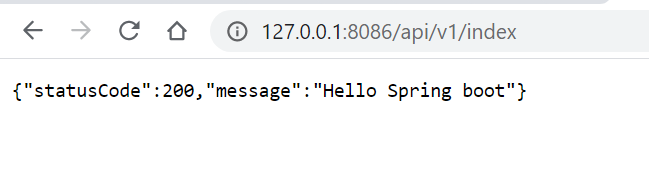
全局包装
一般完成上面的操作后,就可以定义出很规范的数据统一的响应。不过全局包装是方便了,但是灵活性变差了,这里仅做记录,方便以后查询
因为全局包装我们不知道返回是正确还是失败,所以我们只能 hardcode
@JsonInclude(JsonInclude.Include.NON_NULL)@Getter@Setterpublic class GeneralResponse<T> {...public GeneralResponse(T data){this(CustomResult.SUCCESS.getStatusCode());this.data = data;}...}
然后我们需要自定义一个配置类
package com.example.demo01.configuration;import com.example.demo01.common.GeneralResponse;import com.fasterxml.jackson.databind.ObjectMapper;import org.springframework.core.MethodParameter;import org.springframework.http.MediaType;import org.springframework.http.converter.HttpMessageConverter;import org.springframework.http.server.ServerHttpRequest;import org.springframework.http.server.ServerHttpResponse;import org.springframework.web.bind.annotation.RestControllerAdvice;import org.springframework.web.servlet.mvc.method.annotation.ResponseBodyAdvice;/*** @DATA: 2020/11/19*/// 定义要执行全局包装的模块@RestControllerAdvice(basePackages = {"com.example.demo01"})public class ResponseControllerAdvice implements ResponseBodyAdvice<Object> {// 如果返回的时候已经是 GeneralResponse 那就无需操作。@Overridepublic boolean supports(MethodParameter returnType, Class<? extends HttpMessageConverter<?>> aClass) {return !returnType.getParameterType().equals(GeneralResponse.class);}@Overridepublic Object beforeBodyWrite(Object o, MethodParameter returnType, MediaType mediaType, Class<? extends HttpMessageConverter<?>> aClass, ServerHttpRequest serverHttpRequest, ServerHttpResponse serverHttpResponse) {if(returnType.getParameterType().equals(String.class)){ObjectMapper objectMapper = new ObjectMapper();try{return objectMapper.writeValueAsString(new GeneralResponse<>(o));}catch (Exception e){}}return new GeneralResponse(o);}}
测试一下
@RestController
@RequestMapping("/api/v1")
public class HomeController {
    @GetMapping("/index")
    public String Home(){
        return "Hello Spring boot";
    }
}
直接返回 String,但是 Response 已经变了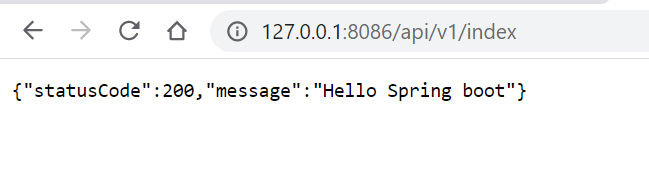

若有收获,就点个赞吧
0 人点赞


