目的
使用内嵌的 Tomcat 启动 Spring MVC 项目
依赖
<?xml version="1.0" encoding="UTF-8"?>

<project xmlns="http://maven.apache.org/POM/4.0.0" xmlns:xsi="http://www.w3.org/2001/XMLSchema-instance"
  xsi:schemaLocation="http://maven.apache.org/POM/4.0.0 http://maven.apache.org/xsd/maven-4.0.0.xsd">
  <modelVersion>4.0.0</modelVersion>

  <groupId>org.example</groupId>
  <artifactId>mall</artifactId>
  <version>1.0-SNAPSHOT</version>
  <packaging>war</packaging>

  <name>mall Maven Webapp</name>
  <!-- FIXME change it to the project's website -->
  <url>http://www.example.com</url>

  <properties>
    <project.build.sourceEncoding>UTF-8</project.build.sourceEncoding>
    <maven.compiler.source>1.7</maven.compiler.source>
    <maven.compiler.target>1.7</maven.compiler.target>
    <spring.version>5.2.9.RELEASE</spring.version>
    <tomcat.version>9.0.39</tomcat.version>
  </properties>

  <dependencies>
    <dependency>
      <groupId>junit</groupId>
      <artifactId>junit</artifactId>
      <version>4.11</version>
      <scope>test</scope>
    </dependency>
    <!-- spring -->
    <dependency>
      <groupId>org.springframework</groupId>
      <artifactId>spring-webmvc</artifactId>
      <version>${spring.version}</version>
    </dependency>
    <!-- tomcat -->
    <dependency>
      <groupId>org.apache.tomcat.embed</groupId>
      <artifactId>tomcat-embed-core</artifactId>
      <version>${tomcat.version}</version>
      <scope>provided</scope>
    </dependency>

  </dependencies>

  <build>
    ...
  </build>
</project>
maven 定义了以下几种关系
| scope | 说明 | 示例 |
|---|---|---|
| compile | 编译时需要用到该jar包(默认) | commons-logging |
| test | 编译Test时需要用到该jar包 | junit |
| runtime | 编译时不需要,但运行时需要用到 | mysql |
| provided | 编译时需要用到,但运行时由JDK或某个服务器提供 | servlet-api |
这里我们设置了内嵌的 tomcat 为 provided, 表示编译的时候需要用到,但是运行的时候不用,可以防止被打包进去我们开发的软件里面。
新建启动文件
我们新建一个 App.java 来启动 tomcat
/*
 * @Description:
 * @Date: 2020/10/29
 */
package com.example;

import com.example.configuration.AppConfiguration;
import org.apache.catalina.Context;
import org.apache.catalina.LifecycleException;
import org.apache.catalina.WebResourceRoot;
import org.apache.catalina.Wrapper;
import org.apache.catalina.startup.Tomcat;
import org.apache.catalina.webresources.DirResourceSet;
import org.apache.catalina.webresources.StandardRoot;
import org.springframework.web.context.support.AnnotationConfigWebApplicationContext;
import org.springframework.web.servlet.DispatcherServlet;

import java.io.File;

public class App {
    public static void main(String[] args) {
        String webApplicationDir = "src/main/webapp";

        Tomcat tomcat = new Tomcat();
        String port = System.getenv("PORT");
        if (port == null || port.isEmpty()){
            port = "8081";
        }

        tomcat.setPort(Integer.valueOf(port));
        tomcat.getConnector();
        Context ctx = tomcat.addWebapp("", new File(webApplicationDir).getAbsolutePath());
        WebResourceRoot webResourceRoot = new StandardRoot(ctx);
        webResourceRoot.addPreResources(new DirResourceSet(webResourceRoot, "/WEB_INF/classes", new File("target/classes").getAbsolutePath(), "/"));
        ctx.setResources(webResourceRoot);

        try {
            tomcat.start();

            AnnotationConfigWebApplicationContext annotationConfigWebApplicationContext = new AnnotationConfigWebApplicationContext();
            annotationConfigWebApplicationContext.register(AppConfiguration.class);
            annotationConfigWebApplicationContext.refresh();

            DispatcherServlet dispatcherServlet = new DispatcherServlet(annotationConfigWebApplicationContext);
            Wrapper wrapper = tomcat.addServlet("/", "dispatcher", dispatcherServlet);
            wrapper.setLoadOnStartup(1);
            wrapper.addMapping("/");
            tomcat.getServer().await();

        } catch (LifecycleException e) {
            e.printStackTrace();
        }

    }
}
因为 tomcat 设置为 provided, 所以我们需要在 IDE 里面也进行以下配置: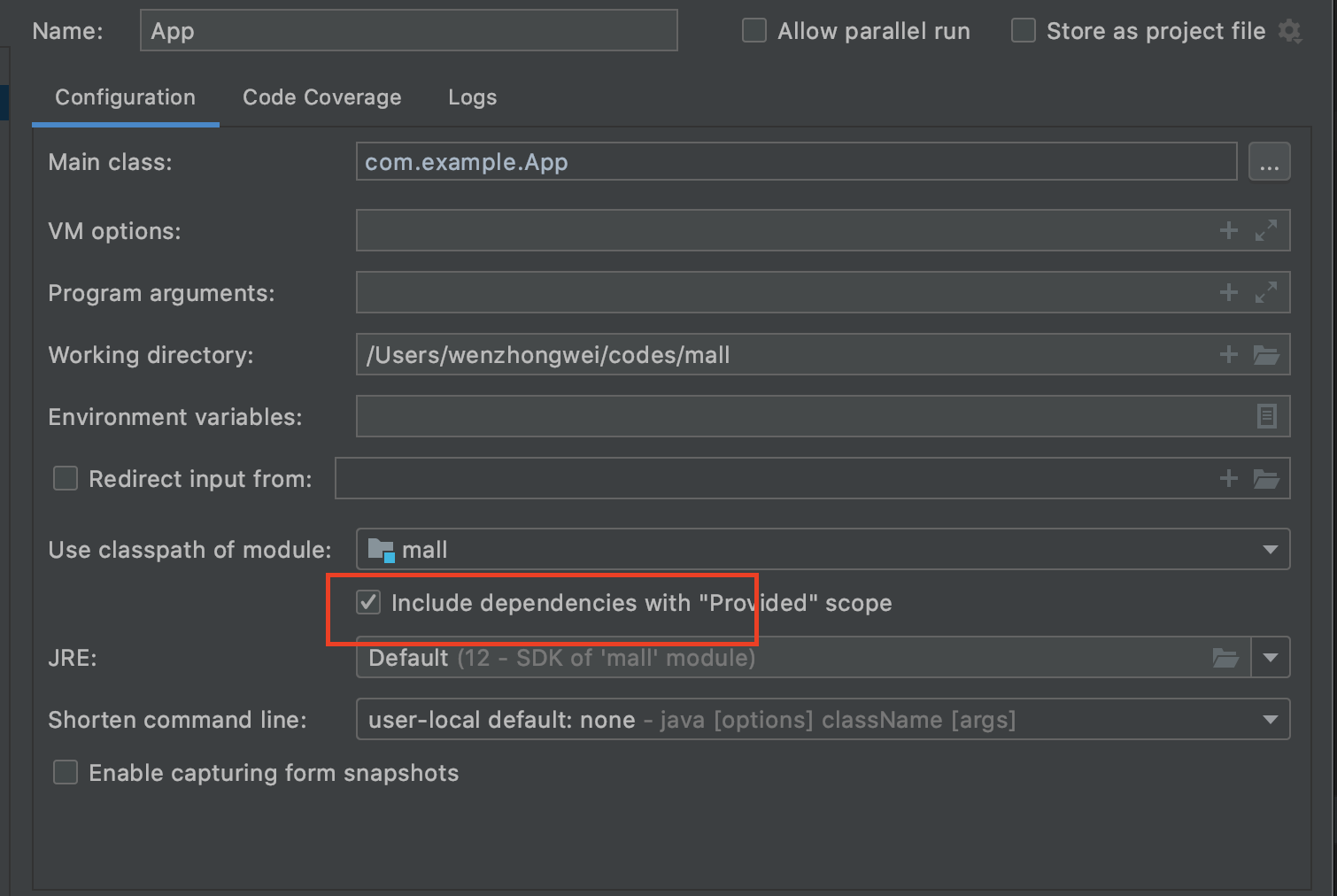

若有收获,就点个赞吧
0 人点赞


