一. 基于服务器 log 的热门页面浏览量统计
基本需求
- 读取服务器日志中的每 一行 log,统计在一段时间内用户访问每一个 url 的次数,然后排序输出显示
解决思路
- 每隔 5 秒,输出最近 10 分钟内访问量最多的前 N 个 URL
与之前的热门实时商品统计类似
需要注意的是,原始日志中的时间是“dd/MM/yyyy:HH:mm:ss”的形式,需要 定义一个 DateTimeFormat 将其转换为我们需要的时间戳格式:
208.115.111.72 - - 17/05/2015:11:05:49 +0000 GET /blog/geekery/oniguruma-named-capture-example.html?commentlimit=0208.115.111.72 - - 17/05/2015:11:05:50 +0000 GET /blog/geekery/oniguruma-named-capture-example.html?commentlimit=0208.115.111.72 - - 17/05/2015:11:05:46 +0000 GET /blog/geekery/oniguruma-named-capture-example.html?commentlimit=0208.115.111.72 - - 17/05/2015:11:05:51 +0000 GET /blog/geekery/oniguruma-named-capture-example.html?commentlimit=0208.115.111.72 - - 17/05/2015:11:05:31 +0000 GET /blog/geekery/oniguruma-named-capture-example.html?commentlimit=0
定义样例类
```scala //输入数据的样例类 case class ApacheLogEvent(ip:String,userId:String,timestamp:Long,method:String,url:String)
//定义一个窗口聚合结果样例类 case class PageViewCount(url:String,windowEnd:Long,count:Long)
<a name="bYpY4"></a>
## 读取数据转化为样例类
```scala
val dataStream = inputStream
  .map(data =>{
    val arr = data.split(" ")
    //输入日期格式
    val simpleDateFormat = new SimpleDateFormat("dd/MM/yyyy:HH:mm:ss")
    //
    val ts = simpleDateFormat.parse(arr(3)).getTime
    ApacheLogEvent(arr(0),arr(1),ts,arr(5),arr(6))
  })
- 注意:原始日志中的时间是“dd/MM/yyyy:HH:mm:ss”的形式,需 定义一个DateTimeFormat 将其转换为我们需要的时间戳格式
- ApacheLogEvent(arr(0),arr(1),ts,arr(5),arr(6)),注意定义的样例类在文本文件中的位置
- gettime返回的是毫秒数
完整代码
```scala package networkflow_analysis
import java.sql.Timestamp import java.text.SimpleDateFormat
import org.apache.flink.api.common.functions.AggregateFunction import org.apache.flink.api.common.state.{ListState, ListStateDescriptor, MapState, MapStateDescriptor} import org.apache.flink.streaming.api.TimeCharacteristic import org.apache.flink.streaming.api.functions.KeyedProcessFunction import org.apache.flink.streaming.api.functions.timestamps.BoundedOutOfOrdernessTimestampExtractor import org.apache.flink.streaming.api.scala._ import org.apache.flink.streaming.api.scala.function.WindowFunction import org.apache.flink.streaming.api.windowing.time.Time import org.apache.flink.streaming.api.windowing.windows.TimeWindow import org.apache.flink.util.Collector
import scala.collection.mutable.ListBuffer
//输入数据的样例类 case class ApacheLogEvent(ip:String,userId:String,timestamp:Long,method:String,url:String)
//定义一个窗口聚合结果样例类 case class PageViewCount(url:String,windowEnd:Long,count:Long)
object HotPagesNetworkFlow { def main(args: Array[String]): Unit = {
val env = StreamExecutionEnvironment.getExecutionEnvironment
env.setParallelism(1)
env.setStreamTimeCharacteristic(TimeCharacteristic.EventTime)

/**
 * 读取数据
 * 转换为样例类
 * 并提取时间戳和watermark
 */
  val inputStream=env.socketTextStream("192.168.188.8",7777)
val dataStream = inputStream
  .map(data =>{
    val arr = data.split(" ")
// 对事件时间进行转换,得到时间戳 val simpleDateFormat = new SimpleDateFormat(“dd/MM/yyyy:HH:mm:ss”) val ts = simpleDateFormat.parse(arr(3)).getTime //getTime返回的是毫秒数 ApacheLogEvent(arr(0),arr(1),ts,arr(5),arr(6)) //注意定义的样例类在文本文件中的位置 }) //传入的参数为延迟时间,延迟时间看数据中最大乱序程度(估算一下) .assignTimestampsAndWatermarks(new BoundedOutOfOrdernessTimestampExtractorApacheLogEvent) { override def extractTimestamp(element: ApacheLogEvent): Long = element.timestamp })
//进行开窗聚合以及排序输出
val aggStream = dataStream
  .filter(_.method== "GET")
  .keyBy(_.url)
  .timeWindow(Time.minutes(10),Time.seconds(5))
  //乱序数据处理
  .allowedLateness(Time.minutes(1))
  .sideOutputLateData(new OutputTag[ApacheLogEvent]("late"))

  .aggregate(new PageCountAgg(),new PageViewCountWindowResult())

val resultStream = aggStream
  .keyBy(_.windowEnd)
  .process(new TopNHotPage(3))

dataStream.print("data")
aggStream.print("agg")
aggStream.getSideOutput(new OutputTag[ApacheLogEvent]("late")).print()
resultStream.print()
env.execute("hot pages job")
}
}
class PageCountAgg() extends AggregateFunction[ApacheLogEvent,Long,Long]{ override def createAccumulator(): Long = 0L
override def add(value: ApacheLogEvent, accumulator: Long): Long = accumulator+1
override def getResult(accumulator: Long): Long = accumulator
override def merge(a: Long, b: Long): Long = a+b }
class PageViewCountWindowResult() extends WindowFunction[Long,PageViewCount,String,TimeWindow]{ override def apply(key: String, window: TimeWindow, input: Iterable[Long], out: Collector[PageViewCount]): Unit = { out.collect(PageViewCount(key,window.getEnd,input.iterator.next())) } }
class TopNHotPage(n: Int) extends KeyedProcessFunction[Long,PageViewCount,String]{
lazy val pageViewCountMapState: MapState[String,Long] = getRuntimeContext.getMapState(new MapStateDescriptorString,Long)
override def processElement(value: PageViewCount, ctx: KeyedProcessFunction[Long, PageViewCount, String]#Context, out: Collector[String]): Unit = { pageViewCountMapState.put(value.url,value.count+1) ctx.timerService().registerEventTimeTimer(value.windowEnd+1) //另外注册一个定时器,一分钟后触发,这时窗口彻底关闭,不再有聚合结果,可以清空状态 ctx.timerService().registerEventTimeTimer(value.windowEnd + 60000L) }
override def onTimer(timestamp: Long, ctx: KeyedProcessFunction[Long, PageViewCount, String]#OnTimerContext, out: Collector[String]): Unit = { / val allPageViewCounts: ListBuffer[PageViewCount] = ListBuffer() val iter = pageViewCountListState.get().iterator() while(iter.hasNext){ allPageViewCounts +=iter.next() } /
//判断定时器触发时间,如果已近是窗口结束时间1分钟之后,那么直接清空状态
if (timestamp ==ctx.getCurrentKey + 60000L){
  pageViewCountMapState.clear()
  return
}
val allPageViewCounts: ListBuffer[(String,Long)] = ListBuffer()
val iter = pageViewCountMapState.entries().iterator()
while (iter.hasNext){
  val entry = iter.next()
  //外面括号表示方法调用,里面括号表示二元组
  allPageViewCounts +=((entry.getKey,entry.getValue))

}

//提前清空状态
// pageViewCountListState.clear()
//按照访问量进行排序并输出topN
val sortedPageViewCounts = allPageViewCounts.sortWith(_._2 > _._2).take(n)

//将排序信息格式化成String,便于打印输出可视化展示
val result: StringBuilder = new StringBuilder
result.append("窗口结束时间:").append(new Timestamp(timestamp - 1)).append("\n")

//遍历结果列表中的每一个ItemViewCount,输出到一行
for (i <- sortedPageViewCounts.indices) {
  val currentItemViewCount = sortedPageViewCounts(i)
  result.append("NO").append(i + 1).append(": ")
    .append("页面url= ").append(currentItemViewCount._1).append("\t")
    .append("热门度= ").append(currentItemViewCount._2).append("\n")
}

result.append("==================\n\n")
Thread.sleep(1000)
out.collect(result.toString())
} }
<a name="vnPNU"></a>
# 二.  基于埋点日志数据的网络流量统计
     从 web 服务器 log 中得到的 url,往往更多的是请求某个资源地址 (/*.js、/*.css),如果要针对页面进行统计往往还需要进行过滤。而在实际电商应 用中,相比每个单独页面的访问量,我们可能更加关心整个电商网站的网络流量。 这个指标,除了合并之前每个页面的统计结果之外,还可以通过统计埋点日志数据 中的“pv”行为来得到。

<a name="J2hmo"></a>
##  网站总浏览量(PV)的统计
 衡量网站流量一个最简单的指标,就是网站的页面浏览量(Page View,PV)
```scala
package networkflow_analysis

import org.apache.flink.api.common.functions.{AggregateFunction, MapFunction}
import org.apache.flink.api.common.state.{ListState, ValueState, ValueStateDescriptor}
import org.apache.flink.streaming.api.TimeCharacteristic
import org.apache.flink.streaming.api.functions.KeyedProcessFunction
import org.apache.flink.streaming.api.scala._
import org.apache.flink.streaming.api.scala.function.WindowFunction
import org.apache.flink.streaming.api.windowing.time.Time
import org.apache.flink.streaming.api.windowing.windows.TimeWindow
import org.apache.flink.util.Collector

import scala.util.Random

case class UserBehavior(userId: Long, itemId: Long, categoryId: Int, behavior: String, timestamp: Long)
//定义输出pv统计的样例类
case class PvCount(windowEnd:Long,count:Long)


object PageView {
  def main(args: Array[String]): Unit = {
    val env = StreamExecutionEnvironment.getExecutionEnvironment
//    env.setParallelism(1)
    env.setStreamTimeCharacteristic(TimeCharacteristic.EventTime)

    val resource = getClass.getResource("/UserBehavior.csv")
    val inputStream: DataStream[String] = env.readTextFile(resource.getPath)
    //转换为样例类类型,并提取时间戳与watermark
    val dataStream: DataStream[UserBehavior] = inputStream
      .map(data => {
        val arr = data.split(",")
        UserBehavior(arr(0).toLong, arr(1).toLong, arr(2).toInt, arr(3), arr(4).toLong)
      })
      // 选择事件时间的字段
      // 因为数据中时间戳不是乱序的,使用assignAscendingTimestamps
      .assignAscendingTimestamps(_.timestamp * 1000L)

    val pvStream = dataStream
      .filter(_.behavior =="pv")
//      .map( data => ("pv",1L))  //定义一个pv字段作为分组的dummy key
      .map(new MyMapper())
      .keyBy(_._1)  //当前所有数据会被分在同一个组
      .timeWindow(Time.hours(1)) //一小时滚动窗口
      .aggregate(new PvCountAgg(),new PvCountWindowResult())

    val totalPvStream = pvStream
        .keyBy(_.windowEnd)
        .process(new TotalPvCountResult())

    totalPvStream.print()
    env.execute("pv job")
  }
}

//自定义预聚合函数
class PvCountAgg() extends AggregateFunction[(String,Long),Long,Long]{
  override def createAccumulator(): Long = 0L

  override def add(value: (String,Long), accumulator: Long): Long = accumulator+1

  override def getResult(accumulator: Long): Long = accumulator

  override def merge(a: Long, b: Long): Long = a+b
}

//自定义窗口函数
class PvCountWindowResult() extends WindowFunction[Long,PvCount,String,TimeWindow]{
  override def apply(key: String, window: TimeWindow, input: Iterable[Long], out: Collector[PvCount]): Unit = {
    out.collect(PvCount(window.getEnd,input.head))
  }
}

//自定义mapper,随机分组生成key,防止数据倾斜
class MyMapper() extends MapFunction[UserBehavior,(String,Long)]{
  override def map(value: UserBehavior): (String, Long) = {
    (Random.nextString(10),1L)
  }
}

class TotalPvCountResult() extends KeyedProcessFunction[Long,PvCount,PvCount]{
  //定义一个状态,保存当前所有的count总和
  lazy val totalPvCountResultState: ValueState[Long] = getRuntimeContext.getState(new ValueStateDescriptor[Long]("total-pv",classOf[Long]))

  override def processElement(value: PvCount, ctx: KeyedProcessFunction[Long, PvCount, PvCount]#Context, out: Collector[PvCount]): Unit = {
    //每来一个数据将count值叠加到当前状态上
    val currentTotalCount = totalPvCountResultState.value()
    totalPvCountResultState.update(currentTotalCount + value.count)

    //注册windowEnd+1触发的定时器
    ctx.timerService().registerEventTimeTimer(value.windowEnd+1)
  }

  override def onTimer(timestamp: Long, ctx: KeyedProcessFunction[Long, PvCount, PvCount]#OnTimerContext, out: Collector[PvCount]): Unit = {
    val totalPvCount = totalPvCountResultState.value()
    out.collect(PvCount(ctx.getCurrentKey,totalPvCount))
    totalPvCountResultState.clear()
  }
}
网站独立访客数(UV)的统计
在上节的例子中,我们统计的是所有用户对页面的所有浏览行为,也就是说, 同一用户的浏览行为会被重复统计。而在实际应用中,我们往往还会关注,在一段 时间内到底有多少不同的用户访问了网站。
另外一个统计流量的重要指标是网站的独立访客数(Unique Visitor,UV)。UV 指的是一段时间(比如一小时)内访问网站的总人数,1 天内同一访客的多次访问 只记录为一个访客。
对于 UserBehavior 数据源来说,我们直接可以根据 userId 来区分不同的 用户。
在 src/main/scala 下创建 UniqueVisitor.scala 文件
package networkflow_analysis

import org.apache.flink.streaming.api.TimeCharacteristic
import org.apache.flink.streaming.api.scala._
import org.apache.flink.streaming.api.scala.function.{AllWindowFunction, WindowFunction}
import org.apache.flink.streaming.api.windowing.time.Time
import org.apache.flink.streaming.api.windowing.windows.TimeWindow
import org.apache.flink.util.Collector

//定义输出输出UV统计样例类
case class UvCount(windowEnd:Long,count:Long)

object UniqueVisitor {
  def main(args: Array[String]): Unit = {
    val env = StreamExecutionEnvironment.getExecutionEnvironment
    env.setParallelism(1)
    env.setStreamTimeCharacteristic(TimeCharacteristic.EventTime)

    val resource = getClass.getResource("/UserBehavior.csv")
    val inputStream: DataStream[String] = env.readTextFile(resource.getPath)
    //转换为样例类类型,并提取时间戳与watermark
    val dataStream: DataStream[UserBehavior] = inputStream
      .map(data => {
        val arr = data.split(",")
        UserBehavior(arr(0).toLong, arr(1).toLong, arr(2).toInt, arr(3), arr(4).toLong)
      })
      // 选择事件时间的字段
      // 因为数据中时间戳不是乱序的,使用assignAscendingTimestamps
      .assignAscendingTimestamps(_.timestamp * 1000L)

    val uvStream = dataStream
      .filter(_.behavior == "pv")
      .timeWindowAll(Time.hours(1)) //直接不分组,基于DataStream开1小时滚动窗口
      .apply(new UvCountResult())

    uvStream.print()
    env.execute("uv job")
  }

}

//自定义全窗口函数,用一个set结构保存数据,进行自动去重
class UvCountResult() extends AllWindowFunction[UserBehavior,UvCount,TimeWindow]{
  override def apply(window: TimeWindow, input: Iterable[UserBehavior], out: Collector[UvCount]): Unit = {
    //定义set
    var userIdSet = Set[Long]()

    //遍历窗口中所有数据,把userID添加到set中,自动去重
    for (userBehavior <- input){
      userIdSet += userBehavior.userId
    }
    //将set的size作为去重后的uv进行输出
    out.collect(UvCount(window.getEnd,userIdSet.size))
  }
}
上例中,把所有数据的userId 都存在了窗口计算的状态里,在窗口收集数据的过程中,状态会不断增大。一般情况下,只要不超出内存的承受范围,这种做法也没什么问题;但如果我们遇到的数据量很大呢?把所有数据暂存放到内存里,显然不是一个好注意。我们会想到,可以利用 redis这种内存级 k v 数据库,为我们做一个缓存。但如果我们遇到的情况非常极端,数据大到惊人呢?比如上亿级的用户,要去重计算 UV 。如果放到redis 中,亿级的用户id (每个20字节左右的话)可能需要几G甚至几十G的空间来存储。当然放到 redis 中,用集群进行扩展也不是不可以,但明显代价太大了。一个更好的想法是,其实我们不需要完整地存储用户ID 的信息,只要知道他在不在就行了。所以其实我们可以进行压缩处理,用一位(bit)就可以表示一个用户的状态。这个思想的具体实现就是布隆过滤器(Bloom Filter)。
本质上布隆过滤器是一种数据结构,比较巧妙的概率型数据结构(probabilisticdata structure ),特点是高效地插入和查询,可以用来告诉你 “某样东西一定不存在或者可能存在”。
它本身是一个很长的二进制向量,既然是二进制的向量,那么显而易见的,存放的不是 0,就是 1。相比于传统的 List、Set、Map 等数据结构,它更高效、占用 空间更少,但是缺点是其返回的结果是概率性的,而不是确切的。 我们的目标就是,利用某种方法(一般是 Hash 函数)把每个数据,对应到一个 位图的某一位上去;如果数据存在,那一位就是 1,不存在则为 0。
超大数据量去重——布隆过滤器查重-过滤的UV统计
package networkflow_analysis

import org.apache.flink.streaming.api.TimeCharacteristic
import org.apache.flink.streaming.api.scala._
import org.apache.flink.streaming.api.scala.function.ProcessWindowFunction
import org.apache.flink.streaming.api.windowing.time.Time
import org.apache.flink.streaming.api.windowing.triggers.{Trigger, TriggerResult}
import org.apache.flink.streaming.api.windowing.windows.TimeWindow
import org.apache.flink.util.Collector
import redis.clients.jedis.Jedis

////定义输出输出UV统计样例类
//case class UvCount(windowEnd:Long,count:Long)

object UvWithBloom {
  def main(args: Array[String]): Unit = {
    val env = StreamExecutionEnvironment.getExecutionEnvironment
    env.setParallelism(1)
    env.setStreamTimeCharacteristic(TimeCharacteristic.EventTime)

    val resource = getClass.getResource("/UserBehavior.csv")
    val inputStream: DataStream[String] = env.readTextFile(resource.getPath)
    //转换为样例类类型,并提取时间戳与watermark
    val dataStream: DataStream[UserBehavior] = inputStream
      .map(data => {
        val arr = data.split(",")
        UserBehavior(arr(0).toLong, arr(1).toLong, arr(2).toInt, arr(3), arr(4).toLong)
      })
      // 选择事件时间的字段
      // 因为数据中时间戳不是乱序的,使用assignAscendingTimestamps
      .assignAscendingTimestamps(_.timestamp * 1000L)

    val uvStream = dataStream
      .filter(_.behavior == "pv")
      .map(data => ("uv",data.userId))
      .keyBy(_._1)
      .timeWindow(Time.hours(1)) //直接不分组,基于DataStream开1小时滚动窗口
      .trigger(new MyTrigger())   //自定义触发器
      .process(new UvCountWithBloom())

    uvStream.print()
    env.execute("uv with bloom job")
  }
}

//每来一条数据直接触发窗口计算,并清空窗口状态
class MyTrigger() extends Trigger[(String,Long),TimeWindow]{
  override def onElement(element: (String, Long), timestamp: Long, window: TimeWindow, ctx: Trigger.TriggerContext): TriggerResult = {
    TriggerResult.FIRE_AND_PURGE
  }
  override def onProcessingTime(time: Long, window: TimeWindow, ctx: Trigger.TriggerContext): TriggerResult = TriggerResult.CONTINUE

  override def onEventTime(time: Long, window: TimeWindow, ctx: Trigger.TriggerContext): TriggerResult = TriggerResult.CONTINUE

  override def clear(window: TimeWindow, ctx: Trigger.TriggerContext): Unit = {}
}

//自定义布隆过滤器,主要就是一个位图和hash函数
class Bloom(size:Long) extends Serializable{
  private val cap = size   //默认cap是2的整次幂

  //hash函数
  def hash(value: String,seed:Int):Long = {
    var result = 0
    for (i <- 0 until value.length){
      result = result * seed + value.charAt(i)
    }
    //返回hash值,要映射到cap范围内
    (cap -1) & result
  }
}

//实现自定义的窗口处理函数
class UvCountWithBloom() extends ProcessWindowFunction[(String,Long),UvCount,String,TimeWindow]{
//  定义Redis连接以及布隆过滤器
  lazy val jedis = new Jedis("localhost",6379)
  lazy val bloomFilter = new Bloom(1<<29)  //位的个数 64MB = 2^6(64) * 2^20(1M)  * 2^3(8bit)
  override def process(key: String, context: Context, elements: Iterable[(String, Long)], out: Collector[UvCount]): Unit = {
    //首先先定义Redis中存储位图的key
    val storedBitMapKey = context.window.getEnd.toString

    //另外将当前窗口的uv count值,作为状态保存到Redis中,用一个叫做uvcount的hash表来保存(windEnd,count)
    val uvCountMap = "uvcount"
    val currentKey = context.window.getEnd.toString
    var count = 0L
    //从Redis窗口中取出当前窗口的uv count值
    if(jedis.hget(uvCountMap,currentKey) !=null){
      count = jedis.hget(uvCountMap,currentKey).toLong
    }
    //去重:判断当前useID对应的hash值是否为0
    val userId = elements.last._2.toString
    //计算hash值,就对应为图中的偏移量
    val offset = bloomFilter.hash(userId,61)
    //用Redis的位操作命令,取bitmap中对应的值
    val isExsit = jedis.getbit(storedBitMapKey,offset)
    if (!isExsit){
      //如果不存在,那么位图随影位置为1,并且将count值加1
      jedis.setbit(storedBitMapKey,offset,true)
      jedis.hset(uvCountMap,currentKey,(count+1).toString)

    }


  }
}
三. App市场推广统计
import java.sql.Timestamp
import java.util.UUID

import org.apache.flink.streaming.api.TimeCharacteristic
import org.apache.flink.streaming.api.scala._
import org.apache.flink.streaming.api.functions.source.{RichSourceFunction, SourceFunction}
import org.apache.flink.streaming.api.scala.function.ProcessWindowFunction
import org.apache.flink.streaming.api.windowing.time.Time
import org.apache.flink.streaming.api.windowing.windows.TimeWindow
import org.apache.flink.util.Collector

import scala.util.Random

//定义输入数据的样例类
case class MarketUserBehavior(userId: String, behavior: String, channel: String, timestamp: Long)

//定义输出数据样例类
case class MarketViewCount(windowStart: String, windowEnd: String, channel: String, behavior: String, count: Long)

//自定义测试数据源
class SimulatedSource extends RichSourceFunction[MarketUserBehavior] {
  //是否运行的标识位
  var running = true
  //定义用户行为和渠道集合
  val behaviorSet: Seq[String] = Seq("view", "download", "install", "uninstall")
  val channelSet: Seq[String] = Seq("appstore", "weibo", "wechat", "tieba")
  val rand: Random = Random

  override def run(ctx: SourceFunction.SourceContext[MarketUserBehavior]): Unit = {
    //定义一个生成数据最大数量
    val maxCounts = Long.MaxValue
    var count = 0L

    //while循环,不停的产生数据
    while (running && count < maxCounts) {
      val id = UUID.randomUUID().toString
      //随机生成数据,预先定义一个集合,随机生成一个对应的下标,指定范围0—size之间
      val behavior = behaviorSet(rand.nextInt(behaviorSet.size))
      val channel = channelSet(rand.nextInt(channelSet.size))
      val ts = System.currentTimeMillis()
      ctx.collect(MarketUserBehavior(id, behavior, channel, ts))
      count += 1
      Thread.sleep(50L)


    }
  }

  override def cancel(): Unit = running = false
}

object MarketAnalysis {
  def main(args: Array[String]): Unit = {
    val env = StreamExecutionEnvironment.getExecutionEnvironment
    env.setParallelism(1)
    env.setStreamTimeCharacteristic(TimeCharacteristic.EventTime)

    val inputStream2: DataStream[String] = env.readTextFile("D:\\IDEA\\UserBehaviorAnalysis\\NetworkFlowAnalysis\\src\\main\\resources\\apache.log")


    val dataStream = env.addSource(new SimulatedSource)
      .assignAscendingTimestamps(_.timestamp)

    //开窗统计输出
    val resultStream = dataStream
      .filter(_.behavior != "uninstall")
      .keyBy(data => (data.channel, data.behavior))
      .timeWindow(Time.days(1), Time.seconds(5))
      .process(new MarketCountByChannel())

    resultStream.print()

    env.execute("app market by channel job")


  }
}

//自定义ProcessFunction
class MarketCountByChannel() extends ProcessWindowFunction[MarketUserBehavior, MarketViewCount, (String, String), TimeWindow] {

  override def process(key: (String, String), context: Context, elements: Iterable[MarketUserBehavior], out: Collector[MarketViewCount]): Unit = {
    val start = new Timestamp(context.window.getStart).toString
    val end = new Timestamp(context.window.getEnd).toString
    val channel = key._1
    val behavior = key._2
    val count = elements.size
    out.collect(MarketViewCount(start, end, channel, behavior, count))

  }
}
四. 页面广告统计
import java.sql.Timestamp

import org.apache.flink.api.common.functions.AggregateFunction
import org.apache.flink.streaming.api.TimeCharacteristic
import org.apache.flink.streaming.api.scala._
import org.apache.flink.streaming.api.scala.function.WindowFunction
import org.apache.flink.streaming.api.windowing.time.Time
import org.apache.flink.streaming.api.windowing.windows.TimeWindow
import org.apache.flink.util.Collector

//定义样例类
case class AdClickLog(userId: Long, adId: Long, province: String, city: String, timestamp: Long)

case class AdClickCountryByProvince(windowEnd: String, province: String, count: Long)

object AdClickAnalysis {
  def main(args: Array[String]): Unit = {
    val env = StreamExecutionEnvironment.getExecutionEnvironment
    env.setParallelism(1)
    env.setStreamTimeCharacteristic(TimeCharacteristic.EventTime)

    //读取数据
    val resource = getClass.getResource("AdClickLog.csv")
    val inputStream = env.readTextFile(resource.getPath)

    //转换为样例类,并提取时间戳
    val adCountResult = inputStream
      .map(data => {
        val arr = data.split(",")
        AdClickLog(arr(0).toLong, arr(1).toLong, arr(2), arr(3), arr(4).toLong)
      })
      .assignAscendingTimestamps(_.timestamp * 1000L)

    //开窗聚合统计
      .keyBy(_.province)
      .timeWindow(Time.days(1),Time.seconds(5))
      //之所以定义AdCountWindowResult是因为AdCountAgg拿不到窗口信息
      .aggregate(new AdCountAgg(),new AdCountWindowResult())

    adCountResult.print()
    env.execute("ad count statistics job")


  }

}

class AdCountAgg() extends AggregateFunction[AdClickLog,Long,Long]{
  override def createAccumulator(): Long = 0L
  override def add(value: AdClickLog, accumulator: Long): Long = accumulator+1

  override def getResult(accumulator: Long): Long = accumulator

  override def merge(a: Long, b: Long): Long = a+b
}

class AdCountWindowResult() extends WindowFunction[Long,AdClickCountryByProvince,String,TimeWindow]{
  override def apply(key: String, window: TimeWindow, input: Iterable[Long], out: Collector[AdClickCountryByProvince]): Unit = {
    val end = new Timestamp(window.getEnd).toString
    out.collect(AdClickCountryByProvince(end,key,input.head))
  }
}
输入数据类型: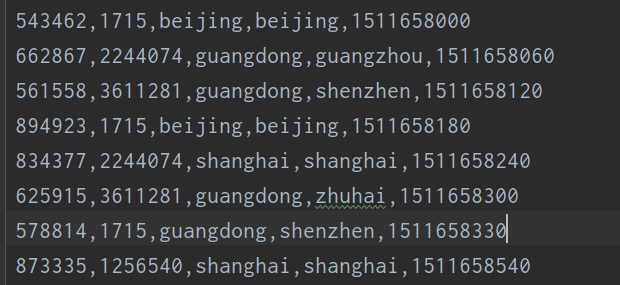
输出数据: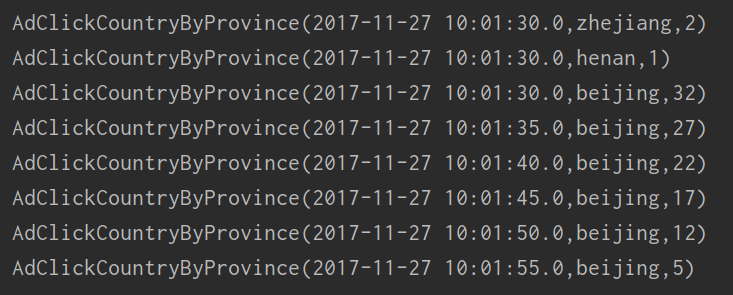
五. 黑名单过滤
上节我们进行的点击量统计,同一用户的重复点击是会叠加计算的。在实际场 景中,同一用户确实可能反复点开同一个广告,这也说明了用户对广告更大的兴趣; 但是如果用户在一段时间非常频繁地点击广告,这显然不是一个正常行为,有刷点 击量的嫌疑。所以我们可以对一段时间内(比如一天内)的用户点击行为进行约束, 如果对同一个广告点击超过一定限额(比如 100 次),应该把该用户加入黑名单并 报警,此后其点击行为不应该再统计。
方法:用processfunction进行黑名单过滤,检测出用户对同一广告的点击量,如果超出上限就将用户信息已侧输出流输出到黑名单中
import java.sql.Timestamp

import org.apache.flink.api.common.functions.AggregateFunction
import org.apache.flink.api.common.state.{ValueState, ValueStateDescriptor}
import org.apache.flink.streaming.api.TimeCharacteristic
import org.apache.flink.streaming.api.functions.KeyedProcessFunction
import org.apache.flink.streaming.api.scala._
import org.apache.flink.streaming.api.scala.function.WindowFunction
import org.apache.flink.streaming.api.windowing.time.Time
import org.apache.flink.streaming.api.windowing.windows.TimeWindow
import org.apache.flink.util.Collector

//定义样例类
case class AdClickLog(userId: Long, adId: Long, province: String, city: String, timestamp: Long)

case class AdClickCountryByProvince(windowEnd: String, province: String, count: Long)

//黑名单报警信息样例类
case class BlackListUserWarning(userId: Long, adId: Long, msg: String)

object AdClickAnalysis {
  def main(args: Array[String]): Unit = {
    val env = StreamExecutionEnvironment.getExecutionEnvironment
    env.setParallelism(1)
    env.setStreamTimeCharacteristic(TimeCharacteristic.EventTime)

    //读取数据
    val resource = getClass.getResource("AdClickLog.csv")
    val inputStream = env.readTextFile(resource.getPath)

    //转换为样例类,并提取时间戳
    val adLogStream = inputStream
      .map(data => {
        val arr = data.split(",")
        AdClickLog(arr(0).toLong, arr(1).toLong, arr(2), arr(3), arr(4).toLong)
      })
      .assignAscendingTimestamps(_.timestamp * 1000L)

    //过操作,将有刷单行为的用户输出到测输出流
    val filterBlackUserStream: DataStream[AdClickLog] = adLogStream
      .keyBy(data => (data.userId, data.adId))
      .process(new FilterBlackListUserResult(100))

    val adCountResultStream = filterBlackUserStream
      //开窗聚合统计
      .keyBy(_.province)
      .timeWindow(Time.hours(1), Time.seconds(5))
      //之所以定义AdCountWindowResult是因为AdCountAgg拿不到窗口信息
      .aggregate(new AdCountAgg(), new AdCountWindowResult())


    adCountResultStream.print("count result")
    filterBlackUserStream.getSideOutput(new OutputTag[BlackListUserWarning]("warning")).print("warning")
    env.execute("ad count statistics job")


  }

}

class AdCountAgg() extends AggregateFunction[AdClickLog, Long, Long] {
  override def createAccumulator(): Long = 0L

  override def add(value: AdClickLog, accumulator: Long): Long = accumulator + 1

  override def getResult(accumulator: Long): Long = accumulator

  override def merge(a: Long, b: Long): Long = a + b
}

class AdCountWindowResult() extends WindowFunction[Long, AdClickCountryByProvince, String, TimeWindow] {
  override def apply(key: String, window: TimeWindow, input: Iterable[Long], out: Collector[AdClickCountryByProvince]): Unit = {
    val end = new Timestamp(window.getEnd).toString
    out.collect(AdClickCountryByProvince(end, key, input.head))
  }
}

//自定义keyedProcessFunction
class FilterBlackListUserResult(maxCount:Long) extends KeyedProcessFunction[(Long, Long), AdClickLog, AdClickLog] {
  //定义状态:保存用户对广告的点击量、每天零点定时清空状态的时间戳、标记当前用户是否进过黑名单
  lazy val countState: ValueState[Long] = getRuntimeContext.getState(new ValueStateDescriptor[Long]("count", classOf[Long]))
  lazy val resetTimerTsState: ValueState[Long] = getRuntimeContext.getState(new ValueStateDescriptor[Long]("reset-ts", classOf[Long]))
  lazy val isBlackState: ValueState[Boolean] = getRuntimeContext.getState(new ValueStateDescriptor[Boolean]("is-black", classOf[Boolean]))

  override def processElement(value: AdClickLog, ctx: KeyedProcessFunction[(Long, Long), AdClickLog, AdClickLog]#Context, out: Collector[AdClickLog]): Unit = {
    val currentCount = countState.value()
    //判断只要是第一个数据来了,直接注册0点清空状态的定时器
    if (currentCount == 0) {
      val ts = (ctx.timerService().currentProcessingTime() / (1000 * 60 * 60 * 24) + 1) * (24 * 60 * 60 * 1000) - 8 * 60 * 60 * 1000
      resetTimerTsState.update(ts)
      ctx.timerService().registerEventTimeTimer(ts)
    }

    //判断count值是否达到预定的阈值,如果超过输出到黑名单
    if (currentCount >= maxCount){
      //判断是否已经在黑名单中,没有的话才输出测输出流
      if (!isBlackState.value()){
        isBlackState.update(true)
        ctx.output(new OutputTag[BlackListUserWarning]("warning"),BlackListUserWarning(value.userId,value.adId,"Click ad over"+maxCount+"times today"))
      }
      return
    }
    //正常情况:count+1,将数据原样输出
    countState.update(currentCount + 1)
    out.collect(value)
  }

  override def onTimer(timestamp: Long, ctx: KeyedProcessFunction[(Long, Long), AdClickLog, AdClickLog]#OnTimerContext, out: Collector[AdClickLog]): Unit = {
    if(timestamp==resetTimerTsState){
      isBlackState.clear()
      countState.clear()
    }
  }
}
六. 恶意登陆监控

需要在 pom 文件中引入 CEP 的相关依赖:
<dependency>
    <groupId>org.apache.flink</groupId>
    <artifactId>flink-cep-scala_${scala.binary.version}</artifactId>
    <version>${flink.version}</version>
</dependency>
七.

若有收获,就点个赞吧
0 人点赞


