1.Eureka基础知识
1.1 服务治理
Spring Cloud封装了Netflix 公司开发的Eureka模块来实现服务治理
在传统的RPC远程调用框架中,管理每个服务与服务之间依赖关系比较复杂,管理比较复杂,所以需要使用服务治理,管理服务于服务之间依赖关系,可以实现服务调用、负载均衡、容错等,实现服务发现与注册。
1.2 服务注册
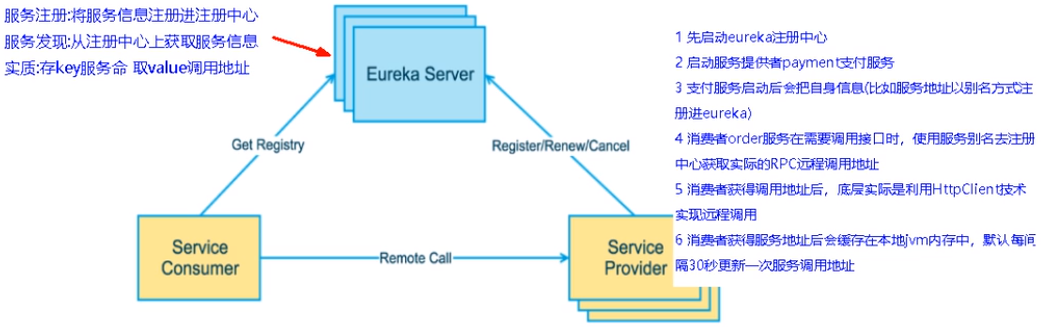
Eureka采用了CS的设计架构,Eureka Sever作为服务注册功能的服务器,它是服务注册中心。而系统中的其他微服务,使用Eureka的客户端连接到 Eureka Server并维持心跳连接。这样系统的维护人员就可以通过Eureka Server来监控系统中各个微服务是否正常运行。
在服务注册与发现中,有一个注册中心。当服务器启动的时候,会把当前自己服务器的信息比如服务地址通讯地址等以别名方式注册到注册中心上。另一方(消费者服务提供者),以该别名的方式去注册中心上获取到实际的服务通讯地址,然后再实现本地RPC调用RPC远程调用框架核心设计思想:在于注册中心,因为使用注册中心管理每个服务与服务之间的一个依赖关系(服务治理概念)。在任何RPC远程框架中,都会有一个注册中心存放服务地址相关信息(接口地址)
1.3 Eureka两组件
(1)Eureka Server提供服务注册服务
各个微服务节点通过配置启动后,会在EurekaServer中进行注册,这样EurekaServer中的服务注册表中将会存储所有可用服务节点的信息,服务节点的信息可以在界面中直观看到。
(2)EurekaClient通过注册中心进行访问
它是一个Java客户端,用于简化Eureka Server的交互,客户端同时也具备一个内置的、使用轮询(round-robin)负载算法的负载均衡器。在应用启动后,将会向Eureka Server发送心跳(默认周期为30秒)。如果Eureka Server在多个心跳周期内没有接收到某个节点的心跳,EurekaServer将会从服务注册表中把这个服务节点移除(默认90秒)
2.单机Eureka构建步骤
2.1 IDEA生成EurekaServer端服务注册中心
类似物业公司
(1)建Module
(2)POM
1.x和2.x的对比说明
<!-- eureka新旧版本 --><!-- 以前的老版本(2018)--><dependency><groupid>org.springframework.cloud</groupId><artifactId>spring-cloud-starter-eureka</artifactId></dependency><!-- 现在新版本(2020.2)--><!-- 我们使用最新的 --><dependency><groupId>org.springframework.cloud</groupId><artifactId>spring-cloud-starter-netflix-eureka-server</artifactId></dependency>
<?xml version="1.0" encoding="UTF-8"?>
<project xmlns="http://maven.apache.org/POM/4.0.0"
         xmlns:xsi="http://www.w3.org/2001/XMLSchema-instance"
         xsi:schemaLocation="http://maven.apache.org/POM/4.0.0 http://maven.apache.org/xsd/maven-4.0.0.xsd">
    <parent>
        <artifactId>cloud2021</artifactId>
        <groupId>com.atguigu.springcloud</groupId>
        <version>1.0-SNAPSHOT</version>
    </parent>
    <modelVersion>4.0.0</modelVersion>

    <artifactId>cloud-eureka-server7001</artifactId>

    <dependencies>
        <!--eureka-server-->
        <dependency>
            <groupId>org.springframework.cloud</groupId>
            <artifactId>spring-cloud-starter-netflix-eureka-server</artifactId>
        </dependency>
        <!-- 引入自己定义的api通用包,可以使用Payment支付Entity -->
        <dependency>
            <groupId>com.atguigu.springcloud</groupId>
            <artifactId>cloud-api-commons</artifactId>
            <version>${project.version}</version>
        </dependency>
        <!--boot web actuator-->
        <dependency>
            <groupId>org.springframework.boot</groupId>
            <artifactId>spring-boot-starter-web</artifactId>
        </dependency>
        <dependency>
            <groupId>org.springframework.boot</groupId>
            <artifactId>spring-boot-starter-actuator</artifactId>
        </dependency>
        <!--一般通用配置-->
        <dependency>
            <groupId>org.springframework.boot</groupId>
            <artifactId>spring-boot-devtools</artifactId>
            <scope>runtime</scope>
            <optional>true</optional>
        </dependency>
        <dependency>
            <groupId>org.projectlombok</groupId>
            <artifactId>lombok</artifactId>
        </dependency>
        <dependency>
            <groupId>org.springframework.boot</groupId>
            <artifactId>spring-boot-starter-test</artifactId>
            <scope>test</scope>
        </dependency>
        <dependency>
            <groupId>junit</groupId>
            <artifactId>junit</artifactId>
        </dependency>
    </dependencies>

</project>
(3)application.yml
server:
  port: 7001

eureka:
  instance:
    hostname: locathost #eureka服务端的实例名称
  client:
    #false表示不向注册中心注册自己。
    register-with-eureka: false
    #false表示自己端就是注册中心,我的职责就是维护服务实例,并不需要去检索服务
    fetch-registry: false
    service-url:
      #设置与Eureka server交互的地址查询服务和注册服务都需要依赖这个地址。
      defaultZone: http://${eureka.instance.hostname}:${server.port}/eureka/
(4)主启动类
@EnableEurekaServer 在项目启动类上使用@EnableEurekaServer,可以将项目作为SpringCloud中的注册中心
package com.atguigu.springcloud;

import org.springframework.boot.SpringApplication;
import org.springframework.boot.autoconfigure.SpringBootApplication;
import org.springframework.cloud.netflix.eureka.server.EnableEurekaServer;

@SpringBootApplication
@EnableEurekaServer
public class EurekaMain7001 {

    public static void main(String[] args) {
        SpringApplication.run(EurekaMain7001.class,args);
    }
}
(5)测试
测试运行EurekaMain7001,浏览器输入http://localhost:7001/回车,会查看到Spring Eureka服务主页。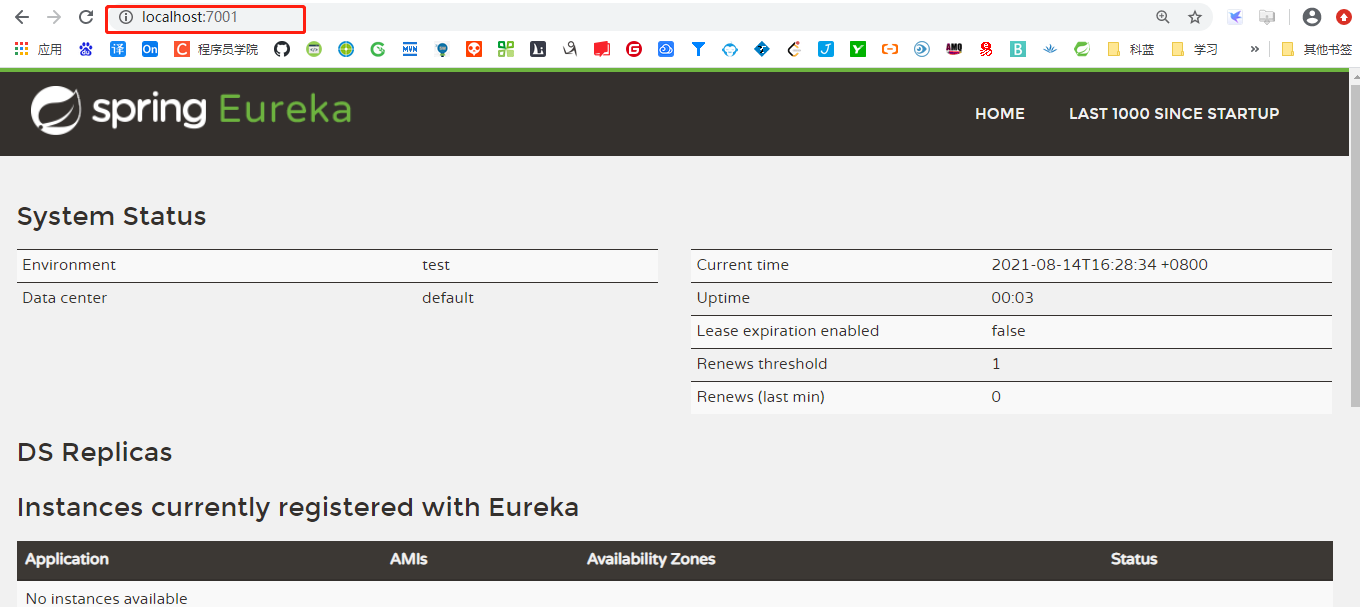
2.2 支付微服务8001入驻进EurekaServer
EurekaClient端cloud-provider-payment8001将注册进EurekaServer成为服务提供者provider,类似学校对外提供授课服务。
(1)POM添加依赖
<dependency>
    <groupId>org.springframework.cloud</groupId>
    <artifactId>spring-cloud-starter-netflix-eureka-client</artifactId>
</dependency>
(2)application.yml添加配置
eureka:
  client:
    #表示是否将自己注册进Eurekaserver默认为true。
    register-with-eureka: true
    #是否从EurekaServer抓取已有的注册信息,默认为true。单节点无所谓,集群必须设置为true才能配合ribbon使用负载均衡
    fetchRegistry: true
    service-url:
      defaultZone: http://localhost:7001/eureka
(3)主启动类添加注解
import org.springframework.boot.SpringApplication;
import org.springframework.boot.autoconfigure.SpringBootApplication;
import org.springframework.cloud.netflix.eureka.EnableEurekaClient;

@SpringBootApplication
@EnableEurekaClient//<-----添加该注解
public class PaymentMain001 {

    public static void main(String[] args) {
        SpringApplication.run(PaymentMain001.class, args);
    }
}
(4)测试
启动cloud-provider-payment8001和cloud-eureka-server7001工程。
浏览器输入 - http://localhost:7001/ 主页内的Instances currently registered with Eureka会显示cloud-provider-payment8001的配置文件application.yml设置的应用名cloud-payment-service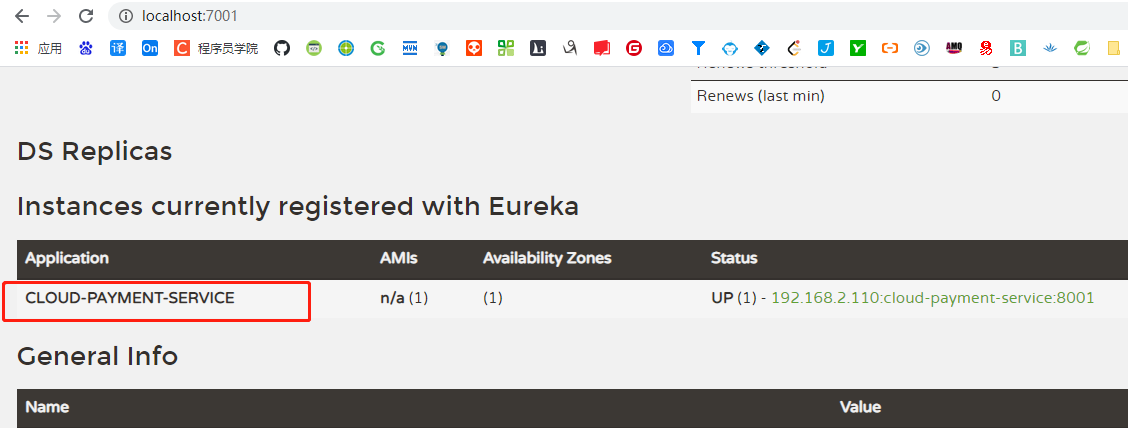
(5)自我保护机制
EMERGENCY! EUREKA MAY BE INCORRECTLY CLAIMING INSTANCES ARE UP WHEN THEY’RE NOT. RENEWALS ARELESSER THAN THRESHOLD AND HENCFT ARE NOT BEING EXPIRED JUST TO BE SAFE.
紧急情况!EUREKA可能错误地声称实例在没有启动的情况下启动了。续订小于阈值,因此实例不会为了安全而过期
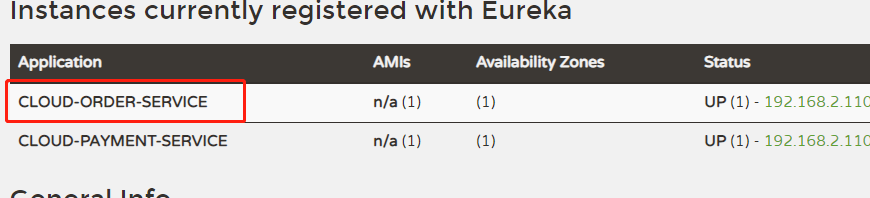
2.3 订单微服务80入驻进EurekaServer
- POM添加依赖
- application.yml添加配置 ```yaml server: port: 80
spring: application: name: cloud-order-service
eureka: client:
#表示是否将自己注册进Eurekaserver默认为true。
register-with-eureka: true
#是否从EurekaServer抓取已有的注册信息,默认为true。单节点无所谓,集群必须设置为true才能配合ribbon使用负载均衡
fetchRegistry: true
service-url:
  defaultZone: http://localhost:7001/eureka
3. 启动类添加注解@EnableEurekaClient
<a name="Xvyyo"></a>
# 3. 集群Eureka构建
<a name="dXCJ3"></a>
## 3.1 Eureka集群原理说明
<br />问题:<br />微服务RPC远程服务调用最核心的是什么?<br />高可用,试想你的注册中心只有一个only one,万一它出故障了,会导致整个为服务环境不可用。<br />解决办法:搭建Eureka注册中心集群,实现负载均衡+故障容错。
集群核心<br />**互相注册,相互守望**。
<a name="KKxC4"></a>
## 3.2 Eureka集群环境构建
创建cloud-eureka-server7002工程,过程参考cloud-eureka-server7001
<a name="gDA0N"></a>
### (1)host文件添加映射
找到C:\Windows\System32\drivers\etc路径下的hosts文件,修改映射配置添加进hosts文件
127.0.0.1 eureka7001.com 127.0.0.1 eureka7002.com
<a name="33Xdk"></a>
### (2)修改cloud-eureka-server7001配置文件
```yaml
server:
  port: 7001

eureka:
  instance:
    hostname: eureka7001.com #eureka服务端的实例名称
  client:
    register-with-eureka: false     #false表示不向注册中心注册自己。
    fetch-registry: false     #false表示自己端就是注册中心,我的职责就是维护服务实例,并不需要去检索服务
    service-url:
    #集群指向其它eureka
      defaultZone: http://eureka7002.com:7002/eureka/
    #单机就是7001自己
      #defaultZone: http://eureka7001.com:7001/eureka/
(3)修改cloud-eureka-server7002配置文件
server:
  port: 7002

eureka:
  instance:
    hostname: eureka7002.com #eureka服务端的实例名称
  client:
    register-with-eureka: false     #false表示不向注册中心注册自己。
    fetch-registry: false     #false表示自己端就是注册中心,我的职责就是维护服务实例,并不需要去检索服务
    service-url:
    #集群指向其它eureka
      defaultZone: http://eureka7001.com:7001/eureka/
    #单机就是7002自己
      #defaultZone: http://eureka7002.com:7002/eureka/
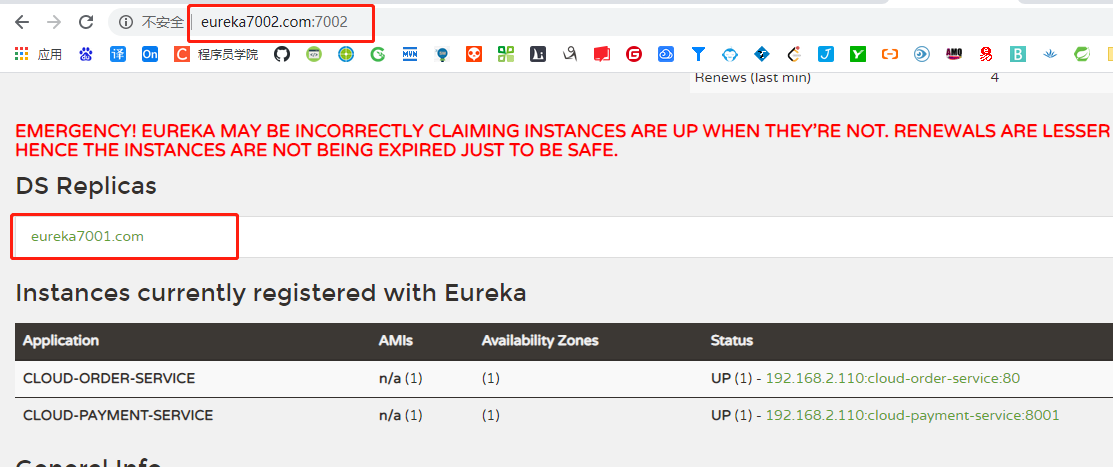
3.3 订单支付两微服务注册进Eureka集群
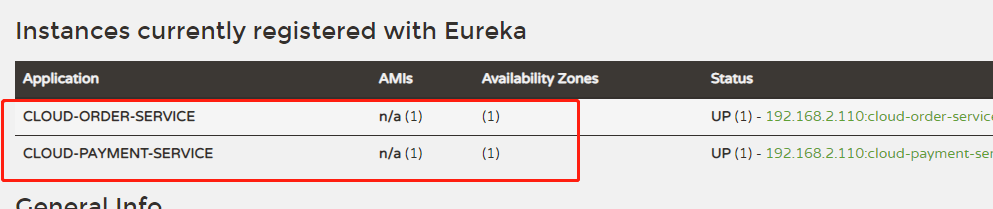
(1)修改applicatiion.yml
将它们的配置文件的eureka.client.service-url.defaultZone进行修改
eureka:
  client:
    #表示是否将自己注册进Eurekaserver默认为true。
    register-with-eureka: true
    #是否从EurekaServer抓取已有的注册信息,默认为true。单节点无所谓,集群必须设置为true才能配合ribbon使用负载均衡
    fetchRegistry: true
    service-url:
      defaultZone: http://eureka7001.com:7001/eureka, http://eureka7002.com:7002/eureka
(2)测试
- 先要启动EurekaServer,7001/7002服务
- 再要启动服务提供者provider,8001
- 再要启动消费者,80
- 浏览器输入 - http://localhost/consumer/payment/get/1
3.4 支付微服务集群配置
创建cloud-provicer-payment8002按照8001
(1)修改application.yml
将端口号改为8002
同时修改8001和8002的controller,添加server-port,方便测试
@RestController
@Slf4j
public class PaymentController{

    @Value("${server.port}")
    private String serverPort;//添加serverPort

    @PostMapping(value = "/payment/create")
    public CommonResult create(@RequestBody Payment payment)
    {
        int result = paymentService.create(payment);
        log.info("*****插入结果:" + result);

        if(result > 0) {
            return new CommonResult(200,"插入数据库成功,serverPort: "+serverPort/*添加到此处*/, result);
        }else{
            return new CommonResult(444,"插入数据库失败",null);
        }
    }
}
(2)cloud-consumer-order80订单服务访问地址修改
订单服务访问地址现在是固定写死,只能访问固定地址,需要修改
@RestController
@Slf4j
public class OrderController {

    private final static String PAYMENT_URL = "http://CLOUD-PAYMENT-SERVICE";
此处名称CLOUD-PAYMENT-SERVICE为支付服务在配置文件中设置的名称(eureka注册的名称)
(3)负载均衡
将两笔支付订单都启动以后,用postman发请求http://127.0.0.1/consumer/payment/get/1,访问报错 因为eureka上注册的支付服务有两台,eureka不知道应该把请求往哪台服务发
使用@LoadBalanced注解赋予RestTemplate负载均衡的能力
import org.springframework.cloud.client.loadbalancer.LoadBalanced;
import org.springframework.context.annotation.Bean;
import org.springframework.context.annotation.Configuration;
import org.springframework.web.client.RestTemplate;

@Configuration
public class ApplicationContextConfig {

    @Bean
    @LoadBalanced//使用@LoadBalanced注解赋予RestTemplate负载均衡的能力
    public RestTemplate getRestTemplate(){
        return new RestTemplate();
    }
}
(4)测试
postman发请求,负载均衡效果达到,8001/8002端口交替出现
Ribbon和Eureka整合后Consumer可以直接调用服务而不用再关心地址和端口号,且该服务还有负载功能。
4. actuator微服务信息完善
eureka:
  instance:
    instance-id: payment8001  #服务名称
    prefer-ip-address: true #ip信息显示
4.1 主机名称:服务名称修改

application.yml添加配置
eureka:
  instance:
    instance-id: payment8001

4.2 访问信息有IP信息提示
访问信息有IP信息提示,(就是将鼠标指针移至payment8001,payment8002名下,会有IP地址提示)
eureka:
  instance:
    prefer-ip-address: true
5. 服务发现Discovery
5.1 功能
对于注册eureka里面的微服务,可以通过服务发现来获得该服务的信息
5.2 使用
(1)修改cloud-provider-payment8001的Controller
import org.springframework.cloud.client.discovery.DiscoveryClient;
@RestController
@Slf4j
public class PaymentController{
    ...

    @Resource
    private DiscoveryClient discoveryClient;

    ...

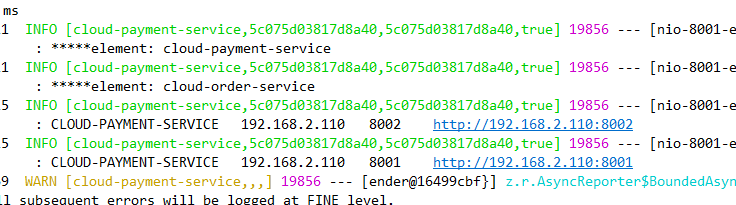
    @GetMapping(value = "/payment/discovery")
    public Object discovery()
    {
        List<String> services = discoveryClient.getServices();
        for (String element : services) {
            log.info("*****element: "+element);
        }

        List<ServiceInstance> instances = discoveryClient.getInstances("CLOUD-PAYMENT-SERVICE");
        for (ServiceInstance instance : instances) {
            log.info(instance.getServiceId()+"\t"+instance.getHost()+"\t"+instance.getPort()+"\t"+instance.getUri());
        }

        return this.discoveryClient;
    }
}
(2)主启动类添加注解
@SpringBootApplication
@EnableEurekaClient
@EnableDiscoveryClient//添加该注解
public class PaymentMain001 {

    public static void main(String[] args) {
        SpringApplication.run(PaymentMain001.class, args);
    }
}
(3)测试
先要启动EurekaSeryer
再启动8001主启动类,需要稍等一会儿
浏览器输入http://localhost:8001/payment/discovery
6. eureka自我保护
6.1 故障现象
保护模式主要用于一组客户端和Eureka Server之间存在网络分区场景下的保护。一旦进入保护模式,Eureka Server将会尝试保护其服务注册表中的信息,不再删除服务注册表中的数据,也就是不会注销任何微服务。
如果在Eureka Server的首页看到以下这段提示,则说明Eureka进入了保护模式:
6.2 导致原因
一句话:某时刻 一个微服务不可用了,Eureka不会立刻清理,依旧会对该服务的信息进行保存
6.2.1 为什么会产生Eureka自我保护机制?
**
为了EurekaClient可以正常运行,防止与EurekaServer网络不通情况下,EurekaServer不会立刻将EurekaClient服务剔除
6.2.2 什么是自我保护模式?
默认情况下,如果EurekaServer在一定时间内没有接收到某个微服务实例的心跳,EurekaServer将会注销该实例(默认90秒)。但是当网络分区故障发生(延时、卡顿、拥挤)时,微服务与EurekaServer之间无法正常通信,以上行为可能变得非常危险了——因为微服务本身其实是健康的,此时本不应该注销这个微服务。Eureka通过“自我保护模式”来解决这个问题——当EurekaServer节点在短时间内丢失过多客户端时(可能发生了网络分区故障),那么这个节点就会进入自我保护模式。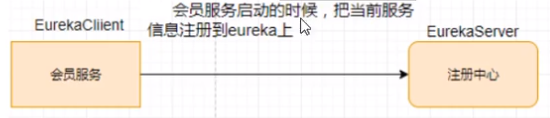
自我保护机制∶默认情况下EurekaClient定时向EurekaServer端发送心跳包
如果Eureka在server端在一定时间内(默认90秒)没有收到EurekaClient发送心跳包,便会直接从服务注册列表中剔除该服务,但是在短时间( 90秒中)内丢失了大量的服务实例心跳,这时候Eurekaserver会开启自我保护机制,不会剔除该服务(该现象可能出现在如果网络不通但是EurekaClient为出现宕机,此时如果换做别的注册中心如果一定时间内没有收到心跳会将剔除该服务,这样就出现了严重失误,因为客户端还能正常发送心跳,只是网络延迟问题,而保护机制是为了解决此问题而产生的)。
在自我保护模式中,Eureka Server会保护服务注册表中的信息,不再注销任何服务实例。
它的设计哲学就是宁可保留错误的服务注册信息,也不盲目注销任何可能健康的服务实例。一句话讲解:好死不如赖活着。
综上,自我保护模式是一种应对网络异常的安全保护措施。它的架构哲学是宁可同时保留所有微服务(健康的微服务和不健康的微服务都会保留)也不盲目注销任何健康的微服务。使用自我保护模式,可以让Eureka集群更加的健壮、稳定。
6.3 禁止自我保护
6.3.1 注册中心eurekaServer端
出厂默认,自我保护机制是开启的
使用eureka.server.enable-self-preservation = false可以禁用自我保护模式
eureka:
  ...
  server:
    #关闭自我保护机制,保证不可用服务被及时踢除
    enable-self-preservation: false
    eviction-interval-timer-in-ms: 2000

6.3.2 生产者客户端eureakeClient端
默认:eureka.instance.lease-renewal-interval-in-seconds=30eureka.instance.lease-expiration-duration-in-seconds=90
eureka:
  ...
  instance:
    instance-id: payment8001
    prefer-ip-address: true
    #心跳检测与续约时间
    #开发时没置小些,保证服务关闭后注册中心能即使剔除服务
    #Eureka客户端向服务端发送心跳的时间间隔,单位为秒(默认是30秒)
    lease-renewal-interval-in-seconds: 1
    #Eureka服务端在收到最后一次心跳后等待时间上限,单位为秒(默认是90秒),超时将剔除服务
    lease-expiration-duration-in-seconds: 2
7. 停更说明
https://github.com/Netflix/eureka/wiki
Eureka 2.0 (Discontinued) The existing open source work on eureka 2.0 is discontinued. The code base and artifacts that were released as part of the existing repository of work on the 2.x branch is considered use at your own risk. Eureka 1.x is a core part of Netflix’s service discovery system and is still an active project.
8. 项目地址
https://github.com/muzhiyi1996/Cloud2021.git
git@github.com:muzhiyi1996/Cloud2021.git
Eureka20210814 分支

若有收获,就点个赞吧
0 人点赞


