1. 是什么
一旦我们重启应用,sentinel规则将消失,生产环境需要将配置规则进行持久化。
2. 怎么玩
将限流配置规则持久化进Nacos保存,只要刷新8401某个rest地址,sentinel控制台的流控规则就能看到,只要Nacos里面的配置不删除,针对8401上sentinel上的流控规则持续有效。
3. 步骤
修改cloudalibaba-sentinel-service8401
3.1 pom
<!--SpringCloud ailibaba sentinel-datasource-nacos 后续做持久化用到--><dependency><groupId>com.alibaba.csp</groupId><artifactId>sentinel-datasource-nacos</artifactId></dependency>
3.2 yaml
server:
  port: 8401

spring:
  application:
    name: cloudalibaba-sentinel-service
  cloud:
    nacos:
      discovery:
        server-addr: localhost:8848 #Nacos服务注册中心地址
    sentinel:
      transport:
        dashboard: localhost:8080 #配置Sentinel dashboard地址
        port: 8719
      datasource: #<---------------------------关注点,添加Nacos数据源配置
        ds1:
          nacos:
            server-addr: localhost:8848
            dataId: cloudalibaba-sentinel-service
            groupId: DEFAULT_GROUP
            data-type: json
            rule-type: flow

management:
  endpoints:
    web:
      exposure:
        include: '*'

feign:
  sentinel:
    enabled: true # 激活Sentinel对Feign的支持
3.3 添加Nacos业务规则配置
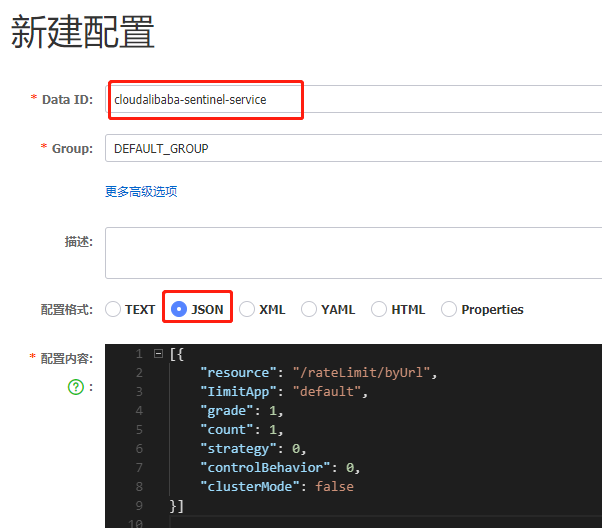
3.4 配置内容解析
[{
    "resource": "/rateLimit/byUrl",
    "IimitApp": "default",
    "grade": 1,
    "count": 1,
    "strategy": 0,
    "controlBehavior": 0,
    "clusterMode": false
}]
- resource:资源名称;
- limitApp:来源应用;
- grade:阈值类型,0表示线程数, 1表示QPS;
- count:单机阈值;
- strategy:流控模式,0表示直接,1表示关联,2表示链路;
- controlBehavior:流控效果,0表示快速失败,1表示Warm Up,2表示排队等待;
- clusterMode:是否集群
3.5 测试
启动8401后快速访问测试接口 - http://localhost:8401/rateLimit/byUrl - 页面返回Blocked by Sentinel (flow limiting)
停止8401再看sentinel - 停机后发现流控规则没有了
重新启动8401再看sentinel
- 乍一看还是没有,稍等一会儿
- 多次调用 - http://localhost:8401/rateLimit/byUrl
- 重新配置出现了,持久化验证通过

若有收获,就点个赞吧
0 人点赞


