https://www.elastic.co/guide/en/elasticsearch/reference/current/query-dsl.html
GET /product_index/product/_validate/query?explain{"query": {"match": {"product_name": "toothbrush"}}
1 查询所有的商品
GET /product_index/product/_search{"query": {"match_all": {}}
2 查询商品名称包含 toothbrush 的商品,同时按照价格降序排序
GET /product_index/product/_search{"query": {"match": {"product_name": "toothbrush"}},"sort": [{"price": "desc"}]
3 分页查询
GET /product_index/product/_search{"query": {"match_all": {}},"from": 0, ## 从第几个商品开始查,最开始是 0"size": 1 ## 要查几个结果}
4 指定字段
GET /product_index/product/_search{"query": {"match_all": {}},"_source": ["product_name","price"]}
5 相关符号标识(》=。《等)
https://www.elastic.co/guide/en/elasticsearch/reference/current/query-dsl-range-query.html
| 符号标识 | 代表含义 |
|---|---|
| gte | 大于或等于 |
| gt | 大于 |
| lte | 小于或等于 |
| lt | 小于 |
6 搜索商品名称包含 toothbrush,而且售价大于 400 元,小于 700 的商品
GET /product_index/product/_search{"query": {"bool": {"must": {"match": {"product_name": "toothbrush"}},"filter": {"range": {"price": {"gt": 400,"lt": 700}}}}}}
7 复合查询
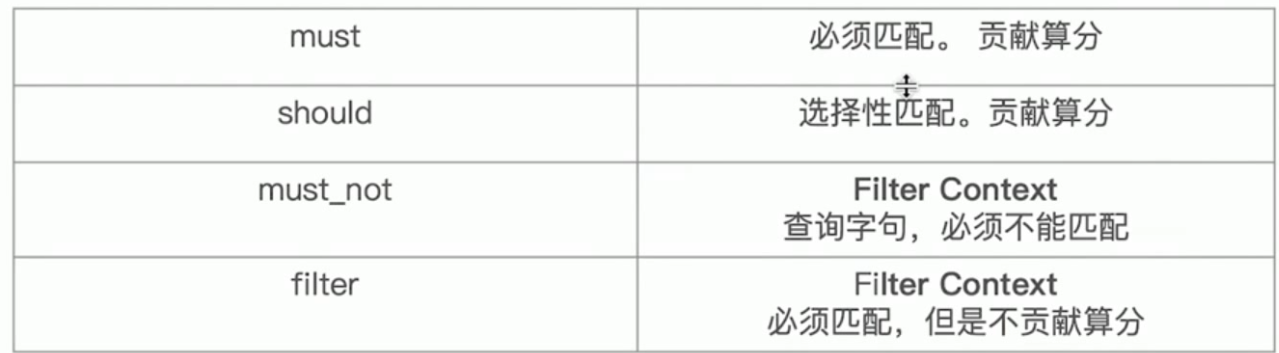
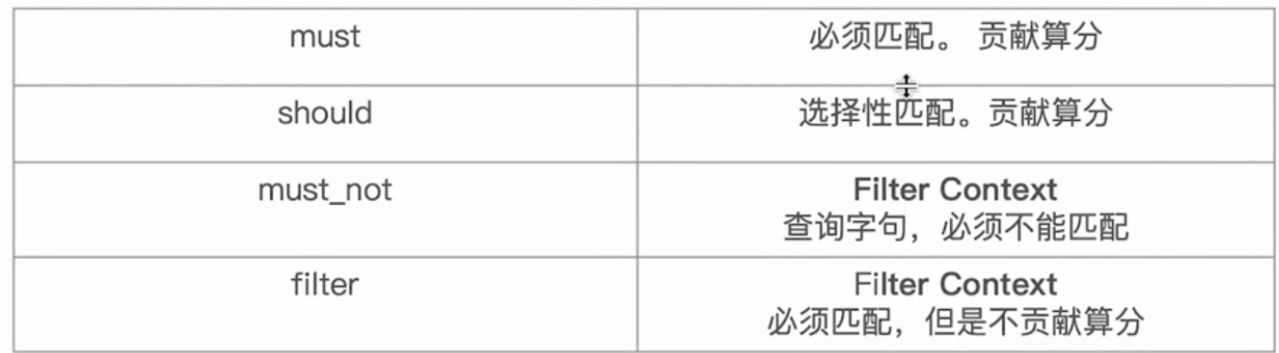
{},{} 之间是and 关系
bool用于组合条件 类似()
must 类似 =
must_not 类似不等于
fitter
should查询在mysql中就好比是or或,但在es中使用should查询必须要和must一起使用才可以,相当于must[should A,should B],中文解释就好比是满足A或者是B条件的数据,如下这一段shoudl语句的大概意思是满足是用户A上传并且permission状态是private或者permission状态是public的
{"bool" : {"must" : [{"bool" : {"should" : [{"bool" : {"must" : [{"term" : {"upload_user_name" : {"value" : "用户A",}}},{"term" : {"permission" : {"value" : "private","boost" : 1.0}}}]}},{"term" : {"permission" : {"value" : "public","boost" : 1.0}}}]}}]}}
搜索需求:title必须包含elasticsearch,content可以包含elasticsearch也可以不包含,author_id必须不为111
GET /website/article/_search{"query": {"bool": {"must": [{"match": {"title": "elasticsearch"}}],"should": [{"match": {"content": "elasticsearch"}}],"must_not": [{"match": {"author_id": 111}}]}}}
8 filter与query
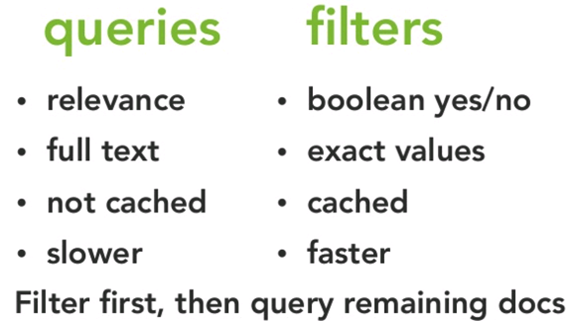
filter,仅仅只是按照搜索条件过滤出需要的数据而已,不计算任何相关度分数,对相关度没有任何影响
query,会去计算每个document相对于搜索条件的相关度,并按照相关度进行排序
一般来说,如果你是在进行搜索,需要将最匹配搜索条件的数据先返回,那么用query;如果你只是要根据一些条件筛选出一部分数据,不关注其排序,那么用filter
除非是你的这些搜索条件,你希望越符合这些搜索条件的document越排在前面返回,那么这些搜索条件要放在query中;如果你不希望一些搜索条件来影响你的document排序,那么就放在filter中即可
filter,不需要计算相关度分数,不需要按照相关度分数进行排序,同时还有内置的自动cache最常使用filter的数据
query,相反,要计算相关度分数,按照分数进行排序,而且无法cache结果
1 query DSL
在查询上下文中,查询会回答这个问题——“这个文档匹不匹配这个查询,它的相关度高么?”
如何验证匹配很好理解,如何计算相关度呢?ES中索引的数据都会存储一个_score分值,分值越高就代表越匹配。另外关于某个搜索的分值计算还是很复杂的,因此也需要一定的时间。
查询上下文 是在 使用query进行查询时的执行环境,比如使用search的时候。
一些query的场景:
与full text search的匹配度最高
包含run单词,如果包含这些单词:runs、running、jog、sprint,也被视为包含run单词
包含quick、brown、fox。这些词越接近,这份文档的相关性就越高
2 filter DSL
在过滤器上下文中,查询会回答这个问题——“这个文档匹不匹配?”
答案很简单,是或者不是。它不会去计算任何分值,也不会关心返回的排序问题,因此效率会高一点。
过滤上下文 是在使用filter参数时候的执行环境,比如在bool查询中使用Must_not或者filter
另外,经常使用过滤器,ES会自动的缓存过滤器的内容,这对于查询来说,会提高很多性能。
一些过滤的情况:
创建日期是否在2013-2014年间?
status字段是否为published?
lat_lon字段是否在某个坐标的10公里范围内?
9 term查询(不分词)
GET /test_index/test_type/_search
{
“query”: {
“term”: {
“test_field”: “test hello”
}
}
}
10 、terms query
GET /_search
{
“query”: { “terms”: { “tag”: [ “search”, “full_text”, “nosql” ] }}
}
11 explain 查询纠错

若有收获,就点个赞吧
0 人点赞


