1、关于日期控件日期少一天的问题
在我进行前后端联调时,发现传给服务端的参数比输入选择的日期少一天,但代码逻辑并没有什么错误
随后经过排查发现是
el-date-picker日期控件的问题
Ⅰ- 问题说明
- 代码示例
- 传参截图

<el-form-item label="申请时间" prop="applyDate"><el-date-pickerclass="eve-common-date-picker":size="$size"v-model="form.applyDate"type="date":style="{width:'100% '}"placeholder="请选择申请时间"></el-date-picker></el-form-item>
Ⅱ- 原因剖析
element-ui中时间控件的默认时间为国际标准时间,所以与北京时间差8个小时
Ⅲ- 解决方案
在标签中加上value-format=”yyyy-MM-dd” 即可,将其转换格式
- 解决代码
- 成功解决

<el-form-item label="申请时间" prop="applyDate"><el-date-pickerclass="eve-common-date-picker":size="$size"v-model="form.applyDate"type="date":style="{width:'100% '}"placeholder="请选择申请时间"value-format="yyyy-MM-dd" //--------多加这一行代码-----//></el-date-picker></el-form-item>
2、关于时间区间选择 查询边界错误的问题
Ⅰ - 问题说明
当我们使用时间选择框选择时间区间时,处于边界的数据往往会得不到 比如 :
- 选择 1~11号的数据,实际上默认转换成
1号0时0分~11号0时0分- 这样我们是查不到11号0时到23:59分的数据的
Ⅱ - 解决方案
设置两个属性即可
value-format="yyyy-MM-dd HH:mm:ss" :default-time="['00:00:00', '23:59:59']"
<el-date-pickerv-model="form.applyDate"value-format="yyyy-MM-dd HH:mm:ss":default-time="['00:00:00', '23:59:59']":style="{width:'100% '}"type="daterange"range-separator="~"start-placeholder="开始日期"end-placeholder="结束日期"></el-date-picker>
3、日期格式转化后限制时间范围picker-options失效的问题
Ⅰ- 问题说明
- 因为element-ui如不指定
value-format就会出现日期数据少一天的问题,所以需要加上这个属性- 但是当我们加上格式转换后,原来的
picker-options就失去了限制时间范围的效果,这是为什么?实际上是因为格式转换后,我们的时间格式转换成了 字符串 格式,所以我们要在
picker-options对比时间的时候将其转换回来日期格式即可
Ⅱ - 解决方案
此处只展示部分代码帮助理解
效果图

<template><el-date-pickervalue-format="yyyy-MM-dd"v-model="form.applyEndDate"type="date":picker-options="pickerOptions.theoryExamEndTime"placeholder="选择日期"></el-date-picker></template><script>export default {data () {return {theoryExamEndTime: {disabledDate: (time) => {return new Date(this.form.theoryExamStartTime)? new Date(this.form.theoryExamStartTime) > new Date(time): null } }}}}</script>
4、日期选择器设置默认时间 23:59:59
Ⅰ - 问题说明
- 一般来说,设置默认时间区间可以用
:default-time="['00:00:00', '23:59:59']"进行设置,但这个属性要求你的类型type="daterange"- 这时我突然有个需求:因为有些用户显示屏较小,导致
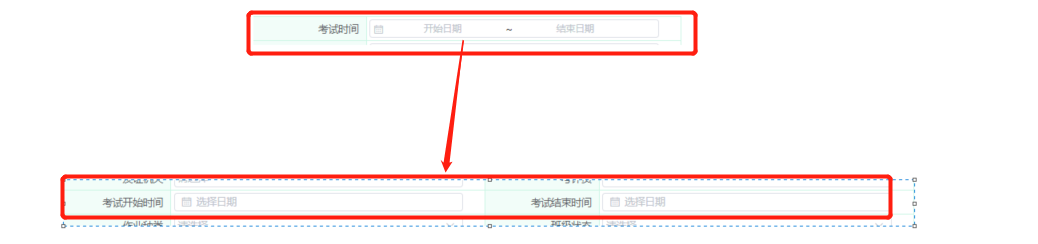
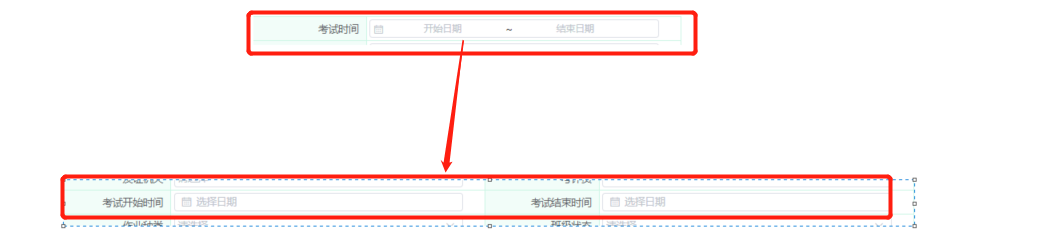
type="daterange"的选择器部分显示内容被隐藏,所以要我拆分成两个字段
- 所以这时,原本的
type="daterange"就要改成type="date",就导致:default-time="['00:00:00', '23:59:59']"失效甚至报错

Ⅱ - 解决方案一
这个方案是我最初自己想出来的,因为对于Element-ui的不熟悉,就想在最终使用数据的时候将默认时间添加上去
这样实现是可行的,但是也有缺点,就是如果当你时间选择框特别多时,代码就会变得冗余
<el-form-item label="考试结束时间" prop="examEndDate"><el-date-pickerv-model="form.examEndDate"value-format="yyyy-MM-dd":style="{width:'100% '}"type="date"placeholder="选择日期"></el-date-picker></el-form-item><script>//使用数据时export default {methods: {use() {//从form中获取该时间let { examEndDate } = this.form// 结束时间手动加上 23:59:59 防止查询边界错误examEndDate = examEndDate ? examEndDate += ' 23:59:59' : undefined//填入请求参数中const condition = { ...this.form, examEndDate }}}}</script>
Ⅱ - 解决方案二
后来觉得Element-ui应该会有相应的处理,不应该这种常见的需求会没有解决方案,果然,在文档中发现了这个
所以,实际上我们只要在时间控件中这样写,就不用自己亲自做数据处理了
value-format="yyyy-MM-dd [23:59:59]"

<el-form-item label="考试结束时间" prop="examEndDate"><el-date-pickerv-model="form.examEndDate"value-format="yyyy-MM-dd [23:59:59]":style="{width:'100% '}"type="date"placeholder="选择日期"></el-date-picker></el-form-item>
5、两个关联时间框无法选择同一天
Ⅰ- 问题提出
需求要求,开始时间与结束时间需要可以选择同一天,但突然发现一个BUG,两个时间选择框,当限制开始时间后,结束时间无法选择与开始时间同一天(限制结束时间后却可以选择同一天的开始时间)
代码展示

<template><el-date-pickervalue-format="yyyy-MM-dd"v-model="form.applyEndDate"type="date":picker-options="pickerOptions.theoryExamEndTime"placeholder="选择日期"></el-date-picker></template><script>export default {data () {return {theoryExamEndTime: {disabledDate: (time) => {return new Date(this.form.theoryExamStartTime)//此处明明是 >= 为何还不能选择同一天??? new Date(this.form.theoryExamStartTime) >= new Date(time): null } }}}}</script>
Ⅱ - 问题分析
Element-ui的时间偏差了8小时,所以导致这个判断结束时间错误,所以一个是当天的8小时,一个是当天的0时,就导致了,开始时间可以选择到截止时间的当当天,而反过来却不行
一般来说 我们加个
value-format="yyyy-MM-dd"就可以消除这个问题,就能转换成年月日 然后再转成时间 就是默认0时0分
我这边这个是要进行范围限制 它默认传入的时间却没有受到我们 value-format 的影响 他就是默认偏差8小时,需要我们将这个传入的time在进行格式转换所以解决方案理论上会有两种
- 可以是将默认传入的时间都用 value-format转换成
yyyy-MM-dd [00:00:00]格式(也可以先转成年月日再转换成时间格式,取决于自己),这样就能把超出的8小时去除- 直接操作日期加减一天
Ⅲ - 代码示例
这里直接操作日期加减一天,问就是代码简单
<template><el-date-pickervalue-format="yyyy-MM-dd"v-model="form.applyEndDate"type="date":picker-options="pickerOptions.theoryExamEndTime"placeholder="选择日期"></el-date-picker></template><script>export default {data () {return {theoryExamEndTime: {disabledDate: (time) => {// elementui时间默认多了8小时,需要消除这8小时的影响const tempDate = new Date(time)const newDate = tempDate.setDate(tempDate.getDate() + 1)return new Date(this.form.applyStartDate) ? new Date(this.form.applyStartDate) >= new Date(newDate) : null} }}}}</script>
Ⅳ - 解决







若有收获,就点个赞吧
0 人点赞


