动态加载的数据是不能直接通过网址访问的。
需通过抓包工具。
全局搜索。
selenium模块的基本使用
问题:selenium模块和爬虫之间具有怎样的关联?
- 便捷的获取网站中动态加载的数据
- 便捷实现模拟登录
什么是selenium模块?
- 基于浏览器自动化的一个模块。
selenium使用流程
环境安装:pip install selenium
下载一个浏览器的驱动程序(谷歌浏览器)
from selenium import webdriver# 返回一个浏览器对象,实例化了一个浏览器对象bro = webdriver.ChromiumEdge(executable_path='./msedgedriver.exe')
编写基于浏览器自动化的操作代码
#!/usr/bin/env python# -*- coding:utf-8 -*-# @Time : 2022/4/12 9:15# @Author : hqfrom selenium import webdriverfrom lxml import etree# 返回一个浏览器对象,实例化了一个浏览器对象bro = webdriver.ChromiumEdge(executable_path='./msedgedriver.exe')# 让浏览器发起一个指定url对应请求bro.get('https://ech.xmsmjk.com/ehcweb/h5/index.html?v=1472743999281299457#/eleLogin/ch')# page_source获取浏览器当前页面的页码源码数据page_text = bro.page_source
发起请求:get(url)
标签定位:find系列的方法
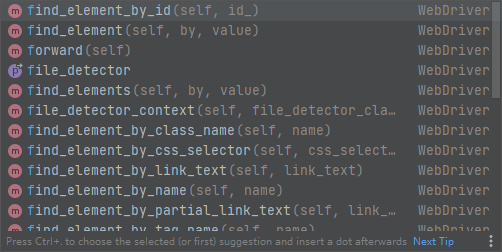
标签交互:send_keys(‘xxx’)
- 执行js程序:excute_script(‘jsCode’)
开发者工具:console
bro.execute_script(‘window.scrollTo(0,document.body.scrollHeight)’)
- 前进,后退:back(),forward()
- 关闭浏览器:quit()
from selenium import webdriverfrom time import sleepbro = webdriver.ChromiumEdge(executable_path='./msedgedriver.exe')bro.get('https://www.taobao.com/')# 标签定位search_input = bro.find_element_by_id('q')# 标签交互search_input.send_keys('Iphone')# 执行一组js程序bro.execute_script('window.scrollTo(0,document.body.scrollHeight)')sleep(2)# 点击搜索按钮btn = bro.find_element_by_css_selector('.btn-search')btn.click()bro.get('https://www.baidu.com')sleep(2)# 回退bro.back()sleep(2)# 前进bro.forward()sleep(5)bro.quit()
动作链、selenium处理iframe
页面嵌套子页面,可以由iframe实现。
iframe
需要切换浏览器标签定位的作用域。
#如果定位的标签是存在于iframe标签之中的则必须通过如下操作在进行标签定位bro.switch_to.frame('iframeResult')#切换浏览器标签定位的作用域div = bro.find_element_by_id('draggable')
动作链
#导入动作链对应的类from selenium.webdriver import ActionChains#动作链action = ActionChains(bro)#点击长按指定的标签action.click_and_hold(div)for i in range(5):#perform()立即执行动作链操作#move_by_offset(x,y):x水平方向 y竖直方向,偏移action.move_by_offset(17,0).perform()sleep(0.5)#释放动作链action.release()
动作链(拖动):
from selenium.webdriver import ActionChains
- 实例化一个动作链对象:action = ActionChains(bro)
- click_and_hold(div):长按且点击操作
- move_by_offset(x,y):滑动、拖动
- perform()让动作链立即执行
- action.release()释放动作链对象
无头浏览器+反检测
让浏览器弹出应该是无弹出的。不要有可视化界面。
from selenium import webdriverfrom time import sleep#实现无可视化界面from selenium.webdriver.chrome.options import Options#实现规避检测from selenium.webdriver import ChromeOptions#实现无可视化界面的操作chrome_options = Options()chrome_options.add_argument('--headless')chrome_options.add_argument('--disable-gpu')#实现规避检测option = ChromeOptions()option.add_experimental_option('excludeSwitches', ['enable-automation'])#如何实现让selenium规避被检测到的风险bro = webdriver.Chrome(executable_path='./chromedriver',chrome_options=chrome_options,options=option)#无可视化界面(无头浏览器) phantomJsbro.get('https://www.baidu.com')print(bro.page_source)sleep(2)bro.quit()
12306模拟登录
超级鹰:http://www.chaojiying.com/about.html
注册:普通用户
登录:普通用户
题分查询:充值
- 创建一个软件(id)
- 下载示例代码
12306模拟登录编码流程:
使用selenium打开登录页面
对当前selenium打开的这张页面进行截图
对当前图片局部区域(验证码图片)进行裁剪
好处:将验证码图片和模拟登录进行一一对应。
使用超级鹰识别验证码图片(坐标)
使用动作链根据坐标实现点击操作
录入用户名密码,点击登录按钮实现登录
#下述代码为超级鹰提供的示例代码import requestsfrom hashlib import md5class Chaojiying_Client(object):def __init__(self, username, password, soft_id):self.username = usernamepassword = password.encode('utf8')self.password = md5(password).hexdigest()self.soft_id = soft_idself.base_params = {'user': self.username,'pass2': self.password,'softid': self.soft_id,}self.headers = {'Connection': 'Keep-Alive','User-Agent': 'Mozilla/4.0 (compatible; MSIE 8.0; Windows NT 5.1; Trident/4.0)',}def PostPic(self, im, codetype):"""im: 图片字节codetype: 题目类型 参考 http://www.chaojiying.com/price.html"""params = {'codetype': codetype,}params.update(self.base_params)files = {'userfile': ('ccc.jpg', im)}r = requests.post('http://upload.chaojiying.net/Upload/Processing.php', data=params, files=files, headers=self.headers)return r.json()def ReportError(self, im_id):"""im_id:报错题目的图片ID"""params = {'id': im_id,}params.update(self.base_params)r = requests.post('http://upload.chaojiying.net/Upload/ReportError.php', data=params, headers=self.headers)return r.json()# chaojiying = Chaojiying_Client('bobo328410948', 'bobo328410948', '899370') #用户中心>>软件ID 生成一个替换 96001# im = open('12306.jpg', 'rb').read() #本地图片文件路径 来替换 a.jpg 有时WIN系统须要//# print(chaojiying.PostPic(im, 9004)['pic_str'])#上述代码为超级鹰提供的示例代码#使用selenium打开登录页面from selenium import webdriverimport timefrom PIL import Imagefrom selenium.webdriver import ActionChainsbro = webdriver.Chrome(executable_path='./chromedriver')bro.get('https://kyfw.12306.cn/otn/login/init')time.sleep(1)#save_screenshot就是将当前页面进行截图且保存bro.save_screenshot('aa.png')#确定验证码图片对应的左上角和右下角的坐标(裁剪的区域就确定)code_img_ele = bro.find_element_by_xpath('//*[@id="loginForm"]/div/ul[2]/li[4]/div/div/div[3]/img')location = code_img_ele.location # 验证码图片左上角的坐标 x,yprint('location:',location)size = code_img_ele.size #验证码标签对应的长和宽print('size:',size)#左上角和右下角坐标rangle = (int(location['x']), int(location['y']), int(location['x'] + size['width']), int(location['y'] + size['height']))#至此验证码图片区域就确定下来了i = Image.open('./aa.png')code_img_name = './code.png'#crop根据指定区域进行图片裁剪frame = i.crop(rangle)frame.save(code_img_name)#将验证码图片提交给超级鹰进行识别chaojiying = Chaojiying_Client('bobo328410948', 'bobo328410948', '899370') #用户中心>>软件ID 生成一个替换 96001im = open('code.png', 'rb').read() #本地图片文件路径 来替换 a.jpg 有时WIN系统须要//print(chaojiying.PostPic(im, 9004)['pic_str'])result = chaojiying.PostPic(im, 9004)['pic_str']all_list = [] #要存储即将被点击的点的坐标 [[x1,y1],[x2,y2]]if '|' in result:list_1 = result.split('|')count_1 = len(list_1)for i in range(count_1):xy_list = []x = int(list_1[i].split(',')[0])y = int(list_1[i].split(',')[1])xy_list.append(x)xy_list.append(y)all_list.append(xy_list)else:x = int(result.split(',')[0])y = int(result.split(',')[1])xy_list = []xy_list.append(x)xy_list.append(y)all_list.append(xy_list)print(all_list)#遍历列表,使用动作链对每一个列表元素对应的x,y指定的位置进行点击操作for l in all_list:x = l[0]y = l[1]ActionChains(bro).move_to_element_with_offset(code_img_ele, x, y).click().perform()time.sleep(0.5)bro.find_element_by_id('username').send_keys('www.zhangbowudi@qq.com')time.sleep(2)bro.find_element_by_id('password').send_keys('bobo_15027900535')time.sleep(2)bro.find_element_by_id('loginSub').click()time.sleep(30)bro.quit()

若有收获,就点个赞吧
0 人点赞


