基本介绍
外观模式(Facade),也叫“过程模式:外观模式为子系统中的一组接口提供一个一致的界面,此模式定义了一个高层接口,这个接口使得这一子系统更加容易使用
外观模式通过定义一个一致的接口,用以屏蔽内部子系统的细节,使得调用端只需跟这个接口发生调用,而无需关心这个子系统的内部细节
解决多个复杂接口带来的使用困难,起到简化用户操作的作用
外观模式UML
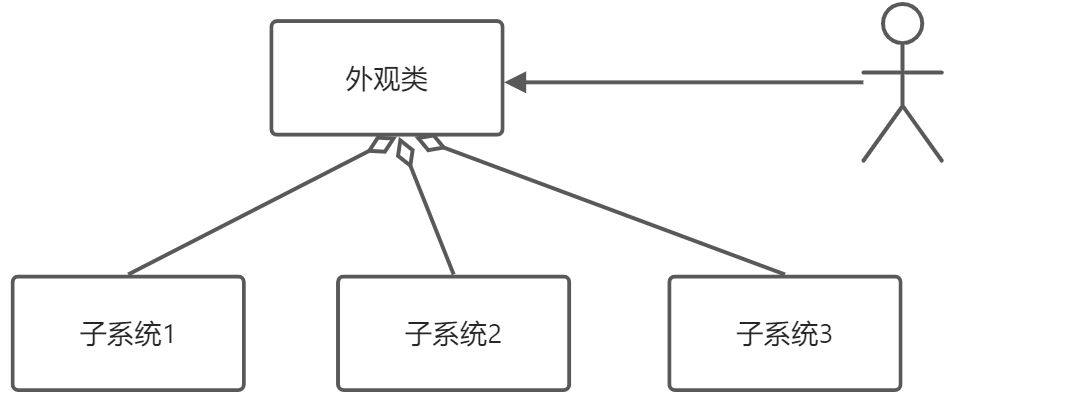
- 外观类(Facade): 为调用端提供统一的调用接口, 外观类知道哪些子系统负责处理请求,从而将调用端的请求代理给适当子系统对象
- 调用者(Client): 外观接口的调用者
子系统的集合:指模块或者子系统,处理 Facade 对象指派的任务,他是功能的实际提供者
外观模式来完成家庭影院项目
组建一个家庭影院:
DVD 播放器、投影仪、自动屏幕、环绕立体声、爆米花机,要求完成使用家庭影院的功能,其过程为: 直接用遥控器:统筹各设备开关
开爆米花机放下屏幕 开投影仪 开音响
开 DVD,选 dvd
去拿爆米花调暗灯光 播放
观影结束后,关闭各种设备
思路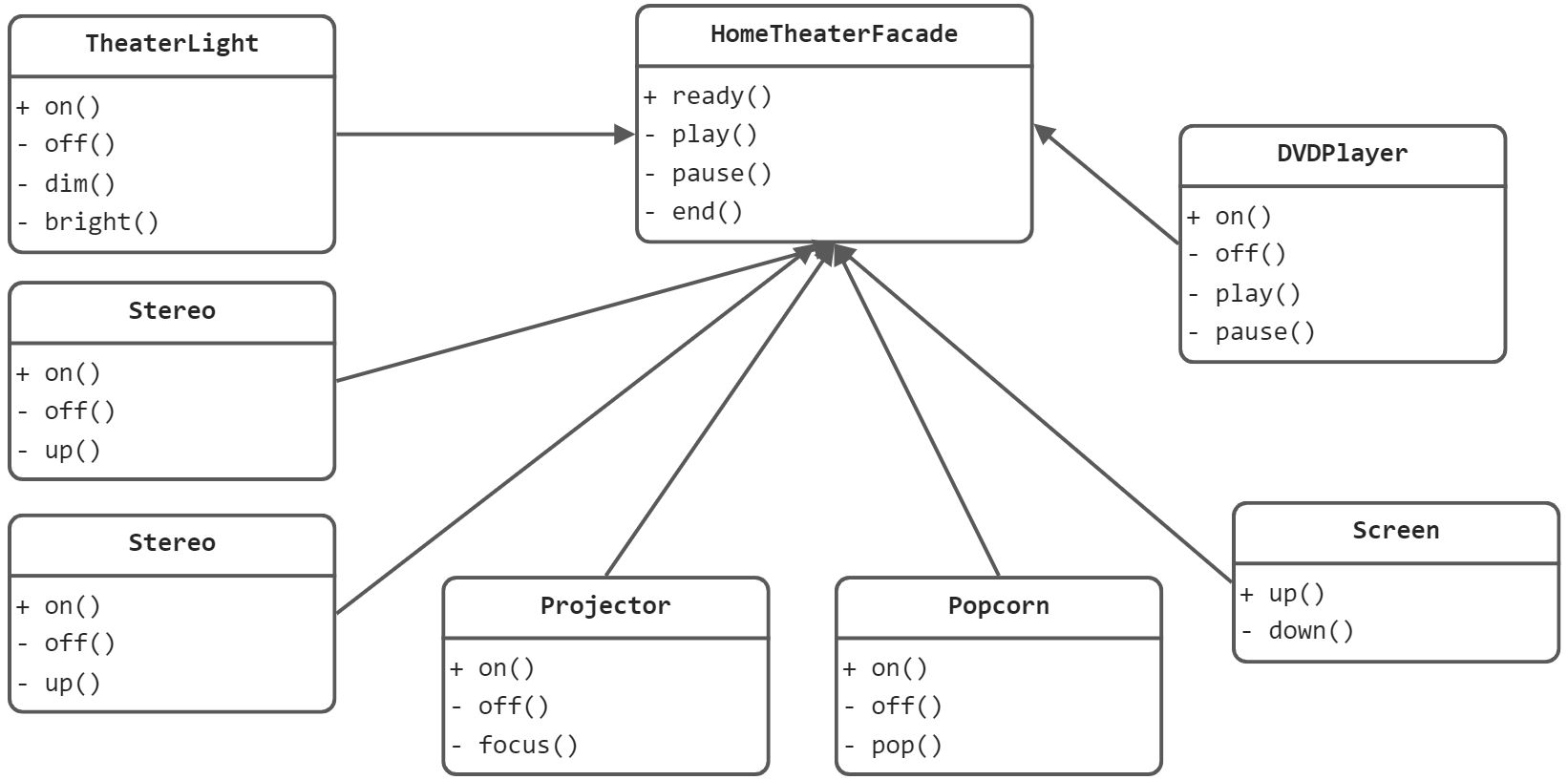
代码实现
```java public class DVDPlayer {
//使用单例模式, 使用饿汉式 private static DVDPlayer instance = new DVDPlayer();
public static DVDPlayer getInstanc() { return instance; }
public void on() { System.out.println(“ dvd on “); } public void off() { System.out.println(“ dvd off “); }
public void play() { System.out.println(“ dvd is playing “); }
//…. public void pause() { System.out.println(“ dvd pause ..”); } }
```javapublic class Popcorn {private static Popcorn instance = new Popcorn();public static Popcorn getInstance() {return instance;}public void on() {System.out.println(" popcorn on ");}public void off() {System.out.println(" popcorn ff ");}public void pop() {System.out.println(" popcorn is poping ");}}
public class Projector {private static Projector instance = new Projector();public static Projector getInstance() {return instance;}public void on() {System.out.println(" Projector on ");}public void off() {System.out.println(" Projector ff ");}public void focus() {System.out.println(" Projector is Projector ");}//...}
public class Screen {

   private static Screen instance = new Screen();

   public static Screen getInstance() {
      return instance;
   }


   public void up() {
      System.out.println(" Screen up ");
   }

   public void down() {
      System.out.println(" Screen down ");
   }


}
//立体声
public class Stereo {

   private static Stereo instance = new Stereo();

   public static Stereo getInstance() {
      return instance;
   }

   public void on() {
      System.out.println(" Stereo on ");
   }

   public void off() {
      System.out.println(" Screen off ");
   }

   public void up() {
      System.out.println(" Screen up.. ");
   }

   //...
}
public class TheaterLight {

   private static TheaterLight instance = new TheaterLight();

   public static TheaterLight getInstance() {
      return instance;
   }

   public void on() {
      System.out.println(" TheaterLight on ");
   }

   public void off() {
      System.out.println(" TheaterLight off ");
   }

   public void dim() {
      System.out.println(" TheaterLight dim.. ");
   }

   public void bright() {
      System.out.println(" TheaterLight bright.. ");
   }
}
public class HomeTheaterFacade {

   //定义各个子系统对象
   private TheaterLight theaterLight;
   private Popcorn popcorn;
   private Stereo stereo;
   private Projector projector;
   private Screen screen;
   private DVDPlayer dVDPlayer;


   //构造器
   public HomeTheaterFacade() {
      super();
      this.theaterLight = TheaterLight.getInstance();
      this.popcorn = Popcorn.getInstance();
      this.stereo = Stereo.getInstance();
      this.projector = Projector.getInstance();
      this.screen = Screen.getInstance();
      this.dVDPlayer = DVDPlayer.getInstanc();
   }

   //操作分成 4 步

   public void ready() {
      popcorn.on();
      popcorn.pop();
      screen.down();
      projector.on();
      stereo.on();
      dVDPlayer.on();
      theaterLight.dim();
   }

   public void play() {
      dVDPlayer.play();
   }

   public void pause() {
      dVDPlayer.pause();
   }

   public void end() {
      popcorn.off();
      theaterLight.bright();
      screen.up();
      projector.off();
      stereo.off();
      dVDPlayer.off();
   }


}
public class Client {

   public static void main(String[] args) {

      HomeTheaterFacade homeTheaterFacade = new HomeTheaterFacade();
      homeTheaterFacade.ready();
      homeTheaterFacade.play();
      //homeTheaterFacade.end();
   }

}
注意事项
- 外观模式对外屏蔽了子系统的细节,因此外观模式降低了客户端对子系统使用的复杂性
- 外观模式对客户端与子系统的耦合关系 - 解耦,让子系统内部的模块更易维护和扩展
- 通过合理的使用外观模式,可以帮我们更好的划分访问的层次
- 当系统需要进行分层设计时,可以考虑使用 Facade 模式
- 在维护一个遗留的大型系统时,可能这个系统已经变得非常难以维护和扩展,此时可以考虑为新系统开发一个Facade 类,来提供遗留系统的比较清晰简单的接口,让新系统与 Facade 类交互,提高复用性
- 不能过多的或者不合理的使用外观模式,使用外观模式好,还是直接调用模块好。要以让系统有层次,利于维护为目的。

若有收获,就点个赞吧
0 人点赞


