A
选的幂集那道题
一次通过,但是其实抄的自己另一个问题得答案,一开始空手撸方向都不对
R
感觉selenium关于Wait如何在设计中运用,是个问题,考虑到selenium官网文档就是个机器翻译(当然十有八九机器是比我英语好的),所以自己走一个
WebDriver can generally be said to have a blocking API. Because it is an out-of-process library that instructs the browser what to do, and because the web platform has an intrinsically asynchronous nature, WebDriver does not track the active, real-time state of the DOM. This comes with some challenges that we will discuss here.
WebDriver 通常可以被说成是一套阻塞式的API。因为它是一个指示浏览器做什么的,(浏览器)进程之外的库,并且因为web平台本质上具有异步的性质,WebDriver不跟踪DOM的实时的状态和活动。这就带来了一些挑战,我们接下来讨论这个问题
综述性质的,最后一句意译调整了一下,宾语从句(?或者是补语的从句,这个一直搞不懂)按说是修饰challenges这个词的,但是按因果关系和文章结构来说,我觉得我拆成两句更好吧
From experience, most intermittent issues that arise from use of Selenium and WebDriver are connected to race conditions that occur between the browser and the user’s instructions. An example could be that the user instructs the browser to navigate to a page, then gets a no such element error when trying to find an element.
根据经验,绝大多数关于使用selenium和webdriver的问题,都和浏览器和用户指令中间发生的race conditions有关。一个例子就是,用户指示浏览器导航到一个页面,然后当尝试拿到一个页面元素的时候,拿到的却是一个没有这个元素的错误
race conditions,竞争条件还是比较容易翻的,但它其实是个并发方面得专有的说法,习惯一下还是比较好;这里和前一段综合其实确实说明了这个问题的本质,实际上是两个进程之间同步的问题
Consider the following document:
考虑下面这个页面
<!doctype html><meta charset=utf-8><title>Race Condition Example</title><script>var initialised = false;window.addEventListener("load", function() {var newElement = document.createElement("p");newElement.textContent = "Hello from JavaScript!";document.body.appendChild(newElement);initialised = true;});</script>
这页面,完全动态的,感谢html5,它特么的都是不完整的,我截图edge最终出来的是这个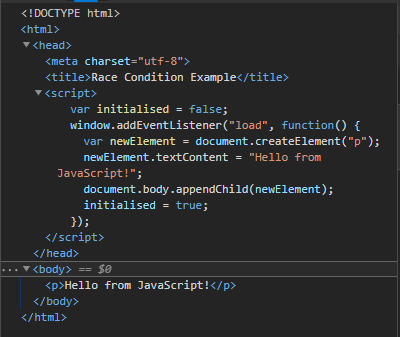
chrome也一样
继续往后
The WebDriver instructions might look innocent enough
WebDriver的代码可能看起来挺无辜的
driver.navigate("file:///race_condition.html")el = driver.find_element(By.TAG_NAME, "p")assert el.text == "Hello from JavaScript!"
driver.get("file:///race_condition.html");WebElement element = driver.findElement(By.tagName("p"));assertEquals(element.getText(), "Hello from JavaScript!");
The issue here is that the default page load strategy used in WebDriver listens for the
document.readyStateto change to"complete"before returning from the call to navigate. Because thepelement is added after the document has completed loading, this WebDriver script might be intermittent. It “might” be intermittent because no guarantees can be made about elements or events that trigger asynchronously without explicitly waiting—or blocking—on those events.这里的问题是WebDriver在从调用navigate返回之前,使用的缺省的page load strategy是在监听document.readyState变为complete。因为p元素在页面完成加载之后添加的,那么这个WebDriver脚本可能就是intermittent的了。它可能被中断(intermittent)是因为创建(完成)这个页面元素并没有明确的承诺,或者是触发异步事件时没有一个显式的等待或者阻塞
信息量有点多,不理解不了解前端渲染机制和WebDriver和浏览器之间交互细节得话,不是太容易完全说明白这个case,虽然简单的就着这个例子来说,应该就是webdriver要去获取p标签的时候,这个标签“可能”还没创建完成呢
be intermittent 不能简单地描述成中断,因为一个是这种中断是不可预期的,还有可能是不发生的,可能有一个间歇,也可能会卡壳般的有多个间歇,说成断断续续也是描述一种可能性,虽然可能更符合实际不可预期这个形态
最后一句真是句读之不知,瞎来的,拆成两句去表达了,也许原文并没有刻意强调element be made这个事情(因为原文实际上是make guarantee),整体的元素创建和推广至所有异步事件的递进关系是我意淫的理解
Fortunately, the normal instruction set available on the WebElement interface—such as WebElement.click and WebElement.sendKeys—are guaranteed to be synchronous, in that the function calls will not return (or the callback will not trigger in callback-style languages) until the command has been completed in the browser. The advanced user interaction APIs, Keyboard and Mouse, are exceptions as they are explicitly intended as “do what I say” asynchronous commands.
幸运的是,WebElement接口上的normal的(相对于后面的advanced应该是)指令可以承诺是同步的,例如WebElement.click和WebElement.sendKeys,这些函数直到浏览器完成他们才会返回(或者在回调式的语言中回调先不触发)。高级的用户交互API,例如键盘和鼠标的一些操作,是例外,他们显式扩展为那些“做我说的”那类异步得命令
前半句容易明白,click和sendkeys不用担心,后面那个我没使用经验,瞎翻得
Waiting is having the automated task execution elapse a certain amount of time before continuing with the next step.
等待就是一个在继续到下一步执行前需要花费一定时间的的自动执行的任务
是这个意思吧…
To overcome the problem of race conditions between the browser and your WebDriver script, most Selenium clients ship with a wait package. When employing a wait, you are using what is commonly referred to as an explicit wait.
为了克服浏览器和你的WebDriver脚本间的竞争条件这个问题,绝大多数Selenium客户端打包了一个wait包。 在采用这个等待(包)的时候,你通常使用的是一个叫做 explicit wait的东西
没啥说的
本篇后面是显式的,隐式的还有所谓的流畅的?FluentWait的api,下周继续
T

这个有点意思,平时用IDE的git功能确实少,就是代码窗口的gutter位置点击右键就可以看见annotate快捷菜单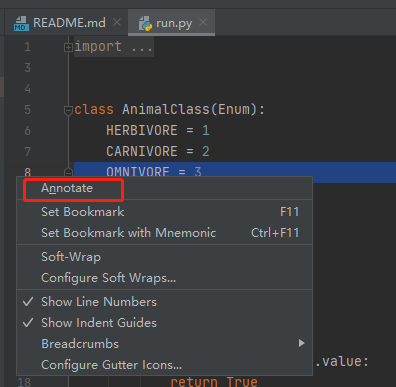
点击之后gutter就变了多了每一行的版本?我这个文件只有一个版本,所以可能看不出意思来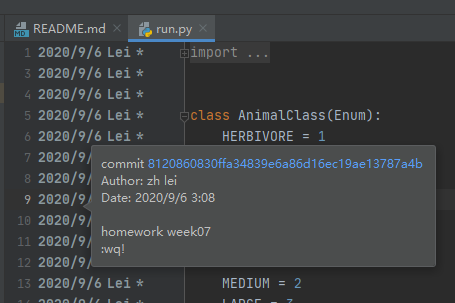
鼠标悬停,还有tip弹出,完整的commit SHA信息
S
这周基本在撸selenium,R小节就是么,主要看Wait的问题,但是发现即便正确得设置了Wait,Wait的条件也设置正确,还是会报错,仔细的观察是下面这个截图里面描述的错误
ElementClickInterceptedException,而且说了,Other element would receive the click,目前面向google中文网页编程没有找到什么令人满意的办法,有些奇特的driver.excutescript什么的不是太让人理解,因为感觉问题出现频率也不定,所以我也没特别的实验这些不令人满意的方法
那这里share(吐槽)两个问题吧:
- python的调用栈信息好乱啊,根因在最下面这个是不是有点不太好,我怎么觉得java除非是特别复杂的有意识封装的cause by,这些详细信息是在最上面的
- selenium确实就是个模拟操作,如果完全模拟确实要放慢每一个动作之间的间隔,就像性能测试中间插入随机等待差不多,所以sleep,并不邪恶,只是丑陋吧

若有收获,就点个赞吧
0 人点赞


