A
选的是这道题,一个中级题,前前后后应该大半个下午的时间,通过时的代码感觉其实挺凌乱的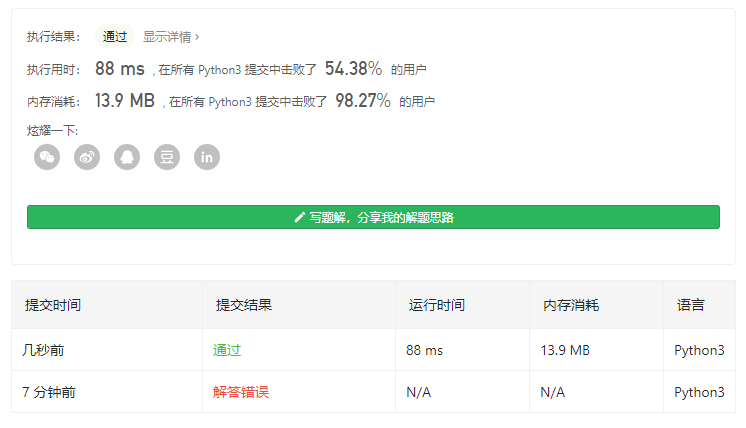
R
翻了一下难道这个流程是Atlassian设计的?那当然不是了吧
反省了一下,据说这个是练英语的,所以找一个自己熟悉的主题来做这周吧,前两周有点跑偏这么看起来
The Forking Workflow is fundamentally different than other popular Git workflows. Instead of using a single server-side repository to act as the “central” codebase, it gives every developer their own server-side repository. This means that each contributor has not one, but two Git repositories: a private local one and a public server-side one. The Forking Workflow is most often seen in public open source projects.
Forking Workflow (以下简称FW)从根本上不同于其他流行的Git工作流。相比较一个使用单一的服务端仓库作为中心的代码基,它给每一个开发者他们自己的服务端仓库。这意味着没个贡献者不是有一个而是有两个Git仓库:一个在本地,一个在服务端。FW经常的被看到在开源工程上使用>
我估计很多人看到开源工程就被劝退了,其实这只是一个现状而非其完全的特点和能力吧
The main advantage of the Forking Workflow is that contributions can be integrated without the need for everybody to push to a single central repository. Developers push to their own server-side repositories, and only the project maintainer can push to the official repository. This allows the maintainer to accept commits from any developer without giving them write access to the official codebase.
无需每个人都推送到那个唯一的中心仓库就可以集成是FW的主要的优势。开发者推送到他们自己的服务端的仓库,儿只有工程的维护这可以推送到官方的仓库。这允许维护者从任何的开发者那里接受提交儿不需要授予他们官方库的写访问权限
这里强调的是权限管控能力,当然很多人概念里面是看都不让人看才是他们唯一的目的
The Forking Workflow typically follows a branching model based on the Gitflow Workflow. This means that complete feature branches will be purposed for merge into the original project maintainer’s repository. The result is a distributed workflow that provides a flexible way for large, organic teams (including untrusted third-parties) to collaborate securely. This also makes it an ideal workflow for open source projects.
FW通常会遵循一个基于Gitflow工作流的分支模型。这意味着完整的特性分支将以合并为目的进入到原始项目维护者的仓库。结果就是一个为大型的,复杂的团队(包括不被信任的第三方)安全的协作提供了一个灵活的分布式工作流的方式。这就也使得FW对于开源工程来说是一个理想的工作流方式
第一句有点惊到我,所以我简单地又扫了一遍Atlassian关于Git的协作这一部分的系列文章,因为没有精读,只能从结构、目录上体会一下,感觉Atlassian用一种自己的理解方式重新组织了一下各个工作流的概念上的联系(也有可能这个更符合实际发展的历史情况?),要么是一种独特的解构方式吧,要么仅仅是一家之言,看样子,后面需要把整个的系列文章都仔细读过再来评判了
How it works
As in the other Git workflows, the Forking Workflow begins with an official public repository stored on a server. But when a new developer wants to start working on the project, they do not directly clone the official repository.
像其他的Git工作流一样,FW从一个存储在服务端的官方的公共的仓库开始的。但是当一个新的开发这要开始这个项目的工作的时候,他不直接的clone这个官方的仓库
作为工作流的管理者,这个begins with,是对我自己的一个批评吧算是
Instead, they fork the official repository to create a copy of it on the server. This new copy serves as their personal public repository—no other developers are allowed to push to it, but they can pull changes from it (we’ll see why this is important in a moment). After they have created their server-side copy, the developer performs a git clone to get a copy of it onto their local machine. This serves as their private development environment, just like in the other workflows.
作为替代,他们在服务端fork一份官方仓库的copy,这个新的copy作为他们个人的public的仓库——没有其他的开发者被允许推送到这个仓库,但是可以从这里拉取变更(我们稍后会看到为什么这会是重要的一点)。在他们创建他们的服务端copy之后,开发者就可以通过git clone 获取一份copy到他自己本地的机器上了。这是作为他们私有地开发环境,就像其他的工作流一样
先是陈述fork是FW的一个特点;接着提到了每个人自己的个人远端库向其他开发者开放读能力?是一个重要的事情,虽然是准备后面再说吧;最后陈述进入自己本地开发环境这块儿和其他工作流没什么差别
When they’re ready to publish a local commit, they push the commit to their own public repository—not the official one. Then, they file a pull request with the main repository, which lets the project maintainer know that an update is ready to be integrated. The pull request also serves as a convenient discussion thread if there are issues with the contributed code. The following is a step-by-step example of this workflow.
当开发者准备发布他本地的commit的时候,他们推送这个commit到他们自己的远端库——不是官方的那个。接着他们要开启一个到主库的pull request,这个PR使得项目维护这了解到一个更新已经准备好集成进来了。这个PR也可以当贡献的代码有问题的时候,作为一个便于讨论的场合。接下来是这个工作流的一个按步骤说明的样例:
这段也是一个基本的陈述,描述了新的commit经过个人远端库的PR向中心库提交,并且还有PR的额外的价值,这都是经常使用PR的人非常容易理解的
- A developer ‘forks’ an ‘official’ server-side repository. This creates their own server-side copy.
- The new server-side copy is cloned to their local system.
- A Git remote path for the ‘official’ repository is added to the local clone.
- A new local feature branch is created.
- The developer makes changes on the new branch.
- New commits are created for the changes.
- The branch gets pushed to the developer’s own server-side copy.
- The developer opens a pull request from the new branch to the ‘official’ repository.
The pull request gets approved for merge and is merged into the original server-side repository
一个开发这forks 一个官方的服务端仓库。这创建一个他们自己的服务端copy
- 从这个新的服务端copy clone到他们自己的本地系统
- 一个关于官方仓库的远端路径田间到本地的clone copy中
- 创建一个新的本地的特性分支
- 开发者在这个分支上做变更
- 为这些变更创建一个新的commits
- 推送这些commits到开发者自己的远端个人库
- 开发者开启一个PR从新的分支到官方的仓库
- PR被接受,并合并到原始的服务端的的仓库中
第3步…看他后面有没有解释吧,如果没有,立即对这篇文章,甚至对整个系列文章的观感变差了
To integrate the feature into the official codebase, the maintainer pulls the contributor’s changes into their local repository, checks to make sure it doesn’t break the project, merges it into their local master branch, then pushes the master branch to the official repository on the server. The contribution is now part of the project, and other developers should pull from the official repository to synchronize their local repositories.
要集成特性到官方的代码库,维护者拉取贡献者的变更到他们本地的仓库,检查确保他们没有对项目产生破坏,然后合并这些commits到他们本地的master分支,接着推送这个master分支到服务端的official仓库。这个贡献现在就是项目的一部分了,并且其他的开发者应该可以从官方仓库拉取并且公布到他们自己的本地的仓库
这段就很有意思了,并不是真的会颠覆对github和gitlab这样工具平台的理解,因为可以理解他其实是想脱离开这个平台来讲述FW这个分布式工作流应该怎么工作地,但是前面都是混着PR的啊
一直没补课的是request pull,这个都被这些平台隐藏在自己后面了吧,然后去gitlab data里面的看了一下(其实只看了一下config文件),这个远端库的上下游关系,似乎并不是在服务端的git仓库里面来维护的,所以,这些也只有概念上的类比了吧
It’s important to understand that the notion of an “official” repository in the Forking Workflow is merely a convention. In fact, the only thing that makes the official repository so official is that it’s the public repository of the project maintainer.
重要的一点是,理解FW中 official 仓库的概念仅仅是一个惯例。事实上,唯一的使得官方仓库是官方的是由于这个是项目维护这的仓库
这真的就是开源项目的语境的解读,之所以权威,是因为大家认可维护者的权威,一旦维护者放弃了,或者出现了更被大家认可的维护者,那么那个fork可能才是未来
所以FW本质上是革命的和民主的,有一个开源运动中的词汇,仁慈的独裁者,甚至还有终身的仁慈的独裁者,是另一个如此革命和民主机制下(其实会不会也有些许市场的作用呢)的另一个维度来看待开发者和开发者之间的关系吧
仁慈独裁者究竟是个政治学语境的概念还是被开源运动发扬了,这个有待考证,还是挺好玩儿的吧
Forking or cloning
It’s important to note that “forked” repositories and “forking” are not special operations. Forked repositories are created using the standard git clone command. Forked repositories are generally “server-side clones” and usually managed and hosted by a 3rd party Git service like Bitbucket. There is no unique Git command to create forked repositories. A clone operation is essentially a copy of a repository and its history.
一个重要的事情要note一下,就是forked的仓库,或者forking并不是什么特别的操作。Forked的仓库的创建就是使用的标准的git clone 命令。Forked 仓库相当于服务端的clone,通常是有第三方托管的Git服务例如Bitbucket来做的。并没有什么独特的git命令来创建一个forked 仓库,clone操作就是一个copy一个仓库和他的所有历史
这个可以想象的
Branching in the Forking Workflow
All of these personal public repositories are really just a convenient way to share branches with other developers. Everybody should still be using branches to isolate individual features, just like in the Feature Branch Workflow and the Gitflow Workflow. The only difference is how those branches get shared. In the Forking Workflow, they are pulled into another developer’s local repository, while in the Feature Branch and Gitflow Workflows they are pushed to the official repository.
所有这些个人的仓库真的只是和其他开发人员共享的便捷的方式。每个人应该持续的使用分支来隔离每一个特性,就像特性分支工作流和Gitflow工作流一样。唯一的不同是这些分支如何共享出去。在FW,他们从另一个开发者那里的本地仓库中拉取,而特性分支和Gitflow工作流他们是要推送official的仓库。
这个就有点和使用经验不符了,难道原来我用的都是假的?或者确实我熟悉的这种并不是这里的这个FW,而只能叫做github workflow with Forking and Syncing?
Fork a repository
All new developers to a Forking Workflow project need to fork the official repository. As previously stated, forking is just a standard git clone operation. It’s possible to do this by SSH’ing into the server and running git clone to copy it to another location on the server. Popular Git hosting services like Bitbucket, offer repo forking features that automate this step. 所有新加入FW项目的开发者需要fork那个official的仓库。像前面说的,forking就是一个标准的git clone操作。他可能就是通过ssh练到服务器上并且运行一下git clone从服务器上copy到另一个位置。流行的git托管服务,比如Bitbucket,提供repo forking特性自动的完成这步
这一步直觉就是很好理解的,解释的也不是那么的有特色,反正就是强调没什么特别的
Clone your fork
Next each developer needs to clone their own public forked repository. They can do this with the familiar git clone command. Assuming the use of Bitbucket to host these repositories, developers on a project should have their own Bitbucket account and they should clone their forked copy of the repository with: git clone https://user@bitbucket.org/user/repo.git
接下来每个开发者需要clone他们自己forked出来的那个repository。他们做这一步就用那个熟悉的git clone命令就行了。
假设就是使用Bitbucket托管他们的仓库,项目上的开发者应该拥有他们自己的Bitbucket账户并且他们应该clone他们的forked的仓库拷贝就像这样:git clone XXX
废话一段,感觉跟最一开始都不是一个人写的
Adding a remote
Whereas other Git workflows use a single origin remote that points to the central repository, the Forking Workflow requires two remotes—one for the official repository, and one for the developer’s personal server-side repository. While you can call these remotes anything you want, a common convention is to use origin as the remote for your forked repository (this will be created automatically when you run git clone) and upstream for the official repository. git remote add upstream https://bitbucket.org/maintainer/repo
You’ll need to create the upstream remote yourself using the above command. This will let you easily keep your local repository up-to-date as the official project progresses. Note that if your upstream repository has authentication enabled (i.e., it’s not open source), you’ll need to supply a username, like so: git remote add upstream https://user@bitbucket.org/maintainer/repo.git
This requires users to supply a valid password before cloning or pulling from the official codebase.
其他的git工作流使用单一的远端地址,但是FW要有两个,一个是official的repository,另一个是开发这自己的服务端的仓库。尽管你可以随意称呼这些远端库,但是一个通常的约定是使用origin来指代你自己的forked仓库(这也会在clone的时候自动创建这个名称)同时称呼官方的那个仓库叫做upstream,就像这样 git remote add upstream YYY
你需要自己创建上游远端的地址使用上面这条名利个。它可以让你简单地保持你本地仓库跟进官方项目的进程。注意如果你的上游仓库如果有认证校验(例如它不是一个开源的项目),那么你需要提供一个用户名,像这样 (译注:不重复了,就是http basic auth 那种加上个用户名,上面copy的原文也有 )
当从official代码库中clone或者pull的时候需要提供个有效的密码
这几段就…:
- 好像长期以来github都是这么个建议,一直没有sync mirror之类的功能在平台提供
- 我第一次用能sync的就是bitbucket,所以很难想象它竟然这么矜持的介绍这个原始的流程
- 但是介绍的过程可能是为了说明必要的点吧,我反正都用ssh
- 我确实长久以来没有用过本地设upstream,如果没有sync,我就…不用fork workflow了,或者手动的通过MR来将上游合并到下游——长期在gitlab社区版上是这么干的
看完这个我只能说,这不是我理想的FW,不会是qdgx那个对我根深蒂固的影响吧
Working in a branch: making & pushing changes
In the developer’s local copy of the forked repository they can edit code, commit changes, and create branches just like in other Git workflows:
git checkout -b some-feature# Edit some codegit commit -a -m "Add first draft of some feature"All of their changes will be entirely private until they push it to their public repository. And, if the official project has moved forward, they can access new commits with git pull:
git pull upstream masterSince developers should be working in a dedicated feature branch, this should generally result in a fast-forward merge.
在开发者fored的仓库本地副本中,他们可以编辑代码,提交变更,并且创建像其他git工作流那样的分支: 命令略 所有的变更将完全是私密的知道它推送到他们自己的public仓库。并且如果official项目向前变更了,他们可以获得新的commits通过git pull命令 命令略 (由于上一个命令是pull到master)尽管开发者应该工作在一个特定的特性分支,这使得通常的合并都是fast-forward的
废话吧,除了描述原始的FW流程是自己从上游获取变更的
所以说明如果使用得当的话,那么从上游sync下来master就是一个ff的
Making a Pull Request
Once a developer is ready to share their new feature, they need to do two things. First, they have to make their contribution accessible to other developers by pushing it to their public repository. Their origin remote should already be set up, so all they should have to do is the following:
git push origin feature-branchThis diverges from the other workflows in that the origin remote points to the developer’s personal server-side repository, not the main codebase.
Second, they need to notify the project maintainer that they want to merge their feature into the official codebase. Bitbucket provides a “pull request” button that leads to a form asking you to specify which branch you want to merge into the official repository. Typically, you’ll want to integrate your feature branch into the upstream remote’s master branch.
一旦一个开发者准备分享他的特性分支,他们需要做两件事情。首先,他们不得不让他们的共享可以被其他的开发者访问到,这是通过推送这些贡献到他们自己的仓库来完成的。他们的origin 远端库应该已经设置了,所以他们就做 git push origin feature-branch就可以了
这处和其他的工作流的不同在于这个origin的remote指向的是开发者个人的服务端仓库,而不是main的代码库
其次,他们需要通知项目维护者他们要合并他们的特性到official的代码库。Bitbucket提供一个pull request按钮导向一个表单询问你之处你要合并到官方仓库中的分支。通常你将要集成你的特性分支到上游远端的master分支
这块儿好简约,同时有回到了一个特定平台Bitbucket来描述,导致整体文章风格有点那么的奇怪,但确实静下心来想想,基本的责任确实都描述清楚了,对于中心仓库而言,你只需要提交你的变更分支就可以了,如果中心仓库的管理员感兴趣(或有时间?)它自然就会看这个PR,所以说这个确实更适合开源产品而不是公司内部的开发流程,公司内部其实更倾向于将责任放在具体的开发者身上…因为要剥削么,但是为了交换,所以提供一个类似于sync的方法,让工人更舒服的卖命?
Summary
To recap, the Forking Workflow is commonly used in public open-source projects. Forking is a git clone operation executed on a server copy of a projects repo. A Forking Workflow is often used in conjunction with a Git hosting service like Bitbucket. A high-level example of a Forking Workflow is:
- You want to contribute to an open source library hosted at bitbucket.org/userA/open-project
- Using Bitbucket you create a fork of the repo to bitbucket.org/YourName/open-project
- On your local system you execute git clone on https://bitbucket.org/YourName/open-project to get a local copy of the repo
- You create a new feature branch in your local repo
- Work is done to complete the new feature and git commit is executed to save the changes
- You then push the new feature branch to your remote forked repo
- Using Bitbucket you open up a pull request for the new branch against the original repo at bitbucket.org/userA/open-project
The Forking Workflow helps a maintainer of a project open up the repository to contributions from any developer without having to manually manage authorization settings for each individual contributor. This gives the maintainer more of a “pull” style workflow. Most commonly used in open-source projects, the Forking Workflow can also be applied to private business workflows to give more authoritative control over what is merged into a release. This can be useful in teams that have Deploy Managers or strict release cycles.
Unsure what workflow is right for you? Check out our comprehensive Git workflow comparison page.
回顾一下,FW通常用在开放的开源工程中。Forking就是一个在服务端执行的git clone操作生成了一个项目仓库副本。FW通常和像Bitbucket这样的Git托管服务一起使用。一个高层次例子的FW如下:
- 你要为一个托管到bitbucket.org/userA/open-project的开源项目贡献内容
- 使用Bitbucket,你创建了一个fork的仓库到bitbucket.org/YourName/open-project
- 在你本地的系统中你执行git clone https://bitbucket.org/YourName/open-project to 获得了你自己forked库的本地副本
- 你创建了一个新的特性分支在你本地的仓库里
- 新特性工作完成后通过git commit提交保存了变更
- 你接着推送新的特性分支到你的远程forked仓库
- 使用Bitbucket开启一个PR,源就是刚才那个新分支,目标是在bitbucket.org/YourName/open-project的那个 original repo
FW帮助项目的维护者避免为每一个贡献者做权限配置的同时获取他们的贡献。这给了maintainer更多pull风格的工作流。(除了)最经常用于开源项目,FW也能够为私有的商业工作流合并到发行版(的过程)带来更多的权限控制。这对于有着部署经理?或者严格发布周期的团队来说也是有用的。
不确定哪一种工作流适合你?阅读我们全面的 Git 工作流比较页(这篇文章吧)
最后一段终于有那么点想看到的内容了,比如说FW可以用在有严格发布周期的组织里,就是因为有一个更强有力的管控吧,maintainer这个看门人在这个流程里面还是挺重要的
其他的,那么example就是这篇最拧吧的那个点的集中再现——又没说p配置中心仓库到本地仓库副本的upstream remote吧,远程仓库关联就是在bitbucket里面做的,所以也就是没有这个hosting的工具,还是别玩儿FW了?
最后一句标明,它这一篇是这个系列文章中单独介绍git工作流中的最后一篇了,其他的以后?还是下周就计划看呢?
差点忘了初心,这么拧吧混乱的一篇(在仔细看之前觉得可能还不错,可能是被atlassian的大名迷惑了吧)
T
每周一喷的时刻
不过这周看起来没什么可喷的好像还挺好,虽然我不用intellij做DB操作吧,这么一说还真值得看看,也是属于花的钱的一部分啊,说起来DB功能会有很多,比如ORM的来回来去地映射创建之类的,上周看django的migaration?是这个词么,感觉好简陋,不过python geek范儿就是命令行吧
不过抛开了DB的tip的问题,其实ctrl+q是一个挺通用的快捷键,快速的看光标所在处比如标识符的文档啦,声明了之类的东西…是不是前几周写过这个
second tip

主要是TODO panel在哪儿,在最低下

可以设置的很详细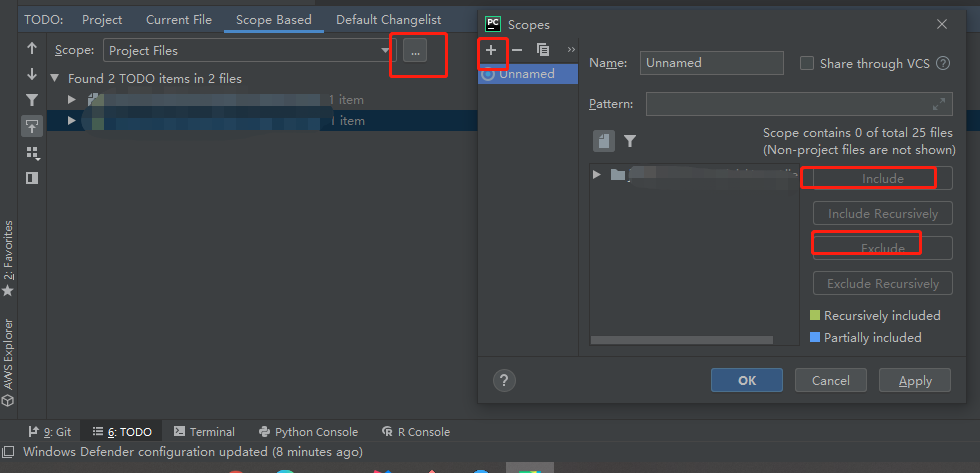
其实一切todo都是 # todo记录在代码里面的,IDE是扩展一些管理方法,是个体工艺能力的体现吧,组织级的只管理到# todo
不知道真的会有很多人用# todo 这个东西么?目力所及几乎没有…
third tip
终于觉得可以写一个有点用了的
pytest的文档里有这么一段:
You can mix both fixture mechanisms in the same file but test methods of
unittest.TestCasesubclasses cannot receive fixture arguments
也就是说使用unittest.TestCase方式的子类型,是不能接收pytest(自己认为更牛逼)的测试夹具的
forth tip
pytest 如果想把代码里面的print都输出在屏幕上,需要增加一个-s的option
S
这期要不share简单一点
之前一直挺纠结gitlab社区版怎么下方权利给team leader的,毕竟,其实很多的问题,根儿上当然在我或者更高级别的leader身上,但是一线的问题,必然一线的第一指挥官的意识能力是影响面最大的
废话不该多说,主要是gitlab 社区版的这个权限层次太少,只有一个role,固定死的三类,maintainer,maintainer and developer,no one,按说如果每一个个体可以名符其实,那就没什么问题,但是实际的组织当中…彼得原理是吧,就不多说了
这里主要share的(吐槽的),是gitlab的商业策略吧,这个东西看起来连public的工程也是同样受限于starter版本这条线,不过,最近github发展的很有可能也是这样
所以结论是,越小的团队,越应该精干和精英化,否则隐形成本反而会更高

若有收获,就点个赞吧
0 人点赞


