因为十一放假,下周的先对付出来?但最后发现其实失败了,节后才来搞
A
环形列表 - 141. Linked List Cycle
当天的那道题,看了两遍竟然没看懂,做的时候有点明白了这个linklist就是个bug么,提交过程很二B,太不认真了吧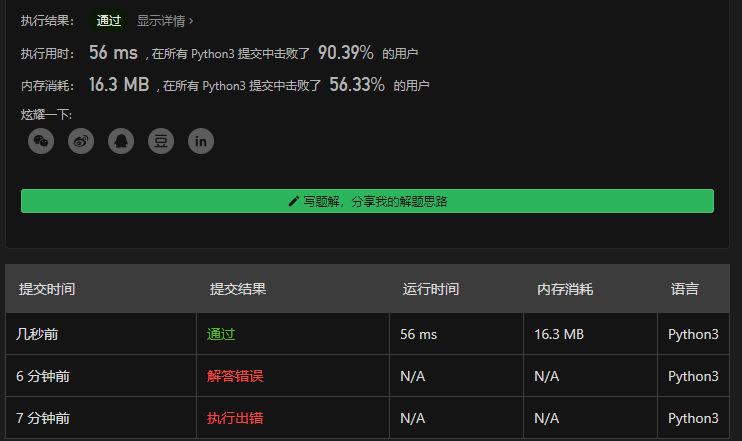
R
Selenium - Implicit wait ,FluentWait
Implicit wait
There is a second type of wait that is distinct from explicit wait called implicit wait. By implicitly waiting, WebDriver polls the DOM for a certain duration when trying to find any element. This can be useful when certain elements on the webpage are not available immediately and need some time to load.
有另一种和explicit wait不同类型的wait叫做implicit wait。通过隐式的等待,WebDriver 在尝试获取任何的元素的时候,都会轮询 DOM 一段时间,这在那些页面上不能立即而是需要一定时间加载的元素是很有用的
Implicit waiting for elements to appear is disabled by default and will need to be manually enabled on a per-session basis. Mixing explicit waits and implicit waits will cause unintended consequences, namely waits sleeping for the maximum time even if the element is available or condition is true.
隐式的等待元素缺省是禁用的,需要以session为粒度进行手动的设置。混合显式的和隐式的等待将引发非预期的后果,换句话说,及时元素可用或者条件为真,也要等待最大时间
Warning: Do not mix implicit and explicit waits. Doing so can cause unpredictable wait times. For example, setting an implicit wait of 10 seconds and an explicit wait of 15 seconds could cause a timeout to occur after 20 seconds.
警告:不要混合两种等待。这么搞会引发非预期的等待时间。例如,设置隐式的10秒等待和显式的15秒等待可能引发一个20秒后的超时
An implicit wait is to tell WebDriver to poll the DOM for a certain amount of time when trying to find an element or elements if they are not immediately available. The default setting is 0, meaning disabled. Once set, the implicit wait is set for the life of the session.
隐式的等待告知WebDriver轮询DOM一定的时间当尝试获取一个元素或者元素不能立即可用得时候,默认是0,意味着关闭,一旦设定,隐式的等待设定会持续整个session的过程当中
driver = Firefox()driver.implicitly_wait(10)driver.get("http://somedomain/url_that_delays_loading")my_dynamic_element = driver.find_element(By.ID, "myDynamicElement")
可能最主要的隐式的等待的注意事项就是两点:
- 不要和显式的混用,理由是可能导致一个非预期的最大的等待时间(?似乎也不是太糟糕?而且究竟为什么似乎也没太说明白)
- 隐式的检查条件这里没说清楚,但是估计就是直接findElement,返回有还是没有之类的
另一个是隐式的生命周期是session的目前还没想到可以怎么用
FluentWait
FluentWait instance defines the maximum amount of time to wait for a condition, as well as the frequency with which to check the condition.
流畅等待实例定义了等待一个状态的最大等待之间,同时还包含了检查状态的频率
Users may configure the wait to ignore specific types of exceptions whilst waiting, such as NoSuchElementException when searching for an element on the page.
用户可以配置等待忽略特定类型的异常列表,例如当在页面上搜索元素时候忽略掉NoSuchElementException
driver = Firefox()driver.get("http://somedomain/url_that_delays_loading")wait = WebDriverWait(driver, 10, poll_frequency=1, ignored_exceptions=[ElementNotVisibleException, ElementNotSelectableException])element = wait.until(EC.element_to_be_clickable((By.XPATH, "//div")))
FluentWait这个Java的API和Python的API不太一样,在Java的API中显式的wait和这个所谓的FluentWait是两个类型,而Python中都是WebDriverWait,FluentWait在python api的表现就是一个poll_frequency和ignored_exception两个命名参数,挺奇怪的,不知道这个Fluent究竟流畅在何处
T
总算写个别的吧
gitlab和jenkins forking workflow互通细节
- forking workflow时候,jenkins里面post action配上把状态发出来的时候,是会把状态发到私库里面的,就别傻傻的在中心库里找了,有点感觉奇怪,不知道哪儿能不能改
- 还是forking workflow,jenkins gitlab整合文档里面jenkins的配置部分,
有个地方写的感觉不对,Branch to merge to不应该是 ${gitlabTargetBranch}(虽然逻辑上感觉对),而需要写成master,否则会有类似这里描述的报错,虽然我感觉人家这个说的跟我这不是一个问题- 目前没有切实结论,${gitlabTargetBranch} 肯定是符合目的的,但是issue已经明确说是fixed了,但是考虑到jenkins这东西的奇葩,又reopen了也不一定吧
second tip - win10 emoji快捷键
third tip - 高亮跳转,就是F3

意思挺简单的,试了一下在高亮一个词的时候,还可以同时一起高亮其他的词(换句话说其实就是如果想只显示一个,那得先esc了,才能再显示别的)
比较SB的是发现的两件事情,一个是PyCharm Community Customization这行,我以为是PyCharm还是社区版独有呢,结果我的收费Intellij也是有啊;另一个则是感觉是个bug,都esc了,F3还可以navigate…
S
童心哌试用?
mlink安装
它叫mlink2,安装过程有一个让人确认的地方,不知道啥意思
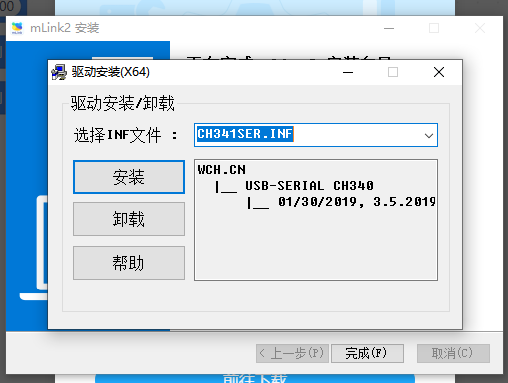
点击帮助按钮有以下说明文字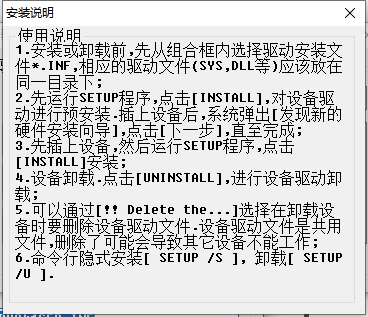
mlink2安装完是有一个本地应用的
安装过程显示…这东西其实真不是直接给孩子用的
示例的还没来得及看,后面找机会抨击吧

若有收获,就点个赞吧
0 人点赞


