⭕ 搜索Nginx镜像
DockerHub-Nginx : https://registry.hub.docker.com/_/nginx
⭕ 下载镜像
$ docker pull nginx
⭕ 测试
$ docker imagesREPOSITORY TAG IMAGE ID CREATED SIZEnginx latest 7a4e271c6c34 4 days ago 126MBmariadb latest 701ebc295699 5 days ago 399MBcentos latest 9d5bccb1776b 3 months ago 255MBhello-world latest a29f45ccde2a 10 months ago 9.14kB$ docker run -d --name nginx01 -p 3344:80 nginx #docker run 后台运行 给容器命名 宿主机端口:容器内部端口 nginx90363df374796534c008455d27224a5c0250e8aa6c8cc73a5dc3f37ea744666b$ docker psCONTAINER ID IMAGE COMMAND CREATED STATUS PORTS NAMES90363df37479 nginx "/docker-entrypoint.…" 3 seconds ago Up 2 seconds 0.0.0.0:3344->80/tcp nginx01$ curl localhost:3344 #这个方法常用于测试一台服务器是否可以到达一个网站$ docker exec -it nginx01 /bin/bash #在运行的容器中执行命令$ whereis nginxnginx: /usr/sbin/nginx /usr/lib/nginx /etc/nginx /usr/share/nginx$ cd /etc/nginx$ lsconf.d fastcgi_params koi-utf koi-win mime.types modules nginx.conf scgi_params uwsgi_params win-utf
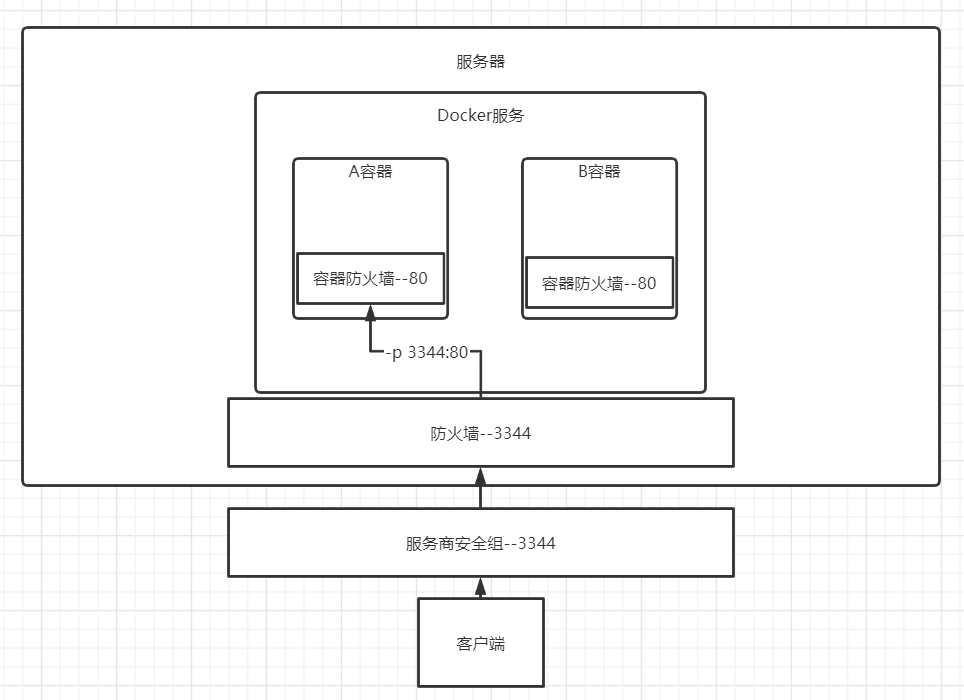
🤔思考
问题: 每次改动nginx配置文件 , 都需要进入容器内部吗?
解决方法: 不需要,只要在容器外部提供一个映射路径,达到同步修改 , -v数据卷?

若有收获,就点个赞吧
0 人点赞


