Read
ResultSet
By default, ResultSets are completely retrieved and stored in memory. In most cases this is the most efficient way to operate and, due to the design of the MySQL network protocol, is easier to implement. If you are working with ResultSets that have a large number of rows or large values and cannot allocate heap space in your JVM for the memory required, you can tell the driver to stream the results back one row at a time.
To enable this functionality, create a Statement instance in the following manner:
stmt = conn.createStatement(java.sql.ResultSet.TYPE_FORWARD_ONLY, java.sql.ResultSet.CONCUR_READ_ONLY);stmt.setFetchSize(Integer.MIN_VALUE);
The combination of a forward-only, read-only result set, with a fetch size of Integer.MIN_VALUE serves as a signal to the driver to stream result sets row-by-row. After this, any result sets created with the statement will be retrieved row-by-row.
There are some caveats with this approach. You must read all of the rows in the result set (or close it) before you can issue any other queries on the connection, or an exception will be thrown.
The earliest the locks these statements hold can be released (whether they be MyISAM table-level locks or row-level locks in some other storage engine such as InnoDB) is when the statement completes.
If the statement is within scope of a transaction, then locks are released when the transaction completes (which implies that the statement needs to complete first). As with most other databases, statements are not complete until all the results pending on the statement are read or the active result set for the statement is closed.
Therefore, if using streaming results, process them as quickly as possible if you want to maintain concurrent access to the tables referenced by the statement producing the result set.
Another alternative is to use cursor-based streaming to retrieve a set number of rows each time. This can be done by setting the connection property useCursorFetch to true, and then calling setFetchSize(int) with int being the desired number of rows to be fetched each time:
conn = DriverManager.getConnection("jdbc:mysql://localhost/?useCursorFetch=true", "user", "s3cr3t");stmt = conn.createStatement();stmt.setFetchSize(100);rs = stmt.executeQuery("SELECT * FROM your_table_here");
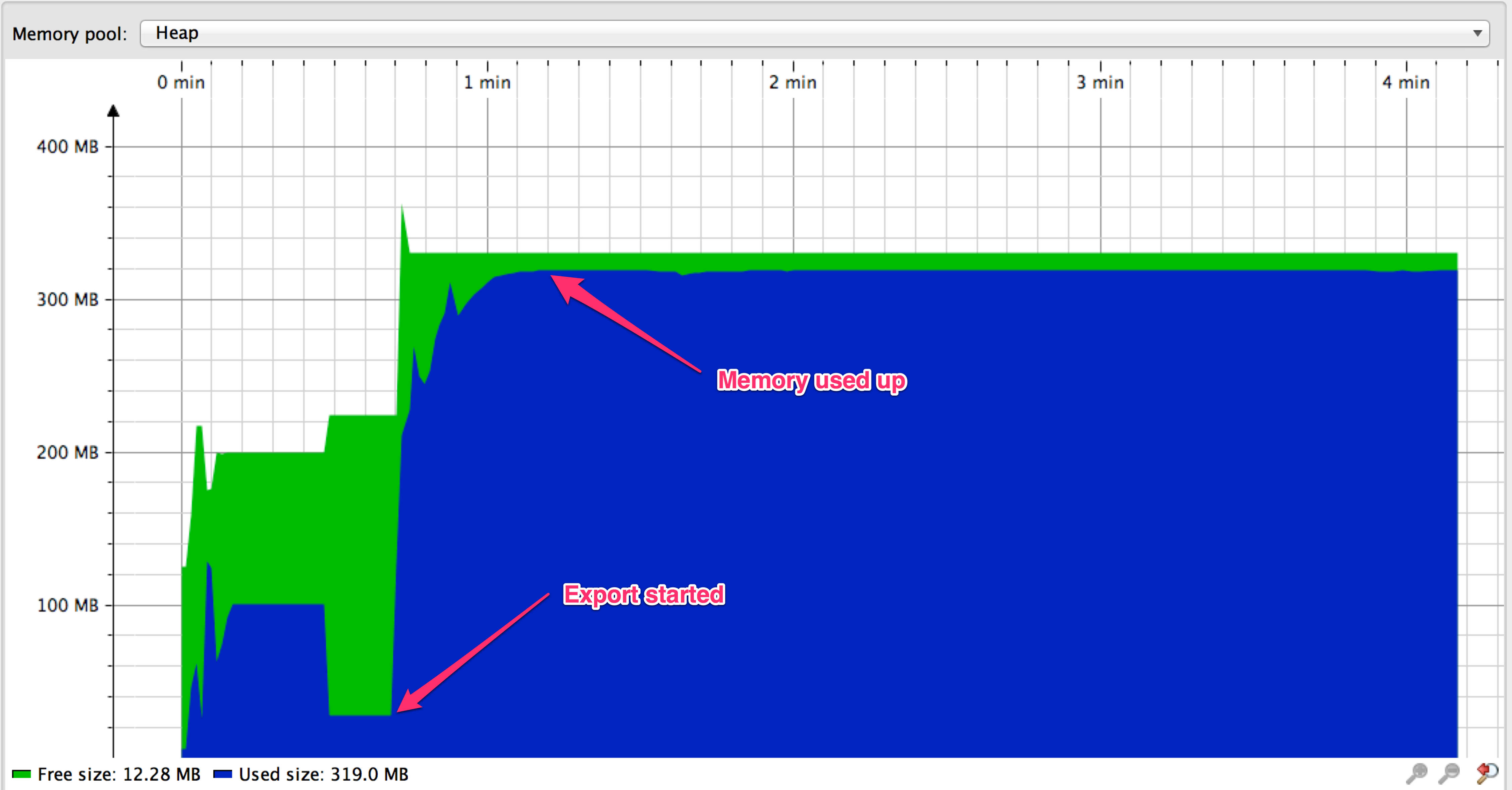 VS
VS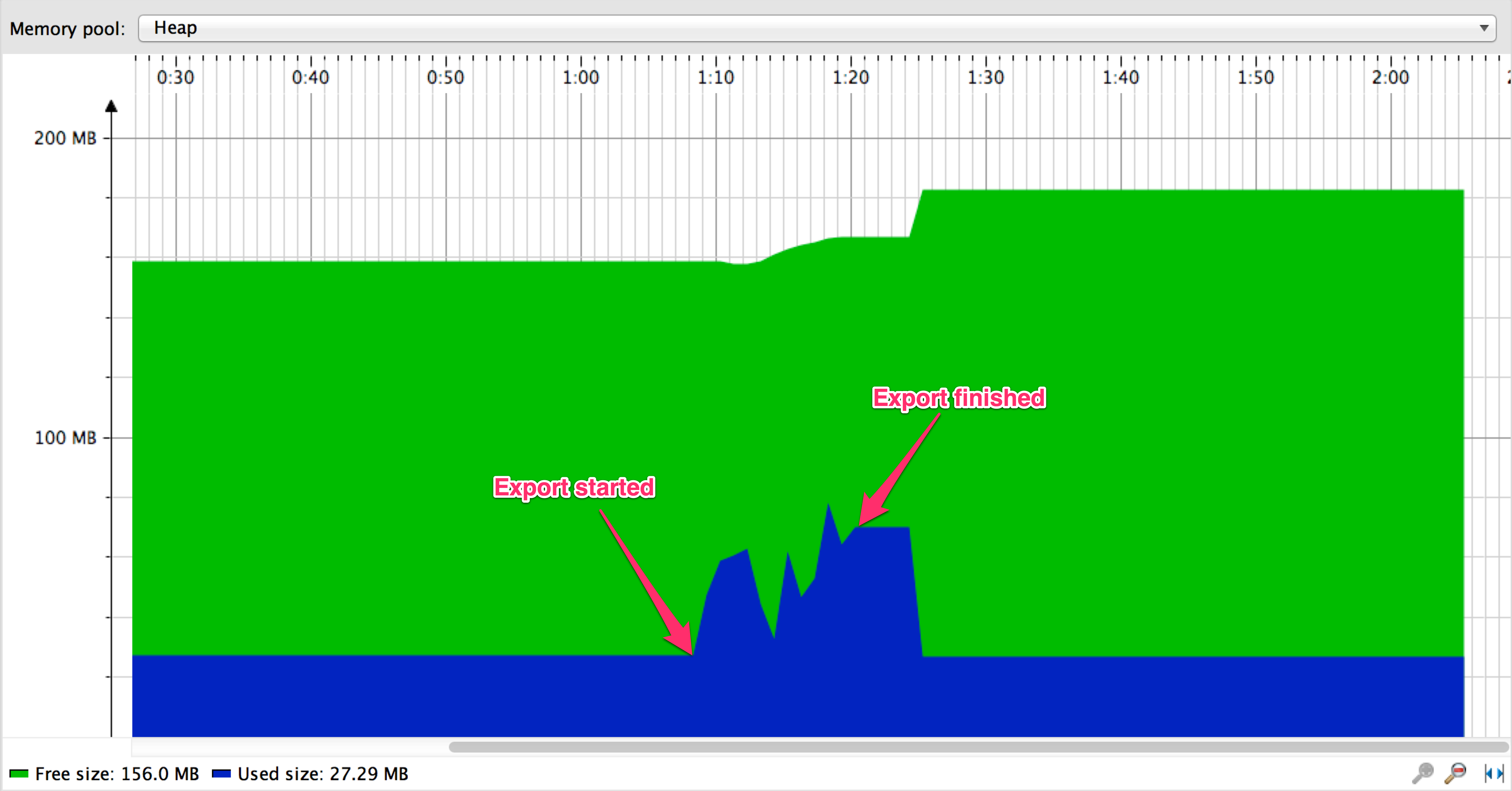
When streaming, export is finished in about 9 seconds vs about 137 seconds when using paging
Code Analysis
com.mysql.jdbc.StatementImpl#setFetchSize
public void setFetchSize(int rows) throws SQLException {synchronized (checkClosed().getConnectionMutex()) {if (((rows < 0) && (rows != Integer.MIN_VALUE))|| ((this.maxRows > 0) && (rows > this.getMaxRows()))) {throw SQLError.createSQLException(Messages.getString("Statement.7"), //$NON-NLS-1$SQLError.SQL_STATE_ILLEGAL_ARGUMENT, getExceptionInterceptor()); //$NON-NLS-1$ //$NON-NLS-2$}this.fetchSize = rows;}}
com.mysql.jdbc.StatementImpl#createStreamingResultSet
protected boolean createStreamingResultSet() {try {synchronized (checkClosed().getConnectionMutex()) {return ((this.resultSetType == java.sql.ResultSet.TYPE_FORWARD_ONLY)&& (this.resultSetConcurrency == java.sql.ResultSet.CONCUR_READ_ONLY) && (this.fetchSize == Integer.MIN_VALUE));}} catch (SQLException e) {// we can't break the interface, having this be no-op in case of error is okreturn false;}}
com.mysql.jdbc.StatementImpl#executeQuery
Use Case
Good
com.alibaba.datax.plugin.rdbms.util.DBUtil
public static ResultSet query(Connection conn, String sql, int fetchSize, int queryTimeout)throws SQLException {// make sure autocommit is offconn.setAutoCommit(false);Statement stmt = conn.createStatement(ResultSet.TYPE_FORWARD_ONLY,ResultSet.CONCUR_READ_ONLY);// Integer.MIN_VALUEstmt.setFetchSize(fetchSize);stmt.setQueryTimeout(queryTimeout);return query(stmt, sql);}
org.apache.spark.rdd.JdbcRDD#compute
override def compute(thePart: Partition, context: TaskContext): Iterator[T] = new NextIterator[T]{context.addTaskCompletionListener[Unit]{ context => closeIfNeeded() }val part = thePart.asInstanceOf[JdbcPartition]val conn = getConnection()val stmt = conn.prepareStatement(sql, ResultSet.TYPE_FORWARD_ONLY, ResultSet.CONCUR_READ_ONLY)val url = conn.getMetaData.getURLif (url.startsWith("jdbc:mysql:")) {// setFetchSize(Integer.MIN_VALUE) is a mysql driver specific way to force// streaming results, rather than pulling entire resultset into memory.// See the below URL// dev.mysql.com/doc/connector-j/5.1/en/connector-j-reference-implementation-notes.htmlstmt.setFetchSize(Integer.MIN_VALUE)} else {stmt.setFetchSize(100)}logInfo(s"statement fetch size set to: ${stmt.getFetchSize}")stmt.setLong(1, part.lower)stmt.setLong(2, part.upper)val rs = stmt.executeQuery()...
Bad
org.apache.spark.sql.execution.datasources.jdbc.JDBCOptions#fetchSize
val fetchSize = {val size = parameters.getOrElse(JDBC_BATCH_FETCH_SIZE, "0").toIntrequire(size >= 0,s"Invalid value `${size.toString}` for parameter " +s"`$JDBC_BATCH_FETCH_SIZE`. The minimum value is 0. When the value is 0, " +"the JDBC driver ignores the value and does the estimates.")size}
备注: spark3.0 preview implement like this:
- org.apache.spark.sql.execution.datasources.jdbc.JDBCOptions#fetchSize
val fetchSize = parameters.getOrElse(JDBC_BATCH_FETCH_SIZE, "0").toInt
- org.apache.spark.sql.execution.datasources.jdbc.JDBCOptions#fetchSize
思考
- PostgreSQL
- Oracle
Reference

若有收获,就点个赞吧
0 人点赞


