概述
java.nio全称(java non-blocking IO),是指jdk1.4 及以上版本里提供的新api(New IO) ,NIO与原来的IO有同样的作用和目的,但是使用的方式完全不同,NIO支持面向缓冲区的、基于通道的IO操作。NIO将以更加高效的方式进行文件的读写。
java.nio系统的核心在于:通道(Channel)和缓冲区(Buffer)。通道表示打开到IO设备(如文件、套接字)的连接。若需要使用NIO系统,需要获取用于连接IO设备的通道以及用于容纳数据的缓冲区。然后操作缓冲区,对数据进行处理。
Channel负责传输,Buffer负责存储
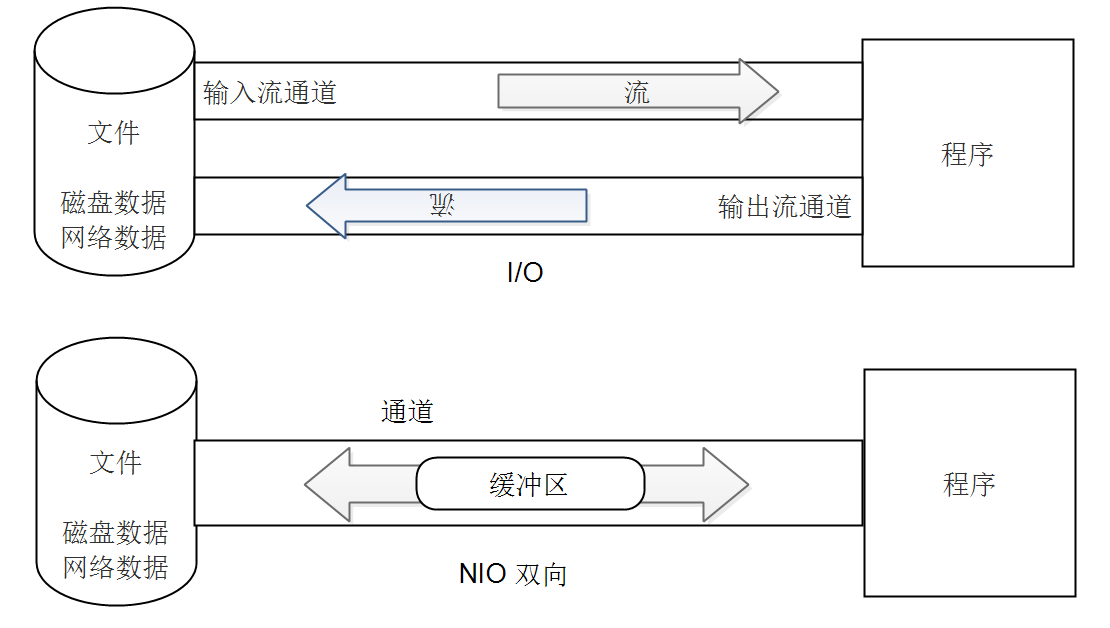
NIO与IO的主要区别:
| IO | NIO |
|---|---|
| 面向流(Stream Oriented) | 面向缓冲区(Buffer Obriented) |
| 阻塞IO(Blocking IO) | 非阻塞IO(Non Blocking IO) |
| (无) | 选择器(Selectors) |
通道(channel)
用于源节点与目标节点的连接,在Java NIO 中负责缓冲区数据的传输。Channel本身不存储数据,需要配合缓冲区进行数据传输。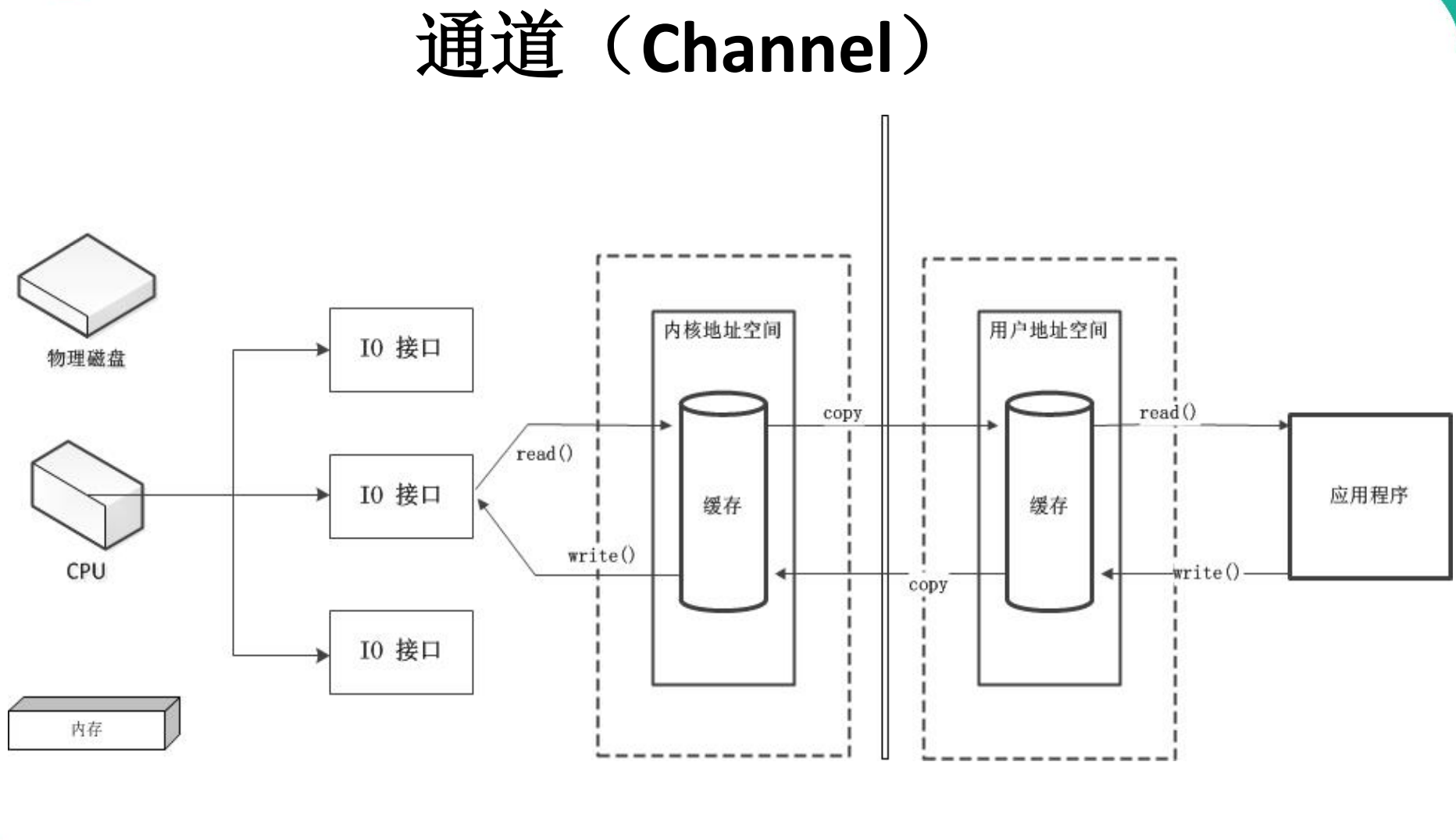
通道的主要类型
| 通道类型 | 描述 | 备注 |
|---|---|---|
| FileChannel | 用于读取、写入、映射和操作文件的通道 | File |
| SocketChannel | 通过 TCP 读写网络中的数据 | TCP |
| ServerSocketChannel | 可以监听新进来的 TCP 连接,对每一个新进来 的连接都会创建一个 SocketChannel |
TCP |
| DatagramChannel | 通过 UDP 读写网络中的数据通道 | UDP |
获取通道
获取通道的一种方式是对支持通道的对象调用getChannel() 方法。支持通道的类如下:
- FileInputStream
- FileOutputStream
- RandomAccessFile
- DatagramSocket
- Socket
- ServerSocket
获取通道的其他方式是使用 Files 类的静态方法 newByteChannel() 获取字节通道。或者通过通道的静态方法 open() 打开并返回指定通道
方式1:获取通道
// 文件拷贝FileInputStream fis = new FileInputStream("test.jpg");FileOutputStream fos = new FileOutputStream("test2.jpg");ByteBuffer buffer = ByteBuffer.allocate(1024);FileChannel fisChannel = fis.getChannel();FileChannel fosChannel = fos.getChannel();while (fisChannel.read(buffer) != -1) {buffer.flip();fosChannel.write(buffer);buffer.clear();}fisChannel.close();fosChannel.close();
方式2:获取通道
// 文件拷贝FileChannel inChannel = FileChannel.open(Paths.get("test.jpg"), StandardOpenOption.READ);FileChannel outChannel = FileChannel.open(Paths.get("test1.jpg"), StandardOpenOption.WRITE,StandardOpenOption.READ,StandardOpenOption.CREATE);ByteBuffer buffer = ByteBuffer.allocate(1024);while (inChannel.read(buffer) != -1) {buffer.flip();outChannel.write(buffer);buffer.clear();}inChannel.close();outChannel.close();
通道之间的数据传输(直接缓冲区)
FileChannel inChannel = FileChannel.open(Paths.get("test.jpg"), StandardOpenOption.READ);FileChannel outChannel = FileChannel.open(Paths.get("test1.jpg"), StandardOpenOption.WRITE,StandardOpenOption.READ,StandardOpenOption.CREATE);// 方式1inChannel.transferTo(0,inChannel.size(),outChannel);// 方式2outChannel.transferFrom(inChannel,0,inChannel.size());
分散与聚集
分散读取(Scattering Reads):将通道中的数据分散到多个缓冲区中
聚集写入(Gethering Writes):将多个缓冲区中的数据聚集到通道中
RandomAccessFile rafRead = new RandomAccessFile("test.txt", "rw");// 分散读取,开启多个缓冲区ByteBuffer buffer = ByteBuffer.allocate(1024);ByteBuffer buffer1 = ByteBuffer.allocate(1024);ByteBuffer buffer2 = ByteBuffer.allocate(1024);ByteBuffer[] buffers = {buffer, buffer1, buffer2};// 打开读模式for (ByteBuffer byteBuffer : buffers) {byteBuffer.flip();}RandomAccessFile rafWrite = new RandomAccessFile("test1.txt", "rw");// 聚集写入FileChannel rafWriteChannel = rafWrite.getChannel();rafWriteChannel.write(buffers);
字符集
编码:将字符串 => 字节数组
解码:将字节数组 => 字符串
// 设置字符集为GBKCharset charset = Charset.forName("GBK");CharsetEncoder charsetEncoder = charset.newEncoder();CharsetDecoder charsetDecoder = charset.newDecoder();CharBuffer charBuffer = CharBuffer.allocate(1024);charBuffer.put("测试编码TTT");charBuffer.flip();// 开始编码ByteBuffer byteBuffer = charsetEncoder.encode(charBuffer);int limit = byteBuffer.limit();for (int i = 0; i < limit; i++) {System.out.println(byteBuffer.get());}// 设置读模式byteBuffer.flip();// 使用GBK解码CharBuffer decodeCharBuffer = charsetDecoder.decode(byteBuffer);System.out.println(decodeCharBuffer.toString());
阻塞与非阻塞
传统的 IO 流都是阻塞式的。也就是说,当一个线程调用 read() 或 write() 时,该线程被阻塞,直到有一些数据被读取或写入,该线程在此期间不能执行其他任务。因此,在完成网络通信进行 IO 操作时,由于线程会阻塞,所以服务器端必须为每个客户端都提供一个独立的线程进行处理,当服务器端需要处理大量客户端时,性能急剧下降。
Java NIO 是非阻塞模式的。当线程从某通道进行读写数据时,若没有数据可用时,该线程可以进行其他任务。线程通常将非阻塞 IO 的空闲时间用于在其他通道上执行 IO 操作,所以单独的线程可以管理多个输入和输出通道。因此,NIO 可以让服务器端使用一个或有限几个线程来同时处理连接到服务器端的所有客户端。
选择器(Selector)
是 SelectableChannle 对象的多路复用器,Selector 可以同时监控多个 SelectableChannel 的 IO 状况,也就是说,利用 Selector 可使一个单独的线程管理多个Channel。Selector 是非阻塞 IO 的核心。
SelectableChannle 的结构如下图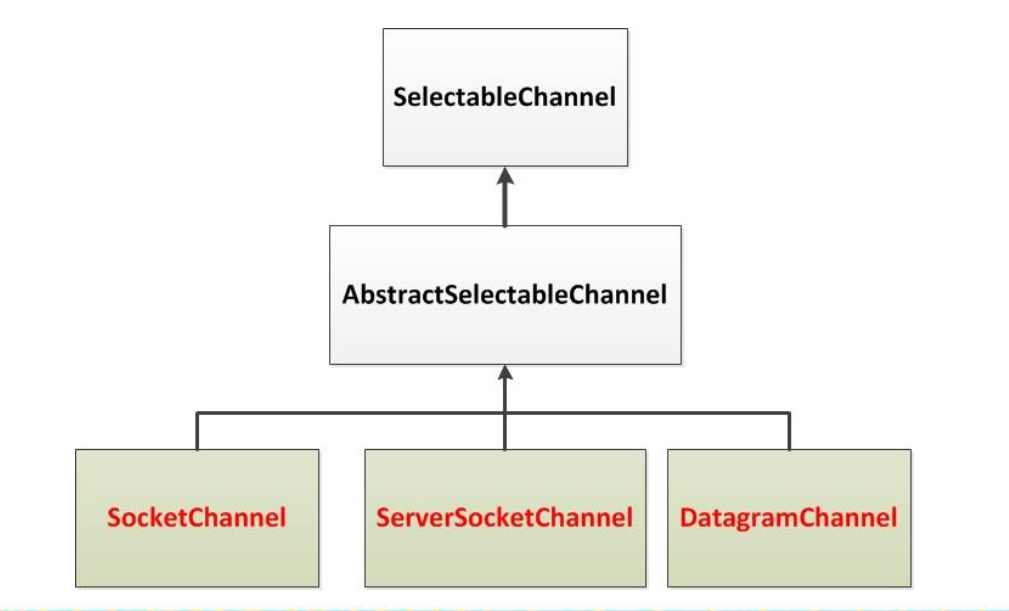
什么是流?
内存与存储设备直接的传输数据通道
流的分类
按照流向分类:
- 输入流:将<存储设备>中的内容读取到<内存>中
- 输出流:将<内存>中的内容读取到<存储设备>中
以内存为参照物来说数据流向
按单位分类:
- 字节流:以字节为代码,可以读写所有数据
- 字符流:以字符为单位,只能读写文本数据
按功能:
- 节点流:具有实际传输数据的读写功能
- 过滤流:在节点的基础上增强功能
字节流的父类(抽象类)
//InputStream 字节输入流public int read(){}public int read(byte[] b){}public int read(byte[] b, int off, int len){}// OutputStream 字节输出流public void write(int n){}public void write(byte[] b){}public void write(byte[] b, int off, int len){}

若有收获,就点个赞吧
0 人点赞


