1、ProwerDesinger设计用户表
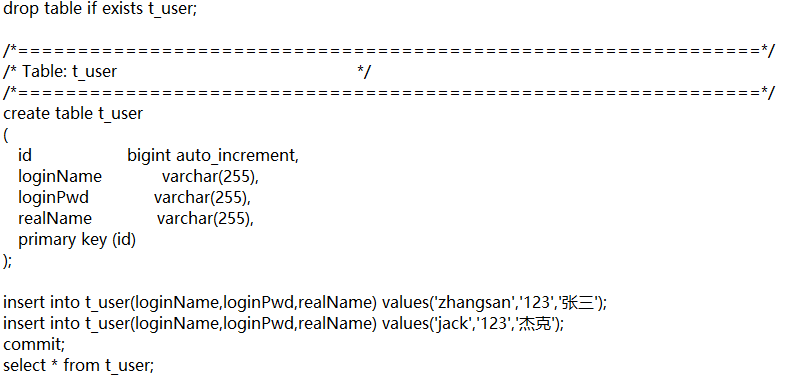
- 得到创建t_user表的sql语句
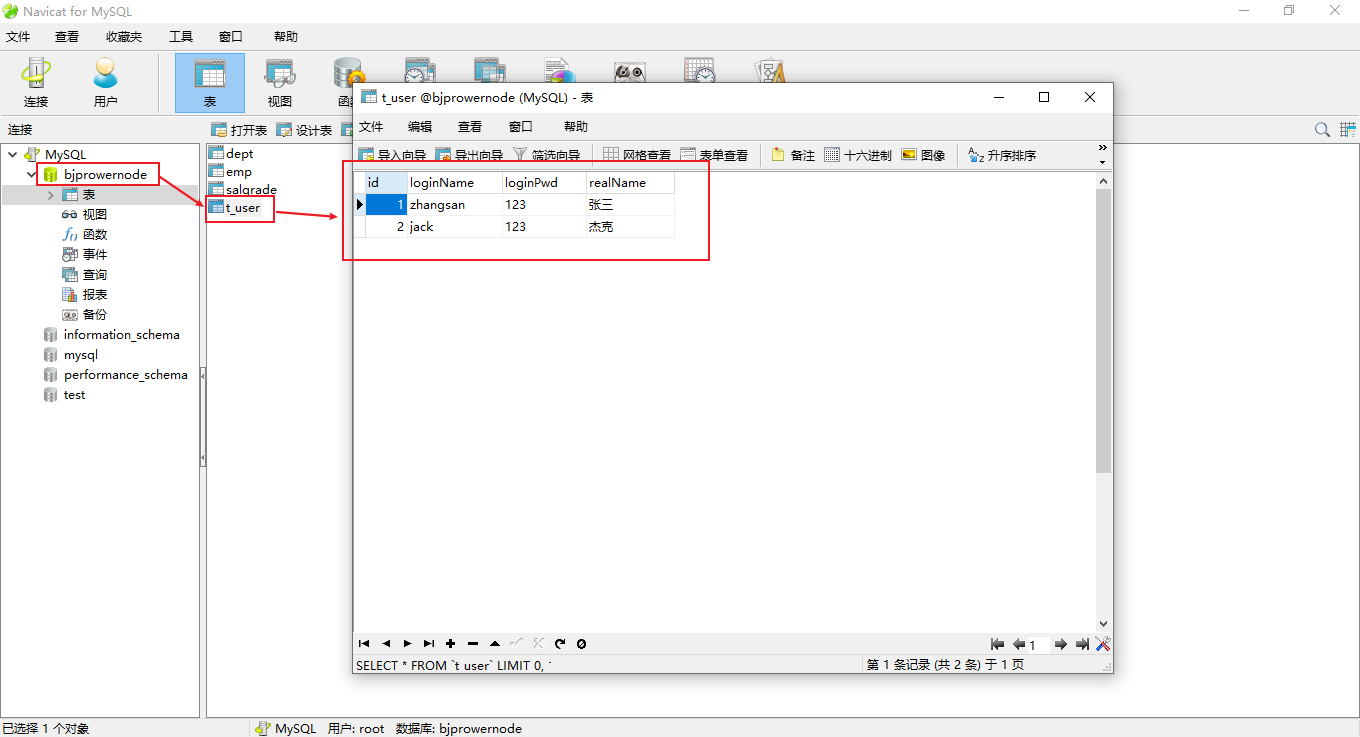
- 将该表source到数据库bjprowernode中
2、编写业务代码
package com.glutnn.test;import java.sql.*;import java.util.HashMap;import java.util.Map;import java.util.Scanner;/** 1、需求:* 模拟用户登录功能的实现* 2、业务描述* 程序运行的时候,提供一个输入的入口,可以让用户输入用户名和密码* 用户输入用户名和密码后,提交信息,java程序收集到用户信息* Java程序连接数据库验证用户名和密码是否合法* 合法:显示登录成功* 不合法:显示登录失败* 3、数据的准备* 在实际开发中,表的设计会使用专业的建模工具,这里使用ProwerDesinger* 使用pd工具来进行数据库表的设计* */public class JDBCTest02 {public static void main(String[] args) {//初始化一个界面Map<String,String> userLoginInfo = initUI();//验证用户名和密码boolean loginSuccess = login(userLoginInfo);//最后输出结果System.out.println(loginSuccess ? "登录成功" : "登录失败");}/*** 用户登录* @param userLoginInfo* @return false表示失败,true表示成功*/private static boolean login(Map<String, String> userLoginInfo) {//打标记的意识boolean loginSuccess = false;//单独定义变量String loginName = userLoginInfo.get("loginName");String loginPwd = userLoginInfo.get("loginPwd");//JDBC代码Connection conn = null;Statement stmt = null;ResultSet rs = null;try {//1、注册驱动Class.forName("com.mysql.jdbc.Driver");//2、获得连接conn = DriverManager.getConnection("jdbc:mysql://localhost:3306/bjprowernode","root","2000");//3、获得数据库操作对象stmt = conn.createStatement();//4、执行sqlString sql = "select * from t_user where loginName = '"+loginName+"' and loginPwd = '"+loginPwd+"' ";rs = stmt.executeQuery(sql);//5、处理结果集if (rs.next()){//登录成功loginSuccess = true;}} catch (ClassNotFoundException | SQLException e) {e.printStackTrace();} finally {//6、释放资源try {if (rs == null) {rs.close();}} catch (SQLException throwables) {throwables.printStackTrace();}try {if (stmt == null) {stmt.close();}} catch (SQLException throwables) {throwables.printStackTrace();}try {if (rs == null) {rs.close();}} catch (SQLException throwables) {throwables.printStackTrace();}}return loginSuccess;}/*** 初始化用户界面* @return 用户输入的用户名和密码等登录信息*/private static Map<String, String> initUI() {Scanner s = new Scanner(System.in);System.out.println("用户名:");String loginName = s.nextLine();System.out.println("密码:");String loginPwd = s.nextLine();Map<String,String> userLoginInfo = new HashMap<>();userLoginInfo.put("loginName",loginName);userLoginInfo.put("loginPwd",loginPwd);return userLoginInfo;}}
3、sql注入问题
/*
以上程序存在sql注入问题
用户名:fdsa
密码:fdsa' or '1'='1
登录成功

【安全隐患】

sql注入的根本原因:
    用户输入的信息中含有sql语句的关键字,并且这些关键字参与了sql语句的编译过程
    导致sql语句的原来意思被扭曲,进而达到sql注入的目的

String sql = "select * from t_user where loginName = '"+loginName+"' and loginPwd = '"+loginPwd+"' ";
以上代码正好完成了sql语句的拼接,之后执行的 rs = stmt.executeQuery(sql);
将sql语句发送给DBMS,DBMS进行sql编译
正好将用户提供的非法信息编译进去,导致了原来sql语句含义被扭曲

解决sql注入问题的关键
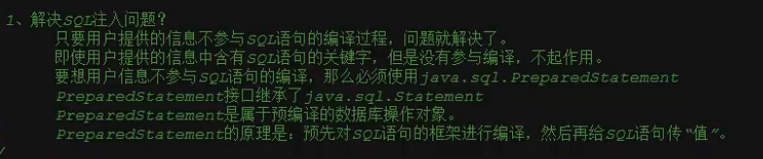
    用户提供的信息中即使含有sql语句的关键字,但是这些关键字不参与编译,不起作用
*/
4、解决sql注入问题
package com.glutnn.test;

import java.sql.*;
import java.util.HashMap;
import java.util.Map;
import java.util.Scanner;

/*
* 1、需求:
*       模拟用户登录功能的实现
* 2、业务描述
*       程序运行的时候,提供一个输入的入口,可以让用户输入用户名和密码
*       用户输入用户名和密码后,提交信息,java程序收集到用户信息
*       Java程序连接数据库验证用户名和密码是否合法
*       合法:显示登录成功
*       不合法:显示登录失败
* 3、数据的准备
*       在实际开发中,表的设计会使用专业的建模工具,这里使用ProwerDesinger
*       使用pd工具来进行数据库表的设计
* */
public class JDBCTest02 {
    public static void main(String[] args) {
        //初始化一个界面
        Map<String,String> userLoginInfo = initUI();
        //验证用户名和密码
        boolean loginSuccess = login(userLoginInfo);
        //最后输出结果
        System.out.println(loginSuccess ? "登录成功" : "登录失败");
    }

    /**
     * 用户登录
     * @param userLoginInfo
     * @return false表示失败,true表示成功
     */
    private static boolean login(Map<String, String> userLoginInfo) {
        //打标记的意识
        boolean loginSuccess = false;

        //单独定义变量
        String loginName = userLoginInfo.get("loginName");
        String loginPwd = userLoginInfo.get("loginPwd");

        //JDBC代码
        Connection conn = null;
        PreparedStatement ps = null;//预编译的数据库操作对象
        ResultSet rs = null;
        try {
            //1、注册驱动
            Class.forName("com.mysql.jdbc.Driver");
            //2、获得连接
            conn = DriverManager.getConnection("jdbc:mysql://localhost:3306/bjprowernode","root","2000");
            //3、获得数据库操作对象
            //sql语句的框子,其中一个?代表一个占位符,一个?将来接收一个值,注意:占位符不能使用单引号括起来
            String sql = "select * from t_user where loginName = ? and loginPwd = ? ";
            //程序执行到这里,会发送sql语句框子给DBMS,然后DBMS进行sql语句的预先编译
            ps = conn.prepareStatement(sql);
            //给占位符?传值(第一个占位符下标是1,第二个占位符下标是2,JDBC中下标从1开始)
            ps.setString(1,loginName);
            ps.setString(2,loginPwd);
            //4、执行sql
            rs = ps.executeQuery(sql);
            //5、处理结果集
            if (rs.next()){
                //登录成功
                loginSuccess = true;
            }
        } catch (ClassNotFoundException | SQLException e) {
            e.printStackTrace();
        } finally {
            //6、释放资源
            try {
                if (rs == null) {
                    rs.close();
                }
            } catch (SQLException throwables) {
                throwables.printStackTrace();
            }
            try {
                if (ps == null) {
                    ps.close();
                }
            } catch (SQLException throwables) {
                throwables.printStackTrace();
            }
            try {
                if (rs == null) {
                    rs.close();
                }
            } catch (SQLException throwables) {
                throwables.printStackTrace();
            }
        }
        return loginSuccess;
    }

    /**
     * 初始化用户界面
     * @return 用户输入的用户名和密码等登录信息
     */
    private static Map<String, String> initUI() {
        Scanner s = new Scanner(System.in);

        System.out.println("用户名:");
        String loginName = s.nextLine();

        System.out.println("密码:");
        String loginPwd = s.nextLine();

        Map<String,String> userLoginInfo = new HashMap<>();
        userLoginInfo.put("loginName",loginName);
        userLoginInfo.put("loginPwd",loginPwd);

        return userLoginInfo;
    }
}
5、Statement和PreparedStatement

6、PreparedStatement完成增删改
- insert ```java package com.glutnn.test;
import java.sql.Connection; import java.sql.DriverManager; import java.sql.PreparedStatement; import java.sql.SQLException;
public class JDBCTest03 { public static void main(String[] args) { Connection conn = null; PreparedStatement ps = null;
    try {
        //1、注册驱动
        Class.forName("com.mysql.jdbc.Driver");
        //2、获得连接
        conn = DriverManager.getConnection("jdbc:mysql://localhost:3306/bjprowernode","root","2000");
        //3、获得预编译数据库对象
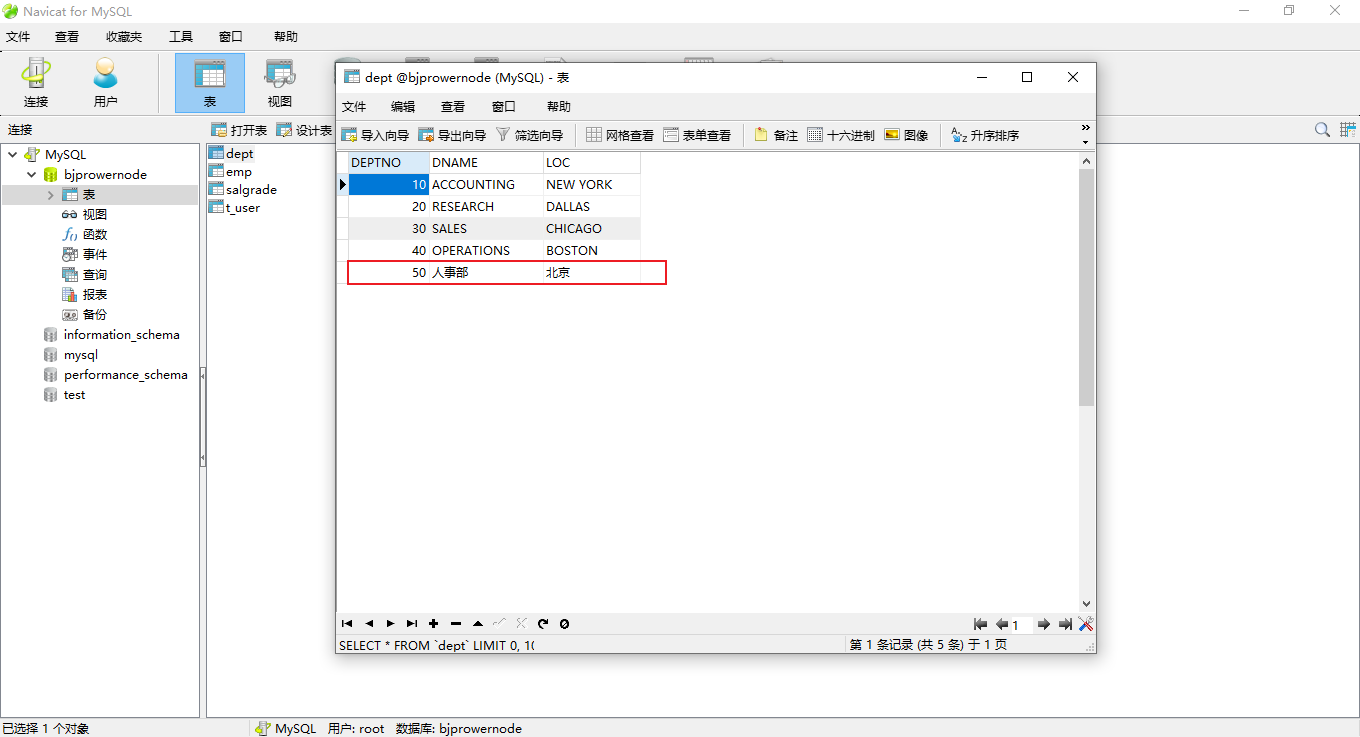
        String sql = "insert into dept(deptno,dname,loc) values(?,?,?)";
        ps = conn.prepareStatement(sql);
        ps.setInt(1,50);
        ps.setString(2,"人事部");
        ps.setString(3,"北京");
        //4、执行sql
        ps.executeUpdate();
    } catch (ClassNotFoundException | SQLException e) {
        e.printStackTrace();
    } finally {
        //6、释放资源
        try {
            if (ps == null) {
                ps.close();
            }
        } catch (SQLException throwables) {
            throwables.printStackTrace();
        }
        try {
            if (conn == null) {
                conn.close();
            }
        } catch (SQLException throwables) {
            throwables.printStackTrace();
        }
    }
}
}
- update
```java
package com.glutnn.test;
import java.sql.Connection;
import java.sql.DriverManager;
import java.sql.PreparedStatement;
import java.sql.SQLException;
public class JDBCTest03 {
public static void main(String[] args) {
Connection conn = null;
PreparedStatement ps = null;
try {
//1、注册驱动
Class.forName("com.mysql.jdbc.Driver");
//2、获得连接
conn = DriverManager.getConnection("jdbc:mysql://localhost:3306/bjprowernode","root","2000");
//3、获得预编译数据库对象
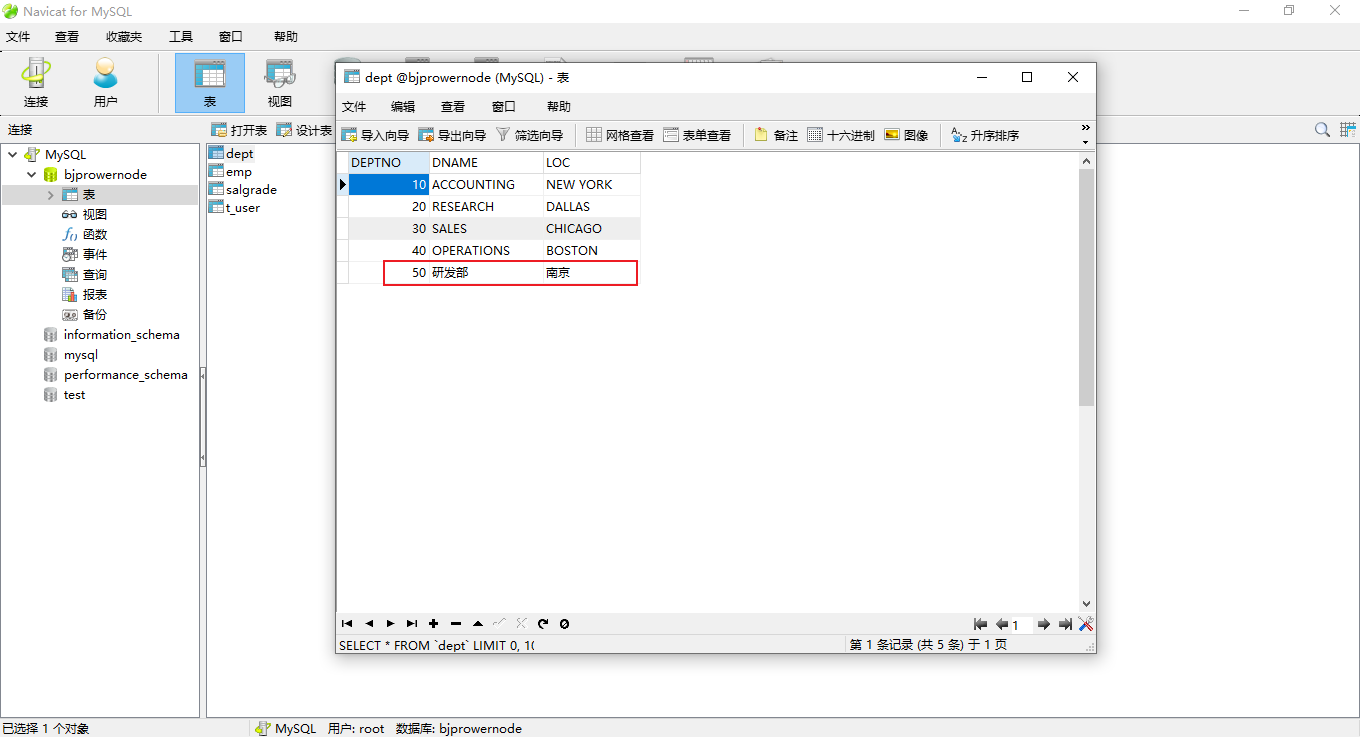
String sql = "update dept set dname=?,loc=? where deptno=?";
ps = conn.prepareStatement(sql);
ps.setString(1,"研发部");
ps.setString(2,"南京");
ps.setInt(3,50);
//4、执行sql
ps.executeUpdate();
} catch (ClassNotFoundException | SQLException e) {
e.printStackTrace();
} finally {
//6、释放资源
try {
if (ps == null) {
ps.close();
}
} catch (SQLException throwables) {
throwables.printStackTrace();
}
try {
if (conn == null) {
conn.close();
}
} catch (SQLException throwables) {
throwables.printStackTrace();
}
}
}
}
- delete ```java package com.glutnn.test;
import java.sql.Connection; import java.sql.DriverManager; import java.sql.PreparedStatement; import java.sql.SQLException;
public class JDBCTest03 { public static void main(String[] args) { Connection conn = null; PreparedStatement ps = null;
    try {
        //1、注册驱动
        Class.forName("com.mysql.jdbc.Driver");
        //2、获得连接
        conn = DriverManager.getConnection("jdbc:mysql://localhost:3306/bjprowernode","root","2000");
        //3、获得预编译数据库对象
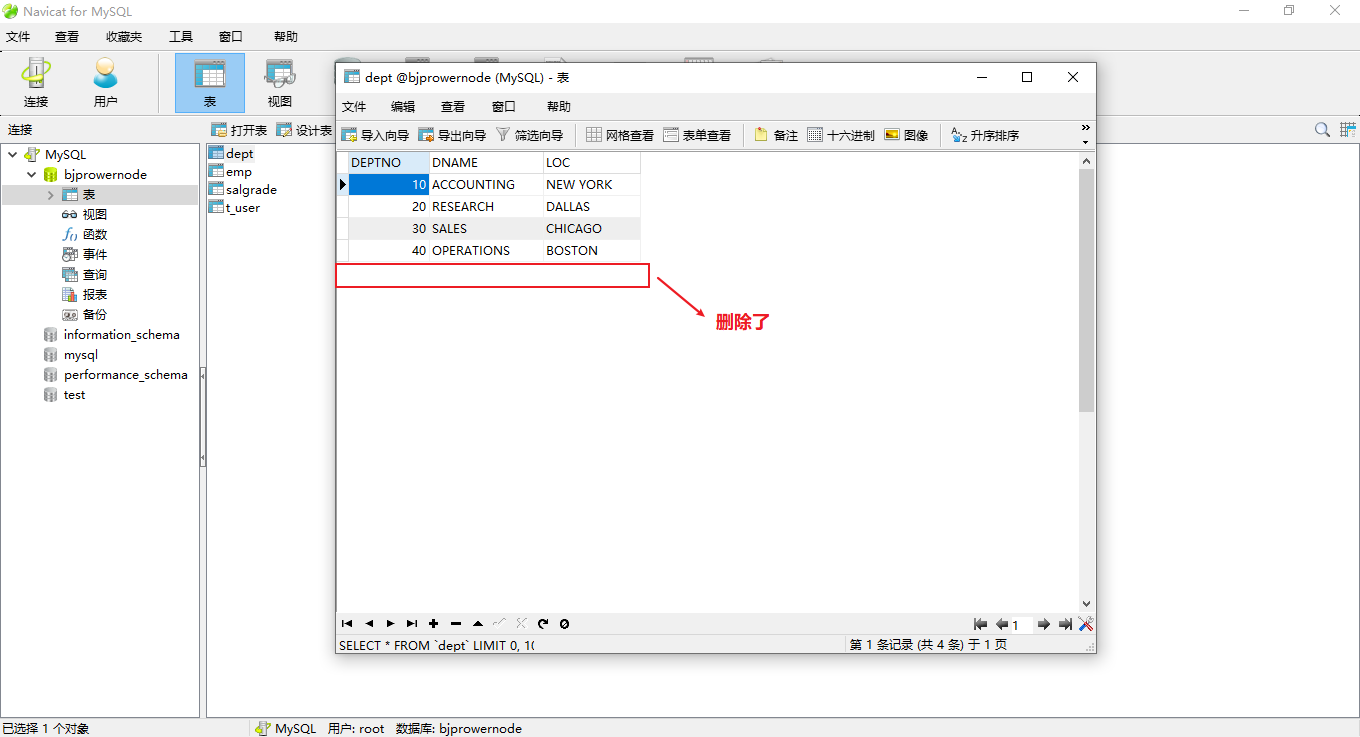
        String sql = "delete from dept where deptno=?";
        ps = conn.prepareStatement(sql);
        ps.setInt(1,50);
        //4、执行sql
        ps.executeUpdate();
    } catch (ClassNotFoundException | SQLException e) {
        e.printStackTrace();
    } finally {
        //6、释放资源
        try {
            if (ps == null) {
                ps.close();
            }
        } catch (SQLException throwables) {
            throwables.printStackTrace();
        }
        try {
            if (conn == null) {
                conn.close();
            }
        } catch (SQLException throwables) {
            throwables.printStackTrace();
        }
    }
}
}
```

若有收获,就点个赞吧
0 人点赞


