Java Server Pages
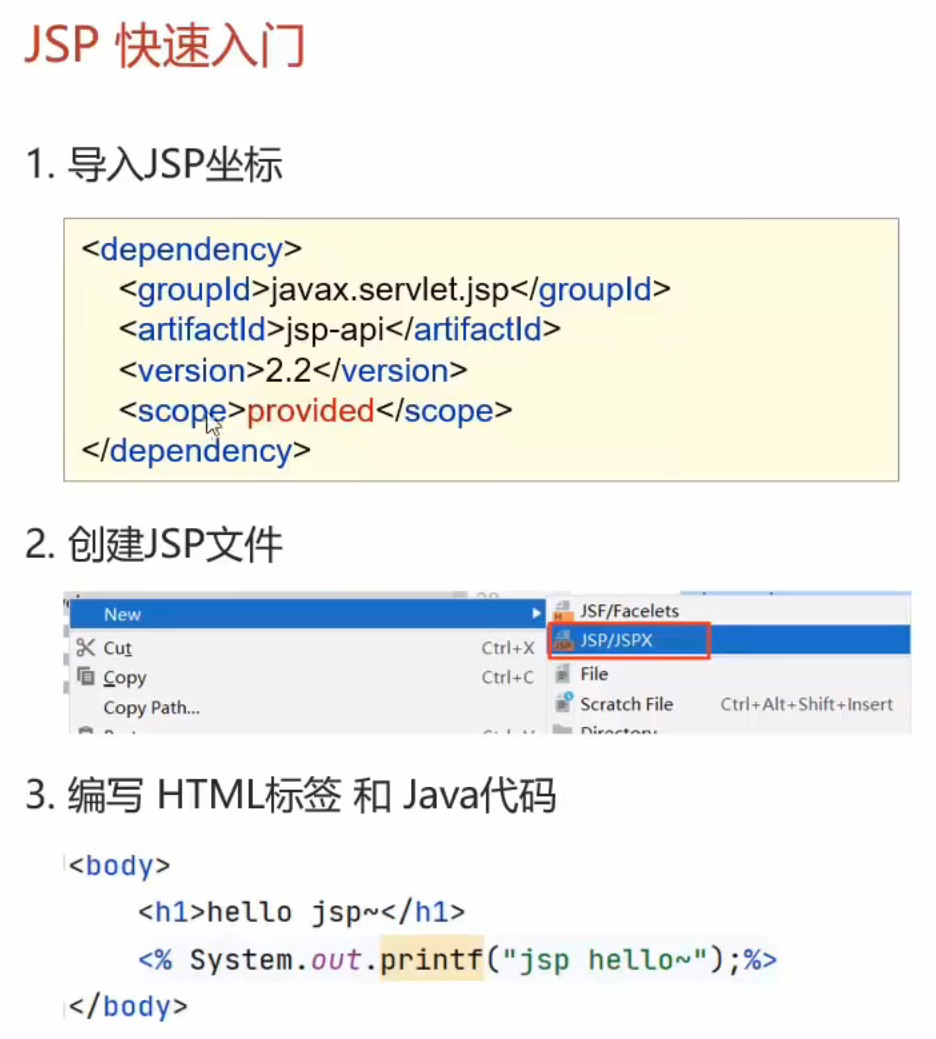
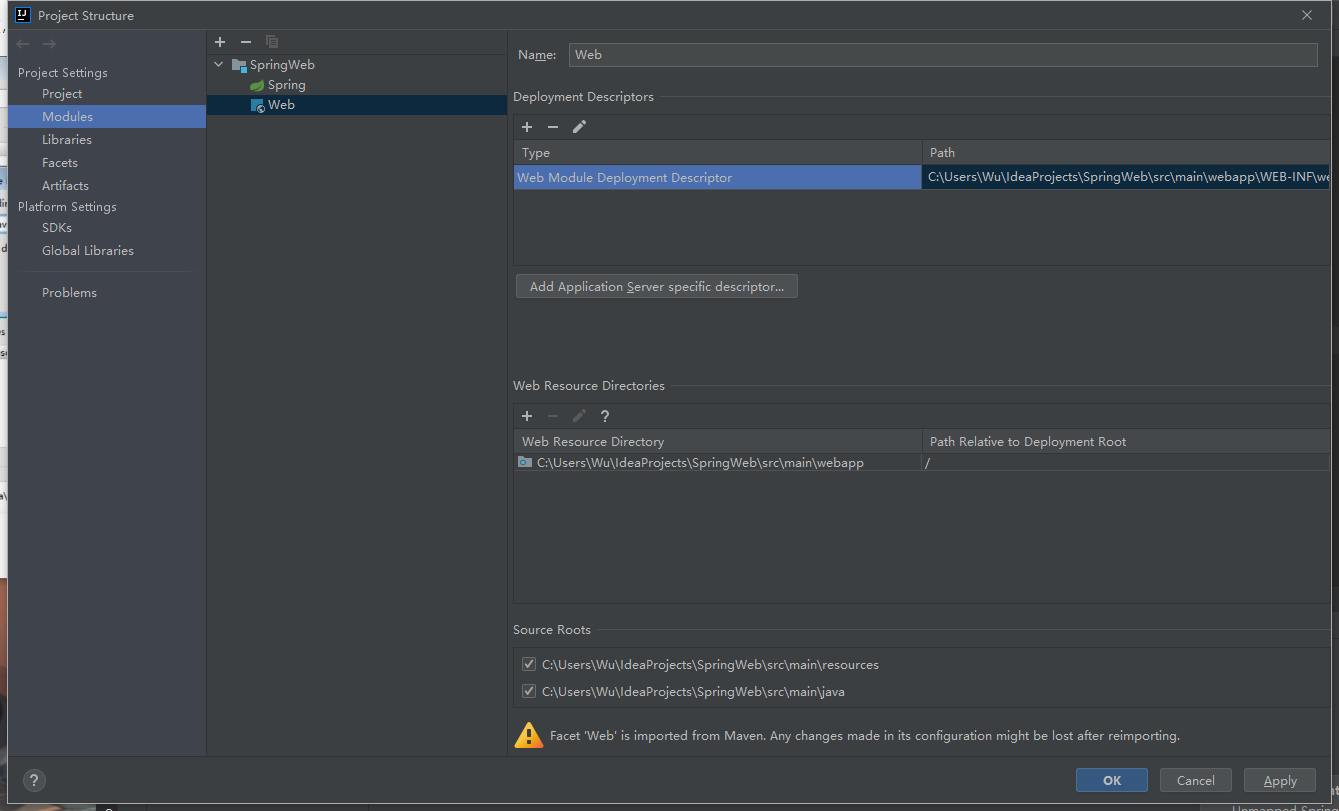
需要注意如果没有创建jsp选项得自己把web resource路径写好
需要注意的scope是provided同理servlet
1.导入pom,略
2.创建jsp文件,直接用index.jsp了
3.改一下
<html><body><h2>Hello JSP!</h2><%System.out.println("Hello JSP!");%></body></html>
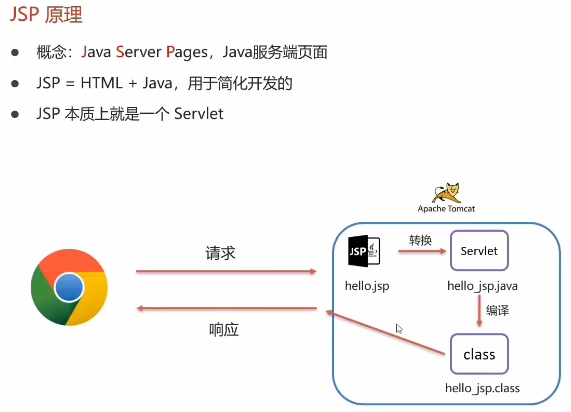
JSP原理
JSP脚本
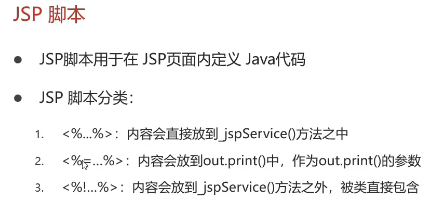
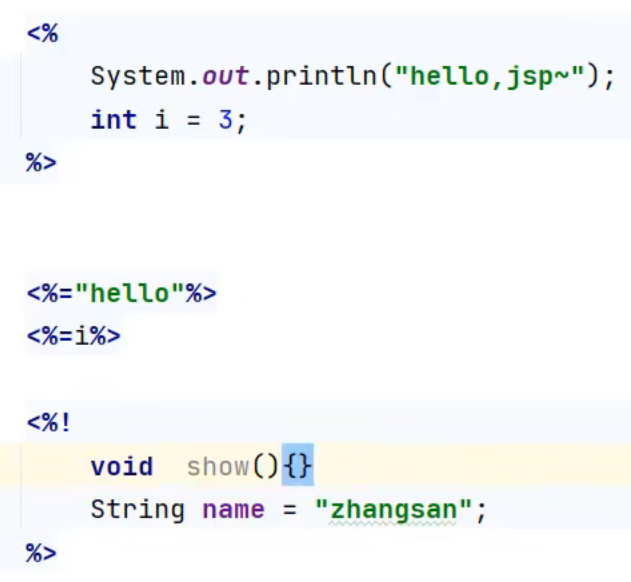
第二种作为参数能够实现动态页面展示比如username会被输出为变量值
第三种包括成员变量和函数
此处模拟数据库内容输出表格
<%@ page import="java.util.List" %>
<%@ page import="top.wjysb.pojo.User" %>
<%@ page import="java.util.ArrayList" %>
<%@ page contentType="text/html;charset=UTF-8" %>
<html>
<body>
<h2>Hello JSP!</h2>
<%
    System.out.println("Hello JSP!");
    //此处模拟数据库已经取出数据的情况
    List<User> users = new ArrayList<User>();
    users.add(new User("yuechan", "yuechan123"));
    users.add(new User("yawang", "yawang456"));
    //两个数据够了
%>

<table border="1">
    <tr>
        <th>用户名
        </th>
        <th>密码
        </th>
    </tr>
    <%
        for (User user : users) {
    %>
    <tr>
        <th><%=user.getUsername()%>
        </th>
        <th><%=user.getPassword()%>
        </th>
    </tr>
    <%
        }
    %>
</table>
</body>
</html>
浏览器的效果,没写css
<table border="1">
    <tr>
        <th>用户名
        </th>
        <th>密码
        </th>
    </tr>

    <tr>
        <th>yuechan
        </th>
        <th>yuechan123
        </th>
    </tr>

    <tr>
        <th>yawang
        </th>
        <th>yawang456
        </th>
    </tr>
</table>
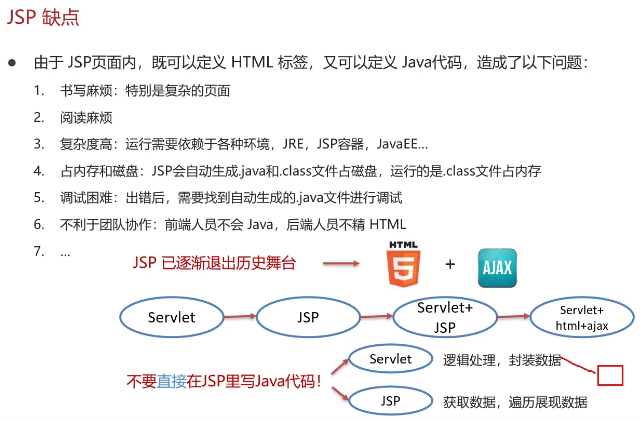
JSP缺点
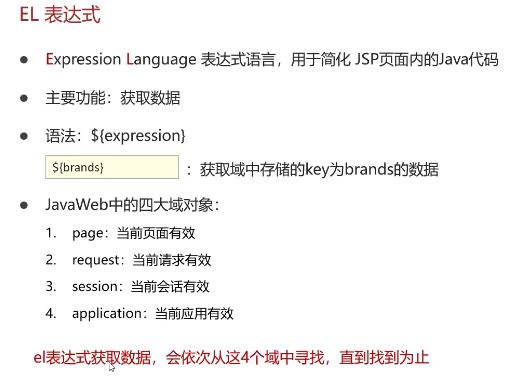
EL表达式 ${}
总之还是来段代码演示
/EL网页打开后从数据库获得数据转发给EL.jsp
然后显示
<%@ page isELIgnored="false" %>
script中同样也可以使用EL标签
在script中使用el标签需要注意:如果是获取的值,必须加引号才可以进行操作,不加引号是没有任何效果!
package top.wjysb;

import org.apache.ibatis.session.SqlSession;
import org.apache.ibatis.session.SqlSessionFactory;
import top.wjysb.mapper.UserMapper;
import top.wjysb.pojo.Student;
import top.wjysb.util.SqlSessionFactoryUtil;

import javax.servlet.ServletException;
import javax.servlet.annotation.WebServlet;
import javax.servlet.http.HttpServlet;
import javax.servlet.http.HttpServletRequest;
import javax.servlet.http.HttpServletResponse;
import java.io.IOException;
import java.util.List;

@WebServlet("/EL")
public class EL extends HttpServlet {
    @Override
    protected void doGet(HttpServletRequest req, HttpServletResponse resp) throws ServletException, IOException {
        SqlSessionFactory sqlSessionFactory = SqlSessionFactoryUtil.getSqlSessionFactory();
        SqlSession sqlSession = sqlSessionFactory.openSession();
        UserMapper mapper = sqlSession.getMapper(UserMapper.class);
        List<Student> students = mapper.SelectAllStudents();

        sqlSession.close();

        req.setAttribute("students", students);
        req.getRequestDispatcher("/EL.jsp").forward(req, resp);
    }

    @Override
    protected void doPost(HttpServletRequest req, HttpServletResponse resp) throws ServletException, IOException {
        this.doGet(req, resp);
    }
}
<%@ page contentType="text/html;charset=UTF-8" language="java" %>
<%@ page isELIgnored="false" %>
<html>
<head>
    <title>EL</title>
</head>
<body>
${students}
</body>
</html>
JSTL标签 if&foreach
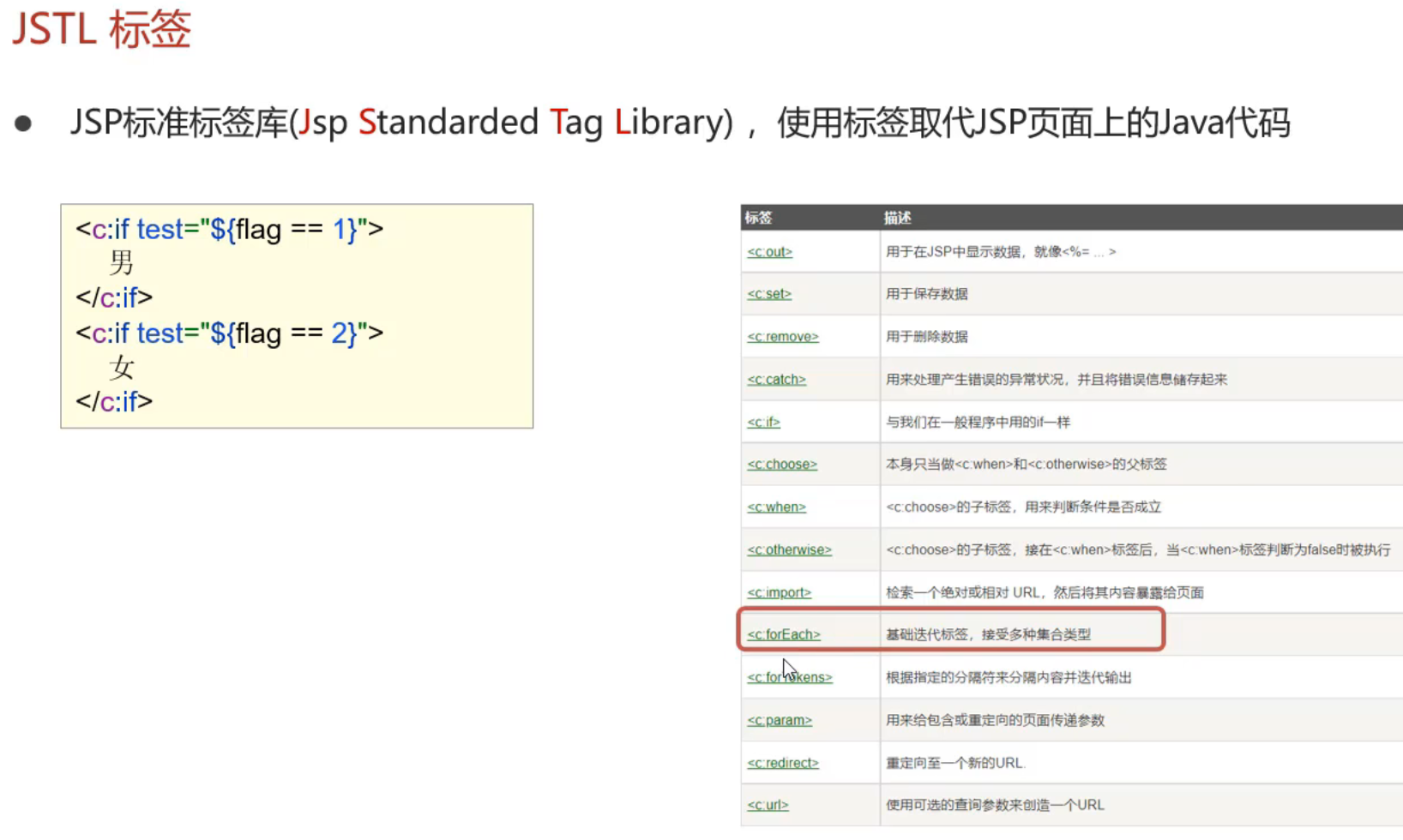
和EL一样,为了简化jsp中java代码存在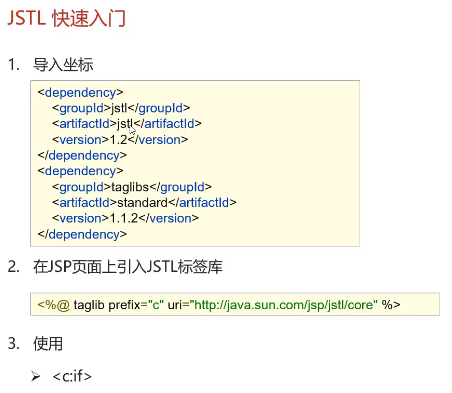
总之在pom中添加
        <dependency>
            <groupId>jstl</groupId>
            <artifactId>jstl</artifactId>
            <version>1.2</version>
        </dependency>
        <dependency>
            <groupId>taglibs</groupId>
            <artifactId>standard</artifactId>
            <version>1.1.2</version>
        </dependency>
jsp中添加<%@ taglib prefix="c" uri="http://java.sun.com/jsp/jstl/core" %>
c代表了标签的名字,建议使用c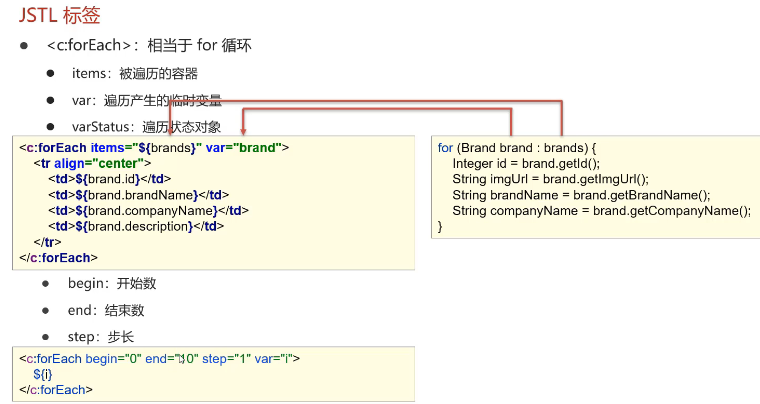
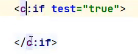 test中的值一般配合EL表达式 类似
<c:if test="${student.grade<60}">
总之还是写例子
<%@ page contentType="text/html;charset=UTF-8" language="java" %>
<%@ page isELIgnored="false" %>
<%@ taglib prefix="c" uri="http://java.sun.com/jsp/jstl/core" %>
<html>
<head>
    <title>EL</title>
</head>
<body>
<table border="1" width="400px">
    <tr>
        <th>学号</th>
        <th>名字</th>
        <th>成绩</th>
        <th>判定</th>
    </tr>
    <c:forEach items="${students}" var="student">
        <tr>
            <td>${student.id}</td>
            <td>${student.name}</td>
            <td>${student.grade}</td>
            <c:if test="${student.grade<60}">
                <td>不及格</td>
            </c:if>
            <c:if test="${student.grade>=60}">
                <td>及格</td>
            </c:if>
        </tr>
    </c:forEach>
</table>
</body>
</html>
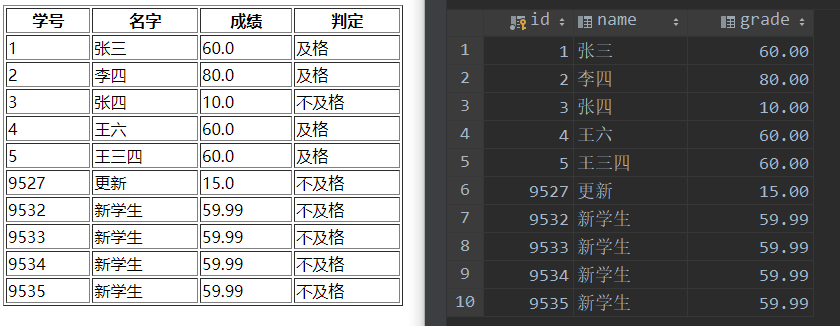
对照数据库和网页显示
foreach还能实现普通的for循环,可以用来写分页链接
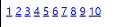
foreach还有一个varStatus 对其赋值后使用能得到index或者count,能够自动生成连续从0或者1开始的连续序号
<table border="1" width="600px">
    <tr>
        <th>index</th>
        <th>count</th>
        <th>学号</th>
        <th>名字</th>
        <th>成绩</th>
        <th>判定</th>
    </tr>
    <c:forEach items="${students}" var="student" varStatus="status">
        <tr>
            <td>${status.index}</td>
            <td>${status.count}</td>
            <td>${student.id}</td>
            <td>${student.name}</td>
            <td>${student.grade}</td>
            <c:if test="${student.grade<60}">
                <td>不及格</td>
            </c:if>
            <c:if test="${student.grade>=60}">
                <td>及格</td>
            </c:if>
        </tr>
    </c:forEach>
</table>
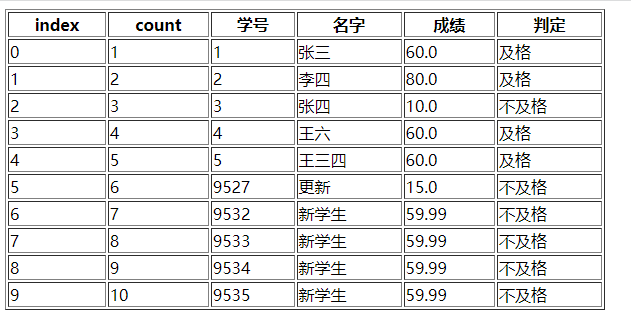
个人感觉count用的会多一些

若有收获,就点个赞吧
0 人点赞


