下载地址https://unpkg.com/browse/vue@3.2.31/版本号可以自己修改
概述&快速入门

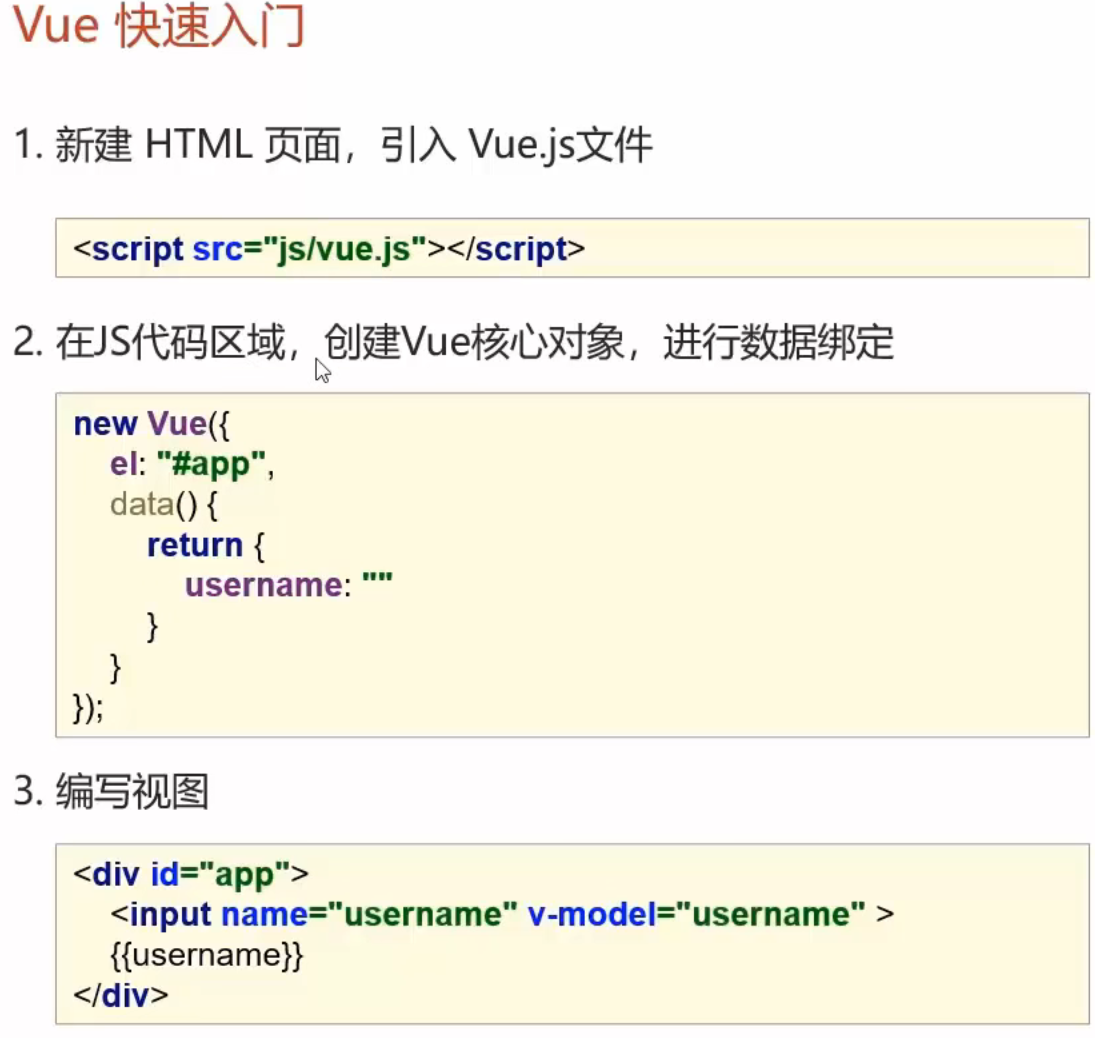
<!DOCTYPE html><html lang="en"><head><meta charset="UTF-8"><title>Title</title></head><body><div id="app"></div><script src="./js/vue.js"></script><script>new Vue({el: "#app",data: function () {return {username: ""}}})</script></body></html>
此处的data: function() 可以简化成data()
常用指令&生命周期
查/删改沿用
<!DOCTYPE html>
<html lang="en">
<head>
    <meta charset="UTF-8">
    <title>Title</title>
</head>
<body>
<div id="app">
    <table border="1" width="600px">
        <tr>
            <th>count</th>
            <th>学号</th>
            <th>名字</th>
            <th>成绩</th>
            <th>判定</th>
            <th>操作</th>
        </tr>
        <tr v-for="(student,i) in students">
            <th>{{ i + 1 }}</th>
            <th>{{ student.id }}</th>
            <th>{{ student.name }}</th>
            <th>{{ student.grade }}</th>
            <th v-if="student.grade>=60">及格</th>
            <th v-else>不及格</th>
            <th><a :href="['/SelectByIdServlet?id='+student.id]">修改</a> <a
                    :href="['/DeleteByIdServlet?id='+student.id]">删除</a>
            </th>
        </tr>
    </table>
</div>

<script src="./js/axios.js"></script>
<script src="./js/vue.js"></script>
<script>
    new Vue({
        el: "#app",
        data() {
            return {
                students: []
            }
        },
        mounted() {
            let _this = this;//此处需要得到vue中的this而不是全局this,所以用这个方法
            axios({
                method: "get",
                url: "http://localhost/JSONSelectAllServlet"
            }).then(function (resp) {
                _this.students = resp.data;
            })
        }
    })
</script>
</body>
</html>
此处删改功能使用:herf"[' String ' + Vue变量 ]"方式可以记忆一下
使用了获取this的小技巧
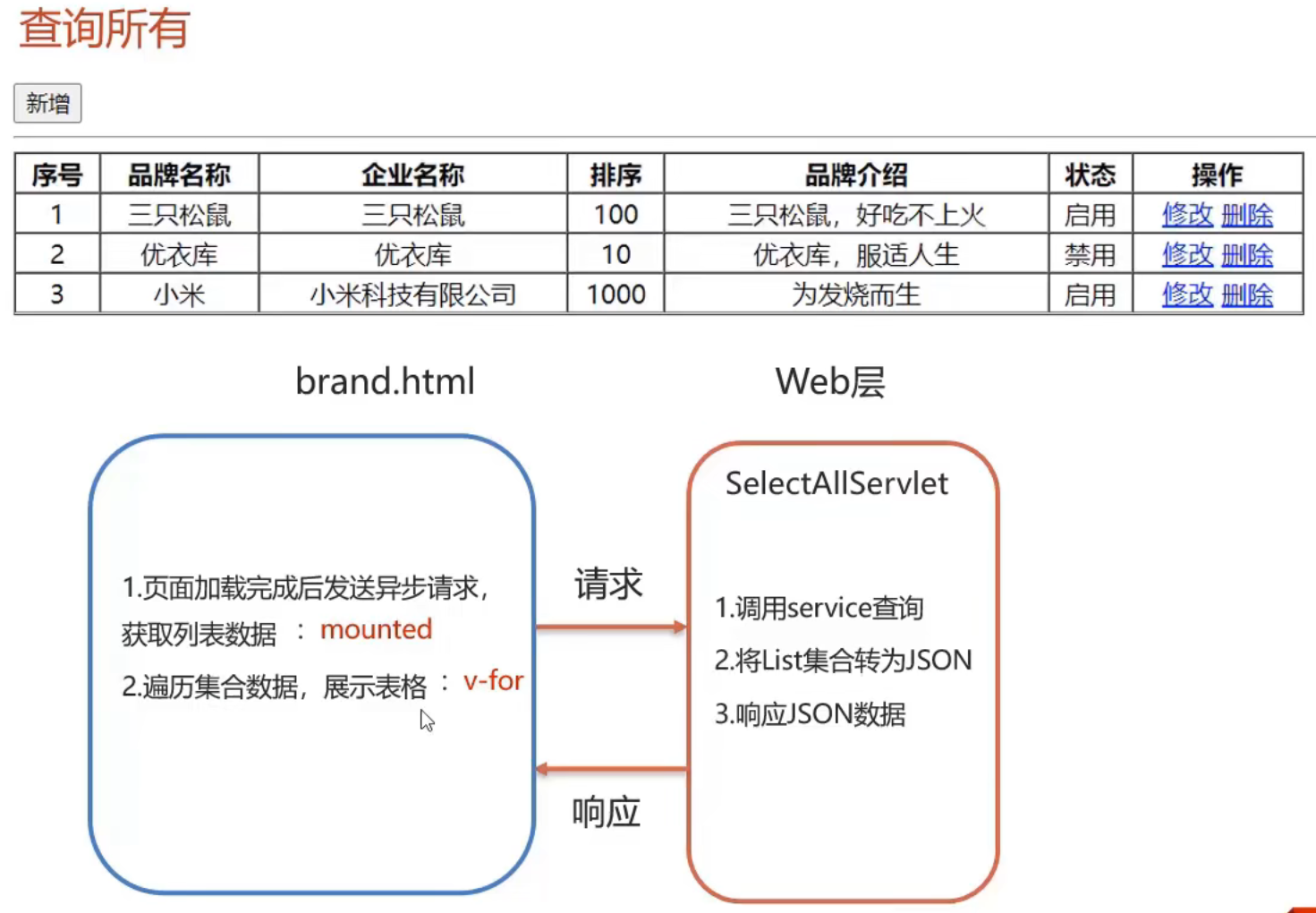
包括v-for v-if v-else mounted
https://www.runoob.com/w3cnote/javascript-window-onload.html
vue中的类似功能即是mounted
具体实现的机制
User/Student -> JSON -> getwriter().write -> resp.data -> Vue中的data -> div
JavaPOJO String text/json;charset=utf-8 axios s {} or [] html
增
<!DOCTYPE html>
<html lang="en">
<head>
    <meta charset="UTF-8">
    <title>AddStudent</title>
</head>
<body>
<div id="app">
    <form action="" method="post" id="submitCheck">
        <label for="IDLabel">请输入ID:</label>
        <input name="id" placeholder="输入ID" id="IDLabel" v-model="Student.id"><br>

        <label for="NAMELabel">请输入名字:</label>
        <input name="name" placeholder="输入名字" id="NAMELabel" v-model="Student.name" v><br>

        <label for="GRADELabel">请输入成绩:</label>
        <input name="grade" placeholder="输入成绩" id="GRADELabel" v-model="Student.grade"><br>

        <input type="button" value="添加学生信息" @click="SubmitF">
    </form>
    <input type="button" value="突然不想添加了" id="back">
</div>
<script src="./js/axios.js"></script>
<script src="./js/vue.js"></script>
<script>
    const IDInput = document.getElementById("IDLabel");

    function checkID() {
        const IDValue = IDInput.value;
        const IDTest = /^\d{1,4}$/
        return IDTest.test(IDValue);
    }

    const NAMEInput = document.getElementById("NAMELabelLabel");

    function checkNAME() {
        const NAMEValue = NAMEInput.value;
        const NAMETest = /^[\u4e00-\u9fa5]{2,3}$/
        return NAMETest.test(NAMEValue);
    }

    const GRADEInput = document.getElementById("GRADELabel");

    function checkGRADE() {
        const GRADEValue = GRADEInput.value;
        const GRADETest = /^[0-9]{0,3}(\.[0-9]{0,2})?$/
        return GRADETest.test(GRADEValue);
    }

    const submitForm = document.getElementById("submitCheck");
    submitForm.onsubmit = function () {
        if (checkID() && checkNAME() && checkGRADE()) {
            return true;
        } else {
            alert("请检查格式!")
            return false;
        }
    }
    document.getElementById("back").onclick = function () {
        document.location = "/Student.html";
    }

    new Vue({
        el: "#app",
        data() {
            return {
                Student: {}
            }
        },
        methods: {
            SubmitF() {
                let _this = this;
                axios({
                    method: "post",
                    url: "http://localhost/JSONAddServlet",
                    data: this.Student
                }).then(function (resp) {
                    if (resp.data == "success") {
                        location.href = "/StudentVue.html";//成功就会返回到之前的列表中
                    }
                })
            }
        }
    })

</script>
</body>
</html>
同理使用了v-on:click的简化版@click
此处Student使用的是{}代表单个元素

若有收获,就点个赞吧
0 人点赞


