放弃soap、dubbo,使用springcloud的原因:
- http协议无状态,支持跨平台调用
- 可插拔:服务短时间掉线后再连上来还会调用此服务
- 生态好,组件齐全(eureka,ribbon,feign,hystrix,zuul)
相对于dubbo,springcloud放弃了一部分性能,增强了可靠性,http调用会把对象序列化为json,而dubbo 服务之间的调用是将对象序列化为byte数组。
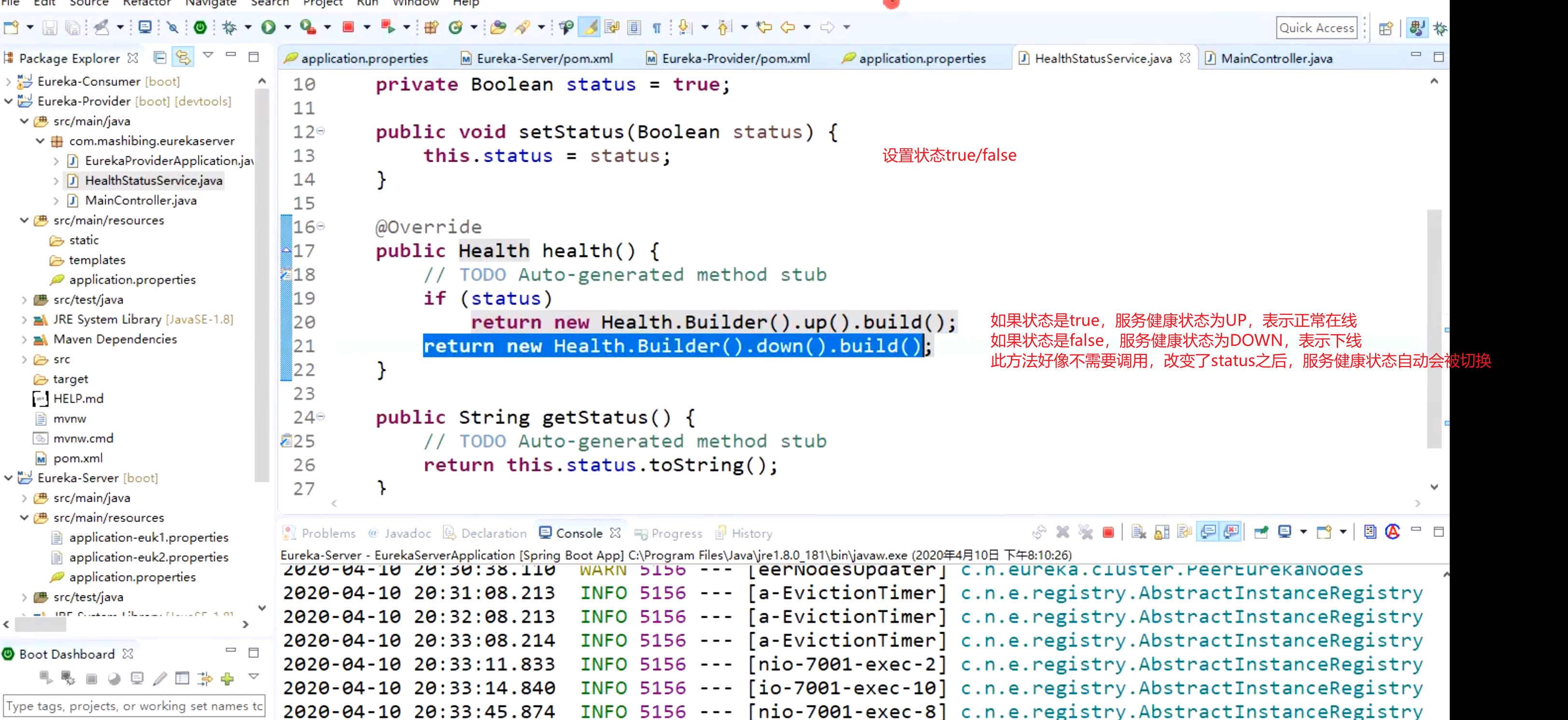
HealthIndicator
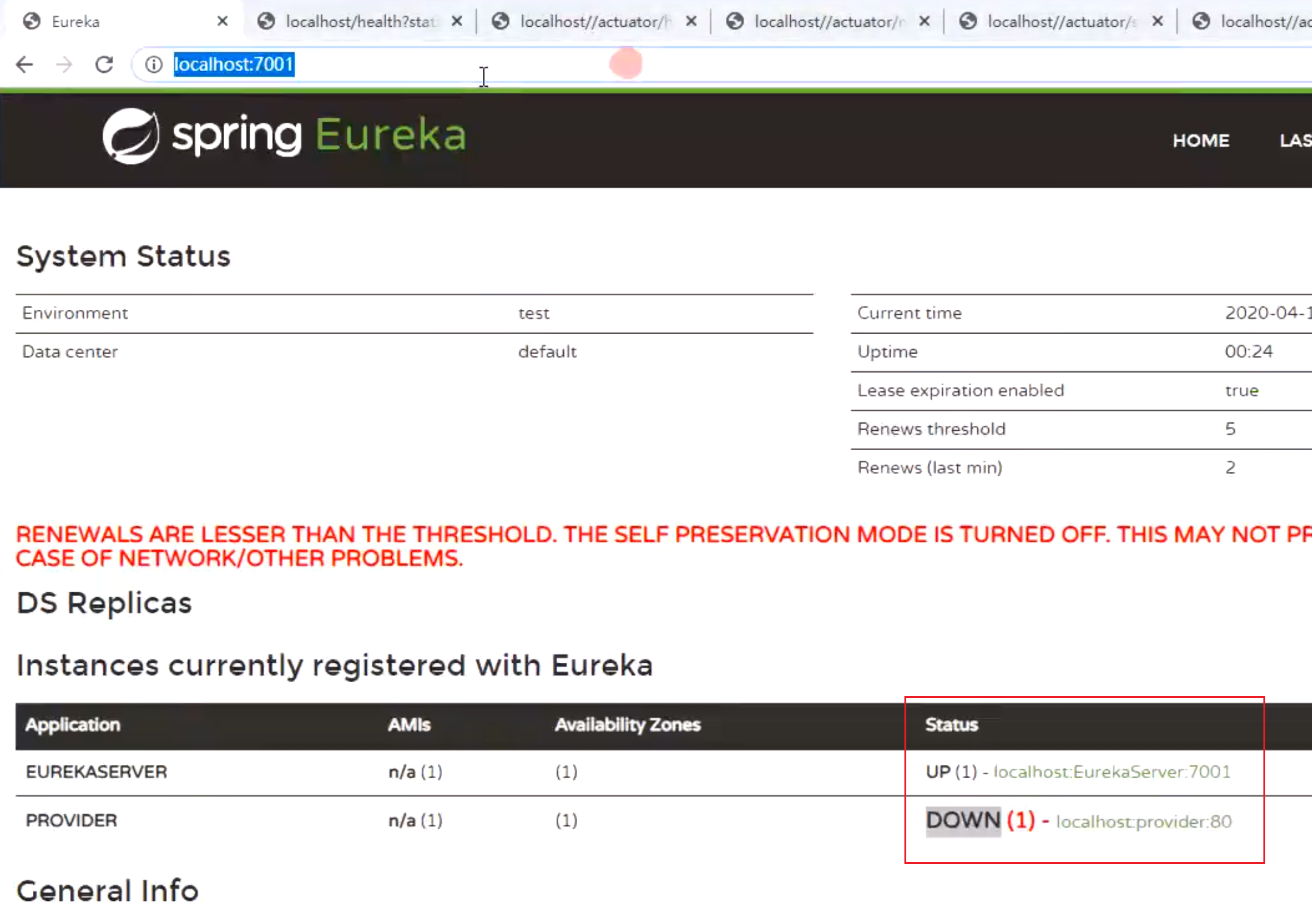
可以写一个Service类实现HealthIndicator接口,该类的功能是可以手动控制服务的上下线,从而向Eureka服务器上报当前服务的健康状态,注意这里的上报跟心跳没有关系,即使上报健康状态DOWN之后,当前服务还是可以上报心跳的(Eureka客户端默认每隔30秒钟向Eureka服务器上报心跳表示自己还活着,如果90秒钟之内没有上报心跳,则服务器会认为该客户端已经挂了,并且将该服务从服务列表中移除)。
Eureka服务器只会将服务列表中健康状态为UP的服务给客户端。
应用场景
每天发送短信的条数限制为一万条,当达到限制后可以调用setStatus(false)将短信发送服务的状态改为false。
搭建高可用EurekaServer
本地host文件
//模拟高可用环境,一定使用不同的域名,不然就还是单机127.0.0.1 baiqi1.com127.0.0.1 baiqi2.com
server1:EurekaServerApplication
package com.baiqi.eureka.server;

import org.springframework.boot.SpringApplication;
import org.springframework.boot.autoconfigure.SpringBootApplication;
import org.springframework.cloud.netflix.eureka.server.EnableEurekaServer;

@EnableEurekaServer
@SpringBootApplication
public class EurekaServerApplication {

    public static void main(String[] args) {
        SpringApplication.run(EurekaServerApplication.class, args);
    }

}
配置文件:
application.properties
#使用application-dev配置文件
spring.profiles.active=dev

#应用名称  所有server服务的名称都是这个,表示同一组的
spring.application.name=EurekaServer
application-dev.properties
server.port=10011
#实例的主机域名
eureka.instance.hostname=baiqi1.com

#是否将自己注册到Eureka Server,默认为true,由于当前就是server,故而设置成false,表明该服务不会向eureka注册自己的信息
#eureka.client.register-with-eureka=false
#是否从eureka server获取注册信息,由于单节点,不需要同步其他节点数据,用false
#eureka.client.fetch-registry=false
#设置服务注册中心的URL,用于client和server端交流
#server1注册到server2上
eureka.client.service-url.defaultZone=http://baiqi2.com:10012/eureka/
server2:EurekaServer2Application
package com.baiqi.eureka.server;

import org.springframework.boot.SpringApplication;
import org.springframework.boot.autoconfigure.SpringBootApplication;
import org.springframework.cloud.netflix.eureka.server.EnableEurekaServer;

@EnableEurekaServer
@SpringBootApplication
public class EurekaServer2Application {

    public static void main(String[] args) {
        SpringApplication.run(EurekaServer2Application.class, args);
    }

}
配置文件:
application.properties
#使用application-dev配置文件
spring.profiles.active=gaokeyong

#应用名称
spring.application.name=EurekaServer
application-gaokeyong.properties
server.port=10012
#实例的主机域名
eureka.instance.hostname=baiqi2.com

#是否将自己注册到Eureka Server,默认为true,由于当前就是server,故而设置成false,表明该服务不会向eureka注册自己的信息
#eureka.client.register-with-eureka=false
#是否从eureka server获取注册信息,由于单节点,不需要同步其他节点数据,用false
#eureka.client.fetch-registry=false
#设置服务注册中心的URL,用于client和server端交流
#server2注册到server1上
eureka.client.service-url.defaultZone=http://baiqi1.com:10011/eureka/
Eureka配置注意事项
// false:在eureka注册中心里显示的是计算机名
instance:
prefer-ip-address: false
// true,并且配置了 ip-address:在eureka注册中心里显示的是ip-address的值
instance:
prefer-ip-address: true
ip-address: 127.0.0.2

若有收获,就点个赞吧
0 人点赞


