进行节点恢复实验
背景
Manager:172.0.0.51(zst2)
Node:172.0.0.52(zst3),172.0.0.53(zst4)
主从关系
M:172.0.0.52(zst3)
S1:172.0.0.51(zst2)
S2:172.0.0.53(zst4)
MySQL环境
版本5.7.19。非GTID,一主两从
实验步骤
1.检查状态
[root@zst2 masterha]# masterha_check_ssh —conf=/etc/masterha/app1.conf 
[root@zst2 masterha]# masterha_check_repl —conf=/etc/masterha/app1.conf

此时master log信息
2.启动MHA
[root@zst2 app1]# nohup masterha_manager --conf=/etc/masterha/app1.conf > /data/mha/app1/nohup.out 2>%1 &
检查MHA运行
[root@zst2 app1]# masterha_check_status --conf=/etc/masterha/app1.conf
app1 (pid:98444) is running(0:PING_OK), master:zst3
3.关闭current master 主机
init 0
4查看app1.log中切换信息
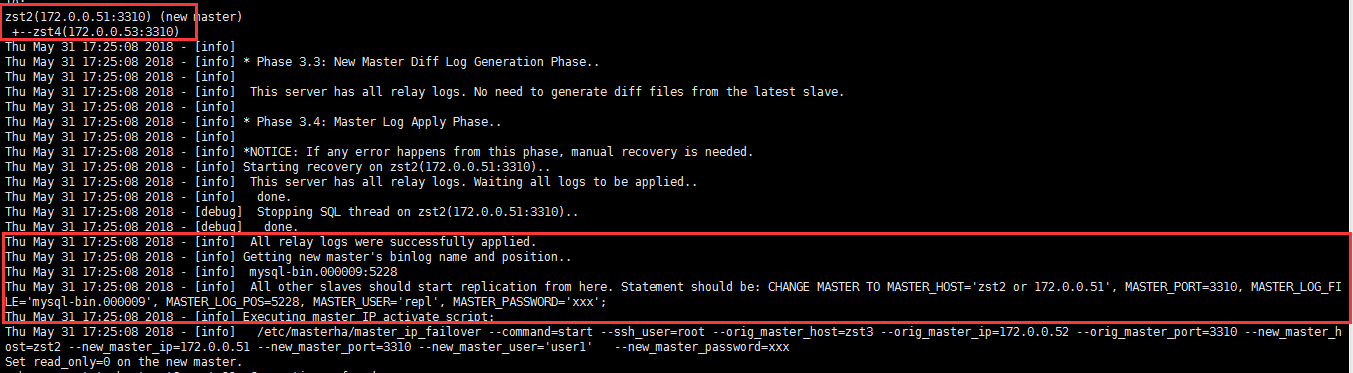
zst2(172.0.0.51:3310) (new master)
+--zst4(172.0.0.53:3310)

Thu May 31 17:25:08 2018 - [info]

Thu May 31 17:25:08 2018 - [info] * Phase 3.3: New Master Diff Log Generation Phase..

Thu May 31 17:25:08 2018 - [info]

Thu May 31 17:25:08 2018 - [info]  This server has all relay logs. No need to generate diff files from the latest slave.

Thu May 31 17:25:08 2018 - [info]

Thu May 31 17:25:08 2018 - [info] * Phase 3.4: Master Log Apply Phase..

Thu May 31 17:25:08 2018 - [info]

Thu May 31 17:25:08 2018 - [info] *NOTICE: If any error happens from this phase, manual recovery is needed.

Thu May 31 17:25:08 2018 - [info] Starting recovery on zst2(172.0.0.51:3310)..

Thu May 31 17:25:08 2018 - [info]  This server has all relay logs. Waiting all logs to be applied..

Thu May 31 17:25:08 2018 - [info]   done.

Thu May 31 17:25:08 2018 - [debug]  Stopping SQL thread on zst2(172.0.0.51:3310)..

Thu May 31 17:25:08 2018 - [debug]   done.

Thu May 31 17:25:08 2018 - [info]  All relay logs were successfully applied.

Thu May 31 17:25:08 2018 - [info] Getting new master's binlog name and position..

Thu May 31 17:25:08 2018 - [info]  mysql-bin.000009:5228

Thu May 31 17:25:08 2018 - [info]  All other slaves should start replication from here. Statement should be: CHANGE MASTER TO MASTER_HOST='zst2 or 172.0.0.51', MASTER_PORT=3310, MASTER_LOG_FILE='mysql-bin.000009', MASTER_LOG_POS=5228, MASTER_USER='repl', MASTER_PASSWORD='xxx';

Thu May 31 17:25:08 2018 - [info] Executing master IP activate script:

Thu May 31 17:25:08 2018 - [info]   /etc/masterha/master_ip_failover --command=start --ssh_user=root --orig_master_host=zst3 --orig_master_ip=172.0.0.52 --orig_master_port=3310 --new_master_host=zst2 --new_master_ip=172.0.0.51 --new_master_port=3310 --new_master_user='user1'   --new_master_password=xxx
5.此时MHA-manager已关闭
[1]+ Done nohup masterha_manager —conf=/etc/masterha/app1.conf > /data/mha/app1/nohup.out 2> %1
6查看现在复制状态
zst2为新master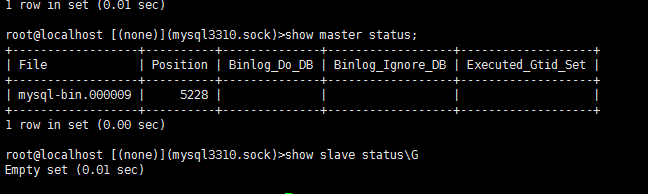
zst4为slave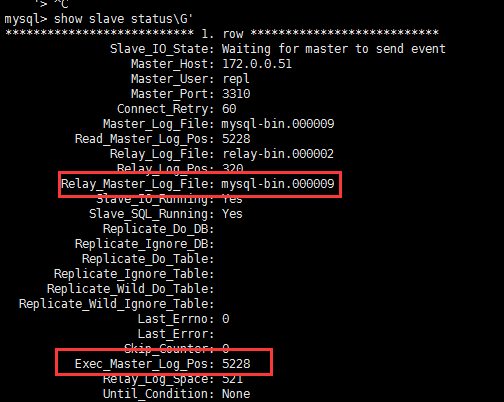
VIP切换成功(zst2)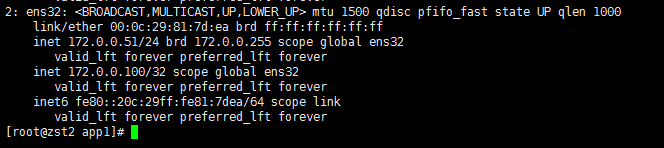
6.重启旧master
将旧master添加回复制中
此时master状态

在新master(zst2)尝试插入新数据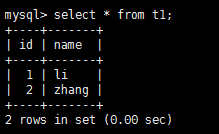

此时MHA-Manager会新生成个文件标示failover成功(下次启动MHA时需要将该文件删除才能启动陈功
7.将原master添加到主从中
查看MHA的日志app1.log。找出生成的change master to语句
在第4步中以标出
CHANGE MASTER TO MASTER_HOST=’zst2 or 172.0.0.51’, MASTER_PORT=3310, MASTER_LOG_FILE=’mysql-bin.000009’, MASTER_LOG_POS=5228, MASTER_USER=’repl’, MASTER_PASSWORD=’xxx’;
语句为:
CHANGE MASTER TO
MASTER_HOST=’172.0.0.51’,
MASTER_PORT=3310,
MASTER_LOG_FILE=’mysql-bin.000009’,
MASTER_LOG_POS=5228,
MASTER_USER=’repl’,
MASTER_PASSWORD=’repl’;
将旧master(zst3)添加回复制中
检查数据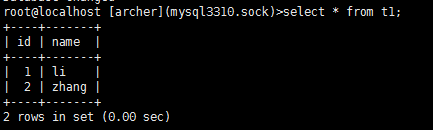
疑问:
1.当切换时如果有写入是否会影响MHA生成的change master to 语句
不会因为VIP是在最后切换的,因此无法正常写入
master_ip_failover中没有设置read_only=1的功能不像master_ip_online_change中有

若有收获,就点个赞吧
0 人点赞


