什么是 HTML?
超文本标记语言 (HTML) 是设计用于在 Web 浏览器中显示的文档的标准标记语言。它可以借助级联样式表 (CSS) 等技术和 JavaScript 等脚本语言来打辅助。
loading=lazy 属性
性能优化。您可以使用该loading=lazy属性来推迟图像的加载,直到用户滚动到它们为止。
<img src='image.jpg' loading='lazy' alt='Alternative Text'>
电子邮件、电话和短信链接:
<a href="mailto:{email}?subject={subject}&body={content}">Send us an email</a><a href="tel:{phone}">Call us</a><a href="sms:{phone}?body={content}">Send us a message</a>
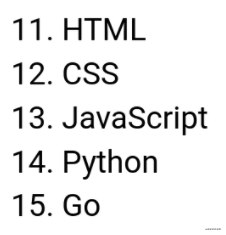
有序列表start属性。
使用该start属性更改有序列表的起点。
<ol start="11"><li>HTML</li><li>CSS</li><li>JavaScript</li><li>Python</li><li>Go</li></ol>
meter 元素
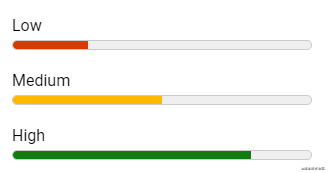
您可以使用该<meter>元素来显示数量。不需要 JavaScript/CSS。
<label for="value1">Low</label><meter id="value1" min="0" max="100" low="30" high="75" optimum="80" value="25"></meter><label for="value2">Medium</label><meter id="value2" min="0" max="100" low="30" high="75" optimum="80" value="50"></meter><label for="value3">High</label><meter id="value3" min="0" max="100" low="30" high="75" optimum="80" value="80"></meter>
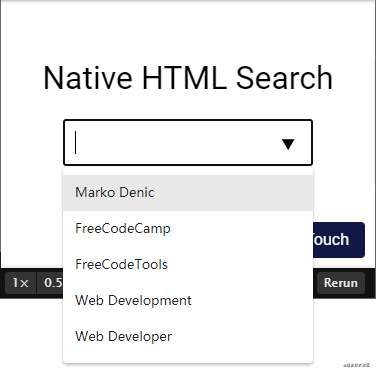
HTML 原生搜索
<div class="wrapper"><h1>Native HTML Search</h1><input list="items"><datalist id="items"><option value="Marko Denic"><option value="FreeCodeCamp"><option value="FreeCodeTools"><option value="Web Development"><option value="Web Developer"></datalist></div>
字段集元素
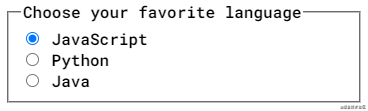
您可以使用该<fieldset>元素对<label>Web 表单中的多个控件和标签 ( )进行分组。
<form><fieldset><legend>Choose your favorite language</legend><input type="radio" id="javascript" name="language"><label for="javascript">JavaScript</label><br/><input type="radio" id="python" name="language"><label for="python">Python</label><br/><input type="radio" id="java" name="language"><label for="java">Java</label></fieldset></form>
Window.opener
打开target="_blank"的页面允许新页面访问原始页面window.opener。这可能会对安全和性能产生影响。包括rel="noopener"或rel="noreferrer"可以防止这种情况发生。
<a href="https://markodenic.com/" target="_blank" rel="noopener">Marko's website</a>
基本元素
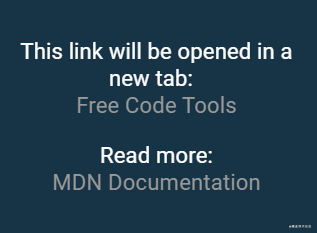
如果要在新选项卡中打开文档中的所有链接,可以使用<base>element:
<head><base target="_blank"></head><!-- This link will open in a new tab. --><div class="wrapper">This link will be opened in a new tab: <a href="https://freecodetools.org/">Free Code Tools</a><p>Read more: <br><a href="https://developer.mozilla.org/en-US/docs/Web/HTML/Element/base">MDN Documentation</a></p></div>
Favicon 缓存破坏
想要刷新您网站的图标,您可以通过添加?v=2到文件名来强制浏览器下载新版本。
这在生产中特别有用,可以确保用户获得新版本。
<link rel="icon" href="/favicon.ico?v=2" />
拼写检查属性
使用该spellcheck属性来定义是否检查元素的拼写错误。
<label for="input1">spellcheck="true"</label><input type="text" id="input1" spellcheck="true"><label for="input2">spellcheck="false"</label><input type="text" id="input2" spellcheck="false">

原生 HTML 滑块
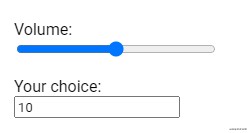
您可以使用它 <input type="range"> 来创建滑块。
<label for="volume">Volume: </label><input type="range" id="volume" name="volume" min="0" max="20"><label for="result">Your choice: </label><input type="number" id="result" name="result">
HTML 手风琴
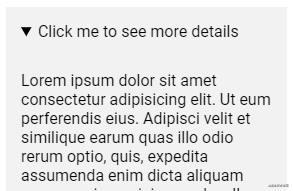
您可以使用该details元素来创建 HTML 手风琴。
<div class="wrapper"><details><summary>Click me to see more details</summary><p>Lorem ipsum dolor sit amet consectetur adipisicing elit. Ut eum perferendis eius. Adipisci velit et similique earum quas illo odio rerum optio, quis, expedita assumenda enim dicta aliquam porro maxime minima sed a ullam, aspernatur corporis.</p></details></div>
mark标签
download属性
您可以使用download链接中的属性来下载文件,而不是导航到该文件。
<a href='path/to/file' download>Download</a>
性能提示
使用.webp图像格式缩小图像并提高网站的性能。
<picture><!-- load .webp image if supported --><source srcset="logo.webp" type="image/webp"><!--Fallback if `.webp` images or <picture> tagnot supported by the browser.--><img src="logo.png" alt="logo"></picture>
视频缩略图
使用该poster属性指定在视频下载时或在用户点击播放按钮之前显示的图像。
<video poster="path/to/image">
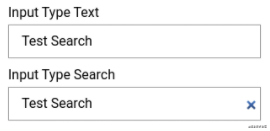
输入 type="search"
将type="search"用于您的搜索输入,您将白嫖“清除”按钮。
<form><label for="text">Input Type Text</label><input type="text" id="text" name="text"><label for="search">Input Type Search</label><input type="search" id="search" name="search"></form>
video/audio隐藏下载按钮
<video src="" controlsList="nodownload"></video>
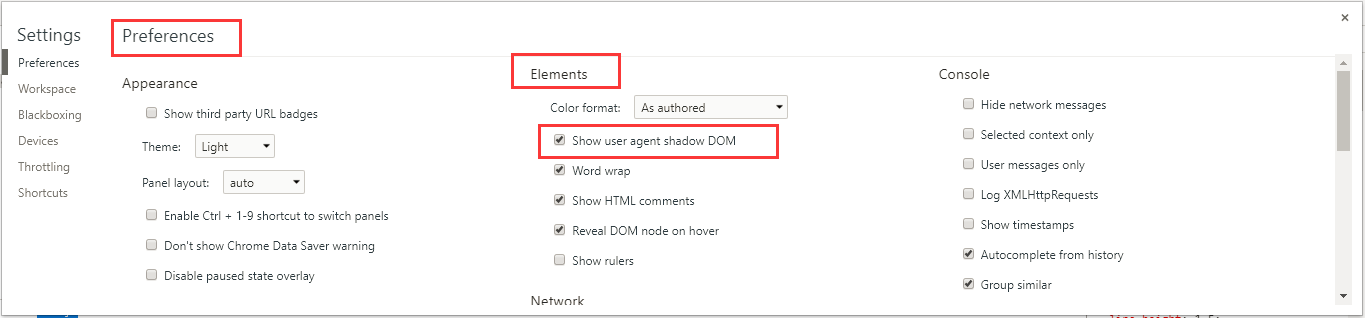
查看video 的内部构造
chrome 下,开发者工具 setting Preferences Elements 勾选 “Show user agent shadow DOM”
图片懒加载 - 延迟获取资源
通过为图片文件添加loading=”lazy”的属性来实现图片懒加载:
<img src="image.png" loading="lazy" alt="图片" />
输入提示
通过
<label for="country">请选择喜欢的国家:</label><input list="countries" name="country" id="country"><datalist id="countries"><option value="UK"><option value="Germany"><option value="USA"><option value="Japan"><option value="India"><option value=“China”></datalist>
图片展示适配问题-Picture标签
允许我们来添加多张图片资源,并且根据不同的分辨率需求来展示不同的图片。 我们可以定义不同区间的最小分辨率来确定图片素材,这个标签的使用有些类似
<picture><source media="(min-width:768px)" srcset="med_flower.jpg"><source media="(min-width:495px)" srcset="small_flower.jpg"><img src="high_flower" style="width: auto;" /></picture>
简化跳转路径
页面上的所有链接规定默认地址或默认目标
标记必须具有href和target属性。
<head><base href="https://www.weibo.com/" target="_blank"></head><body><a href="jackiechan">成龙</a><a href="kukoujialing">贾玲</a></body>
页面重定向(刷新)
<meta http-equiv="refresh" content="4; URL='https://google.com' />
常用的meta属性设置
<meta name="screen-orientation" content="portrait"> //Android 禁止屏幕旋转<meta name="full-screen" content="yes"> //全屏显示<meta name="browsermode" content="application"> //UC应用模式,使用了application这种应用模式后,页面讲默认全屏,禁止长按菜单,禁止收拾,标准排版,以及强制图片显示。<meta name="x5-orientation" content="portrait"> //QQ强制竖屏<meta name="x5-fullscreen" content="true"> //QQ强制全屏<meta name="x5-page-mode" content="app"> //QQ应用模式
电话号码识别
在 iOS Safari (其他浏览器和 Android 均不会)上会对那些看起来像是电话号码的数字处理为电话链接,比如:
- 7 位数字,形如:1234567
- 带括号及加号的数字,形如:(+86)123456789
- 双连接线的数字,形如:00-00-00111
- 11 位数字,形如:13800138000
关闭识别
<meta name="format-detection" content="telephone=no" />
开启识别
<a href="tel:123456">123456</a>
邮箱识别(Android)
<meta content="email=no" name="format-detection" />// or<a mailto:123456@163.com">123456@163.com</a>
iframe高度设置
<template><div class="iframe-box" :style="{height}"><iframe src="http://34.141.107.30" frameborder="0"></iframe></div></template><script>export default {data () {return {height: '100%'}},mounted () {this.height = document.querySelector('iframe').contentWindow.document.querySelector('html').offsetHeight + 'px'}}</script>
table字体膨胀
th,td { -webkit-text-size-adjust: none; }

若有收获,就点个赞吧
0 人点赞


