安装:
- 新建项目文件夹
npm init vite - 安装 electron :
npm i -D electron - 安装自动更新:
npm i -D electron-squirrel-startup - 安装sass
npm i -D sass - 安装插件:
npm i -D vite-plugin-electron
```javascript const { app, BrowserWindow, ipcMain, Tray, nativeImage, Menu } = require(‘electron’) const path = require(‘path’)<!DOCTYPE html><html lang="en"><head><meta charset="UTF-8" /><link rel="icon" type="image/svg+xml" href="/src/favicon.svg" /><meta name="viewport" content="width=device-width, initial-scale=1.0" /><meta http-equiv="Content-Security-Policy" content="script-src 'self'"><meta http-equiv="X-Content-Security-Policy" content="default-src 'self'; script-src 'self'"><title>Vite App</title></head><body><div id="root"></div><script type="module" src="/src/main.jsx"></script></body></html>
if (require(‘electron-squirrel-startup’)) { app.quit() }
let mainWindow, tray
// 主窗口设置 const createWindow = () => { mainWindow = new BrowserWindow({ width: 700, height: 600, frame: false, useContentSize: true, autoHideMenuBar: true, webPreferences: { preload: path.join(dirname, ‘preload.js’), nodeIntegration: true, contextIsolation: false } }) if (app.isPackaged) { mainWindow.loadFile(path.join(dirname, ‘build’, ‘index.html’)) } else { mainWindow.loadURL(‘http://localhost:3000‘) mainWindow.webContents.openDevTools() } } // 初始化 -主窗口 app.whenReady().then(() => { createWindow() // 托盘图标 const icon = nativeImage.createFromPath(path.join(__dirname, ‘icon.png’)) // 托盘 tray = new Tray(icon) // 移动到托盘上的提示 tray.setToolTip(‘electron+react’) // 监听托盘右键事件 tray.on(‘right-click’, () => { // 右键菜单模板 const tempate = [ { label: ‘打开应用’, click: () => mainWindow.restore() }, { label: ‘退出应用’, click: () => app.quit() } ] // 创建托盘右键菜单 const menuConfig = Menu.buildFromTemplate(tempate) // 托盘右键的菜单替代原来的 tray.popUpContextMenu(menuConfig) }) // 监听点击托盘的事件 tray.on(‘click’, () => { // 这里来控制窗口的显示和隐藏 if (mainWindow.isMinimized()) { mainWindow.restore() } else { mainWindow.minimize() } })
app.on(‘activate’, () => { if (BrowserWindow.getAllWindows().length === 0) { createWindow() } }) }) // 关闭 - 主窗口 app.on(‘window-all-closed’, () => { if (process.platform !== ‘darwin’) { app.quit() } })
// 刷新 ipcMain.on(‘reloadApp’, () => { mainWindow.webContents.reload() }) // 最小化 ipcMain.on(‘hideApp’, () => { mainWindow.minimize() }) // 全屏 ipcMain.on(‘fullscreen’, (event) => { if (mainWindow.isMaximized()) { mainWindow.unmaximize() } else { mainWindow.maximize() } event.returnValue = mainWindow.isMaximized() }) // 关闭 ipcMain.on(‘closeApp’, () => { mainWindow = null mainWindow.close() }) const { app, BrowserWindow, ipcMain } = require(‘electron’) const path = require(‘path’)
if (require(‘electron-squirrel-startup’)) { app.quit() }
let mainWindow = null let newWin = null
const createWindow = () => { mainWindow = new BrowserWindow({ width: 1210, height: 800, frame: false, useContentSize: true, webPreferences: { preload: path.join(dirname, ‘preload.js’), nodeIntegration: true, contextIsolation: false } }) if (app.isPackaged) { mainWindow.loadFile(path.join(dirname, ‘build’, ‘index.html’)) } else { mainWindow.loadURL(‘http://localhost:3000‘) mainWindow.webContents.openDevTools() } }
app.whenReady().then(() => { createWindow() app.on(‘activate’, () => { if (BrowserWindow.getAllWindows().length === 0) { createWindow() } }) }) app.on(‘window-all-closed’, () => { if (process.platform !== ‘darwin’) { app.quit() } }) ipcMain.on(‘applyStart’, () => { newWin = new BrowserWindow({ width: 375, height: 872, frame: false, useContentSize: true, webPreferences: { preload: path.join(__dirname, ‘../electron-preload/index.js’), nodeIntegration: true, contextIsolation: false } })
if (app.isPackaged) { mainWindow.loadFile(path.join(__dirname, ‘build’, ‘index.html/apply-start’)) } else { mainWindow.loadURL(‘http://localhost:3000/apply-start‘) mainWindow.webContents.openDevTools() }
newWin.on(‘close’, () => { newWin = null }) }) ipcMain.on(‘closeApplyStart’, () => { newWin.close() newWin = null }) ipcMain.on(‘closeApp’, () => { mainWindow.close() mainWindow = null })
```javascriptwindow.addEventListener('DOMContentLoaded', () => {const replaceText = (selector, text) => {const element = document.getElementById(selector)if (element) element.innerText = text}for (const type of ['chrome', 'node', 'electron']) {replaceText(`${type}-version`, process.versions[type])}})
import { defineConfig } from 'vite'
import react from '@vitejs/plugin-react'

import compressionPlugin from 'vite-plugin-compression'
import PkgConfig from 'vite-plugin-package-config'
import OptimizationPersist from 'vite-plugin-optimize-persist'

export default defineConfig({
  build: {
    outDir: 'app/build',
    emptyOutDir: false,
    chunkSizeWarningLimit: 10240,
    brotliSize: false,
    assetsDir: 'assets',
    rollupOptions: {
      output: {
        chunkFileNames: 'assets/chunk/[name]-[hash].js',
        entryFileNames: 'assets/chunk/[name]-[hash].js',
        assetFileNames: 'assets/[ext]/[name]-[hash].[ext]'
      }
    }
  },
  plugins: [
    react(),
    PkgConfig(),
    OptimizationPersist(),
    compressionPlugin({ threshold: 10240 })
  ]
})
打包
- 安装 Electron Forge:
npm i -D @electron-forge/cli - 执行设置 Forge 的脚手架:
npx electron-forge import - 打包分发应用程序:
npm run make
const router = createRouter({
  history: createWebHashHistory(),
  routes
})
new BrowserWindow({
  useContentSize: true,
  frame: false,
})
<template>
  <div class="app-menu">111</div>
</template>

<script>
export default {
  name: 'app-menu'
}
</script>
<script setup>
import { getCurrentInstance } from 'vue';
const { proxy } = getCurrentInstance()

</script>

<style lang='scss' scoped>
.app-menu {
  width: 100%;
  height: 52px;
  background-color: #fc0;
    // 拖动必须
  -webkit-app-region: drag;
  user-select: none;
}
</style>
packagerConfig: {
    name: 'xxx客户端',
    executableName: 'App',
    extraResource: ['./assets/Readme.txt', './assets/img/a.png'], // 静态文件
    icon: './build/icon' // 不用加后缀,但是需要准备3个文件,win: icon.ico, mac: icon.icns, linux: icon.png,打包时自动识别,linux 在BrowserWindow构造参数中设置
  },
双向通信
使用 ipcMain.handle 监听事件
  ipcMain.handle('showApp', (event, data) => {
    return data
  })
通过预加载脚本暴露 ipcRenderer.invoke
ipcRenderer.invoke('showApp', 'this is show title').then(res => {
  console.log(res)
})
Q&A
打包报错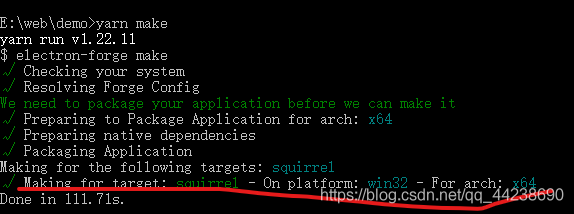
上面横线处是出现错误的位置。报错的原因如下:
1、package.json的“author”和“description”在打包时是必填内容,随便填些内容即可打包成功。
2、和项目的绝对路径有关,项目的绝对路径不能出现中文,否则在红线处会报错。
electron禁止鼠标双击放大窗口
在新建窗口时设置
maximizable: false
这样的话双击就不可以最大化了,然后在具体需要最大化的地方再用
 if (mainWindow.isMaximized()) {
    mainWindow.unmaximize()
  } else {
    mainWindow.maximize()
  }

若有收获,就点个赞吧
0 人点赞


