- 什么是 JavaScript ?
- 返回按钮
- 数字分隔符
- 事件监听器只运行一次
- console.log 变量包装
- 从数组中获取最小值/最大值
- 检查 Caps Lock(大小写) 是否打开
- 复制到剪贴板
- 获取鼠标位置
- 缩短数组
- console.table() 打印特定格式的表格
- 将字符串转换为数字
- 将数字转换为字符串
- 截取后缀
- 从数组中过滤所有虚值
- 过滤字符串
- reduce 数组求和
console.log()样式- 元素的 dataset
- 数组去重
- 数组查重复值or不重复值
- 冻结对象
- 数组内是否包含
- 多条件判断
- 空值检查
- 判断数据类型
- JSON的使用
- 字符串替换
- 快速浮点数转整数
- 获取父级元素
- 平铺多维数组
- 拼接
- 数据分组
- 防抖节流
- 实现浅拷贝
- 实现深拷贝
- 倒计时
- 递归
- 下载
- 随机字符串
- 数据拷贝
- 深拷贝合并
- 对象浅合并
- 检测是否是纯对象
- 数组位置互换
- 数组移动位置
- 树结构更新
- 生成随机颜色
- 数组排序
- 数组重排序
- 复制到剪切板
- 检测暗色主题
- 滚动到顶部
- 滚动到底部
- 检测元素是否在屏幕中
- 检测设备
- 隐藏元素
- 从 URL 中获取参数
- 等待函数
- 获取字符串中的字符数
- 检查对象是否为空
- 等待一段时间再执行
- 获取两个日期之间的日差
- 重定向到另一个 URL
- 检查设备上的触摸支持
- 在元素后插入 HTML 字符串
- 随机排列数组
- 在网页上获取选定的文本
- 获取随机布尔值
- 计算数组的平均值
- 编码和解码
- 获取年月日
- 获取时间差
- 价格千位分割
- 动态改变setInterval时间间隔
什么是 JavaScript ?
Javascript 是一种脚本语言,用于创建动态更新的内容、控制多媒体、动画图像等等。
返回按钮
使用 history.back() 可以创建一个浏览器“返回”按钮。
<button onclick="history.back()">返回</button>
数字分隔符
为了提高数字的可读性,您可以使用下划线作为分隔符:
const largeNumber = 1_000_000_000;console.log(largeNumber); // 1000000000
事件监听器只运行一次
如果你想添加一个事件监听器并且只运行一次,你可以使用 once 选项:
element.addEventListener('click', () => console.log('I run only once'), {once: true});
console.log 变量包装
您在 console.log() 的时候,将参数用大括号括起来,这样可以同时看到变量名和变量值。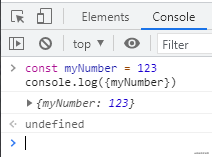
从数组中获取最小值/最大值
您可以使用 Math.min() 或 Math.max() 结合扩展运算符来查找数组中的最小值或最大值。
const numbers = [6, 8, 1, 3, 9];console.log(Math.max(...numbers)); // 9console.log(Math.min(...numbers)); // 1
检查 Caps Lock(大小写) 是否打开
您可以使用 KeyboardEvent.getModifierState() 来检测是否 Caps Lock 打开。
const passwordInput = document.getElementById('password');passwordInput.addEventListener('keyup', function (event) {if (event.getModifierState('CapsLock')) {// CapsLock 已经打开了}});
复制到剪贴板
您可以使用 Clipboard API 创建“复制到剪贴板”功能:
function copyToClipboard(text) {navigator.clipboard.writeText(text);}
获取鼠标位置
您可以使用 MouseEvent 对象下 clientX 和 clientY 的属性值,获取鼠标的当前位置坐标信息。
document.addEventListener('mousemove', (e) => {console.log(`Mouse X: ${e.clientX}, Mouse Y: ${e.clientY}`);});
缩短数组
您可以设置 length 属性来缩短数组。
const numbers = [1, 2, 3, 4, 5]numbers.length = 3;console.log(numbers); // [1, 2, 3]
console.table() 打印特定格式的表格
语法:
// [] 里面指的是可选参数console.table(data [, columns]);
参数:
- data 表示要显示的数据。必须是数组或对象。
- columns 表示一个包含列的名称的数组。
实例:
// 一个对象数组,只打印 firstNamefunction Person(firstName, lastName) {this.firstName = firstName;this.lastName = lastName;}const john = new Person("John", "Smith");const jane = new Person("Jane", "Doe");const emily = new Person("Emily", "Jones");console.table([john, jane, emily], ["firstName"]);

将字符串转换为数字
const str = '404';console.log(+str) // 404;
将数字转换为字符串
const myNumber = 403;console.log(myNumber + ''); // '403'
截取后缀
let suffix = name.substring(name.lastIndexOf("."));//.txtlet suffix =name.substring(name.lastIndexOf(".")+1);//txt
从数组中过滤所有虚值
const myArray = [1, undefined, NaN, 2, null, '@denicmarko', true, 3, false];console.log(myArray.filter(Boolean)); // [1, 2, "@denicmarko", true, 3]
过滤字符串
const myTech = 'JavaScript';const techs = ['HTML', 'CSS', 'JavaScript'];// 普通写法if (myTech === 'HTML' || myTech === 'CSS' || myTech === 'JavaScript') {// do something}// includes 写法if (techs.includes(myTech)) {// do something}
reduce 数组求和
[1, 2, 3, 4].reduce((a, b) => a + b); // 10
console.log() 样式
您知不知道可以使用 CSS 语句在 DevTools 中设置 console.log 输出的样式: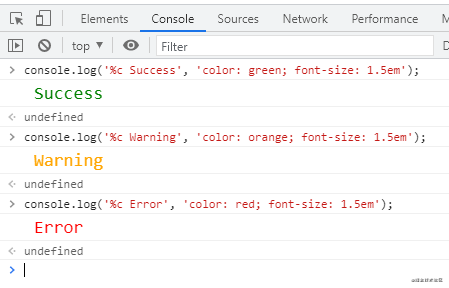
元素的 dataset
使用 dataset 属性访问元素的自定义数据属性 (data-*):
<div id="user" data-name="John Doe" data-age="29" data-something="Some Data">John Doe</div><script>const user = document.getElementById('user');console.log(user.dataset);// { name: "John Doe", age: "29", something: "Some Data" }console.log(user.dataset.name); // "John Doe"console.log(user.dataset.age); // "29"console.log(user.dataset.something); // "Some Data"</script>
数组去重
// 一位数组去重let newArr = Array.from(new Set(Arr))let newArr = [ ...new Set(Arr) ]// 多位数组去重const nMap = new Map()return Arr.filter((e) => !nMap.has(e) && nMap.set(e, 1))let resources = [{ name: "张三", age: "18" },{ name: "张三", age: "19" },{ name: "张三", age: "20" },{ name: "李四", age: "19" },{ name: "王五", age: "20" },{ name: "赵六", age: "21" }]let temp = {};resources = resources.reduce((prev, curv) => {// 如果临时对象中有这个名字,什么都不做if (temp[curv.name]) {}// 如果临时对象没有就把这个名字加进去,同时把当前的这个对象加入到prev中else {temp[curv.name] = true;prev.push(curv);}return prev}, []);console.log("结果", resources);
数组查重复值or不重复值
// 数组查找重复值let newArr = Arr.filter((i) => Arr.indexOf(i) !== Arr.lastIndexOf(i))// 数组查找不重复值let newArr = Arr.filter((i) => Arr.indexOf(i) === Arr.lastIndexOf(i))
冻结对象
只是浅层冻结,只会对最近一层的对象进行冻结,并不会对深层对象冻结
let obj = { name: 'You', age: 25 };Object.freeze(obj);obj.age = 18; // 25 修改失败delete obj.age; // false 无法删除
数组内是否包含
const list = [ 'foo', 12, 'You', 19 ]const type = list.includes(12)console.log(type)// true已知存在数组a:[1,2,3,4,5,6,7,8,9]b:[2,6,8]需要过滤a中存在b数组的值,可以使用下面方法const c = a.filter(v => !b.includes(v));
多条件判断
// data是否为空if (['', null, undefined].includes(data)) {}// arr内是否包含空数据arr.includes('', null, undefined)
空值检查
let first = nulllet second = first || '空';console.log(second)// 空
判断数据类型
// 数组const Arr = []const type1 = Arr.constructor === Arrayconsole.log(type1)// true// 对象const obj = {}const type3 = typeof obj === "object"console.log(type3)// true// 布尔值let str = new Boolean()const type2 = str instanceof Booleanconsole.log(type2)// true
JSON的使用
//将一个JSON字符串转换为JavaScript对象let arrPa = JSON.parse(arr)//将JavaScript值转换为JSON字符串let strFy = JSON.stringify(arr)
字符串替换
// 全局替换s.replace(/啊/g, "额")// 替换中文字符,获取字符串长度s.replace(/[\u0391-\uFFE5]/g, 'aa').length
快速浮点数转整数
使用|(位或运算符)将浮点数截断为整数
console.log(23.9 | 0); // 23console.log(-23.9 | 0); // -23
获取父级元素
const getParentKey = (key, tree) => {let parentKey;for (let i = 0; i < tree.length; i++) {const node = tree[i];// 判断是不是顶级父if (node.key == key) {return node.key;}if (node.children) {if (node.children.some((item) => item.key === key)) {parentKey = node.key;} else if (getParentKey(key, node.children)) { // 必须判断是否有返回值parentKey = getParentKey(key, node.children);}}}return parentKey;};
平铺多维数组
flat 展开数组,参数表示要提取嵌套数组的结构深度
//初始化二维数组const arr = new Array(5).fill(0).map(()=> new Array(5).fill(0));arr.flat(Infinity);const getNodeChild = (val) => {let arr = []val.reduce((total, item) => {total.push(item)if (item.items && item.items.length) {total.push(...getNodeChild(item.items))}return total}, arr)return arr}
拼接
httpUtil: (data) => {let ret = '?'for (const [key, value] of Object.entries(data)) {ret += key + '=' + value + '&'}return ret.slice(0, -1)}
数据分组
// 方法一const groupArr = (arr, fn) => {let list = []for (const value of arr) {let key = JSON.stringify(fn(value))list[key] = list[key] || []list[key].push(value)}return Object.keys(list).map(key => ({ key: JSON.parse(key)[0], data: list[key], total: list[key].length }));}const getName = groupArr(list, (i) => [ i.name ])console.log(getName)由父子元素对应ID分组const groupArr = (arr, parentId, childId, keyName) => {const temp = {};const tree = {};arr.forEach(item => {temp[item[childId]] = item;});const tempKeys = Object.keys(temp);tempKeys.forEach(key => {const item = temp[key];const _itemPId = item[parentId];const parentItemByPid = temp[_itemPId];if (parentItemByPid) {if (!parentItemByPid[keyName]) {parentItemByPid[keyName] = [];}parentItemByPid[keyName].push(item);} else {tree[item[childId]] = item;}});return Object.keys(tree).map(key => tree[key]);}let list = groupArr(arr, 'pid', 'id', 'children');
防抖节流
// 防抖function debounce(fun, delay) {let timer = nullreturn (...rest) => {clearTimeout(timer)timer = setTimeout(() => {fun.apply(this, rest)}, delay)}function test(a, b) {console.log(a, b)}let fun = debounce(test, 1000)fun(1, 2)// 节流// 1.时间戳function throttle(fun, delay) {let start = 0return (...rest) => {let end = + new Date()if (end - start >= delay) {fun.apply(this, rest)start = end}}}// 2.计时器function throttle(fun, delay) {let isActived = false;return (...rest) => {if (!isActived) {fun.apply(this, rest)isActived = truesetTimeout(()=> isActived = false, delay)}}}function test(a, b) {console.log(a, b)}let fun = throttle(test, 2000)fun(1, 2)
实现浅拷贝
// 浅拷贝的实现;function shallowCopy(object) {// 只拷贝对象if (!object || typeof object !== "object") return;// 根据 object 的类型判断是新建一个数组还是对象let newObject = Array.isArray(object) ? [] : {};// 遍历 object,并且判断是 object 的属性才拷贝for (let key in object) {if (object.hasOwnProperty(key)) {newObject[key] = object[key];}}return newObject;}
实现深拷贝
function deepClone(obj, hash = new WeakMap()) {if (hash.has(obj)) {return obj;}let res = null;const reference = [Date, RegExp, Set, WeakSet, Map, WeakMap, Error];if (reference.includes(obj?.constructor)) {res = new obj.constructor(obj);} else if (Array.isArray(obj)) {res = [];obj.forEach((e, i) => {res[i] = deepClone(e);});} else if (typeof obj === "Object" && typeof obj !== null) {res = {};for (const key in obj) {if (Object.hasOwnProperty.call(obj, key)) {res[key] = deepClone(obj[key]);}}} else {res = obj;}hash.set(obj, res);return res;}
倒计时
const countDown = (time) => {let _this = thisthis.timeID = nullthis.timeID = setInterval(() => {let d = +time.daylet h = +time.hourslet m = +time.minlet s = +time.secs--if (s < 0) {m--s = 59}if (m < 0) {h--m = 59}if (h < 0) {d--h = 23}d = d < 10 ? '0' + d : dh = h < 10 ? '0' + h : hm = m < 10 ? '0' + m : ms = s < 10 ? '0' + s : stime.day = dtime.hours = htime.min = mtime.sec = sif (time.day != '00') {_this.nowTime = `${time.day}天${time.hours}:${time.min}:${time.sec}`} else {_this.nowTime = `${time.hours}:${time.min}:${time.sec}`}if (d == '00' && h == '00' && m == '00' && s == '00') {d = h = m = s = 0this[name] = nullclearInterval(_this.timeID)_this.timeID = null}}, 1000)}// 倒计时const showtime = function () {const nowtime = new Date() // 获取当前时间const endtime = new Date('2020/8/8') // 定义结束时间const lefttime = endtime.getTime() - nowtime.getTime() // 距离结束时间的毫秒数const leftd = Math.floor(lefttime / (1000 * 60 * 60 * 24)) // 计算天数const lefth = Math.floor(lefttime / (1000 * 60 * 60) % 24) // 计算小时数const leftm = Math.floor(lefttime / (1000 * 60) % 60) // 计算分钟数const lefts = Math.floor(lefttime / 1000 % 60) // 计算秒数return leftd + '天' + lefth + ':' + leftm + ':' + lefts // 返回倒计时的字符串}
递归
const familyTree=(arr)=> {let temp = [];let forFn = (list)=> {list.forEach(element => {if (element.children) {temp.push(element.id);forFn(element.children);}})}forFn(arr);return temp;}}
下载
// 下载export const DownCsv = (res, name) => {if (res != null && ['text/plain'].includes(res.type)) {const blob = new Blob([res], { type: 'text/plain' })const date =new Date().getFullYear() + '' +(new Date().getMonth() + 1) + '' +new Date().getDate() + '' +new Date().getHours() + '' +new Date().getMinutes() + '' +new Date().getSeconds() + '' +new Date().getMilliseconds()const fileName = name + date + '.csv'if ('download' in document.createElement('a')) {// 非IE下载const elink = document.createElement('a')elink.download = fileNameelink.style.display = 'none'elink.href = URL.createObjectURL(blob)document.body.appendChild(elink)elink.click()URL.revokeObjectURL(elink.href)document.body.removeChild(elink)} else {// IE10+下载navigator.msSaveBlob(blob, fileName)}}}
随机字符串
// 数组随机arr.sort(() => Math.random() - 0.5)// 获取最后8位Math.random().toString(36).slice(-8)// 随机生成32位字符串const randomString = () => {let len = 32let chars ='ABCDEFGHJKMNPQRSTWXYZabcdefhijkmnprstwxyz234567890'let maxPos = chars.lengthlet pwd = ''for (let i = 0; i < len; i++) {pwd += chars.charAt(Math.floor(Math.random() * maxPos))}return pwd}
数据拷贝
// 浅拷贝Object.assign({}, obj)// 深拷贝JSON.parse(JSON.stringify(obj))// 深拷贝export const deepMerge = (obj1, obj2) => {const isPlain1 = isPlainObject(obj1)const isPlain2 = isPlainObject(obj2)if (!isPlain1 || !isPlain2) return shallowMerge(obj1, obj2)const keys = [...Object.keys(obj2),...Object.getOwnPropertySymbols(obj2)]keys.forEach(function (key) {obj1[key] = deepMerge(obj1[key], obj2[key])})return obj1}
深拷贝合并
export const deepMerge = (obj1, obj2) => {const isPlain1 = isPlainObject(obj1)const isPlain2 = isPlainObject(obj2)if (!isPlain1 || !isPlain2) return shallowMerge(obj1, obj2)const keys = [...Object.keys(obj2),...Object.getOwnPropertySymbols(obj2)]keys.forEach(function (key) {obj1[key] = deepMerge(obj1[key], obj2[key])})return obj1}
对象浅合并
export const deepMerge = (obj1, obj2) => {const isPlain1 = isPlainObject(obj1)const isPlain2 = isPlainObject(obj2)if (!isPlain1 || !isPlain2) return shallowMerge(obj1, obj2)const keys = [...Object.keys(obj2),...Object.getOwnPropertySymbols(obj2)]keys.forEach(function (key) {obj1[key] = deepMerge(obj1[key], obj2[key])})return obj1}
检测是否是纯对象
export const shallowMerge = (obj1, obj2) => {const isPlain1 = isPlainObject(obj1)const isPlain2 = isPlainObject(obj2)if (!isPlain1) return obj2if (!isPlain2) return obj1const keys = [...Object.keys(obj2),...Object.getOwnPropertySymbols(obj2)]keys.forEach(function (key) {obj1[key] = obj2[key]})return obj1}
数组位置互换
list[destination] = list.splice(source, 1, list[destination])[0]
数组移动位置
const Move = (arr, from, to) => {const list = [].concat(arr)list.splice(to, 0, list.splice(from, 1)[0])return list}
树结构更新
// 更新export const updateParent = (treeData, key, value, update) => {const fn = (treeData, key, value, update) => {if (!treeData.length) return keyfor (let index = 0; index < treeData.length; index++) {if (treeData[index][key] === value) {const res = treeData[index]res.children = updatebreak}if (treeData[index].children) {if (treeData[index].children.length) {fn(treeData[index].children, key, value, update)}}}}fn(treeData, key, value, update)return treeData}const newData = updateParent(data, 'key', item.key, item.children)
生成随机颜色
const generateRandomHexColor = () => `#${Math.floor(Math.random() * 0xffffff).toString(16)}`console.log(generateRandomHexColor())
数组排序
const arr = [2, 1, 4, 3, 5]arr.sort((a, b) => (b - a)
数组重排序
const shuffle = (arr) => arr.sort(() => Math.random() - 0.5)const arr = [1, 2, 3, 4, 5]console.log(shuffle(arr))
复制到剪切板
const copyToClipboard = (text) => navigator.clipboard && navigator.clipboard.writeText && navigator.clipboard.writeText(text)copyToClipboard("Hello World!")
检测暗色主题
const isDarkMode = () => window.matchMedia && window.matchMedia("(prefers-color-scheme: dark)").matches;console.log(isDarkMode())
滚动到顶部
const scrollToTop = (element) =>element.scrollIntoView({ behavior: "smooth", block: "start" });
滚动到底部
const scrollToBottom = (element) =>element.scrollIntoView({ behavior: "smooth", block: "end" });
检测元素是否在屏幕中
const callback = (entries) => {entries.forEach((entry) => {if (entry.isIntersecting) {// `entry.target` is the dom elementconsole.log(`${entry.target.id} is visible`);}});};const options = {threshold: 1.0,};const observer = new IntersectionObserver(callback, options);const btn = document.getElementById("btn");const bottomBtn = document.getElementById("bottom-btn");observer.observe(btn);observer.observe(bottomBtn);http://www.jsxyy.com.cn/voddetail/203079.html
检测设备
const detectDeviceType = () =>/Android|webOS|iPhone|iPad|iPod|BlackBerry|IEMobile|Opera Mini/i.test(navigator.userAgent) ? "Mobile" : "Desktop";console.log(detectDeviceType());
隐藏元素
const hideElement = (el, removeFromFlow = false) => {removeFromFlow ? (el.style.display = 'none'): (el.style.visibility = 'hidden')}
从 URL 中获取参数
const getParamByUrl = (key) => {const url = new URL(location.href)return url.searchParams.get(key)}
等待函数
const wait = (ms) => new Promise((resolve)=> setTimeout(resolve, ms))const asyncFn = async () => {await wait(1000)console.log('等待异步函数执行结束')}asyncFn()
获取字符串中的字符数
const characterCount = (str, char) => str.split(char).length - 1
检查对象是否为空
const isEmpty = obj => Reflect.ownKeys(obj).length === 0 && obj.constructor === Object
等待一段时间再执行
const wait = async (milliseconds) => new Promise((resolve) => setTimeout(resolve, milliseconds));
获取两个日期之间的日差
const daysBetween = (date1, date2) => Math.ceil(Math.abs(date1 - date2) / (1000 * 60 * 60 * 24))
重定向到另一个 URL
const redirect = url => location.href = url
检查设备上的触摸支持
const touchSupported = () => ('ontouchstart' in window || DocumentTouch && document instanceof DocumentTouch)
在元素后插入 HTML 字符串
const insertHTMLAfter = (html, el) => el.insertAdjacentHTML('afterend', html)
随机排列数组
const shuffle = arr => arr.sort(() => 0.5 - Math.random())
在网页上获取选定的文本
const getSelectedText = () => window.getSelection().toString()
获取随机布尔值
const getRandomBoolean = () => Math.random() >= 0.5
计算数组的平均值
const average = (arr) => arr.reduce((a, b) => a + b) / arr.length
const observer = new IntersectionObserver(callback: IntersectionObserverCallback, options?: IntersectionObserverInit): IntersectionObserver;observer.observe(target);// 最简单的一个使用示例,获取要监听的元素,新建 IntersectionObserver 实例,观察要监听元素,一个根元素可以同时监听多个元素const divDom = document.getElementsByClassName('hidden');const observer = new IntersectionObserver((entries) => {entries.forEach((entry) => {// 过滤掉未出现在视窗中的元素if (entry.intersectionRatio <= 0) {return;}console.log(entry);},{ threshold: [0.2, 0.25, 0.5, 1] },);});observer.observe(divDom[0]);observer.observe(divDom[1]);const io = new IntersectionObserver((entrys) => {entrys.forEach((entry) => {if(!entry.isIntersecting) return;loadMore();})}, {rootMargin:'0px 0px 50px 0px'})//监听最底部的loadmore是否出现const lMore = document.querySelector('.load-more');io.observe(lMore);onWheel:nativeEvent
编码和解码
escape() 编码, unescape() 解码 废弃
encodeURI 编码,decodeURI 解码
encodeURIComponent 编码,decodeURIComponent 解码
// str = escape(str) //%u4E2D%u56FD// str = encodeURI(str) //%E4%B8%AD%E5%9B%BDstr = encodeURIComponent(str) //%E4%B8%AD%E5%9B%BD
str.trim().toLowerCase().replace(str[0], str[0].toUpperCase());
const aplitAR = (str, leng) => {const arr = []let index = 0while (index < str.length) {arr.push(str.slice(index, index += leng))}return arr}# 转短连接const randomWord = (leng = 6, url = 'http://localhost:8085/') => {let str = urlconst arr = ['0', '1', '2', '3', '4', '5', '6', '7', '8', '9', 'a', 'b', 'c', 'd', 'e', 'f', 'g', 'h', 'i', 'j', 'k', 'l', 'm', 'n', 'o', 'p', 'q', 'r', 's', 't', 'u', 'v', 'w', 'x', 'y', 'z', 'A', 'B', 'C', 'D', 'E', 'F', 'G', 'H', 'I', 'J', 'K', 'L', 'M', 'N', 'O', 'P', 'Q', 'R', 'S', 'T', 'U', 'V', 'W', 'X', 'Y', 'Z']for (let i = 0; i < leng; i++) {const pos = Math.round(Math.random() * (arr.length - 1))str += arr[pos]}return str}
获取年月日
const getTime=(date = new Date())=>{var y = date.getFullYear();var m = date.getMonth() + 1;m = m < 10 ? ('0' + m) : m;var d = date.getDate();d = d < 10 ? ('0' + d) : d;var h = date.getHours();h=h < 10 ? ('0' + h) : h;var minute = date.getMinutes();minute = minute < 10 ? ('0' + minute) : minute;var second=date.getSeconds();second=second < 10 ? ('0' + second) : second;return y + '-' + m + '-' + d+' '+h+':'+minute+':'+second;}
获取时间差
const dayjs = require('dayjs');let sevenDaysAgo_time = dayjs().subtract(7, 'day') // 计算7天前的时间let sevenDaysAgo = dayjs(sevenDaysAgo_time.$d).format()//获取到的时间如下console.log("sevenDay",sevenDaysAgo) //2022-07-18T09:39:33+08:00
价格千位分割
function regexHandleNum(num) {return String(num).replace(/\B(?=(\d{3})+(?!\d))/g, ','); // 3是千分位,4是万分位}
动态改变setInterval时间间隔
let Timer = nulllet num = 0let speed = 200const over = 30let timeUp = function () {clearInterval(Timer)num++if (10 < num && num < 20) {speed = 100} else {speed = 200}if (num >= over) {clearInterval(Timer)Timer = null} else {Timer = setInterval(timeUp, speed)}console.log(num, speed)}Timer = setTimeout(timeUp, speed)

若有收获,就点个赞吧
0 人点赞


