网络相关命令
查找所有网络
docker network lsNETWORK ID NAME DRIVER SCOPEd82ae70e53b5 bridge bridge local2da1207cd293 host host local8f9ca1ad177e none null local
如何使用network命令
使用 docker network --help命令查看如何使用网络相关的命令。
docker network --helpUsage: docker network COMMANDManage networksCommands:connect Connect a container to a networkcreate Create a networkdisconnect Disconnect a container from a networkinspect Display detailed information on one or more networksls List networksprune Remove all unused networksrm Remove one or more networks
网络模式
bridge:桥接docker(默认)
none:不配置网络
host:主机模式,容器和宿主机共享
container:容器内网络连通(用的较少)
创建自定义网络
docker network create --driver bridge --subnet 192.168.0.0/16 --gateway 192.168.0.1 mynet
—driver:网络模式
—subnet:设置子网掩码
—gateway:设置网关
再次查看网络情况:
docker network lsNETWORK ID NAME DRIVER SCOPEd82ae70e53b5 bridge bridge local2da1207cd293 host host local62c8bb734cee mynet bridge local8f9ca1ad177e none null local
我们发现多了一个名为mynet的网络,Driver模式为bridge。
使用 docker network inspect mynet查看mynet网络的详细情况: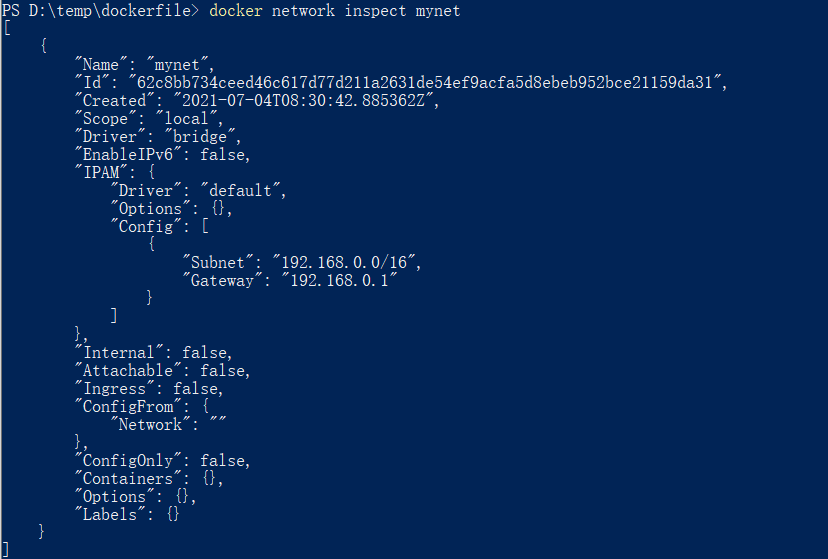
子网掩码和网关和我们设定的值是一致的。
我们再来启动两个容器,使用 --net 参数让它们的网络都处于mynet中:
docker run -it -P --name=centos02 --net mynet mycentos:1.0docker run -it -P --name=centos01 --net mynet mycentos:1.0
两个容器启动完成后(此时不能让容器停止),我们看看mynet的网络情况: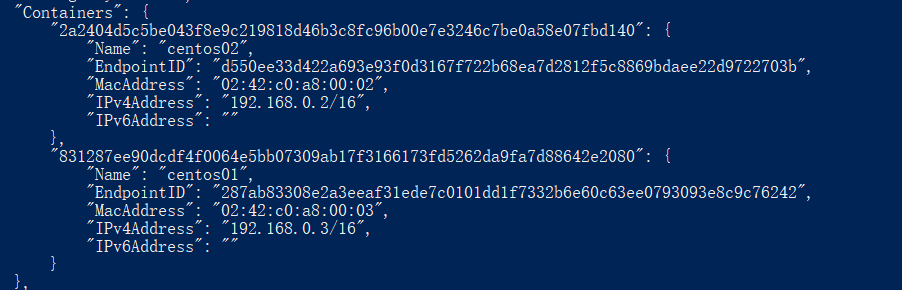
我们发现Containers中多了两个容器,它们就是我们刚刚运行的容器,ip地址分别为 192.168.0.2 和 192.168.0.3。
现在我们从centos01容器作为原点,去ping centos02的ip(192.168.0.2):
docker exec centos01 ping 192.168.0.2PING 192.168.0.2 (192.168.0.2) 56(84) bytes of data.64 bytes from 192.168.0.2: icmp_seq=1 ttl=64 time=0.052 ms64 bytes from 192.168.0.2: icmp_seq=2 ttl=64 time=0.095 ms
没有问题,接下来用名称去ping:
docker exec centos01 ping centos02PING centos02 (192.168.0.2) 56(84) bytes of data.64 bytes from centos02.mynet (192.168.0.2): icmp_seq=1 ttl=64 time=0.027 ms64 bytes from centos02.mynet (192.168.0.2): icmp_seq=2 ttl=64 time=0.102 ms64 bytes from centos02.mynet (192.168.0.2): icmp_seq=3 ttl=64 time=0.038 ms
还是可以ping通。
至此,我们发现了自定义网络的一个重大的好处:只要容器处于自定义网络中,那么容器间就可以使用容器名称连通彼此。

若有收获,就点个赞吧
0 人点赞


