新的挑战
我们建立了自定义网络后,发现容器间互相通信更加方便了。但此时又有了一个新需求,假设其他网络一个容器想要连接mynet网络中的容器,能够连通吗?如果不能连通,我们将怎么打破这个桎梏?
查看帮助文档
首先查看一下帮助文档:
docker network --helpUsage: docker network COMMANDManage networksCommands:connect Connect a container to a networkcreate Create a networkdisconnect Disconnect a container from a networkinspect Display detailed information on one or more networksls List networksprune Remove all unused networksrm Remove one or more networks
看到connect关键字,大致意思是使一个容器能连接到其他的网络。非常好,我们看看具体是怎么操作的:
docker network connect --help

Usage:  docker network connect [OPTIONS] NETWORK CONTAINER

Connect a container to a network

Options:
      --alias strings           Add network-scoped alias for the container
      --driver-opt strings      driver options for the network
      --ip string               IPv4 address (e.g., 172.30.100.104)
      --ip6 string              IPv6 address (e.g., 2001:db8::33)
      --link list               Add link to another container
      --link-local-ip strings   Add a link-local address for the container
网络连通
我们先在默认网络中启动一个容器:
docker run -it --name=centos01d mycentos:1.0
mynet网络中有两个容器正在运行: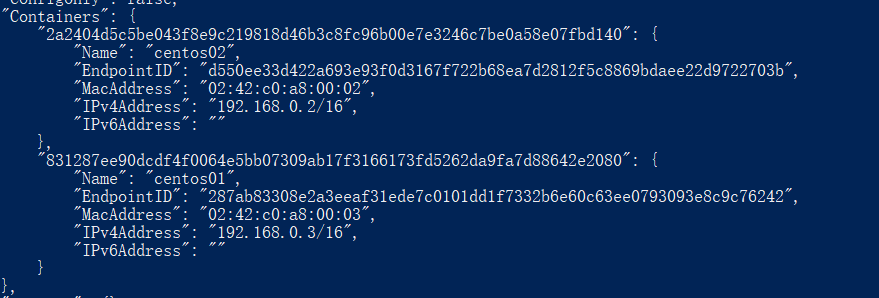
先来ping一下:
docker exec centos01d ping centos01
ping: centos01: Name or service not known
显示ping不通。没关系,我们让这个容器与mynet网络打通关系:
docker network connect mynet centos01d
执行之后,没有任何日志。我们再去测试一下:
docker exec centos01d ping centos01
PING centos01 (192.168.0.3) 56(84) bytes of data.
64 bytes from centos01.mynet (192.168.0.3): icmp_seq=1 ttl=64 time=0.049 ms
64 bytes from centos01.mynet (192.168.0.3): icmp_seq=2 ttl=64 time=0.034 ms
64 bytes from centos01.mynet (192.168.0.3): icmp_seq=3 ttl=64 time=0.035 ms
发现没有,居然连通了。
我们再去看看mynet的网络详细信息:
看最后几行,发现centos01d容器居然位于mynet网络中了。其实背后的原理很简单,centos01d容器此时有了两个ip地址,也就是一个容器,两个ip地址。所以centos01d容器可以与mynet网络中任意容器连通了。

若有收获,就点个赞吧
0 人点赞


