- zhuang xioajin
- 6月-27-2021
- 1.Identification of all markers for each cluster
- Determine the K-nearest neighbor graph
- Determine the clusters for various resolutions
- 1.Identification of all markers for each cluster
- Identification of conserved markers in all conditions
- Adding Gene Annotations
- 4.Running on multiple samples
- Evaluating marker genes
- 6.Visualizing marker genes
- Identifying gene markers for each cluster
zhuang xioajin
6月-27-2021
目标:
- 确定每个群组的基因标志物
- 利用标记物确定每个集群的细胞类型
- 确定是否有必要根据细胞类型标记物重新分组,也许需要合并或拆分群组
挑战:
- 对结果的过度解释
- 结合不同类型的标记物识别
建议:
- 将结果视为需要验证的假说。夸大的P值会导致对结果的过度解读(基本上每个细胞都被当做一个复制体)。顶级标记物是最值得信赖的。识别每个群组的条件之间保守的所有标记物
- 识别特定群组之间差异性表达的标记物
我们可以利用Seurat探索一些不同类型的标记识别,以获得这些问题的答案。每一种都有各自的好处和缺点。
1. Identification of all markers for each cluster:这种分析将每个簇与所有其他簇进行比较,并输出有差异表达/存在的基因。
- 有助于识别未知的聚类,提高对假设的细胞类型的信心。
2. Identification of conserved markers for each cluster:该分析首先寻找在每个条件下有差异表达/存在的基因,然后报告那些在所有条件下集群中保守的基因。这些基因可以帮助弄清集群的身份。
- 对一个以上的条件有用,以确定跨条件保守的细胞类型标记。
3. Marker identification between specific clusters:这种分析探索了特定集群之间的差异表达基因。
- 有助于确定从上述分析中看来代表同一细胞类型(即具有相似的标记)的簇之间的基因表达差异。
1.Identification of all markers for each cluster
```# Load librariesrm(list = ls())library(Seurat)library(tidyverse)library(RCurl)library(cowplot)## 加载整合过的数据seurat_integrated <- readRDS("results/integrated_seurat.rds")# Run PCAseurat_integrated <- RunPCA(object = seurat_integrated)
Determine the K-nearest neighbor graph
seurat_integrated <- FindNeighbors(object = seurat_integrated,dims = 1:40)
Determine the clusters for various resolutions
seurat_integrated <- FindClusters(object = seurat_integrated, resolution = c(0.4, 0.6, 0.8,0.9, 1.0, 1.4))
```
## Modularity Optimizer version 1.3.0 by Ludo Waltman and Nees Jan van Eck
##
## Number of nodes: 29629
## Number of edges: 1110705
##
## Running Louvain algorithm...
## Maximum modularity in 10 random starts: 0.9183
## Number of communities: 14
## Elapsed time: 9 seconds
## Modularity Optimizer version 1.3.0 by Ludo Waltman and Nees Jan van Eck
##
## Number of nodes: 29629
## Number of edges: 1110705
##
## Running Louvain algorithm...
## Maximum modularity in 10 random starts: 0.8990
## Number of communities: 18
## Elapsed time: 8 seconds
## Modularity Optimizer version 1.3.0 by Ludo Waltman and Nees Jan van Eck
##
## Number of nodes: 29629
## Number of edges: 1110705
##
## Running Louvain algorithm...
## Maximum modularity in 10 random starts: 0.8828
## Number of communities: 19
## Elapsed time: 8 seconds
## Modularity Optimizer version 1.3.0 by Ludo Waltman and Nees Jan van Eck
##
## Number of nodes: 29629
## Number of edges: 1110705
##
## Running Louvain algorithm...
## Maximum modularity in 10 random starts: 0.8758
## Number of communities: 21
## Elapsed time: 8 seconds
## Modularity Optimizer version 1.3.0 by Ludo Waltman and Nees Jan van Eck
##
## Number of nodes: 29629
## Number of edges: 1110705
##
## Running Louvain algorithm...
## Maximum modularity in 10 random starts: 0.8688
## Number of communities: 22
## Elapsed time: 8 seconds
## Modularity Optimizer version 1.3.0 by Ludo Waltman and Nees Jan van Eck
##
## Number of nodes: 29629
## Number of edges: 1110705
##
## Running Louvain algorithm...
## Maximum modularity in 10 random starts: 0.8450
## Number of communities: 27
## Elapsed time: 7 seconds
# Assign identity of clusters
Idents(object = seurat_integrated) <- "integrated_snn_res.0.9"
## Calculation of UMAP
## DO NOT RUN (calculated in the last lesson)
seurat_integrated <- RunUMAP(seurat_integrated,
                 reduction = "pca",
                 dims = 1:40)
# Plot the UMAP
DimPlot(seurat_integrated,
        reduction = "umap",
        label = TRUE,
        label.size = 6)

# Assign identity of clusters
Idents(object = seurat_integrated) <- "integrated_snn_res.0.9"
# Plot the UMAP
DimPlot(seurat_integrated,
        reduction = "umap",
        label = TRUE,
        label.size = 6)

# Select the RNA counts slot to be the default assay
DefaultAssay(seurat_integrated) <- "RNA"
# Normalize RNA data for visualization purposes
seurat_integrated <- NormalizeData(seurat_integrated, verbose = FALSE)
这种类型的分析通常建议在评估单一样本组/条件时使用。通过FindAllMarkers()函数,我们将每个簇与所有其他簇进行比较,以确定潜在的标记基因。每个簇中的细胞被视为复制,基本上是通过一些统计测试进行差异性表达分析。
注意:默认是Wilcoxon秩和检验,但也有其他选项。
FindAllMarkers()函数有三个重要的参数,它们提供了确定一个基因是否为标记物的阈值。
logfc.threshold:聚类中的基因平均表达量相对于所有其他聚类中的平均表达量的最小对数折叠变化。默认为0.25。- Cons。
- 如果平均log2FC没有达到阈值,可能会遗漏那些在感兴趣的簇内一小部分细胞中表达,而在其他簇中不表达的细胞标志物
- 由于不同类型的细胞在代谢输出方面的细微差别,可能会返回大量的代谢/核糖体基因,这对于区分细胞类型的特性并不那么有用。
- 如果平均log2FC没有达到阈值,可能会遗漏那些在感兴趣的簇内一小部分细胞中表达,而在其他簇中不表达的细胞标志物
- Cons。
min.diff.pct:集群中表达该基因的细胞百分比与所有其他集群中表达该基因的细胞百分比之和的最小百分比差。- Cons:可能会遗漏那些在所有细胞中都表达,但在这种特定细胞类型中高度上调的细胞标志物。
min.pct:只测试在两个群体中的任何一个细胞中检测到的最小部分的基因。旨在通过不测试表达频率很低的基因来加快函数的速度。默认值为0.1。- Cons:如果设置为一个非常高的值,可能会产生许多假阴性,因为不是所有的基因都能在所有的细胞中检测到(即使它是表达的)。
你可以使用这些参数的任何组合,这取决于你想要多严格/多细微。另外,在默认情况下,这个函数会向你返回同时表现出正负表达变化的基因。通常情况下,我们添加一个参数only.pos来选择只保留正向变化。为每个簇寻找标记的代码如下所示。我们将不运行这段代码。
# Find markers for every cluster compared to all remaining cells, report only the positive ones
markers <- FindAllMarkers(object = seurat_integrated,
                          only.pos = TRUE,
                          logfc.threshold = 0.25)
注意:这个命令可能需要很长时间才能运行,因为它是针对所有其他单元处理每个单独的集群。
2. Identification of conserved markers in all conditions
由于我们的数据集中有代表不同条件的样本,我们最好的选择是寻找保守的标记物。这个函数在内部将细胞按样本组/条件分离出来,然后对一个指定的群组与所有其他群组(或第二个群组,如果指定的话)进行差异基因表达测试。对每个条件计算基因水平的p值,然后使用MetaDE R软件包的meta-analysis方法对各组进行综合分析。
在开始我们的标记识别之前,我们将明确设置我们的默认检测,we want to use the original counts and not the integrated data.
DefaultAssay(seurat_integrated) <- "RNA"
注意:虽然这个函数的默认设置是从 “RNA”槽中获取数据,但我们鼓励你运行上面这行代码以确保万一在你的分析中上游的某个地方改变了活动槽。原始计数和归一化计数存储在这个槽中,用于寻找标记的函数将自动提取原始计数。
函数FindConservedMarkers(),有如下结构。FindConservedMarkers() syntax:
# FindConservedMarkers(seurat_integrated,
#                      ident.1 = cluster,
#                      grouping.var = "sample",
#                      only.pos = TRUE,
#            min.diff.pct = 0.25,
#                      min.pct = 0.25,
#            logfc.threshold = 0.25)
你会认识到我们之前FindAllMarkers()函数描述的一些参数;这是因为在内部,它是使用该函数首先在每个组内寻找标记。这里,我们列出了一些额外的参数,这些参数为使用FindConservedMarkers()时提供。
ident.1:这个函数一次只评估一个群组;这里你要指定感兴趣的群组。grouping.var:你的 metadata 中的变量(列标题),它指定了将单元格分成的组。
在我们的分析中,我们将相当宽松,只使用大于0.25的log2倍变化阈值。我们还将指定只返回每个簇的阳性标记。
让我们在one cluster上进行测试,看看它是如何工作的。
cluster0_conserved_markers <- FindConservedMarkers(seurat_integrated,
                              ident.1 = 0,
                              grouping.var = "sample",
                              only.pos = TRUE,
                      logfc.threshold = 0.25)
cluster0_conserved_markers %>% as.tibble()
## # A tibble: 377 x 12
##    stim_p_val stim_avg_log2FC stim_pct.1 stim_pct.2 stim_p_val_adj ctrl_p_val
##         <dbl>           <dbl>      <dbl>      <dbl>          <dbl>      <dbl>
##  1          0            1.67      1          0.982              0  2.97e- 17
##  2          0            1.57      0.941      0.468              0  0.
##  3          0            1.55      0.984      0.537              0  0.
##  4          0            1.83      0.517      0.119              0  0.
##  5          0            2.18      0.442      0.087              0  0.
##  6          0            1.79      0.799      0.243              0  0.
##  7          0            1.83      0.956      0.276              0  0.
##  8          0            1.68      0.741      0.194              0  0.
##  9          0            1.65      0.556      0.129              0  9.91e-302
## 10          0            1.61      0.91       0.336              0  0.
## # ... with 367 more rows, and 6 more variables: ctrl_avg_log2FC <dbl>,
## #   ctrl_pct.1 <dbl>, ctrl_pct.2 <dbl>, ctrl_p_val_adj <dbl>, max_pval <dbl>,
## #   minimump_p_val <dbl>
FindConservedMarkers()函数的输出是一个矩阵,包含一个按基因ID列出的我们指定的群组的推定标记的排序列表,以及相关的统计数据。请注意,每组(在我们的例子中,是Ctrl和Stim)都计算了相同的统计数据,最后两列对应的是两组的综合P值。我们在下面描述这些列中的一些。
- gene: gene symbol
- condition_p_val: 未对条件进行多重检验修正的P值
- condition_avg_logFC:条件的平均对折变化。正值表示该基因在集群中表达较高。
- condition_pct.1:在集群中检测到该基因的细胞占条件的百分比。
- condition_pct.2:在其他群组中平均检测到该基因的细胞百分比,条件为
- condition_p_val_adj:调整后的p值,基于bonferroni校正,使用数据集中的所有基因,用于确定显著性。
- max_pval:各组/条件计算的最大P值
- minimump_p_val: 综合P值
注意:由于每个细胞都被当作一个复制体,这将导致每组内的p值膨胀 一个基因可能有一个令人难以置信的低p值<1e-50,但这并不能转化为一个高度可靠的标记基因。
在查看输出结果时,我们建议寻找在pct.1 和pct.2之间表达量有较大差异的标记物,以及较大的折叠变化。例如,如果pct.1=0.90,pct.2=0.80,它可能就不是一个令人兴奋的标记。然而,如果pct.2=0.1,相反,更大的差异会更有说服力。另外,值得关注的是,表达该标记的大多数细胞是否在我感兴趣的集群中。如果pct.1很低,如0.3,它可能就不像
3. Adding Gene Annotations
添加带有基因注释信息的栏目可能会有帮助。为了做到这一点,我们将让你通过点击右键和 “另存为”将这个文件下载到你的 data文件夹。然后把它加载到你的R环境中。
annotations <- read.csv("data/annotation.csv")
annotations %>% as.tibble()
## # A tibble: 67,946 x 5
##    gene_id    gene_name  seq_name gene_biotype      description
##    <chr>      <chr>      <chr>    <chr>             <chr>
##  1 ENSG00000~ DDX11L1    1        transcribed_unpr~ DEAD/H-box helicase 11 like~
##  2 ENSG00000~ WASH7P     1        unprocessed_pseu~ WASP family homolog 7, pseu~
##  3 ENSG00000~ MIR6859-1  1        miRNA             microRNA 6859-1 [Source:HGN~
##  4 ENSG00000~ MIR1302-2~ 1        lncRNA            MIR1302-2 host gene [Source~
##  5 ENSG00000~ MIR1302-2  1        miRNA             microRNA 1302-2 [Source:HGN~
##  6 ENSG00000~ FAM138A    1        lncRNA            family with sequence simila~
##  7 ENSG00000~ OR4G4P     1        unprocessed_pseu~ olfactory receptor family 4~
##  8 ENSG00000~ OR4G11P    1        transcribed_unpr~ olfactory receptor family 4~
##  9 ENSG00000~ OR4F5      1        protein_coding    olfactory receptor family 4~
## 10 ENSG00000~ AL627309.1 1        lncRNA            novel transcript
## # ... with 67,936 more rows
首先,我们将把带有基因标识符的行名变成它自己的列。然后我们将把这个注释文件与我们从FindConservedMarkers()得到的结果合并。
# Combine markers with gene descriptions
cluster0_ann_markers <- cluster0_conserved_markers %>%
                rownames_to_column(var="gene") %>%
                left_join(y = unique(annotations[, c("gene_name", "description")]),
                          by = c("gene" = "gene_name"))
View(cluster0_ann_markers)
4.Running on multiple samples
函数FindConservedMarkers()一次只接受一个簇,我们可以在有簇的情况下多次运行这个函数。然而,这不是很有效。相反,我们将首先创建一个寻找保守标记的函数,包括我们想要包括的所有参数。我们还将添加几行代码来修改输出。我们的函数将。
- 运行
FindConservedMarkers()函数 - 使用
rownames_to_column()函数将行名转移到一个列中 - 合并注释
- 使用cbind()函数创建集群ID列
现在我们已经创建了这个函数,我们可以把它作为适当的map函数的一个参数。我们希望map系列函数的输出是一个数据框架,每个簇的输出都用行绑定在一起,我们将使用# Create function to get conserved markers for any given cluster get_conserved <- function(cluster){ FindConservedMarkers(seurat_integrated, ident.1 = cluster, grouping.var = "sample", only.pos = TRUE) %>% rownames_to_column(var = "gene") %>% left_join(y = unique(annotations[, c("gene_name", "description")]), by = c("gene" = "gene_name")) %>% cbind(cluster_id = cluster, .) }map_dfr()函数。mapfamily syntax:map_dfr(inputs_to_function, name_of_function)
现在,让我们试试这个函数,为那些未确定的细胞类型的簇找到保守的标记:簇7和簇18(这里是我随意定义的因为确定细胞类型的我没有免疫细胞标志做完)。# Iterate function across desired clusters conserved_markers <- map_dfr(c(7,18), get_conserved)为所有聚类寻找标记物
对于你的数据,你可能想在所有的簇上运行这个函数,在这种情况下,你可以输入
0:20而不是c(7,20);然而,这将需要相当长的时间来运行。另外,当你在所有的簇上运行这个函数时,在某些情况下,你会有一些簇没有足够的单元格,而你的函数会失败。对于这些群组,你需要使用FindAllMarkers()。
5. Evaluating marker genes
我们想利用这些基因列表,看看我们是否能确定这些集群与哪些细胞类型有关。让我们看一下每个集群的顶级基因,看看是否能给我们任何提示。我们可以按两组的平均倍数变化查看每个簇的前10个标记物,以便快速浏览。
# Extract top 10 markers per cluster
top10 <- conserved_markers %>%
  mutate(avg_fc = (ctrl_avg_log2FC + stim_avg_log2FC) /2) %>%
  group_by(cluster_id) %>%
  top_n(n = 10,
        wt = avg_fc)
# Visualize top 10 markers per cluster
View(top10)
6.Visualizing marker genes
为了更好地了解第20组的细胞类型特征,我们可以使用FeaturePlot()函数按组探索不同识别标记物的表达。
# Plot interesting marker gene expression for cluster 20
FeaturePlot(object = seurat_integrated,
                        features = c("TPSAB1", "TPSB2", "FCER1A", "GATA1", "GATA2"),
                         sort.cell = TRUE,
                         min.cutoff = 'q10',
                         label = TRUE,
                         repel = TRUE)

我们还可以通过使用小提琴图来探索特定标记物的表达范围。
小提琴图与箱形图类似,只是它们还显示了数据在不同数值下的概率密度,通常由内核密度估计器平滑。小提琴图比普通的箱形图信息量更大。箱形图只显示平均数/中位数和四分位数范围等汇总统计数据,而小提琴图则显示数据的完整分布。当数据分布是多模态的(不止一个峰值)时,这种差异特别有用。在这种情况下,小提琴图显示了不同峰值的存在、它们的位置和相对振幅。
# Vln plot - cluster 18
VlnPlot(object = seurat_integrated,
        features = c("TPSAB1", "TPSB2", "FCER1A", "GATA1", "GATA2"))

这些结果和图表可以帮助我们确定这些集群的身份,或者验证我们在之前探索了预期细胞类型的典型标记后所假设的身份。
7. Identifying gene markers for each cluster
FeaturePlot(seurat_integrated,
            reduction = "umap",
            features = c("CD3D", "IL7R", "CCR7"),
            sort.cell = TRUE,
            min.cutoff = 'q10',
            label = TRUE)
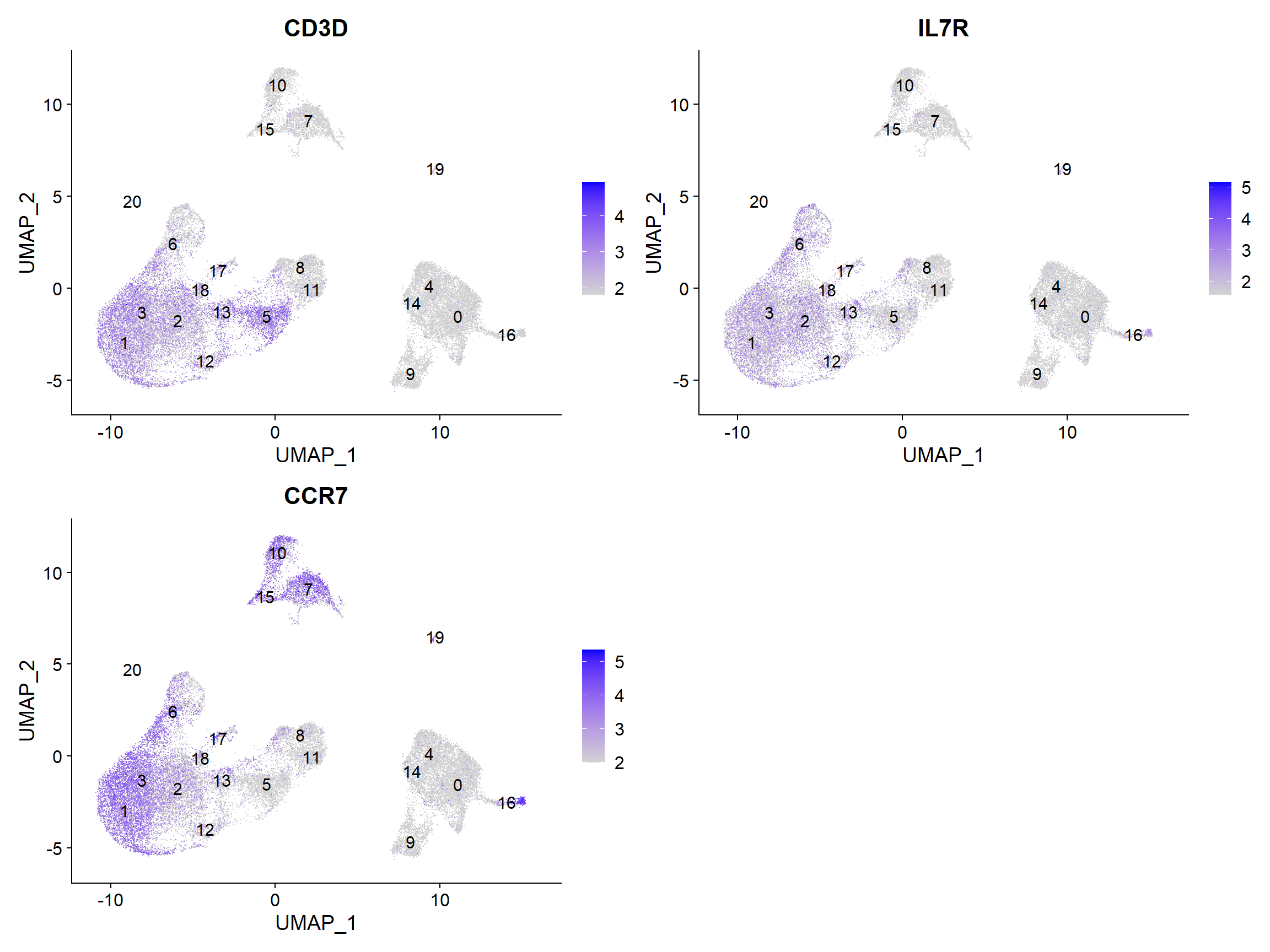
我们关于分析的最后一组问题涉及到对应于相同细胞类型的集群是否有生物学意义上的差异。有时,返回的标记物清单并不能充分地将一些集群分开。例如,我们之前将集群1、2、3、12和18确定为CD4+T细胞,但这些细胞集群之间是否有生物学上的差异?我们可以使用FindMarkers()函数来确定两个特定集群之间有差异表达的基因。
我们可以尝试所有的比较组合,但我们将从群组1与所有其他CD4+T细胞群组开始。
# Determine differentiating markers for CD4+ T cell
cd4_tcells <- FindMarkers(seurat_integrated,
                          ident.1 = 2,
                          ident.2 = c(3,1,12,18))
# Add gene symbols to the DE table
cd4_tcells <- cd4_tcells %>%
  rownames_to_column(var = "gene") %>%
  left_join(y = unique(annotations[, c("gene_name", "description")]),
             by = c("gene" = "gene_name"))
# Reorder columns and sort by padj
cd4_tcells <- cd4_tcells[, c(1, 3:5,2,6:7)]
cd4_tcells <- cd4_tcells %>%
  dplyr::arrange(p_val_adj)
# View data
View(cd4_tcells)
在这些top genes中,CREM基因作为激活的一个标志物脱颖而出。我们知道,激活的另一个标记是CD69,而幼稚或记忆细胞的标记包括SELL和CCR7基因。有趣的是,SELL基因也在名单之首。让我们用这些新的细胞状态标志物来直观地探讨一下激活状态。
| Cell State | Marker |
|---|---|
| Naive T cells | CCR7, SELL |
| Activated T cells | CREM, CD69 |
# Plot gene markers of activated and naive/memory T cells
FeaturePlot(seurat_integrated,
            reduction = "umap",
            features = c("CREM", "CD69", "CCR7", "SELL"),
            label = TRUE,
            sort.cell = TRUE,
            min.cutoff = 'q10',
        repel = TRUE)

由于Naive状态和Activated的标记物都出现在标记物列表中,这对可视化表达是有帮助的。根据这些图,似乎集群1和3是可靠的Naive T细胞。然而,对于Activated T细胞,很难说。我们可以说集群2和18是活化的T细胞,但CD69的表达并不像CREM那样明显。我们将标记幼稚细胞,并将其余的簇标记为CD4+T细胞。
1. CD14+ monocyte markers
FeaturePlot(seurat_integrated,
            reduction = "umap",
            features = c("CD14", "LYZ"),
            sort.cell = TRUE,
            min.cutoff = 'q10',
            label = TRUE)

# 0,4,14
2. FCGR3A+ monocytes
FeaturePlot(seurat_integrated,
            reduction = "umap",
            features = c("FCGR3A", "MS4A7"),
            sort.cell = TRUE,
            min.cutoff = 'q10',
            label = TRUE)

# 9
3. Conventional dendritic cells
FeaturePlot(seurat_integrated,
            reduction = "umap",
            features = c("FCER1A"," CST3"),
            sort.cell = TRUE,
            min.cutoff = 'q10',
            label = TRUE)

# 16
4. Plasmacytoid dendritic cells
FeaturePlot(seurat_integrated,
            reduction = "umap",
            features = c("IL3RA", "GZMB", "SERPINF1", "ITM2C"),
            sort.cell = TRUE,
            min.cutoff = 'q10',
            label = TRUE)

# 19
5. B cells
FeaturePlot(seurat_integrated,
            reduction = "umap",
            features = c("CD79A","MS4A1"),
            sort.cell = TRUE,
            min.cutoff = 'q10',
            label = TRUE)

# 7,10,15
6. T cells
FeaturePlot(seurat_integrated,
            reduction = "umap",
            features = c("CD3D"),
            sort.cell = TRUE,
            min.cutoff = 'q10',
            label = TRUE)

# 1,2,3,5,12,13,18,
7. CD4+ T cells
FeaturePlot(seurat_integrated,
            reduction = "umap",
            features = c("CD3D", "IL7R", "CCR7"),
            sort.cell = TRUE,
            min.cutoff = 'q10',
            label = TRUE)
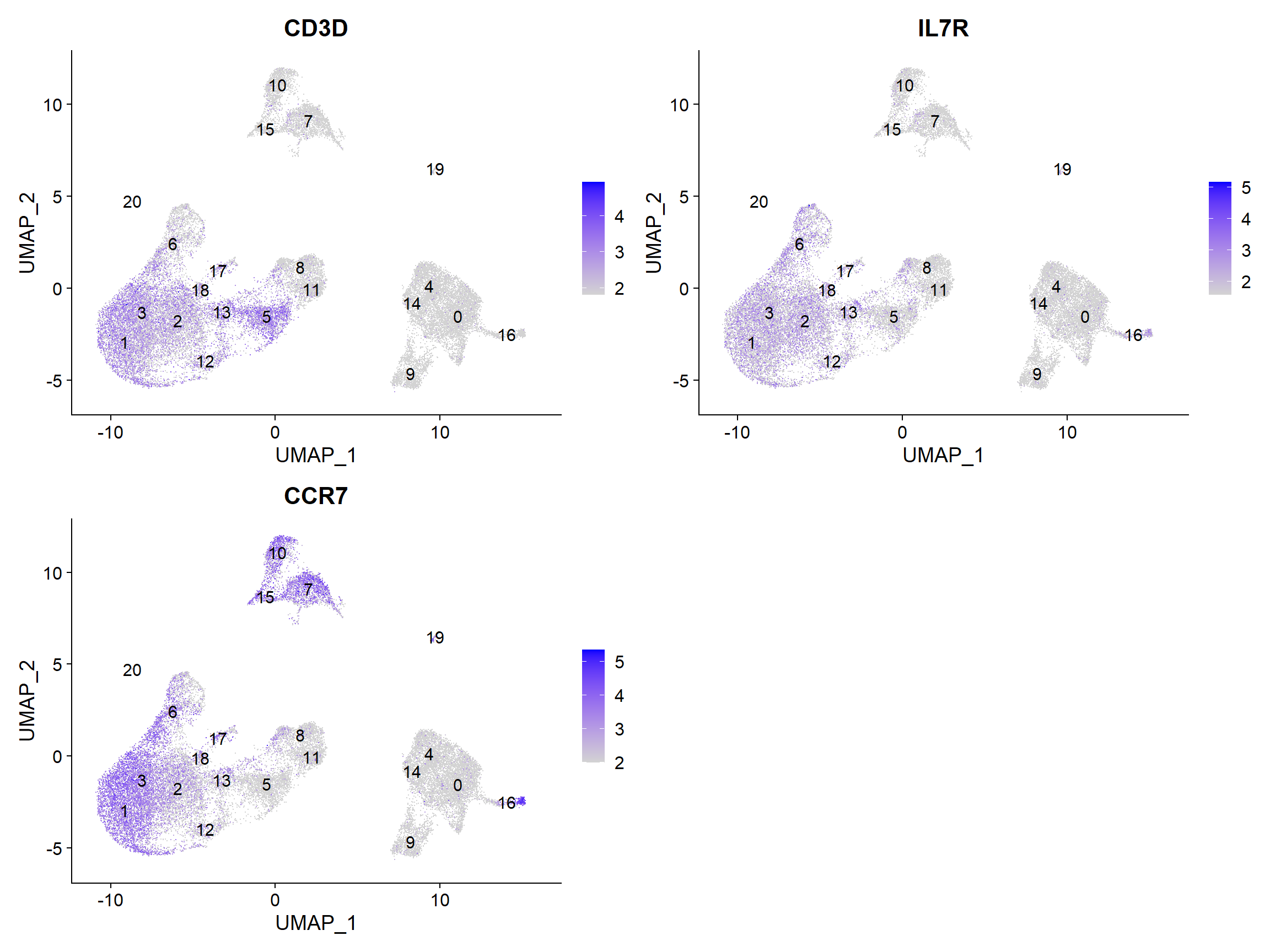
# 2,12,18
8. CD8+ T cells
FeaturePlot(seurat_integrated,
            reduction = "umap",
            features = c("CD3D", "CD8A"),
            sort.cell = TRUE,
            min.cutoff = 'q10',
            label = TRUE)

# 5,13
9. NK cells
FeaturePlot(seurat_integrated,
            reduction = "umap",
            features = c("GNLY", 'NKG7'),
            sort.cell = TRUE,
            min.cutoff = 'q10',
            label = TRUE)

# 8,11
9. Megakaryocytes
FeaturePlot(seurat_integrated,
            reduction = "umap",
            features = c("PPBP"),
            sort.cell = TRUE,
            min.cutoff = 'q10',
            label = TRUE)
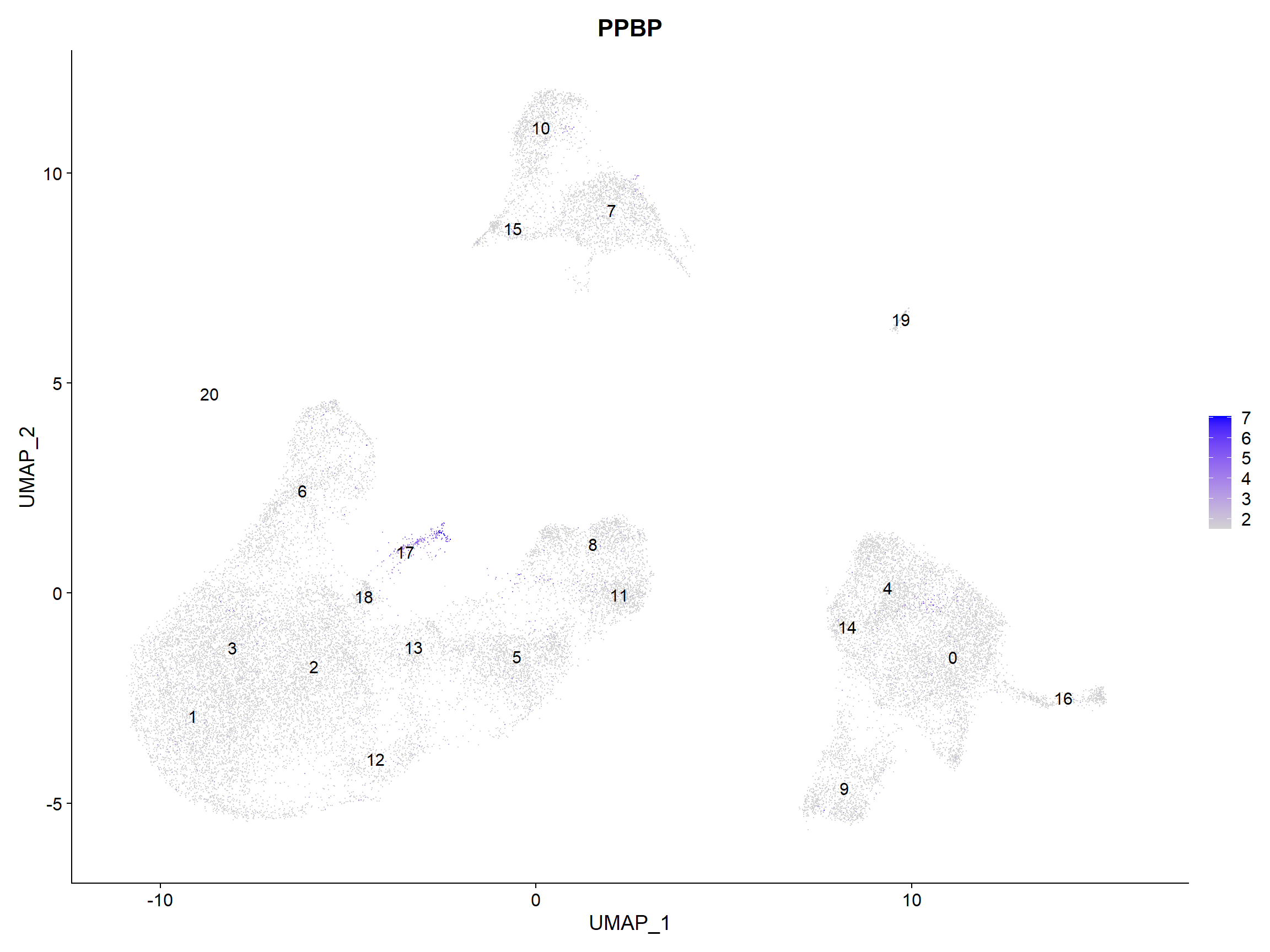
# 17
10. Naive or memory CD4+ T cells
FeaturePlot(seurat_integrated,
            reduction = "umap",
            features = c("CCR7", "SELL"),
            sort.cell = TRUE,
            min.cutoff = 'q10',
            label = TRUE)

# 1,3
| Cell State | Cluster |
|---|---|
| CD14+ monocyte markers | 0,4,14 |
| FCGR3A+ monocytes | 9 |
| Conventional dendritic cells | 16 |
| Plasmacytoid dendritic cells | 19 |
| B cells | 7,10,15 |
| CD4+ T cells | 2,12,18 |
| CD8+ T cells | 5,13 |
| NK cells | 8,11 |
| Megakaryocytes | 17 |
| Naive or memory CD4+ T cells | 1,3 |
然后,我们可以将集群的身份重新分配给这些细胞类型。
# Rename all identities
seurat_integrated <- RenameIdents(object = seurat_integrated,
                               "0" = "CD14+ monocyte markers",
                               "1" = "Naive or memory CD4+ T cells",
                               "2" = "CD4+ T cells",
                               "3" = "Naive or memory CD4+ T cells",
                               "4" = "CD14+ monocyte markers",
                               "5" = "CD8+ T cells",
                               "6" = "Unknown ",
                               "7" = "B cells",
                               "8" = "NK cells",
                               "9" = "FCGR3A+ monocytes",
                               "10" = "B cells",
                               "11" = "NK cells ",
                               "12" = "CD4+ T cells",
                               "13" = "CD8+ T cells",
                               "14" = "CD14+ monocyte markers",
                               "15" = "B cells",
                   "16" = "Conventional dendritic cells",
                   "17" = "Megakaryocytes",
                   "18" = "CD4+ T cells",
                   "19" = "Plasmacytoid dendritic cells",
                   "20" = "Unknown ")
# Plot the UMAP
DimPlot(object = seurat_integrated,
        reduction = "umap",
        label = TRUE,
        label.size = 3,
        repel = TRUE)

If we wanted to remove the potentially stressed cells, we could use the subset() function:
# Remove the stressed or dying cells
seurat_subset_labeled <- subset(seurat_integrated,
                               idents = "Unknown ", invert = TRUE)
# Re-visualize the clusters
DimPlot(object = seurat_subset_labeled,
        reduction = "umap",
        label = TRUE,
        label.size = 3,
    repel = TRUE)

现在,我们要保存我们最终标记的Seurat object:
# 保存最终的R对象
write_rds(seurat_integrated,
          path = "results/seurat_labelled.rds")
原图

庄庄复现图


教程
复现cell types
These materials have been developed by members of the teaching team at the Harvard Chan Bioinformatics Core (HBC). These are open access materials distributed under the terms of the Creative Commons Attribution license (CC BY 4.0), which permits unrestricted use, distribution, and reproduction in any medium, provided the original author and source are credited.

若有收获,就点个赞吧
0 人点赞


