- 设置 Seurat 对象
-
Seurat官网笔记-01:Guided Clustering Tutorial
zhuang xiaojin
7月-03-2021
设置 Seurat 对象
在本教程中,我们将分析 10X Genomics 免费提供的外周血单核细胞 (PBMC) 数据集。有 2,700 个单细胞在 Illumina NextSeq 500 上测序。原始数据可在此处找到。
我们从读入数据开始。该Read10X()函数从 10X读取cellranger管道的输出,返回唯一的分子识别 (UMI) 计数矩阵。该矩阵中的值表示在每个细胞(列)中检测到的每个特征(即基因;行)的分子数。
接下来我们使用计数矩阵来创建一个Seurat对象。library(dplyr)library(Seurat)library(patchwork)# Load the PBMC datasetpbmc.data <- Read10X(data.dir = "data/pbmc3k/filtered_gene_bc_matrices/hg19/")# Initialize the Seurat object with the raw (non-normalized data).pbmc <- CreateSeuratObject(counts = pbmc.data, project = "pbmc3k", min.cells = 3, min.features = 200)pbmc
## An object of class Seurat## 13714 features across 2700 samples within 1 assay## Active assay: RNA (13714 features, 0 variable features)
查看count矩阵的信息
# Lets examine a few genes in the first thirty cellspbmc.data[c("CD3D", "TCL1A", "MS4A1"), 1:30]
## 3 x 30 sparse Matrix of class "dgCMatrix"#### CD3D 4 . 10 . . 1 2 3 1 . . 2 7 1 . . 1 3 . 2 3 . . . . . 3 4 1 5## TCL1A . . . . . . . . 1 . . . . . . . . . . . . 1 . . . . . . . .## MS4A1 . 6 . . . . . . 1 1 1 . . . . . . . . . 36 1 2 . . 2 . . . .
.矩阵中的值代表 0(未检测到分子)。由于 scRNA-seq 矩阵中的大多数值都是 0,Seurat 尽可能使用稀疏矩阵表示。这会显着节省 Drop-seq/inDrop/10x 数据的内存和速度。dense.size <- object.size(as.matrix(pbmc.data))dense.size
## 709591472 bytes
sparse.size <- object.size(pbmc.data)sparse.size
## 29905192 bytes
标准预处理工作流程
以下步骤包括 Seurat 中 scRNA-seq 数据的标准预处理工作流程。这些代表基于 QC 指标、数据标准化和缩放以及高度可变特征检测的细胞选择和过滤。
QC 和选择细胞进行进一步分析
Seurat 允许您根据任何用户定义的标准轻松探索 QC 指标和过滤单元格。社区常用的一些 QC 指标包括
在每个细胞中检测到的独特基因的数量。
- 低质量细胞或空液滴通常只有很少的基因
- 细胞双联体或多重联体可能表现出异常高的基因计数
- 同样,在细胞内检测到的分子总数(与独特的基因密切相关)
映射到线粒体基因组的读数百分比
- 低质量/垂死的细胞通常表现出广泛的线粒体污染
- 我们使用该
PercentageFeatureSet()函数计算线粒体 QC 指标,该函数计算源自一组特征的计数百分比 - 我们使用所有基因
MT-的集合作为一组线粒体基因# The [[ operator can add columns to object metadata. This is a great place to stash QC statspbmc[["percent.mt"]] <- PercentageFeatureSet(pbmc, pattern = "^MT-")
在此过程中自动计算独特基因和总分子的数量
CreateSeuratObject()您可以在对象metadata中找到它们# Show QC metrics for the first 5 cellshead(pbmc@meta.data, 5)
## orig.ident nCount_RNA nFeature_RNA percent.mt## AAACATACAACCAC-1 pbmc3k 2419 779 3.0177759## AAACATTGAGCTAC-1 pbmc3k 4903 1352 3.7935958## AAACATTGATCAGC-1 pbmc3k 3147 1129 0.8897363## AAACCGTGCTTCCG-1 pbmc3k 2639 960 1.7430845## AAACCGTGTATGCG-1 pbmc3k 980 521 1.2244898
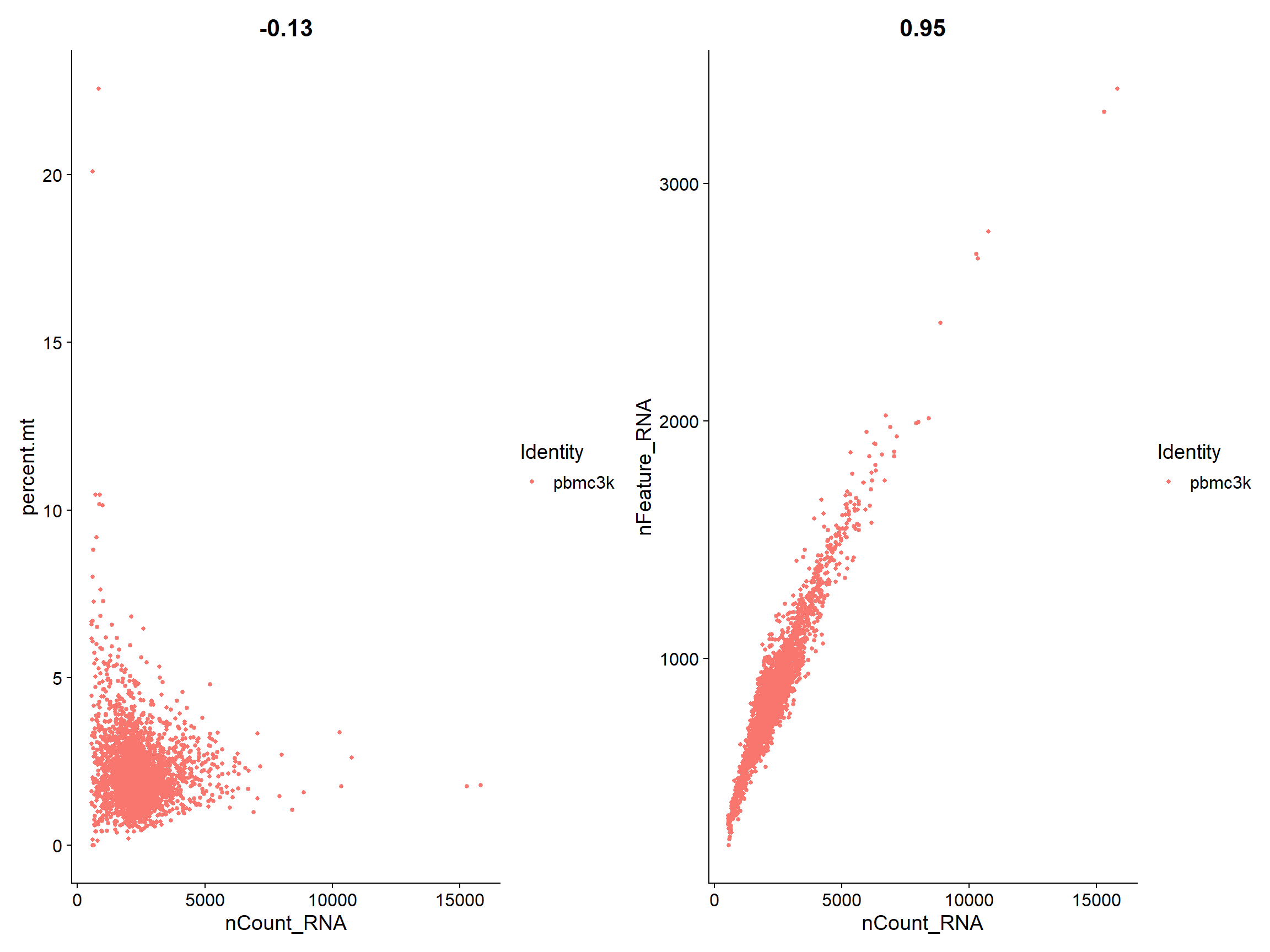
在下面的示例中,我们将 QC 指标可视化,并使用它们来过滤单元格。 我们过滤具有超过 2,500 或少于 200 的独特特征计数的单元格 我们过滤线粒体计数 > 5% 的细胞
# Visualize QC metrics as a violin plotVlnPlot(pbmc, features = c("nFeature_RNA", "nCount_RNA", "percent.mt"), ncol = 3)

# FeatureScatter is typically used to visualize feature-feature relationships, but can be used# for anything calculated by the object, i.e. columns in object metadata, PC scores etc.plot1 <- FeatureScatter(pbmc, feature1 = "nCount_RNA", feature2 = "percent.mt")plot2 <- FeatureScatter(pbmc, feature1 = "nCount_RNA", feature2 = "nFeature_RNA")plot1 + plot2
过滤数据pbmc <- subset(pbmc, subset = nFeature_RNA > 200 & nFeature_RNA < 2500 & percent.mt < 5)
标准化数据
从数据集中删除不需要的单元格后,下一步是对数据进行标准化。默认情况下,我们采用全局缩放归一化方法“LogNormalize”,该方法将每个单元格的特征表达式测量值按总表达进行归一化,将其乘以比例因子(默认为 10,000),并对结果进行对数转换。标准化值存储在
pbmc[["RNA"]]@data.pbmc <- NormalizeData(pbmc, normalization.method = "LogNormalize", scale.factor = 10000)
识别高度可变的特征(特征选择)
计算在数据集中表现出高细胞间变异的特征子集(即,它们在某些细胞中高度表达,而在其他细胞中低表达)。通过
FindVariableFeatures()函数中实现。默认情况下,我们为每个数据集返回2,000高度可变的基因。这些将用于下游分析,如 PCA。pbmc <- FindVariableFeatures(pbmc, selection.method = "vst", nfeatures = 2000)# Identify the 10 most highly variable genestop10 <- head(VariableFeatures(pbmc), 10)# plot variable features with and without labelsplot1 <- VariableFeaturePlot(pbmc)plot2 <- LabelPoints(plot = plot1, points = top10, repel = TRUE)plot1 + plot2
归一化数据
使用线性变换(“缩放”),这是在降维技术(如 PCA)之前的标准预处理步骤。该
ScaleData()函数:
改变每个基因的表达,使跨细胞的平均表达为 0 缩放每个基因的表达,使细胞间的方差为 1 此步骤在下游分析中给予同等权重,因此高表达基因不会占主导地位 其结果存储在pbmc[["RNA"]]@scale.dataall.genes <- rownames(pbmc)pbmc <- ScaleData(pbmc, features = all.genes)
Scale是 Seurat 工作流程中必不可少的步骤,但仅限于**将用作 PCA 输入的基因**。因此,默认情况下`ScaleData()`仅对先前识别的变量特征执行缩放(默认为 2,000)。为此,请省略`features`前一个函数调用中的参数,即PCA 和聚类结果将不受影响。但是,Seurat 热图(如下所示生成DoHeatmap())需要对热图中的**基因进行缩放**,以确保高表达的基因不会主导热图。为了确保我们以后不会在热图中留下任何基因,我们将在本教程中缩放所有基因。可以‘regress out’细胞周期阶段或线粒体污染相关的异质性通过`vars.to.regress`参数。
降维
我们对缩放后的数据执行PCA。默认情况下,只有先前确定的变量特征用作输入,但features如果您希望选择不同的子集,可以使用参数定义。
pbmc <- RunPCA(pbmc, features = VariableFeatures(object = pbmc))
可视化细胞和定义PCA,可通过
VizDimReduction(),DimPlot()和DimHeatmap()函数# Examine and visualize PCA results a few different waysprint(pbmc[["pca"]], dims = 1:5, nfeatures = 5)
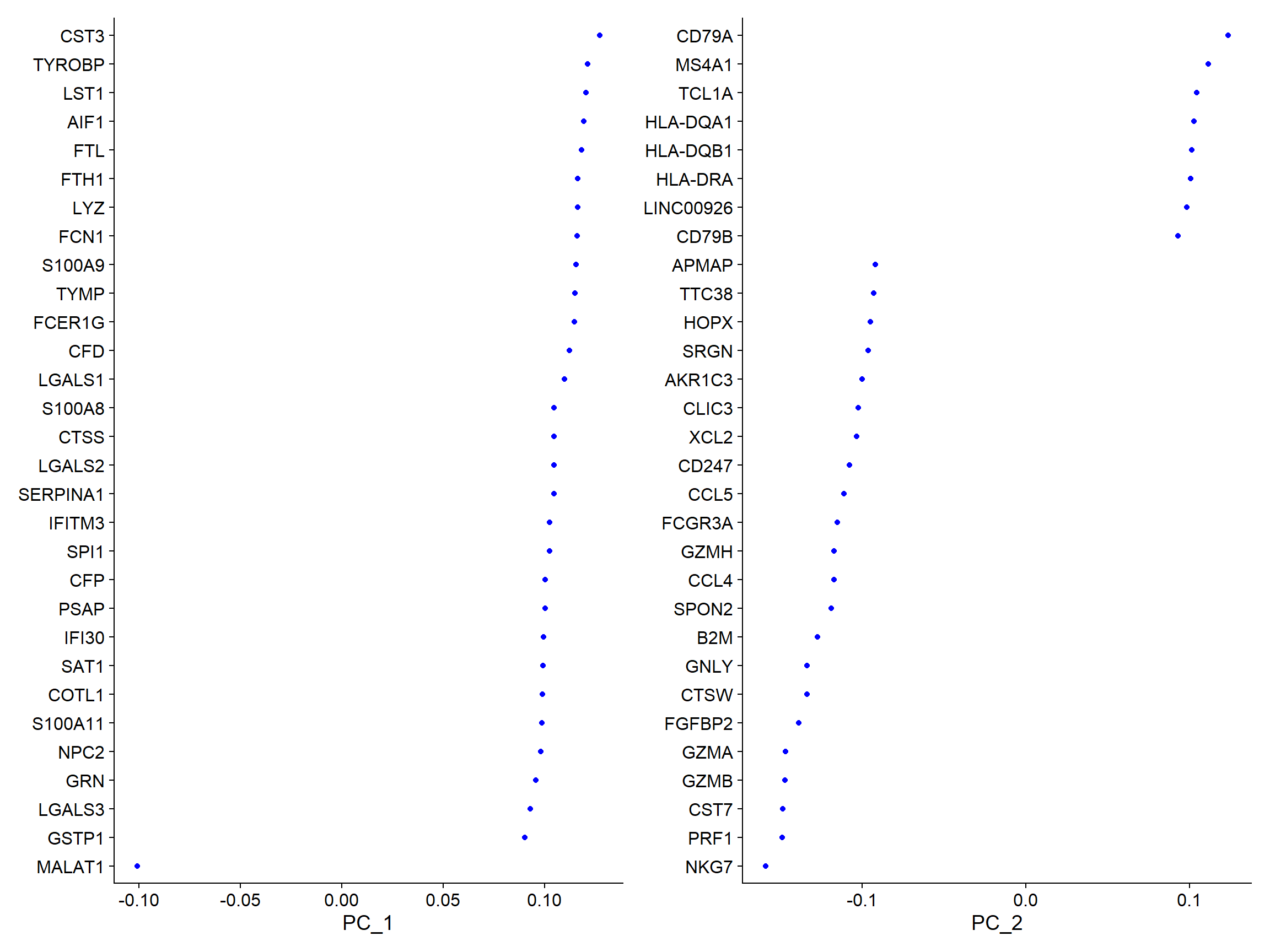
## PC_ 1## Positive: CST3, TYROBP, LST1, AIF1, FTL## Negative: MALAT1, LTB, IL32, IL7R, CD2## PC_ 2## Positive: CD79A, MS4A1, TCL1A, HLA-DQA1, HLA-DQB1## Negative: NKG7, PRF1, CST7, GZMB, GZMA## PC_ 3## Positive: HLA-DQA1, CD79A, CD79B, HLA-DQB1, HLA-DPB1## Negative: PPBP, PF4, SDPR, SPARC, GNG11## PC_ 4## Positive: HLA-DQA1, CD79B, CD79A, MS4A1, HLA-DQB1## Negative: VIM, IL7R, S100A6, IL32, S100A8## PC_ 5## Positive: GZMB, NKG7, S100A8, FGFBP2, GNLY## Negative: LTB, IL7R, CKB, VIM, MS4A7
VizDimLoadings(pbmc, dims = 1:2, reduction = "pca")
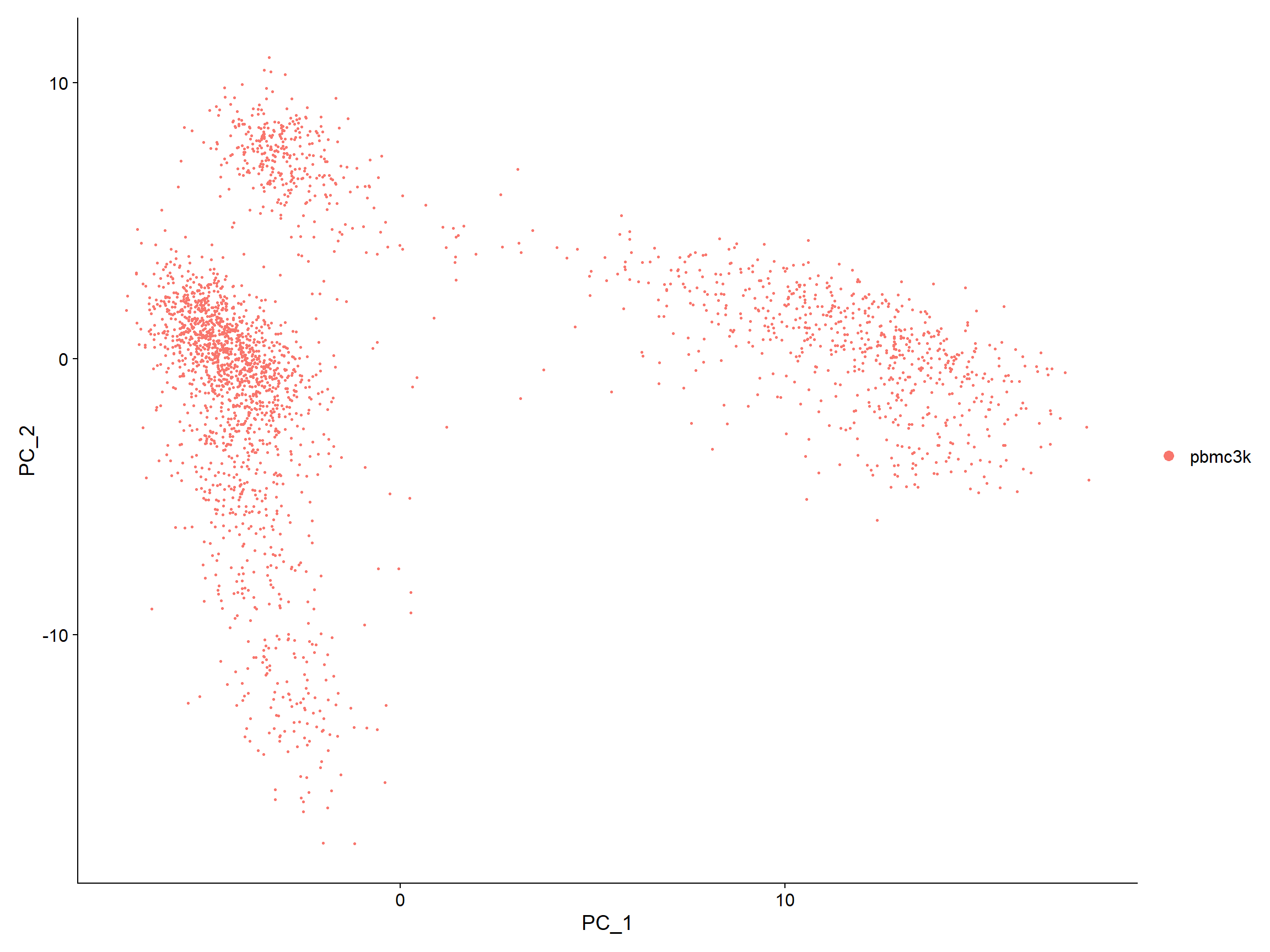
DimPlot(pbmc, reduction = "pca")
DimHeatmap()允许轻松探索数据集中异质性的主要来源,并且在尝试决定包含哪些 PC以进行进一步下游分析时非常有用。 cells and features 都根据其 PCA 分数进行排序。设置cells为一个数字会在频谱的两端绘制“极端”单元格,这大大加快了大型数据集的绘制速度。尽管显然是有监督的分析,但我们发现这是探索相关特征集的宝贵工具。DimHeatmap(pbmc, dims = 1, cells = 500, balanced = TRUE)

DimHeatmap(pbmc, dims = 1:15, cells = 500, balanced = TRUE)
确定数据集的“维度”
# NOTE: This process can take a long time for big datasets, comment out for expediency. More# approximate techniques such as those implemented in ElbowPlot() can be used to reduce# computation timepbmc <- JackStraw(pbmc, num.replicate = 100)pbmc <- ScoreJackStraw(pbmc, dims = 1:20)JackStrawPlot(pbmc, dims = 1:15)

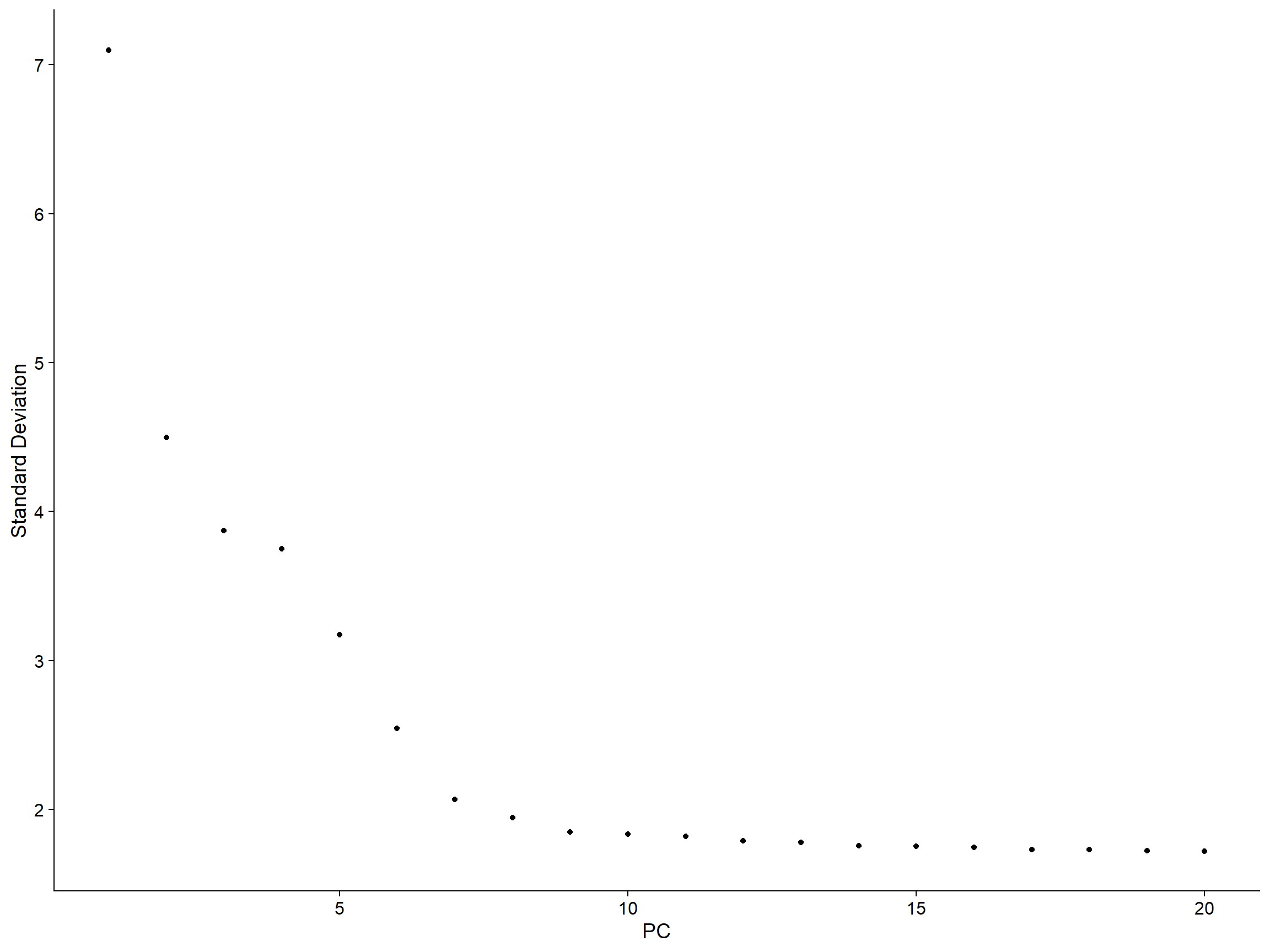
该JackStrawPlot()函数提供了一个可视化工具,用于将每个 PC 的 p值分布与均匀分布(虚线)进行比较。“显着”PC 将显示出大量具有低 p值的特征(虚线上方的实线)。在这种情况下,在前 10-12 个 PC 之后,重要性似乎急剧下降。 另一种启发式方法会生成一个“肘图”:根据每个(ElbowPlot()函数)解释的方差百分比对主成分进行排名。在这个例子中,我们可以观察到 PC9-10 周围的“肘部”,这表明大部分真实信号是在前 10 个 PC 中捕获的。ElbowPlot(pbmc)
聚类细胞
此步骤使用该
FindNeighbors()函数执行,并将先前定义的数据集维度(前 10 个 PC)作为输入。 resolution通常在0.4-1.2之间,越大识别的聚类就更多。 细胞聚类的结果可以通过Idents()函数显示。pbmc <- FindNeighbors(pbmc, dims = 1:10)pbmc <- FindClusters(pbmc, resolution = 0.5)
## Modularity Optimizer version 1.3.0 by Ludo Waltman and Nees Jan van Eck#### Number of nodes: 2638## Number of edges: 95965#### Running Louvain algorithm...## Maximum modularity in 10 random starts: 0.8723## Number of communities: 9## Elapsed time: 0 seconds
# Look at cluster IDs of the first 5 cellshead(Idents(pbmc), 5)
## AAACATACAACCAC-1 AAACATTGAGCTAC-1 AAACATTGATCAGC-1 AAACCGTGCTTCCG-1## 2 3 2 1## AAACCGTGTATGCG-1## 6## Levels: 0 1 2 3 4 5 6 7 8
非线性降维
Seurat 提供了多种非线性降维技术,例如 tSNE 和 UMAP,以可视化和探索这些数据集。这些算法的目标是学习数据的底层流形,以便将相似的单元格放在低维空间中。上面确定的基于图形的集群中的单元格应该共同定位在这些降维图中。作为 UMAP 和 tSNE 的输入,我们建议使用相同的 PC 作为聚类分析的输入。
# If you haven't installed UMAP, you can do so via reticulate::py_install(packages =# 'umap-learn')pbmc <- RunUMAP(pbmc, dims = 1:10)# note that you can set `label = TRUE` or use the LabelClusters function to help label# individual clustersDimPlot(pbmc, reduction = "umap")

saveRDS(pbmc, file = "results/pm3k_results/pbmc_tutorial.rds")
寻找差异基因(簇生物标志物)
默认情况下,
ident.1与所有其他细胞相比,它识别单个簇(在 中指定)的阳性和阴性标记。FindAllMarkers()为所有集群自动执行此过程,但您也可以测试集群组之间的对比,或针对所有单元格进行测试。 该min.pct参数要求在两组细胞中的任何一组中以最小百分比检测到一个特征,而thresh.test参数要求一个特征在两组之间差异表达(平均)一定量。# find all markers of cluster 2cluster2.markers <- FindMarkers(pbmc, ident.1 = 2, min.pct = 0.25)head(cluster2.markers, n = 5)
## p_val avg_log2FC pct.1 pct.2 p_val_adj## IL32 2.593535e-91 1.2154360 0.949 0.466 3.556774e-87## LTB 7.994465e-87 1.2828597 0.981 0.644 1.096361e-82## CD3D 3.922451e-70 0.9359210 0.922 0.433 5.379250e-66## IL7R 1.130870e-66 1.1776027 0.748 0.327 1.550876e-62## LDHB 4.082189e-65 0.8837324 0.953 0.614 5.598314e-61
# find markers for every cluster compared to all remaining cells, report only the positive# onespbmc.markers <- FindAllMarkers(pbmc, only.pos = TRUE, min.pct = 0.25, logfc.threshold = 0.25)pbmc.markers %>%group_by(cluster) %>%top_n(n = 2, wt = avg_log2FC)
## # A tibble: 18 x 7## # Groups: cluster [9]## p_val avg_log2FC pct.1 pct.2 p_val_adj cluster gene## <dbl> <dbl> <dbl> <dbl> <dbl> <fct> <chr>## 1 1.74e-109 1.07 0.897 0.593 2.39e-105 0 LDHB## 2 1.17e- 83 1.33 0.435 0.108 1.60e- 79 0 CCR7## 3 0 5.57 0.996 0.215 0 1 S100A9## 4 0 5.48 0.975 0.121 0 1 S100A8## 5 7.99e- 87 1.28 0.981 0.644 1.10e- 82 2 LTB## 6 2.61e- 59 1.24 0.424 0.111 3.58e- 55 2 AQP3## 7 0 4.31 0.936 0.041 0 3 CD79A## 8 9.48e-271 3.59 0.622 0.022 1.30e-266 3 TCL1A## 9 1.17e-178 2.97 0.957 0.241 1.60e-174 4 CCL5## 10 4.93e-169 3.01 0.595 0.056 6.76e-165 4 GZMK## 11 3.51e-184 3.31 0.975 0.134 4.82e-180 5 FCGR3A## 12 2.03e-125 3.09 1 0.315 2.78e-121 5 LST1## 13 1.05e-265 4.89 0.986 0.071 1.44e-261 6 GZMB## 14 6.82e-175 4.92 0.958 0.135 9.36e-171 6 GNLY## 15 1.48e-220 3.87 0.812 0.011 2.03e-216 7 FCER1A## 16 1.67e- 21 2.87 1 0.513 2.28e- 17 7 HLA-DPB1## 17 7.73e-200 7.24 1 0.01 1.06e-195 8 PF4## 18 3.68e-110 8.58 1 0.024 5.05e-106 8 PPBP
Seurat 有几种差异表达测试,可以使用
test.use参数进行设置(有关详细信息,请参阅我们的DE 小插图)。例如,ROC 测试返回任何单个标记的“分类能力”(范围从 0 - 随机,到 1 - 完美)。# find all markers of cluster 0cluster0.markers <- FindMarkers(pbmc, ident.1 = 0, logfc.threshold = 0.25, test.use = "roc", only.pos = TRUE)
可视化标记表达的工具。
VlnPlot()(显示跨集群的表达概率分布)和FeaturePlot()(在 tSNE 或 PCA 图上可视化特征表达)是我们最常用的可视化。我们还建议探索RidgePlot()、CellScatter()和DotPlot()作为查看数据集的其他方法。VlnPlot(pbmc, features = c("MS4A1", "CD79A"))

DotPlot(pbmc, features = c("MS4A1", "CD79A"))
RidgePlot(pbmc, features = c("MS4A1", "CD79A"))
CellScatter(object = pbmc_small,
          cell1 = 'ATAGGAGAAACAGA',
          cell2 = 'CATCAGGATGCACA')
# you can plot raw counts as well
VlnPlot(pbmc, features = c("NKG7", "PF4"), slot = "counts", log = TRUE)
FeaturePlot(pbmc, features = c("MS4A1", "GNLY", "CD3E", "CD14", "FCER1A", "FCGR3A", "LYZ", "PPBP",
  "CD8A"))
DoHeatmap()为给定的细胞和特征生成一个表达热图。在这种情况下,我们为每个集群绘制前 20 个标记(或所有标记,如果小于 20)。## 先提取每个聚类前10的基因 pbmc.markers %>% group_by(cluster) %>% top_n(n = 10, wt = avg_log2FC) -> top10 DoHeatmap(pbmc, features = top10$gene) + NoLegend()确定细胞类型
| Cluster ID | Markers | Cell Type | | —- | —- | —- | | 0 | IL7R, CCR7 | Naive CD4+ T | | 1 | CD14, LYZ | CD14+ Mono | | 2 | IL7R, S100A4 | Memory CD4+ | | 3 | MS4A1 | B | | 4 | CD8A CD8+ | T | | 5 | FCGR3A, MS4A7 | FCGR3A+ Mono | | 6 | GNLY, NKG7 | NK | | 7 | FCER1A, CST3 | DC | | 8 | PPBP | Platelet |



Naive CD4 T
p1 <- DotPlot(pbmc, features = c("IL7R", "CCR7"))
p2 <- VlnPlot(pbmc, features = c("IL7R", "CCR7"))
p1+p2

FeaturePlot(pbmc, features = c("IL7R", "CCR7"),label = T)

# cluster 0
CD14+ Mono
p1 <- DotPlot(pbmc, features = c("CD14", "LYZ"))
p2 <- VlnPlot(pbmc, features = c("CD14", "LYZ"))
p1+p2

FeaturePlot(pbmc, features = c("CD14", "LYZ"),label = T)

# cluster 1
Memory CD4+
p1 <- DotPlot(pbmc, features = c("IL7R", "S100A4"))
p2 <- VlnPlot(pbmc, features = c("IL7R", "S100A4"))
p1+p2

FeaturePlot(pbmc, features = c("IL7R", "S100A4"),label = T)

# cluster 2
new.cluster.ids <- new.cluster.ids <- c("Naive CD4 T", "CD14+ Mono", "Memory CD4 T", "B", "CD8 T", "FCGR3A+ Mono",
    "NK", "DC", "Platelet")
names(new.cluster.ids) <- levels(pbmc)
pbmc <- RenameIdents(pbmc, new.cluster.ids)
DimPlot(pbmc, reduction = "umap", label = TRUE, pt.size = 0.5) + NoLegend()


若有收获,就点个赞吧
0 人点赞


