** 江西现代职业技术学院** <br />**容器云技术**<br />**实训报告**<br />** 学 号: 20628670112 **<br />** 姓 名: 黄文杰 **<br />** 学 院: 信息工程学院 **<br />** 专 业: 云计算技术与应用 **<br />** 班 级: 2020级 **<br />** 指导教师: 刘芃 **
一、项目目的
容器技术是近几年云行业发展中不可缺少的一环。Docker和k8s的大热极大可能会推动云计算PAAS层的完善和普及。以Docker为基础,本次项目任务与目的分为五点:
1、了解Docker相关基础知识;
2、掌握DOCKER安装;
3、了解Docker镜像、容器和操作命令;
4、掌握Docker file的编写;
5、使学生养成在学习中相互配合,团结协作的习惯。
二、项目要求
综合项目的内容应该包括以下知识点:
1、安装DOCKER
2、安装并使用本地仓库
3、使用Dockerfile构建镜像
4、DockerCompose
5、Docker SWARM搭建
6、使用DOCKER STACK搭建服务栈
三、项目实施过程
3.1 docker 安装
3.1.1 准备一台最小安装的CentOS主机,保证此CentOS主机可以顺利访问Internet
[root@hwj ~]# ip add1: lo: <LOOPBACK,UP,LOWER_UP> mtu 65536 qdisc noqueue state UNKNOWN qlen 1link/loopback 00:00:00:00:00:00 brd 00:00:00:00:00:00inet 127.0.0.1/8 scope host lovalid_lft forever preferred_lft foreverinet6 ::1/128 scope hostvalid_lft forever preferred_lft forever2: ens33: <BROADCAST,MULTICAST,UP,LOWER_UP> mtu 1500 qdisc pfifo_fast state UP qlen 1000link/ether 00:0c:29:a0:0d:4a brd ff:ff:ff:ff:ff:ffinet 192.168.20.200/24 brd 192.168.20.255 scope global ens33valid_lft forever preferred_lft foreverinet6 fe80::4158:b4b2:c6b4:819e/64 scope linkvalid_lft forever preferred_lft forever[root@hwj ~]# ping -c 3 www.baidu.comPING www.wshifen.com (45.113.192.101) 56(84) bytes of data.64 bytes from 45.113.192.101 (45.113.192.101): icmp_seq=1 ttl=128 time=236 ms64 bytes from 45.113.192.101 (45.113.192.101): icmp_seq=2 ttl=128 time=247 ms64 bytes from 45.113.192.101 (45.113.192.101): icmp_seq=3 ttl=128 time=235 ms--- www.wshifen.com ping statistics ---3 packets transmitted, 3 received, 0% packet loss, time 2005msrtt min/avg/max/mdev = 235.514/240.084/247.955/5.603 ms
3.1.2 关闭防火墙、selinux和清空iptables
[root@hwj ~]# systemctl stop firewalld[root@hwj ~]# systemctl disable firewalldRemoved symlink /etc/systemd/system/dbus-org.fedoraproject.FirewallD1.service.Removed symlink /etc/systemd/system/multi-user.target.wants/firewalld.service.[root@hwj ~]# setenforce 0[root@hwj ~]# vim /etc/sysconfig/selinux[root@hwj ~]# cat /etc/sysconfig/selinux# This file controls the state of SELinux on the system.# SELINUX= can take one of these three values:# enforcing - SELinux security policy is enforced.# permissive - SELinux prints warnings instead of enforcing.# disabled - No SELinux policy is loaded.SELINUX=disabled[root@hwj ~]# getenforcePermissive[root@hwj ~]# iptables -F[root@hwj ~]# iptables -X[root@hwj ~]# iptables -Z[root@hwj ~]# iptables -save[root@hwj ~]# iptables-save# Generated by iptables-save v1.4.21 on Thu Jun 9 08:48:05 2022*filter:INPUT ACCEPT [36:2196]:FORWARD ACCEPT [0:0]:OUTPUT ACCEPT [22:1912]COMMIT# Completed on Thu Jun 9 08:48:05 2022
3.1.3 修改yum源为阿里云
[root@hwj ~]# yum install wget[root@hwj ~]# cd /etc/yum.repos.d[root@hwj yum.repos.d]# mkdir upload[root@hwj yum.repos.d]# mv CentOS-*.repo upload[root@hwj yum.repos.d]# lsupload[root@hwj yum.repos.d]# wget -O /etc/yum.repos.d/Centos-7.repohttp://mirrors.aliyun.com/repo/Centos-7.repo--2022-06-09 08:54:45-- http://mirrors.aliyun.com/repo/Centos-7.repo正在解析主机 mirrors.aliyun.com (mirrors.aliyun.com)... 106.225.243.214, 106.225.243.215, 106.225.243.216, ...正在连接 mirrors.aliyun.com (mirrors.aliyun.com)|106.225.243.214|:80... 已连接。已发出 HTTP 请求,正在等待回应... 200 OK长度:2523 (2.5K) [application/octet-stream]正在保存至: “/etc/yum.repos.d/Centos-7.repo”100%[====================================================>] 2,523 --.-K/s 用时 0.01s2022-06-09 08:54:46 (202 KB/s) - 已保存 “/etc/yum.repos.d/Centos-7.repo” [2523/2523])[root@hwj yum.repos.d]# yum clean all &&yum makecache&&yum repolistDetermining fastest mirrors* base: mirrors.aliyun.com* extras: mirrors.aliyun.com* updates: mirrors.aliyun.com元数据缓存已建立已加载插件:fastestmirrorLoading mirror speeds from cached hostfile* base: mirrors.aliyun.com* extras: mirrors.aliyun.com* updates: mirrors.aliyun.com源标识 源名称 状态base/7/x86_64 CentOS-7 - Base - mirrors.aliyun.com 10,072extras/7/x86_64 CentOS-7 - Extras - mirrors.aliyun.com 512updates/7/x86_64 CentOS-7 - Updates - mirrors.aliyun.com 3,863repolist: 14,447
3.1.4 设置时间同步
[root@hwj yum.repos.d]# yum install -y ntp net-tools[root@hwj yum.repos.d]# ntpdate cn.pool.ntp.org9 Jun 09:05:26 ntpdate[12069]: adjust time server 84.16.73.33 offset -0.004139 sec
3.1.5 安装Docker依赖环境(运行必备主件)
[root@hwj yum.repos.d]# yum install -y yum-utils device-mapper-persisitent-data lvm2
3.1.6 配置阿里云Docker-CE源
[root@hwj ~]# yum-config-manager --add-repohttp://mirrors.aliyun.com/docker-ce/linux/centos/docker-ce.repo已加载插件:fastestmirroradding repo from: http://mirrors.aliyun.com/docker-ce/linux/centos/docker-ce.repograbbing file http://mirrors.aliyun.com/docker-ce/linux/centos/docker-ce.repoto /etc/yum.repos.d/docker-ce.reporepo saved to /etc/yum.repos.d/docker-ce.repo
3.1.7 安装Docker-CE最新版本并查看是否正常安装
[root@hwj ~]# yum install -y docker-ce[root@hwj ~]# docker -vDocker version 20.10.17, build 100c701[root@hwj ~]# docker versionClient: Docker Engine - CommunityVersion: 20.10.17API version: 1.41Go version: go1.17.11Git commit: 100c701Built: Mon Jun 6 23:05:12 2022OS/Arch: linux/amd64Context: defaultExperimental: true
3.1.8 登录阿里云、添加docker本地镜像加速器
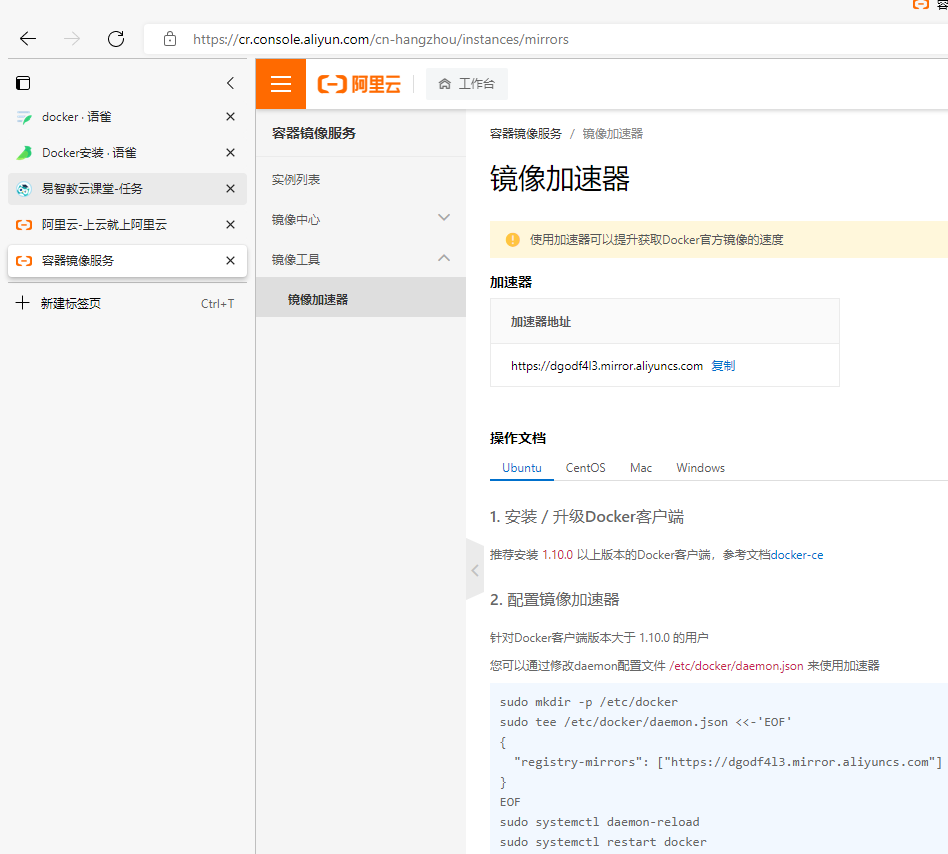
[root@hwj ~]# mkdir -p /etc/docker[root@hwj ~]# tee /etc/docker/daemon.json <<-'EOF'> {> "registry-mirrors": ["https://dgodf4l3.mirror.aliyuncs.com"]> }> EOF{"registry-mirrors": ["https://dgodf4l3.mirror.aliyuncs.com"]}[root@hwj ~]# systemctl daemon-reload[root@hwj ~]# systemctl restart docker
3.1.9 启动Docker服务,并检查信息
[root@hwj ~]# systemctl start docker[root@hwj ~]# systemctl enable dockerCreated symlink from /etc/systemd/system/multi-user.target.wants/docker.serviceto /usr/lib/systemd/system/docker.service[root@hwj ~]# docker infoClient:Context: defaultDebug Mode: falsePlugins:app: Docker App (Docker Inc., v0.9.1-beta3)buildx: Docker Buildx (Docker Inc., v0.8.2-docker)scan: Docker Scan (Docker Inc., v0.17.0)Server:Containers: 0Running: 0Paused: 0Stopped: 0Images: 0Server Version: 20.10.17Storage Driver: overlay2Backing Filesystem: extfsSupports d_type: trueNative Overlay Diff: trueuserxattr: falseLogging Driver: json-fileCgroup Driver: cgroupfsCgroup Version: 1Plugins:Volume: localNetwork: bridge host ipvlan macvlan null overlayLog: awslogs fluentd gcplogs gelf journald json-file local logentries splunk syslogSwarm: inactiveRuntimes: io.containerd.runc.v2 io.containerd.runtime.v1.linux runcDefault Runtime: runcInit Binary: docker-initcontainerd version: 10c12954828e7c7c9b6e0ea9b0c02b01407d3ae1runc version: v1.1.2-0-ga916309init version: de40ad0Security Options:seccompProfile: defaultKernel Version: 3.10.0-693.el7.x86_64Operating System: CentOS Linux 7 (Core)OSType: linuxArchitecture: x86_64CPUs: 2Total Memory: 3.686GiBName: hwjID: GS3O:EENF:MDAA:RHSX:SAAW:DQ7A:XYVV:DC74:445I:VDR3:SQC6:ISAKDocker Root Dir: /var/lib/dockerDebug Mode: falseRegistry: https://index.docker.io/v1/Labels:Experimental: falseInsecure Registries:127.0.0.0/8Registry Mirrors:https://dgodf4l3.mirror.aliyuncs.com/Live Restore Enabled: false
3.1.10 运行镜像进行测试
[root@hwj ~]# docker run -d -p 1280:80 alexwhen/docker-2048Unable to find image 'alexwhen/docker-2048:latest' locallylatest: Pulling from alexwhen/docker-2048Image docker.io/alexwhen/docker-2048:latest uses outdated schema1 manifest format. Please upgrade to a schema2 image for better future compatibility. More information at https://docs.docker.com/registry/spec/deprecated-schema-v1/c862d82a67a2: Pull completea3ed95caeb02: Pull complete69dbbd8c451d: Pull completee9b345a0f742: Pull completeDigest: sha256:4913452e5bd092db9c8b005523127b8f62821867021e23a9acb1ae0f7d2432e1Status: Downloaded newer image for alexwhen/docker-2048:latest4f15612768e00dd4059cfa02116ab526d2707cbb6a95331198e7ab69b5cae491

3.2安装并使用本地仓库
3.2.1 拉取本地仓库工具镜像registry
[root@hwj ~]# docker pull registryUsing default tag: latestlatest: Pulling from library/registry79e9f2f55bf5: Pull complete0d96da54f60b: Pull complete5b27040df4a2: Pull completee2ead8259a04: Pull complete3790aef225b9: Pull completeDigest: sha256:169211e20e2f2d5d115674681eb79d21a217b296b43374b8e39f97fcf866b375Status: Downloaded newer image for registry:latestdocker.io/library/registry:latest
3.2.2 运行一个Registry镜像仓库的容器实例
[root@hwj ~]# docker run -itd --restart=always \ #在后台运行交互模式,并给予一个伪终端> --name hwj_registry \> -p 12500:5000 \> -v /hwj_registry/registry:/var/lib/registry \ #持久储存> registry5405c590ef0a66a445aa95c0b6b5f01e110b85386375672ffb3b20cca9d8ac3a
3.2.3 查看当前仓库下的镜像
[root@hwj ~]# curl 192.168.20.200:12500/v2/_catalog{"repositories":[]}
3.2.4 添加本地不安全的仓库信息
[root@hwj ~]# vim /etc/docker/daemon.json[root@hwj ~]# cat /etc/docker/daemon.json{"insecure-registries": ["192.168.20.200:12500"],"registry-mirrors": ["https://dgodf4l3.mirror.aliyuncs.com"]}
3.2.5 重新加载Docker服务配置文件并重新启动docker
[root@hwj ~]# systemctl daemon-reload[root@hwj ~]# systemctl restart docker
3.2.6 修改镜像标签(重命名)
[root@hwj ~]# docker imagesREPOSITORY TAG IMAGE ID CREATED SIZEnginx latest 605c77e624dd 5 months ago 141MBregistry latest b8604a3fe854 6 months ago 26.2MB[root@hwj ~]# docker tag 605 192.168.20.200:12500/nginx:latest
3.2.7 上传镜像
[root@hwj ~]# docker push 192.168.20.200:12500/nginx:latestThe push refers to repository [192.168.20.200:12500/nginx]d874fd2bc83b: Pushed32ce5f6a5106: Pushedf1db227348d0: Pushedb8d6e692a25e: Pushede379e8aedd4d: Pushed2edcec3590a4: Pushedlatest: digest: sha256:ee89b00528ff4f02f2405e4ee221743ebc3f8e8dd0bfd5c4c20a2fa2aaa7ede3size: 1570
3.2.8 查看本次仓库镜像
[root@hwj ~]# curl 192.168.20.200:12500/v2/_catalog{"repositories":["nginx"]}
3.3 使用Dockerfile构建镜像
3.3.1 创建上下文环境并创建首页文件(压缩)
[root@hwj ~]# mkdir httpd&&cd httpd[root@hwj httpd]# vim index.html[root@hwj httpd]# cat index.htmlwell,so good which httpd mode in hwj's compute[root@hwj httpd]# tar -czvf index.html.tar index.htmlindex.html[root@hwj httpd]# lsindex.html index.html.tar
3.3.2 编写Dockerfile
[root@hwj httpd]# vim Dockerfile[root@hwj httpd]# cat DockerfileARG version=7FROM centos:${version}MAINTAINER HWJRUN mkdir /hwjvolVOLUME ["vdata1","hwjvol"]LABEL version="12" author=hwj description="This is hwj's nginx"RUN yum install -y wgetRUN wget -O /etc/yum.repos.d/epel.repo http://mirrors.aliyun.com/repo/epel-7.repoRUN yum clean all&&yum makecacheRUN yum install -y nginxRUN echo "daemon off;" >> /etc/nginx/nginx.confADD index.html.tar /usr/share/nginx/html/index.htmlEXPOSE 80 443CMD ["/usr/sbin/nginx"]
[root@localhost httpd]# docker build -t hwj_ng:12 -f /root/httpd/Dockerfile .Sending build context to Docker daemon 4.096kBStep 1/13 : ARG version=7Step 2/13 : FROM centos:${version}---> eeb6ee3f44bdStep 3/13 : MAINTAINER HWJ---> Running in 0c3164b512b5Removing intermediate container 0c3164b512b5---> 5f923fd3c365Step 4/13 : RUN mkdir /hwjvol---> Running in 381cdfc7c89fRemoving intermediate container 381cdfc7c89f---> f2b8dcb77635Step 5/13 : VOLUME ["vdata1","hwjvol"]---> Running in 54a6373b9f44Removing intermediate container 54a6373b9f44---> 266371f1aa24Step 6/13 : LABEL version="12" author=hwj description="This is hwj's nginx"---> Running in cfa53128198dRemoving intermediate container cfa53128198d---> d6dc212c1f18Step 7/13 : RUN yum install -y wget---> Running in bf4d940bf763Loaded plugins: fastestmirror, ovlDetermining fastest mirrors* base: mirrors.huaweicloud.com* extras: mirrors.huaweicloud.com* updates: mirrors.ustc.edu.cnResolving Dependencies--> Running transaction check---> Package wget.x86_64 0:1.14-18.el7_6.1 will be installed--> Finished Dependency ResolutionDependencies Resolved================================================================================Package Arch Version Repository Size================================================================================Installing:wget x86_64 1.14-18.el7_6.1 base 547 kTransaction Summary================================================================================Install 1 PackageTotal download size: 547 kInstalled size: 2.0 MDownloading packages:warning: /var/cache/yum/x86_64/7/base/packages/wget-1.14-18.el7_6.1.x86_64.rpm: Header V3 RSA/SHA256 Signature, key ID f4a80eb5: NOKEYPublic key for wget-1.14-18.el7_6.1.x86_64.rpm is not installedRetrieving key from file:///etc/pki/rpm-gpg/RPM-GPG-KEY-CentOS-7Importing GPG key 0xF4A80EB5:Userid : "CentOS-7 Key (CentOS 7 Official Signing Key) <security@centos.org>"Fingerprint: 6341 ab27 53d7 8a78 a7c2 7bb1 24c6 a8a7 f4a8 0eb5Package : centos-release-7-9.2009.0.el7.centos.x86_64 (@CentOS)From : /etc/pki/rpm-gpg/RPM-GPG-KEY-CentOS-7Running transaction checkRunning transaction testTransaction test succeededRunning transactionInstalling : wget-1.14-18.el7_6.1.x86_64 1/1install-info: No such file or directory for /usr/share/info/wget.info.gzVerifying : wget-1.14-18.el7_6.1.x86_64 1/1Installed:wget.x86_64 0:1.14-18.el7_6.1Complete!Removing intermediate container bf4d940bf763---> 2aa125d5d77bStep 8/13 : RUN wget -O /etc/yum.repos.d/epel.repo http://mirrors.aliyun.com/repo/epel-7.repo---> Running in f51f912e28ee--2022-06-09 06:42:30-- http://mirrors.aliyun.com/repo/epel-7.repoResolving mirrors.aliyun.com (mirrors.aliyun.com)... 117.167.122.240, 117.167.122.1, 117.167.122.241, ...Connecting to mirrors.aliyun.com (mirrors.aliyun.com)|117.167.122.240|:80... connected.HTTP request sent, awaiting response... 200 OKLength: 664 [application/octet-stream]Saving to: '/etc/yum.repos.d/epel.repo'0K 100% 323M=0s2022-06-09 06:42:30 (323 MB/s) - '/etc/yum.repos.d/epel.repo' saved [664/664]Removing intermediate container f51f912e28ee---> adfd63435aa0Step 9/13 : RUN yum install -y nginx---> Running in 7cd959c04e31Loaded plugins: fastestmirror, ovlLoading mirror speeds from cached hostfile* base: mirrors.huaweicloud.com* extras: mirrors.huaweicloud.com* updates: mirrors.ustc.edu.cnResolving Dependencies--> Running transaction check---> Package nginx.x86_64 1:1.20.1-9.el7 will be installed--> Processing Dependency: nginx-filesystem = 1:1.20.1-9.el7 for package: 1:nginx-1.20.1-9.el7.x86_64--> Processing Dependency: libcrypto.so.1.1(OPENSSL_1_1_0)(64bit) for package: 1:nginx-1.20.1-9.el7.x86_64--> Processing Dependency: libssl.so.1.1(OPENSSL_1_1_0)(64bit) for package: 1:nginx-1.20.1-9.el7.x86_64--> Processing Dependency: libssl.so.1.1(OPENSSL_1_1_1)(64bit) for package: 1:nginx-1.20.1-9.el7.x86_64--> Processing Dependency: nginx-filesystem for package: 1:nginx-1.20.1-9.el7.x86_64--> Processing Dependency: openssl for package: 1:nginx-1.20.1-9.el7.x86_64--> Processing Dependency: redhat-indexhtml for package: 1:nginx-1.20.1-9.el7.x86_64--> Processing Dependency: system-logos for package: 1:nginx-1.20.1-9.el7.x86_64--> Processing Dependency: libcrypto.so.1.1()(64bit) for package: 1:nginx-1.20.1-9.el7.x86_64--> Processing Dependency: libprofiler.so.0()(64bit) for package: 1:nginx-1.20.1-9.el7.x86_64--> Processing Dependency: libssl.so.1.1()(64bit) for package: 1:nginx-1.20.1-9.el7.x86_64--> Running transaction check---> Package centos-indexhtml.noarch 0:7-9.el7.centos will be installed---> Package centos-logos.noarch 0:70.0.6-3.el7.centos will be installed---> Package gperftools-libs.x86_64 0:2.6.1-1.el7 will be installed---> Package nginx-filesystem.noarch 1:1.20.1-9.el7 will be installed---> Package openssl.x86_64 1:1.0.2k-25.el7_9 will be installed--> Processing Dependency: openssl-libs(x86-64) = 1:1.0.2k-25.el7_9 for package: 1:openssl-1.0.2k-25.el7_9.x86_64--> Processing Dependency: make for package: 1:openssl-1.0.2k-25.el7_9.x86_64---> Package openssl11-libs.x86_64 1:1.1.1k-3.el7 will be installed--> Running transaction check---> Package make.x86_64 1:3.82-24.el7 will be installed---> Package openssl-libs.x86_64 1:1.0.2k-19.el7 will be updated---> Package openssl-libs.x86_64 1:1.0.2k-25.el7_9 will be an update--> Finished Dependency ResolutionDependencies Resolved================================================================================Package Arch Version Repository Size================================================================================Installing:nginx x86_64 1:1.20.1-9.el7 epel 587 kInstalling for dependencies:centos-indexhtml noarch 7-9.el7.centos base 92 kcentos-logos noarch 70.0.6-3.el7.centos base 21 Mgperftools-libs x86_64 2.6.1-1.el7 base 272 kmake x86_64 1:3.82-24.el7 base 421 knginx-filesystem noarch 1:1.20.1-9.el7 epel 24 kopenssl x86_64 1:1.0.2k-25.el7_9 updates 494 kopenssl11-libs x86_64 1:1.1.1k-3.el7 epel 1.5 MUpdating for dependencies:openssl-libs x86_64 1:1.0.2k-25.el7_9 updates 1.2 MTransaction Summary================================================================================Install 1 Package (+7 Dependent packages)Upgrade ( 1 Dependent package)Total download size: 26 MDownloading packages:Delta RPMs disabled because /usr/bin/applydeltarpm not installed.^C[root@localhost httpd]# vim Dockerfile[root@localhost httpd]# docker build -t hwj_ng:12 -f /root/httpd/Dockerfile .Sending build context to Docker daemon 4.096kBStep 1/14 : ARG version=7Step 2/14 : FROM centos:${version}---> eeb6ee3f44bdStep 3/14 : MAINTAINER HWJ---> Using cache---> 5f923fd3c365Step 4/14 : RUN mkdir /hwjvol---> Using cache---> f2b8dcb77635Step 5/14 : VOLUME ["vdata1","hwjvol"]---> Using cache---> 266371f1aa24Step 6/14 : LABEL version="12" author=hwj description="This is hwj's nginx"---> Using cache---> d6dc212c1f18Step 7/14 : RUN yum install -y wget---> Using cache---> 2aa125d5d77bStep 8/14 : RUN wget -O /etc/yum.repos.d/epel.repo http://mirrors.aliyun.com/repo/epel-7.repo---> Using cache---> adfd63435aa0Step 9/14 : RUN yum clean all&&yum makecache---> Running in 9e48660d4870Loaded plugins: fastestmirror, ovlCleaning repos: base epel extras updatesCleaning up list of fastest mirrorsLoaded plugins: fastestmirror, ovlDetermining fastest mirrors* base: mirrors.dgut.edu.cn* extras: ftp.sjtu.edu.cn* updates: mirrors.ustc.edu.cnMetadata Cache CreatedRemoving intermediate container 9e48660d4870---> e8169943f047Step 10/14 : RUN yum install -y nginx---> Running in f31c6dda10adLoaded plugins: fastestmirror, ovlLoading mirror speeds from cached hostfile* base: mirrors.dgut.edu.cn* extras: ftp.sjtu.edu.cn* updates: mirrors.ustc.edu.cnResolving Dependencies--> Running transaction check---> Package nginx.x86_64 1:1.20.1-9.el7 will be installed--> Processing Dependency: nginx-filesystem = 1:1.20.1-9.el7 for package: 1:nginx-1.20.1-9.el7.x86_64--> Processing Dependency: libcrypto.so.1.1(OPENSSL_1_1_0)(64bit) for package: 1:nginx-1.20.1-9.el7.x86_64--> Processing Dependency: libssl.so.1.1(OPENSSL_1_1_0)(64bit) for package: 1:nginx-1.20.1-9.el7.x86_64--> Processing Dependency: libssl.so.1.1(OPENSSL_1_1_1)(64bit) for package: 1:nginx-1.20.1-9.el7.x86_64--> Processing Dependency: nginx-filesystem for package: 1:nginx-1.20.1-9.el7.x86_64--> Processing Dependency: openssl for package: 1:nginx-1.20.1-9.el7.x86_64--> Processing Dependency: redhat-indexhtml for package: 1:nginx-1.20.1-9.el7.x86_64--> Processing Dependency: system-logos for package: 1:nginx-1.20.1-9.el7.x86_64--> Processing Dependency: libcrypto.so.1.1()(64bit) for package: 1:nginx-1.20.1-9.el7.x86_64--> Processing Dependency: libprofiler.so.0()(64bit) for package: 1:nginx-1.20.1-9.el7.x86_64--> Processing Dependency: libssl.so.1.1()(64bit) for package: 1:nginx-1.20.1-9.el7.x86_64--> Running transaction check---> Package centos-indexhtml.noarch 0:7-9.el7.centos will be installed---> Package centos-logos.noarch 0:70.0.6-3.el7.centos will be installed---> Package gperftools-libs.x86_64 0:2.6.1-1.el7 will be installed---> Package nginx-filesystem.noarch 1:1.20.1-9.el7 will be installed---> Package openssl.x86_64 1:1.0.2k-25.el7_9 will be installed--> Processing Dependency: openssl-libs(x86-64) = 1:1.0.2k-25.el7_9 for package: 1:openssl-1.0.2k-25.el7_9.x86_64--> Processing Dependency: make for package: 1:openssl-1.0.2k-25.el7_9.x86_64---> Package openssl11-libs.x86_64 1:1.1.1k-3.el7 will be installed--> Running transaction check---> Package make.x86_64 1:3.82-24.el7 will be installed---> Package openssl-libs.x86_64 1:1.0.2k-19.el7 will be updated---> Package openssl-libs.x86_64 1:1.0.2k-25.el7_9 will be an update--> Finished Dependency ResolutionDependencies Resolved================================================================================Package Arch Version Repository Size================================================================================Installing:nginx x86_64 1:1.20.1-9.el7 epel 587 kInstalling for dependencies:centos-indexhtml noarch 7-9.el7.centos base 92 kcentos-logos noarch 70.0.6-3.el7.centos base 21 Mgperftools-libs x86_64 2.6.1-1.el7 base 272 kmake x86_64 1:3.82-24.el7 base 421 knginx-filesystem noarch 1:1.20.1-9.el7 epel 24 kopenssl x86_64 1:1.0.2k-25.el7_9 updates 494 kopenssl11-libs x86_64 1:1.1.1k-3.el7 epel 1.5 MUpdating for dependencies:openssl-libs x86_64 1:1.0.2k-25.el7_9 updates 1.2 MTransaction Summary================================================================================Install 1 Package (+7 Dependent packages)Upgrade ( 1 Dependent package)Total download size: 26 MDownloading packages:Delta RPMs disabled because /usr/bin/applydeltarpm not installed.Message from syslogd@localhost at Jun 9 14:53:49 ...kernel:unregister_netdevice: waiting for lo to become free. Usage count = 1--------------------------------------------------------------------------------Total 563 kB/s | 26 MB 00:46Running transaction checkRunning transaction testTransaction test succeededRunning transactionInstalling : centos-logos-70.0.6-3.el7.centos.noarch 1/10Installing : centos-indexhtml-7-9.el7.centos.noarch 2/10Installing : 1:openssl11-libs-1.1.1k-3.el7.x86_64 3/10Installing : 1:make-3.82-24.el7.x86_64 4/10Installing : gperftools-libs-2.6.1-1.el7.x86_64 5/10Updating : 1:openssl-libs-1.0.2k-25.el7_9.x86_64 6/10Installing : 1:openssl-1.0.2k-25.el7_9.x86_64 7/10Installing : 1:nginx-filesystem-1.20.1-9.el7.noarch 8/10Installing : 1:nginx-1.20.1-9.el7.x86_64 9/10Cleanup : 1:openssl-libs-1.0.2k-19.el7.x86_64 10/10Verifying : 1:nginx-filesystem-1.20.1-9.el7.noarch 1/10Verifying : 1:nginx-1.20.1-9.el7.x86_64 2/10Verifying : 1:openssl-libs-1.0.2k-25.el7_9.x86_64 3/10Verifying : 1:openssl-1.0.2k-25.el7_9.x86_64 4/10Verifying : gperftools-libs-2.6.1-1.el7.x86_64 5/10Verifying : 1:make-3.82-24.el7.x86_64 6/10Verifying : 1:openssl11-libs-1.1.1k-3.el7.x86_64 7/10Verifying : centos-indexhtml-7-9.el7.centos.noarch 8/10Verifying : centos-logos-70.0.6-3.el7.centos.noarch 9/10Verifying : 1:openssl-libs-1.0.2k-19.el7.x86_64 10/10Installed:nginx.x86_64 1:1.20.1-9.el7Dependency Installed:centos-indexhtml.noarch 0:7-9.el7.centoscentos-logos.noarch 0:70.0.6-3.el7.centosgperftools-libs.x86_64 0:2.6.1-1.el7make.x86_64 1:3.82-24.el7nginx-filesystem.noarch 1:1.20.1-9.el7openssl.x86_64 1:1.0.2k-25.el7_9openssl11-libs.x86_64 1:1.1.1k-3.el7Dependency Updated:openssl-libs.x86_64 1:1.0.2k-25.el7_9Complete!Removing intermediate container f31c6dda10ad---> 0a73e810765bStep 11/14 : RUN echo "daemon off;" >> /etc/nginx/nginx.conf---> Running in 910d281b823fRemoving intermediate container 910d281b823f---> 3d6c5271e013Step 12/14 : ADD index.html.tar /usr/share/nginx/html/index.html---> 6718e5b433deStep 13/14 : EXPOSE 80 443---> Running in c986cab88516Removing intermediate container c986cab88516---> 5e7325370764Step 14/14 : CMD ["/usr/sbin/nginx"]---> Running in 57e755be5d93Removing intermediate container 57e755be5d93---> 9a383288af3bSuccessfully built 9a383288af3bSuccessfully tagged hwj_ng:12
3.3.3 运行镜像
[root@localhost httpd]# docker run -d -p 1280:80  --name hwj_ng 9a3
3cb0dd0032bb399fdc393377fb987eb59e8e611b3b7882e7a1e59687c95b1994
[root@manager httpd]# curl 192.168.20.200:80
<html>
<head><title>301 Moved Permanently</title></head>
<body>
<center><h1>301 Moved Permanently</h1></center>
<hr><center>nginx/1.20.1</center>
</body>
</html>

3.4 Docker Compose搭建使用(以minio文件服务器为例)
3.4.1 安装Docker compose
docker-compose.rar
下载解压后移动为/usr/local/bin/docker-compose
[root@localhost ~]# chmod +x /usr/local/bin/docker-compose
[root@localhost ~]# ln -s /usr/local/bin/docker-compose /usr/bin/docker-compose
[root@localhost ~]# docker-compose --version
docker-compose version 1.29.2, build 5becea4c
3.4.2 创建一个空的项目目录并切换到该项目目录
[root@localhost ~]# mkdir my_minio&&cd my_minio
3.4.3 准备所需镜像并上传本地仓库
[root@manager my_minio]# docker pull minio/minio:RELEASE.2021-06-17T00-10-46Z
Using default tag: latest
latest: Pulling from minio/minio
d46336f50433: Pull complete
be961ec68663: Pull complete
44173c602141: Pull complete
a9809a6a679b: Pull complete
df29d4a76971: Pull complete
2b5a8853d302: Pull complete
84f01ee8dfc1: Pull complete
Digest: sha256:d786220feef7d8fe0239d41b5d74501dc824f6e7dd0e5a05749c502fff225bf3
Status: Downloaded newer image for minio/minio:latest
docker.io/minio/minio:latest
[root@manager my_minio]# docker pull postgres:10.0
10.0: Pulling from library/postgres
3e17c6eae66c: Pull complete
edb9dc1cfcb8: Pull complete
7a344e5b3663: Pull complete
d619f9c5def6: Pull complete
225b82de1e67: Pull complete
10daa23c1d9a: Pull complete
4ba4a4b2d69b: Pull complete
3fc3e282a06c: Pull complete
db8508199c1a: Pull complete
99445470b9b6: Pull complete
dd01bf2076d4: Pull complete
292c6e56e62f: Pull complete
7a07813393c7: Pull complete
Digest: sha256:95e54755cb3a59a56dc2d98d8e8a0b4436537185c7b240eb140069208ec35e22
Status: Downloaded newer image for postgres:10.0
docker.io/library/postgres:10.0
[root@manager my_minio]# docker tag 486 manager:12500/postgre:10.0
[root@manager my_minio]# docker push  manager:12500/postgre:10.0
The push refers to repository [manager:12500/postgre]
fd5630d46a12: Pushed
a7081ac6936d: Pushed
f61a0d61c68d: Pushed
5b40c79cc039: Pushed
df8b904bd3d8: Pushed
9b49ef35a744: Pushed
61e70493df47: Pushed
b52d45345a58: Pushed
87838a6465f4: Pushed
d82ca2d81d59: Pushed
c5af23d9ec6a: Pushed
154fff363662: Pushed
a75caa09eb1f: Pushed
10.0: digest: sha256:061cfd1ede70e0536bc2ca69cd3dcaf0baa32e7211089b32782ba96ab7465fa1 size: 3033
[root@manager my_minio]# docker pull minio/mc
Using default tag: latest
latest: Pulling from minio/mc
d46336f50433: Already exists
be961ec68663: Already exists
61a5592daf49: Pull complete
dfba010b74b1: Pull complete
b60995d41f27: Downloading [=========>                                         ]  13.12MB/70.73MB
latest: Pulling from minio/mc
54e56e6f8572: Pull complete
4f8ddd7f5a75: Pull complete
09b72602014c: Pull complete
b38e8de6b5d9: Pull complete
c3b3b83f5fc9: Pull complete
Digest: sha256:76f22dba106471fda3c2377d6b537587b1bf5ba942d88f2e068307708203987e
Status: Downloaded newer image for minio/mc:latest
docker.io/minio/mc:latest
[root@manager my_minio]# docker tag c73 manager:12500/minio/mc:latest
[root@manager my_minio]# docker push manager:12500/minio/mc:latest
The push refers to repository [manager:12500/minio/mc]
a78878a2432b: Mounted from minio/mc/latest
80c9e3f0e4b9: Mounted from minio/mc/latest
c09fb7c93f16: Mounted from minio/mc/latest
f1ccf0afcb5e: Mounted from minio/mc/latest
235cb1df51fd: Mounted from minio/mc/latest
latest: digest: sha256:817b423528c92044b3647ee7e5ab9330cc5675705c8bb534626789c37aae03d4 size: 1367
[root@manager my_minio]# docker tag c73 manager:12500/minio/mc/latest
[root@manager my_minio]# docker push manager:12500/minio/mc/latest
Using default tag: latest
The push refers to repository [manager:12500/minio/mc/latest]
a78878a2432b: Pushed
80c9e3f0e4b9: Pushed
c09fb7c93f16: Pushed
f1ccf0afcb5e: Pushed
235cb1df51fd: Pushed
latest: digest: sha256:817b423528c92044b3647ee7e5ab9330cc5675705c8bb534626789c37aae03d4 size: 1367
[root@manager my_minio]# docker pull elasticsearch:7.6.0
7.6.0: Pulling from library/elasticsearch
ab5ef0e58194: Pull complete
c7bddb370e64: Pull complete
b477f7f946d3: Pull complete
5a7d0cebbd37: Pull complete
72685965d8ec: Pull complete
9fdbb1d5d01e: Pull complete
f96afe9ae49e: Pull complete
Digest: sha256:578266a8f2de6e1a6896c487dd45cfc901a82ddf50be13bb7c56f97ecd693f77
Status: Downloaded newer image for elasticsearch:7.6.0
docker.io/library/elasticsearch:7.6.0
[root@manager my_minio]# docker tag 5d2 manager:12500/elasticsearch:7.6.0
[root@manager my_minio]# docker push  manager:12500/elasticsearch:7.6.0
The push refers to repository [manager:12500/elasticsearch]
a18779c7c0ef: Pushed
29cf507845ab: Pushed
97e12b10a622: Pushed
d261ef39581a: Pushed
e67ea6265347: Pushed
05efe25e0619: Pushed
77b174a6a187: Pushed
7.6.0: digest: sha256:80326aed1c82da6aa25d333e934553dc2f01e3573fe21798e5a5966125d407bb size: 1785
3.4.4 创建Docker-compose文件
[root@manager my_minio]# vim docker-compose.yml
[root@manager my_minio]# cat docker-compose.yml
version: "3.7"
services:
  minio:
    container_name: hwj_minio    #运行容器的名称
    image: minio/minio:RELEASE.2021-06-17T00-10-46Z
    restart: always
    volumes:
      - /opt/data/minio/data:/data
      - /etc/localtime:/etc/localtime
    ports:
      - 12900:9000
    environment:
      MINIO_ACCESS_KEY: name         #minio的账户名称
      MINIO_SECRET_KEY: password     #minio的账户密码
    command: server /data
    networks:
      - hwj_net
  minio_init:
    container_name: hwj_minio_init
    image: manager:12500/minio/mc:latest
    entrypoint:                     #运行位置
      - /bin/bash
      - -c
    depends_on:                     #依赖关系
      - minio
    networks:
      - hwj_net
  db:
    container_name: hwj_db
    image: manager:12500/postgre:10.0
    restart: always
    environment:                    #sql数据库环境
      - POSTGRES_DB=minio
      - POSTGRES_USER=minio
      - POSTGRES_PASSWORD=P@ssw0rd
      - PGDATA=/var/lib/postgresql/data
    volumes:
      - /opt/data/postgresql/data:/var/lib/postgresql/data
    ports:
      - "5432:5432"
    networks:
      - hwj_net
  elasticsearch:
    container_name: hwj_elastic
    image: manager:12500/elasticsearch:7.6.0
    restart: always
    ports:
      - "9300:9300"
      - "9200:9200"
    environment:
      - discovery.type=single-node      #发现方式
    volumes:
      - /opt/data/elasticsearch/data:/usr/share/elasticsearch/data
    networks:
      - hwj_net
networks:
  hwj_net:
    name: hwj_net
    driver: bridge
3.4.5 运行docker-compose
[root@manager my_minio]# vim docker-compose.yml
[root@manager my_minio]# docker-compose up -d
Creating network "hwj_net" with driver "bridge"
Creating hwj_db      ... done
Creating hwj_elastic ... done
Creating hwj_minio   ... done
Creating hwj_minio_init ... done
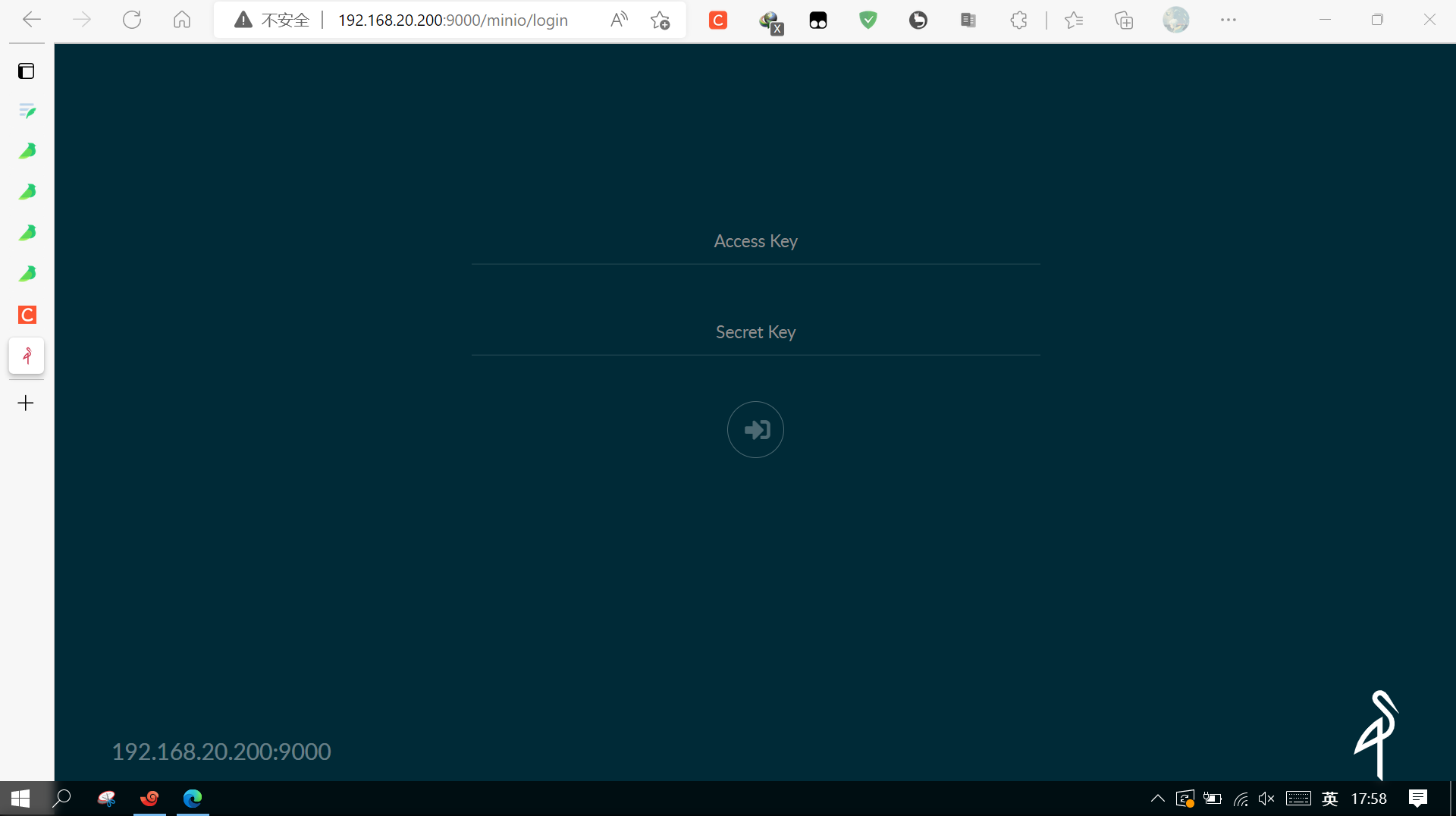

minio是一种专注于对象存储的软件,可以兼容亚马逊的s3接口,同时内置了webserver,运行主程序之后可以直接的使用网页进行连接。
通过左下角可以创建文件夹和上传文件,也可以通过安装的minio/mc客户端管理工具管理
3.4.6 mc客户端工具和下载使用方法(非友情连接)
https://blog.csdn.net/qq_42402854/article/details/121474018?ops_request_misc=&request_id=&biz_id=102&spm=1018.2226.3001.4187
3.5 搭建docker swarm集群
3.5.1 准备三台服务器
| 主机 | 操作系统 | IP地址 | 主要软件 |
|---|---|---|---|
| manager | centos 7 | 192.168.20.200 | Docker |
| worker01 | centos 7 | 192.168.20.201 | Docker |
| worker02 | centos 7 | 192.168.20.202 | Docker |
3.5.2 关闭三台主机的防火墙及SELINUX,设置系统主机名以及 Host 文件的相互解析
这里以manager为例
[root@manager ~]# vim /etc/hosts
[root@manager ~]# cat /etc/hosts
127.0.0.1   localhost localhost.localdomain localhost4 localhost4.localdomain4
::1         localhost localhost.localdomain localhost6 localhost6.localdomain6
192.168.20.200  manager
192.168.20.201 worker01
192.168.20.202 worker02
3.5.3 在manager节点执行
root@manager ~]# docker swarm init --advertise-addr 192.168.20.200
Swarm initialized: current node (bdbpqpnsphmhh3tbeum6u7jb4) is now a manager.

To add a worker to this swarm, run the following command:

    docker swarm join --token SWMTKN-1-10qmh43baxo5qp2wm6ye0kwun6g55n2hezi3p3qbd6hyytoclw-82ew9wteyw469bnrxutv9ubd7 192.168.20.200:2377

To add a manager to this swarm, run 'docker swarm join-token manager' and follow the instructions.
3.5.4 在工作节点执行上面的加入指令
[root@worker01 ~]# docker swarm join --token SWMTKN-1-10qmh43baxo5qp2wm6ye0kwun6g55n2hezi3p3qbd6hyytoclw-82ew9wteyw469bnrxutv9ubd7 192.168.20.200:2377
This node joined a swarm as a worker.
3.5.5 查看集群中的节点
[root@manager ~]# docker node ls
ID                            HOSTNAME   STATUS    AVAILABILITY   MANAGER STATUS   ENGINE VERSION
bdbpqpnsphmhh3tbeum6u7jb4 *   manager    Ready     Active         Leader           20.10.12
q64qn6q4klsdthd0pffoh1s1a     worker01   Ready     Active                          20.10.12
291f7yfi6q9889549flh6e9sp     worker02   Ready     Active                          20.10.12
3.6 使用Docker Stack 部署(home-assistant)
3.6.1 拉取homeassistant/home-assistant和mysql的镜像
[root@manager ~]# docker pull homeassistan/home-assistant
[root@manager ~]# docker pull mysql
3.6.2 将镜像全部上传本地仓库
[root@manager ~]# docker tag 773 manager:12500/homeassisant/home-assistant:latest
[root@manager ~]# docker push manager:12500/homeassisant/home-assistant:latest
The push refers to repository [manager:12500/homeassisant/home-assistant]
e5b1dd04b331: Pushed
ec542c62c153: Pushed
1d13107313ed: Pushed
77dc48b91677: Pushed
be2828812449: Pushed
9d2650ca7417: Pushed
0e51ffe3acc2: Pushed
140f8bec1872: Pushed
de7afb379aa0: Pushed
34a28ce4412c: Pushed
d7b04a5cbce5: Pushed
724086462346: Pushed
ef173cabde8b: Pushed
42322d697e88: Pushed
d0d5bda440ff: Pushed
969767cea71d: Pushed
17e0deeb402c: Pushed
5ecc7efaace6: Pushed
f532417221f4: Pushed
5b86a8d70922: Pushed
20a92118600a: Pushed
b2f43f6b25ef: Pushed
eb83beb5f4c2: Pushed
029d51f4d389: Pushed
42d768421933: Pushed
7b02b55000a2: Pushed
92e486a42e39: Pushed
e2eb06d8af82: Pushed
latest: digest: sha256:3af366423713a6144adf9081b1ede2c21d8511c0048ac4c04615da26a5caf8d6 size: 6190
[root@manager ~]# docker tag 321 manager:12500/mysql:latest
[root@manager ~]# docker push  manager:12500/mysql:latest
3.6.3 编辑yml文件
[root@manager ~]# mkdir home.app&&cd home.app
[root@manager home.app]# vim home.yml
[root@manager home.app]# cat home.yml
version: "3.2"

services:
  home:
    image: manager:12500/homeassisant/home-assistant
    ports:
      - "8123:8123"
    networks:
      - hwj_net
    depends_on:
      - database
    volumes:
      - config:/config
      - localtime:/etc/localtime:ro
    deploy:
      mode: replicated   #复制3台
      replicas: 3
      restart_policy:
        condition: on-failure
        delay: 5s
        max_attempts: 3     #环境是失败后延迟五秒 最多尝试3次
      update_config:
        parallelism: 1
        delay: 10s
  database:
    image: manager:12500/mysql:latest
    networks:
      - hwj_net
    volumes:
      - mysql_data:/var/lib/mysql
    environment:
      MYSQL_ROOT_PASSWORD: homeassisant
      MYSQL_DATABASE: homeassisant
      MYSQL_USER: homeassisant
      MYSQL_PASSWORD: homeassisant
    deploy:
      mode: global
      placement:
        constraints:
          - node.role == manager
networks:
  hwj_net:
    driver: overlay
volumes:
  mysql_data:
  config:
  localtime:
3.6.4 通过docker stack部署服务
[root@manager home.app]# docker stack deploy -c home.yml hwj_home
Creating network hwj_home_hwj_net
Creating service hwj_home_home
Creating service hwj_home_database
3.6.5 查看服务
[root@manager home.app]# docker stack ps hwj_home
ID             NAME                                          IMAGE                                              NODE       DESIRED STATE   CURRENT STATE           ERROR     PORTS
oksd01bdyu86   hwj_home_database.bdbpqpnsphmhh3tbeum6u7jb4   manager:12500/mysql:latest                         manager    Running         Running 4 minutes ago
y4bckix1dd9r   hwj_home_home.1                               manager:12500/homeassisant/home-assistant:latest   worker02   Running         Running 4 minutes ago
vfjepib2bqc3   hwj_home_home.2                               manager:12500/homeassisant/home-assistant:latest   manager    Running         Running 4 minutes ago
789lyiblqbhz   hwj_home_home.3                               manager:12500/homeassisant/home-assistant:latest   worker01   Running         Running 4 minutes ago
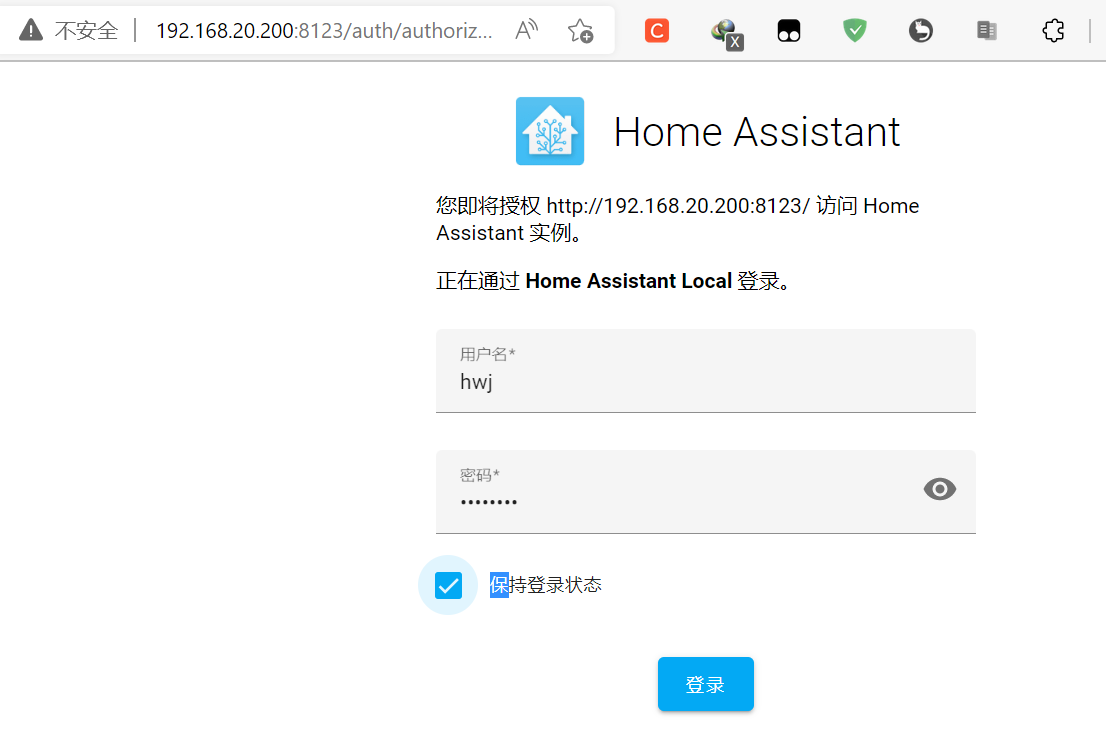
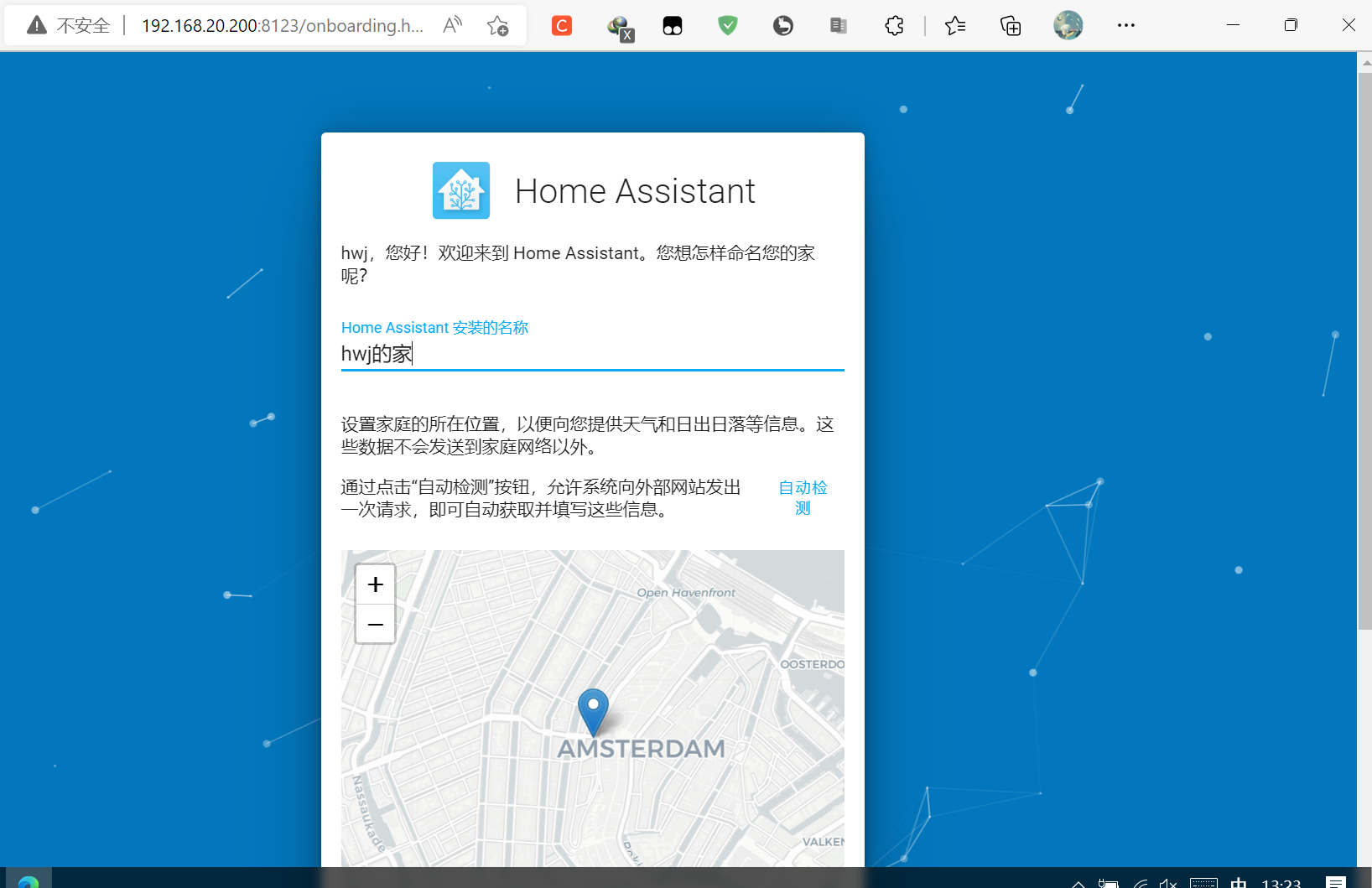
浏览器输入http://192.168.20.200:8123,可以访问居家系统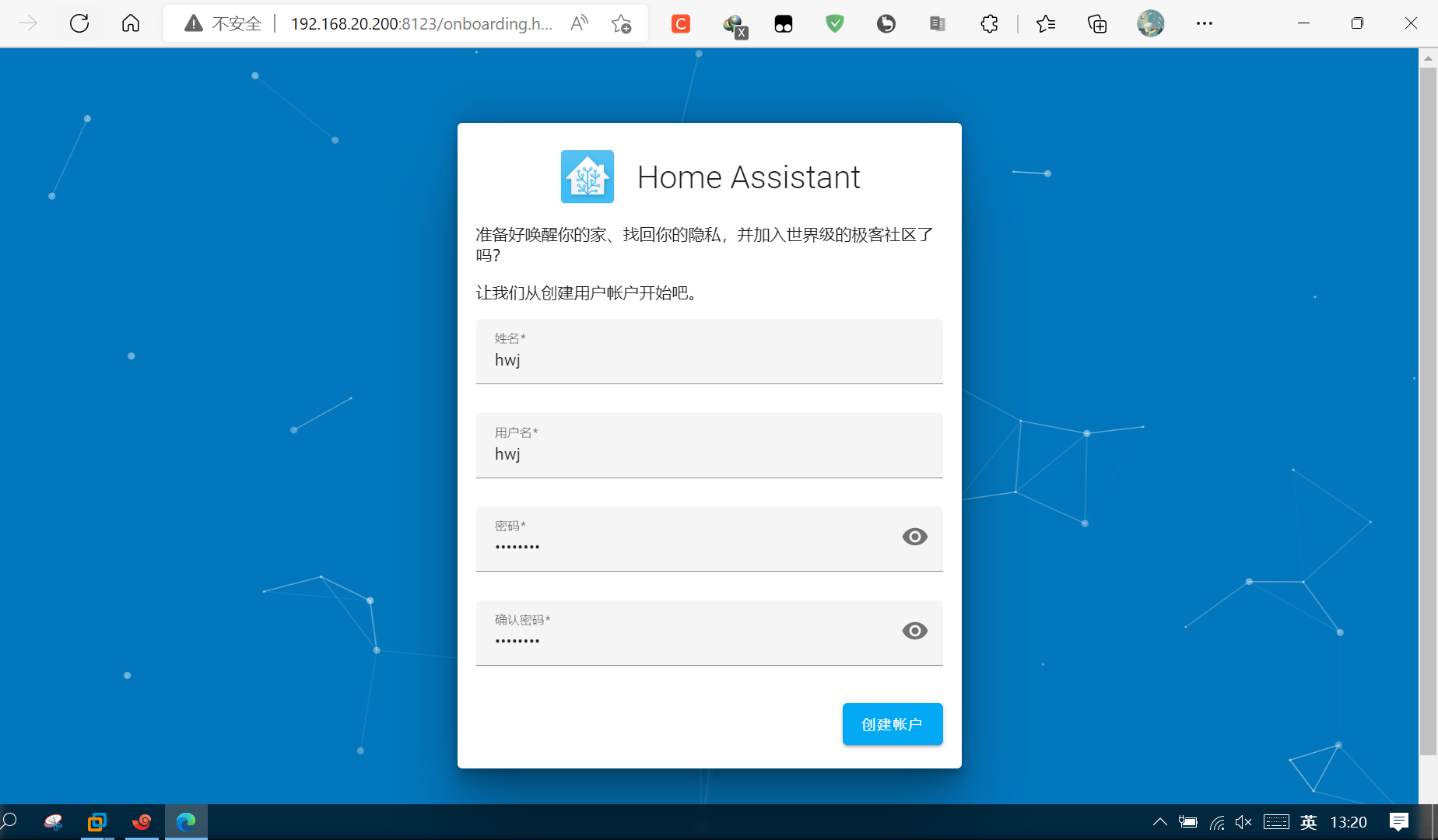

四、 项目总结
通过本次项目实践,我掌握了Docker安装与基本使用,本地镜像仓库的搭建使用,Docker Compose安装与使用,DockerSWARM集群构建,熟练使用Docker stack,对这一轻量型的docker操作有了更深的见解,通过搭建minio的compose和homrassistant的集群项目,使我对“精益求精”有更深的认识,做到仔细列出拓扑规划,有条理的完成每一步过程。

若有收获,就点个赞吧
0 人点赞


