1、创建上下文环境并创建首页文件(压缩)
[root@localhost ~]# mkdir nginx && cd nginx[root@localhost nginx]# echo "hello docker" > index.html
2、编写Dockerfile
[root@localhost nginx]# cat DockerfileARG version=7FROM centos:${version}MAINTAINER HWJRUN mkdir /hwjvolVOLUME ["vdata1","hwjvol"]LABEL version="12" author=hwj description="This is hwj's nginx"RUN yum install -y wgetRUN wget -O /etc/yum.repos.d/epel.repo http://mirrors.aliyun.com/repo/epel-7.repoRUN yum install -y nginxRUN echo "daemon off;" >> /etc/nginx/nginx.confADD index.html /usr/share/nginx/html/index.htmlEXPOSE 80 443CMD ["/usr/sbin/nginx"]
3、构建镜像
[root@localhost nginx]# docker build -t hwj_ng:12 -f /root/nginx/Dockerfile .
Sending build context to Docker daemon 4.096kBStep 1/13 : ARG version=7Step 2/13 : FROM centos:${version}---> eeb6ee3f44bdStep 3/13 : MAINTAINER HWJ---> Using cache---> 2496609ee6e4Step 4/13 : RUN mkdir /hwjvol---> Using cache---> b22884341e05Step 5/13 : VOLUME ["vdata1","hwjvol"]---> Using cache---> e3f891783a32Step 6/13 : LABEL version="12" author=hwj description="This is hwj's nginx"---> Using cache---> af80bf31b198Step 7/13 : RUN yum install -y wget---> Running in f0c28b144d86Loaded plugins: fastestmirror, ovlDetermining fastest mirrors* base: mirrors.aliyun.com* extras: mirrors.ustc.edu.cn* updates: mirrors.ustc.edu.cnResolving Dependencies--> Running transaction check---> Package wget.x86_64 0:1.14-18.el7_6.1 will be installed--> Finished Dependency ResolutionDependencies Resolved================================================================================Package Arch Version Repository Size================================================================================Installing:wget x86_64 1.14-18.el7_6.1 base 547 kTransaction Summary================================================================================Install 1 PackageTotal download size: 547 kInstalled size: 2.0 MDownloading packages:warning: /var/cache/yum/x86_64/7/base/packages/wget-1.14-18.el7_6.1.x86_64.rpm: Header V3 RSA/SHA256 Signature, key ID f4a80eb5: NOKEYPublic key for wget-1.14-18.el7_6.1.x86_64.rpm is not installedRetrieving key from file:///etc/pki/rpm-gpg/RPM-GPG-KEY-CentOS-7Importing GPG key 0xF4A80EB5:Userid : "CentOS-7 Key (CentOS 7 Official Signing Key) <security@centos.org>"Fingerprint: 6341 ab27 53d7 8a78 a7c2 7bb1 24c6 a8a7 f4a8 0eb5Package : centos-release-7-9.2009.0.el7.centos.x86_64 (@CentOS)From : /etc/pki/rpm-gpg/RPM-GPG-KEY-CentOS-7Running transaction checkRunning transaction testTransaction test succeededRunning transactionInstalling : wget-1.14-18.el7_6.1.x86_64 1/1install-info: No such file or directory for /usr/share/info/wget.info.gzVerifying : wget-1.14-18.el7_6.1.x86_64 1/1Installed:wget.x86_64 0:1.14-18.el7_6.1Complete!Removing intermediate container f0c28b144d86---> 5fe03776d9baStep 8/13 : RUN wget -O /etc/yum.repos.d/epel.repo http://mirrors.aliyun.com/repo/epel-7.repo---> Running in fcca48467ba2--2022-03-24 03:01:35-- http://mirrors.aliyun.com/repo/epel-7.repoResolving mirrors.aliyun.com (mirrors.aliyun.com)... 183.216.185.208, 183.216.185.215, 117.167.122.240, ...Connecting to mirrors.aliyun.com (mirrors.aliyun.com)|183.216.185.208|:80... connected.HTTP request sent, awaiting response... 200 OKLength: 664 [application/octet-stream]Saving to: '/etc/yum.repos.d/epel.repo'0K 100% 137M=0s2022-03-24 03:01:36 (137 MB/s) - '/etc/yum.repos.d/epel.repo' saved [664/664]Removing intermediate container fcca48467ba2---> 3c9ec882ee26Step 9/13 : RUN yum install -y nginx---> Running in dfaad2d1147bLoaded plugins: fastestmirror, ovlLoading mirror speeds from cached hostfile* base: mirrors.aliyun.com* extras: mirrors.ustc.edu.cn* updates: mirrors.ustc.edu.cnResolving Dependencies--> Running transaction check---> Package nginx.x86_64 1:1.20.1-9.el7 will be installed--> Processing Dependency: nginx-filesystem = 1:1.20.1-9.el7 for package: 1:nginx-1.20.1-9.el7.x86_64--> Processing Dependency: libcrypto.so.1.1(OPENSSL_1_1_0)(64bit) for package: 1:nginx-1.20.1-9.el7.x86_64--> Processing Dependency: libssl.so.1.1(OPENSSL_1_1_0)(64bit) for package: 1:nginx-1.20.1-9.el7.x86_64--> Processing Dependency: libssl.so.1.1(OPENSSL_1_1_1)(64bit) for package: 1:nginx-1.20.1-9.el7.x86_64--> Processing Dependency: nginx-filesystem for package: 1:nginx-1.20.1-9.el7.x86_64--> Processing Dependency: openssl for package: 1:nginx-1.20.1-9.el7.x86_64--> Processing Dependency: redhat-indexhtml for package: 1:nginx-1.20.1-9.el7.x86_64--> Processing Dependency: system-logos for package: 1:nginx-1.20.1-9.el7.x86_64--> Processing Dependency: libcrypto.so.1.1()(64bit) for package: 1:nginx-1.20.1-9.el7.x86_64--> Processing Dependency: libprofiler.so.0()(64bit) for package: 1:nginx-1.20.1-9.el7.x86_64--> Processing Dependency: libssl.so.1.1()(64bit) for package: 1:nginx-1.20.1-9.el7.x86_64--> Running transaction check---> Package centos-indexhtml.noarch 0:7-9.el7.centos will be installed---> Package centos-logos.noarch 0:70.0.6-3.el7.centos will be installed---> Package gperftools-libs.x86_64 0:2.6.1-1.el7 will be installed---> Package nginx-filesystem.noarch 1:1.20.1-9.el7 will be installed---> Package openssl.x86_64 1:1.0.2k-24.el7_9 will be installed--> Processing Dependency: openssl-libs(x86-64) = 1:1.0.2k-24.el7_9 for package: 1:openssl-1.0.2k-24.el7_9.x86_64--> Processing Dependency: make for package: 1:openssl-1.0.2k-24.el7_9.x86_64---> Package openssl11-libs.x86_64 1:1.1.1k-2.el7 will be installed--> Running transaction check---> Package make.x86_64 1:3.82-24.el7 will be installed---> Package openssl-libs.x86_64 1:1.0.2k-19.el7 will be updated---> Package openssl-libs.x86_64 1:1.0.2k-24.el7_9 will be an update--> Finished Dependency ResolutionDependencies Resolved================================================================================Package Arch Version Repository Size================================================================================Installing:nginx x86_64 1:1.20.1-9.el7 epel 587 kInstalling for dependencies:centos-indexhtml noarch 7-9.el7.centos base 92 kcentos-logos noarch 70.0.6-3.el7.centos base 21 Mgperftools-libs x86_64 2.6.1-1.el7 base 272 kmake x86_64 1:3.82-24.el7 base 421 knginx-filesystem noarch 1:1.20.1-9.el7 epel 24 kopenssl x86_64 1:1.0.2k-24.el7_9 updates 494 kopenssl11-libs x86_64 1:1.1.1k-2.el7 epel 1.5 MUpdating for dependencies:openssl-libs x86_64 1:1.0.2k-24.el7_9 updates 1.2 MTransaction Summary================================================================================Install 1 Package (+7 Dependent packages)Upgrade ( 1 Dependent package)Total download size: 26 MDownloading packages:Delta RPMs disabled because /usr/bin/applydeltarpm not installed.--------------------------------------------------------------------------------Total 632 kB/s | 26 MB 00:41Running transaction checkRunning transaction testTransaction test succeededRunning transactionInstalling : centos-logos-70.0.6-3.el7.centos.noarch 1/10Installing : centos-indexhtml-7-9.el7.centos.noarch 2/10Installing : 1:make-3.82-24.el7.x86_64 3/10Installing : gperftools-libs-2.6.1-1.el7.x86_64 4/10Installing : 1:openssl11-libs-1.1.1k-2.el7.x86_64 5/10Updating : 1:openssl-libs-1.0.2k-24.el7_9.x86_64 6/10Installing : 1:openssl-1.0.2k-24.el7_9.x86_64 7/10Installing : 1:nginx-filesystem-1.20.1-9.el7.noarch 8/10Installing : 1:nginx-1.20.1-9.el7.x86_64 9/10Cleanup : 1:openssl-libs-1.0.2k-19.el7.x86_64 10/10Verifying : 1:nginx-filesystem-1.20.1-9.el7.noarch 1/10Verifying : 1:nginx-1.20.1-9.el7.x86_64 2/10Verifying : 1:openssl-libs-1.0.2k-24.el7_9.x86_64 3/10Verifying : 1:openssl11-libs-1.1.1k-2.el7.x86_64 4/10Verifying : gperftools-libs-2.6.1-1.el7.x86_64 5/10Verifying : 1:make-3.82-24.el7.x86_64 6/10Verifying : 1:openssl-1.0.2k-24.el7_9.x86_64 7/10Verifying : centos-indexhtml-7-9.el7.centos.noarch 8/10Verifying : centos-logos-70.0.6-3.el7.centos.noarch 9/10Verifying : 1:openssl-libs-1.0.2k-19.el7.x86_64 10/10Installed:nginx.x86_64 1:1.20.1-9.el7Dependency Installed:centos-indexhtml.noarch 0:7-9.el7.centoscentos-logos.noarch 0:70.0.6-3.el7.centosgperftools-libs.x86_64 0:2.6.1-1.el7make.x86_64 1:3.82-24.el7nginx-filesystem.noarch 1:1.20.1-9.el7openssl.x86_64 1:1.0.2k-24.el7_9openssl11-libs.x86_64 1:1.1.1k-2.el7Dependency Updated:openssl-libs.x86_64 1:1.0.2k-24.el7_9Complete!Removing intermediate container dfaad2d1147b---> 3156146d32adStep 10/13 : RUN echo "daemon off;" >> /etc/nginx/nginx.conf---> Running in 806bd0eba0a9Removing intermediate container 806bd0eba0a9---> 538ab0005d67Step 11/13 : ADD index.html.tar.gz /usr/share/nginx/httml/index.html---> 96e50ee998f1Step 12/13 : EXPOSE 80 443---> Running in 5e305708d2e6Removing intermediate container 5e305708d2e6---> 5f40f9fd1057Step 13/13 : CMD ["/usr/sbin/nginx"]---> Running in ac5bc5c3a67fRemoving intermediate container ac5bc5c3a67f---> 103fc4f15fa0Successfully built 103fc4f15fa0Successfully tagged hwj_ng:12
4、运行镜像
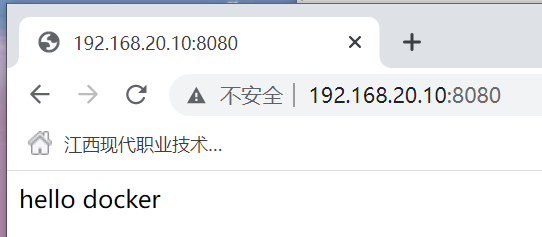
docker run -d -p 8080:80 --name hwj12 1031c9f69945232fc8bdffbecbd95d7d74fda6dd2bc5091d55192d3b85ce105bcd0[root@localhost nginx]# curl localhost:8080hello docker

若有收获,就点个赞吧
0 人点赞


