一、fix的调用方式
@pytest.fixture(scope = “function”,params=None,autouse=False,ids=None,name=None)
参数详解:
1、scope
- 用于控制Fixture的作用范围
- 作用类似于Pytest的setup/teardown
- 默认取值为function(函数级别),控制范围的的排列顺序为:session>module>class>function
| 取值 | 范围 | 说明 |
|---|---|---|
| function | 函数级 | 每一个函数方法都会调用 |
| class | 类级别 | 每个测试类只运行一次 |
| module | 模块级 | 每一个.py文件调用一次 |
| session | 会话级 | 每次会话只需要运行一次,会话内说有方法及类,模块都共享这个方法 |
二、function
作用范围举例:
scope = “function”
语法
@pytest.fixture()# 或者@pytest.fixture(score='function')
场景一:作为参数传入
import pytest# fixture函数(类中) 作为多个参数传入@pytest.fixture()def login():print("打开浏览器")a = "account"return a@pytest.fixture()def logout():print("关闭浏览器")class TestLogin:#传入lonin fixturedef test_001(self, login):print("001传入了loging fixture")assert login == "account"#传入logout fixturedef test_002(self, logout):print("002传入了logout fixture")def test_003(self, login, logout):print("003传入了两个fixture")def test_004(self):print("004未传入仍何fixture哦")if __name__ == '__main__':pytest.main()
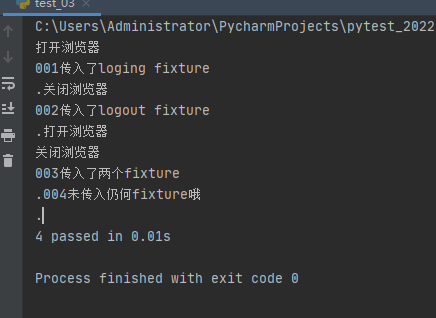
场景二、Fixture的互相调用
# -*- coding:utf-8 -*-'''@Author : 测试工程师Jane@FileName : e.py@Description:'''import pytest# fixtrue作为参数,互相调用传入@pytest.fixture()def account():a = "account"print("第一层fixture")return a#Fixture的相互调用一定是要在测试类里调用这层fixture才会生次,普通函数单独调用是不生效的@pytest.fixture()def login(account):print("第二层fixture")class TestLogin:def test_1(self, login):print("直接使用第二层fixture,返回值为{}".format(login))def test_2(self, account):print("只调用account fixture,返回值为{}".format(account))if __name__ == '__main__':pytest.main()
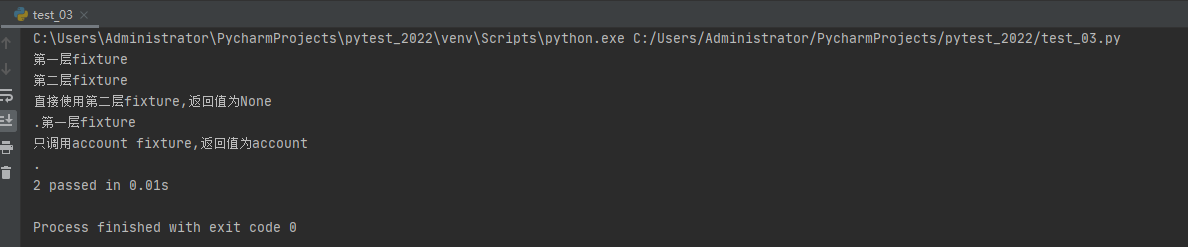
注:
- 即使fixture之间支持相互调用,但普通函数直接使用fixture是不支持的,一定是在测试函数内调用才会逐级调用生效
- 有多层fixture调用时,最先执行的是最后一层fixture,而不是先执行传入测试函数的fixture
- 上层fixture的值不会自动return,这里就类似函数相互调用的一样的逻辑
二、class
- 当测试类内的每一个测试方法都调用了fixture,fixture只在该class下所有测试用例执行前执行一次
- 测试类下面只有一些测试方法使用了fixture函数名,这样的话,fixture只在该class下第一个使用fixture函数的测试用例位置开始算,后面所有的测试用例执行前只执行一次,而该位置之前的测试用例就不管
语法
@pytest.fixture(scope=’class’)
场景一:
# -*- coding:utf-8 -*-'''@Time : 2020/12/28 19:56@Author : 测试工程师Jane@FileName : g.py@Description:'''import pytest# fixture作用域 scope = 'class'@pytest.fixture(scope='class')def login():print("scope为class")class TestLogin:def test_1(self, login):print("用例1")def test_2(self, login):print("用例2")def test_3(self, login):print("用例3")if __name__ == '__main__':pytest.main()

场景二:
# -*- coding:utf-8 -*-'''@Author : 测试工程师Jane@FileName : 1.py@Description:'''import pytest@pytest.fixture(scope='class')def login():a = '123'print("输入账号密码登陆")class TestLogin:def test_1(self):print("用例1")def test_2(self, login):print("用例2")def test_3(self, login):print("用例3")def test_4(self):print("用例4")if __name__ == '__main__':pytest.main()
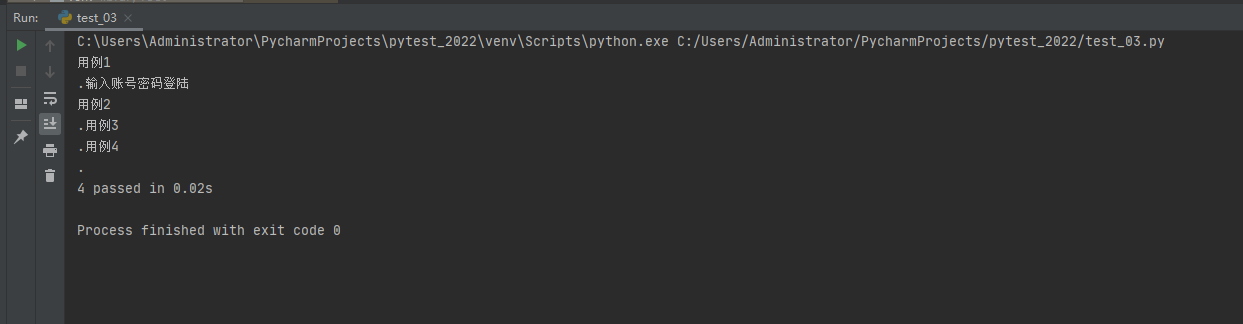
三、module
scope = “module”:与class相同,只从.py文件开始引用fixture的位置生效
# -*- coding:utf-8 -*-'''@Author : 测试工程师Jane@FileName : 2.py@Description:'''import pytest# fixture scope = 'module'@pytest.fixture(scope='module')def login():print("fixture范围为module")def test_01():print("用例01")def test_02(login):print("用例02")class TestLogin():def test_1(self):print("用例1")def test_2(self):print("用例2")def test_3(self):print("用例3")if __name__ == '__main__':pytest.main()
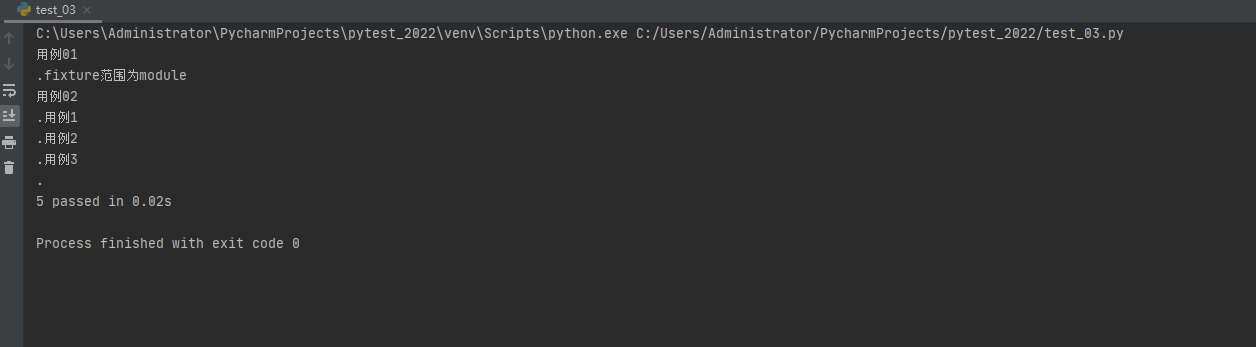
四、session
- session的作用范围是针对.py级别的,module是对当前.py生效,session是对多个.py文件生效
- session只作用一个.py文件时,作用相当于module
- 所以session多数与contest.py文件一起使用,作为全局Fixture

若有收获,就点个赞吧
0 人点赞


