介绍
基于 redux 和 redux-saga 的数据流方案,为了简化开发体验,内置了 react-router 和 fetch,是一个轻量级的应用框架。
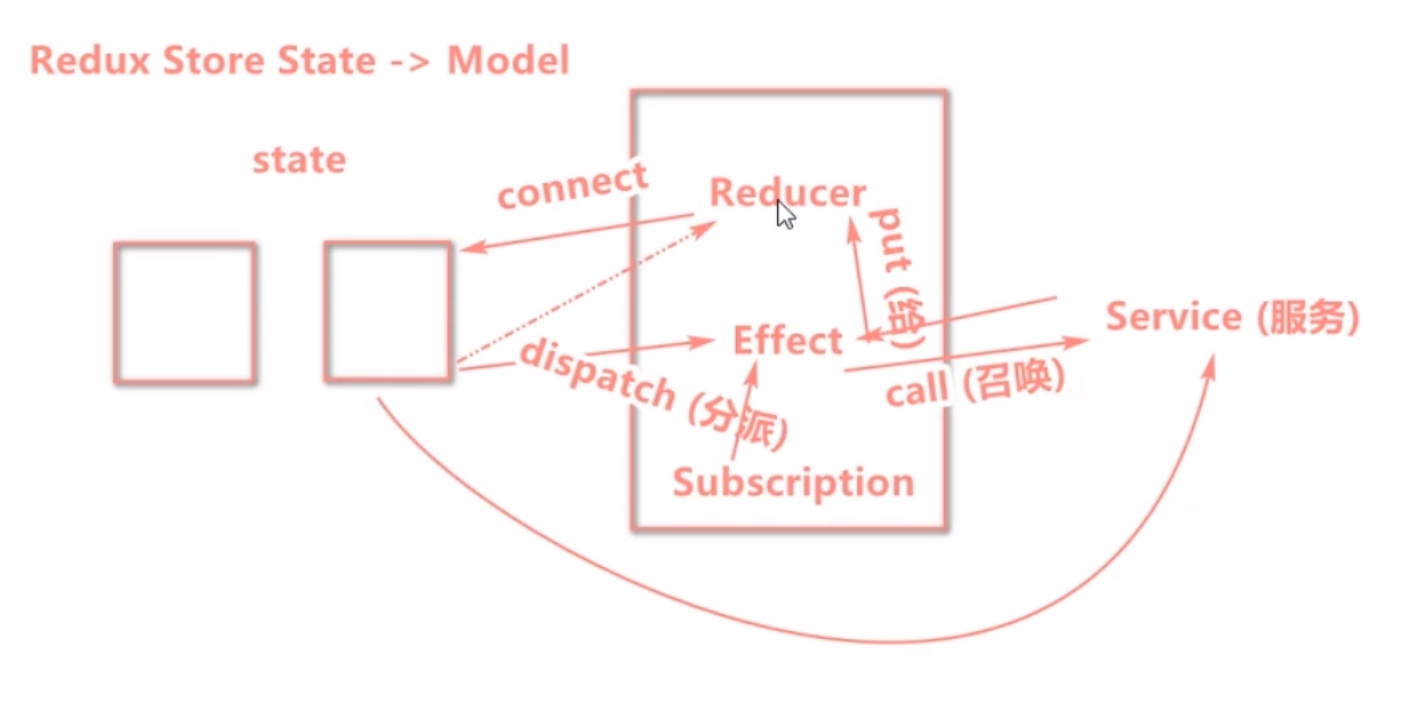
数据流图示
attribute
namespace:命名空间
state:数据
reducers:同步操作
{ function_name(state,{ type,payload }){return newState} }每个
reducer接受两个参数{ function_name({ type,payload },{ call,put }){return newState} }每个
effect接受两个参数Subscription 用于订阅一个数据源,然后根据条件 dispatch 需要的 action。数据源可以是当前的时间、服务器的 websocket 连接、keyboard 输入、geolocation 变化、history 路由变化等等。
setup({dispatch, history}) {return history.listen(({pathname}) => {if (pathname === '/come') {dispatch({type: 'getRemote'});}});}
使用
1. servers.ts
网络请求层
export async function getRemoteList(){return request('http://public-api-v1.aspirantzhang.com/users', {method: 'GET'}).then(response => {const data ={"data":[{"id":7002,"name":"我哥最牛","email":"912455768@S.COM","create_time":"2021-05-19T04:24:43Z","update_time":"2021-05-19T13:03:20Z","status":0},{"id":7001,"name":"瞎","email":"912@S.COM","create_time":"2021-05-26T18:13:54Z","update_time":"2021-05-19T12:18:30Z","status":1},{"id":7000,"name":"牛顿","email":"niudun123@ZX.com","create_time":"2024-06-13T08:06:27Z","update_time":"2021-05-19T13:10:30Z","status":0},{"id":6999,"name":"漂亮","email":"123@qq.com","create_time":"2021-06-02T02:00:52Z","update_time":"2021-05-19T12:27:41Z","status":1},{"id":6996,"name":"12341324","email":"912@S.COM","create_time":"2021-05-26T06:52:04Z","update_time":"2021-05-19T12:27:35Z","status":1},{"id":6966,"name":"12341324各方面","email":"123@qq.com","create_time":"2021-05-09T02:22:37Z","update_time":"2021-05-19T12:18:50Z","status":0},{"id":6965,"name":"我二哥哥","email":"我在@119.com","create_time":"2021-05-11T17:55:39Z","update_time":"2021-05-19T12:06:09Z","status":127},{"id":6964,"name":"沃尔","email":"我在@119.com","create_time":"2021-05-11T17:55:39Z","update_time":"2021-05-19T12:05:53Z","status":1},{"id":6960,"name":"李四","email":"123@qq.com","create_time":"2021-05-09T18:22:37Z","update_time":"2021-05-18T08:27:41Z","status":1},{"id":6931,"name":"李四12","email":"996@23.com","create_time":"2021-05-19T04:18:58Z","update_time":"2021-05-19T12:19:02Z","status":1}],"meta":{"total":13,"per_page":10,"page":1}}return response || data;}).catch(error => { console.log(error);});}
2. model.ts
数据管理层 ```javascript import {getRemoteList} from ‘./servers’ const userModel = { namespace: ‘users’, state: {}, reducers: { getList(state, {payload}) {
return payload
} }, effects: {
- getRemote(action, {call,put}) {
const data = yield call(getRemoteList) // 调用 servers 里的网络请求获取数据
yield put({type:’getList’,payload:data}) // 将数据推送到 reducer,同步更新
}
},
subscriptions: {
setup({dispatch, history}) {
return history.listen(({pathname}) => {
if (pathname === ‘/user’) {
} }); } }dispatch({type: 'getRemote'});
}; export default userModel;
<a name="E6xoH"></a>#### 3. index.ts- 组件层```javascriptimport {connect} from 'umi';const UserTable = ({users,dispatch}) => {const handle = () => {dispatch({type:'users/getRemote'}) // 组件内调用前面需要加上命名空间}return (<div onClick={handle}>{JSON.stringify(users)}</div>;)} // 直接使用 props 数据const mapStateToProps = ({users}) => {users};export default connect(mapStatrToProps)(UserTable) // 将 model 里的数据放到组件 props 中

若有收获,就点个赞吧
0 人点赞


