https://developers.google.com/web/updates/2018/09/inside-browser-part1
Executing program on Process and Thread
- 一个进程有多个线程
- 进程有独立内存空间
- 进程之间使用ipc通信
Browser Architecture

| Process and What it controls | |
|---|---|
| Browser | Controls “chrome” part of the application including address bar, bookmarks, back and forward buttons. Also handles the invisible, privileged parts of a web browser such as network requests and file access. |
| Renderer | Controls anything inside of the tab where a website is displayed. |
| Plugin | Controls any plugins used by the website, for example, flash. |
| GPU | Handles GPU tasks in isolation from other processes. It is separated into different process because GPUs handles requests from multiple apps and draw them in the same surface. |
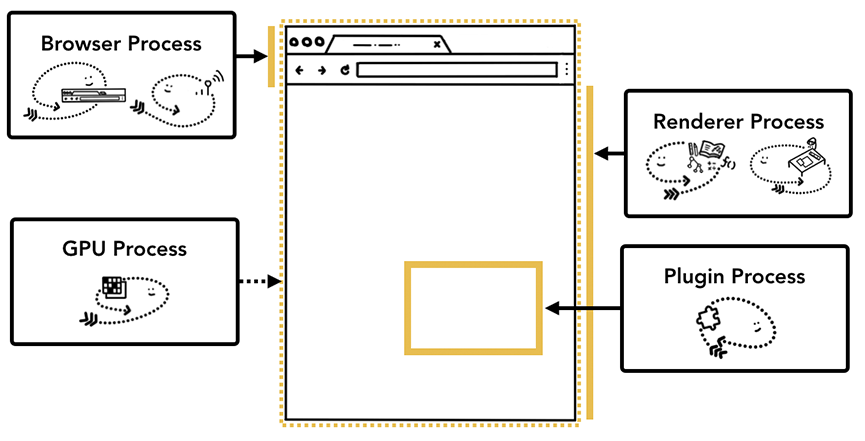
The benefit of multi-process architecture in Chrome
- 一个tab一个render进程 -> one site 一个进程(iframe会加大chrome内存占用)
Saving more memory - Servicification in Chrome
- chrome最大进程数和机器硬件有关,差的硬件,多tab运行在同一个进程下面(至于最大进程数是否和cpu多核数量是否有关,没说)
Inside look at modern web browser (part 2)
Inside look at modern web browser (part 3)
Renderer processes handle web contents
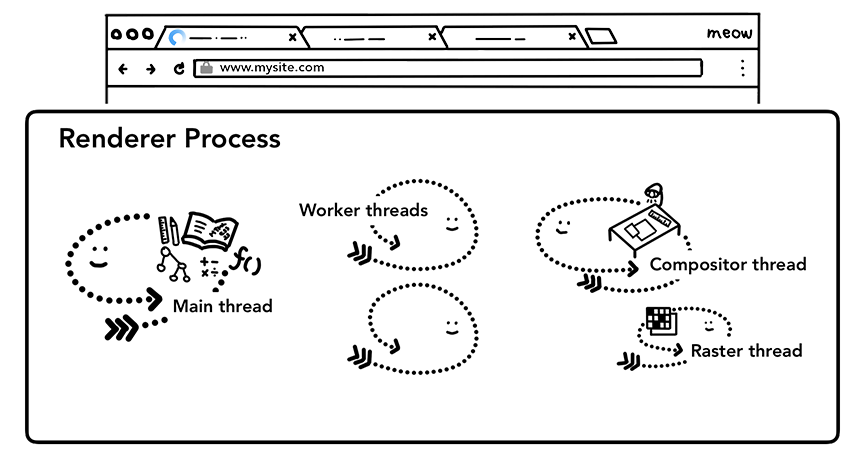
Renderer process with a main thread, worker threads, a compositor thread, and a raster thread inside
Parsing
Construction of a DOM
Subresource loading
JavaScript can block the parsing
Layout
The layout is a process to find the geometry of elements. The main thread walks through the DOM and computed styles and creates the layout tree which has information like x y coordinates and bounding box sizes. Layout tree may be similar structure to the DOM tree, but it only contains information related to what’s visible on the page. If display: none is applied, that element is not part of the layout tree (however, an element with visibility: hidden is in the layout tree). Similarly, if a pseudo class with content like p::before{content:”Hi!”} is applied, it is included in the layout tree even though that is not in the DOM.

若有收获,就点个赞吧
0 人点赞


