Insertion methods
This set of methods provides more ways to insert:
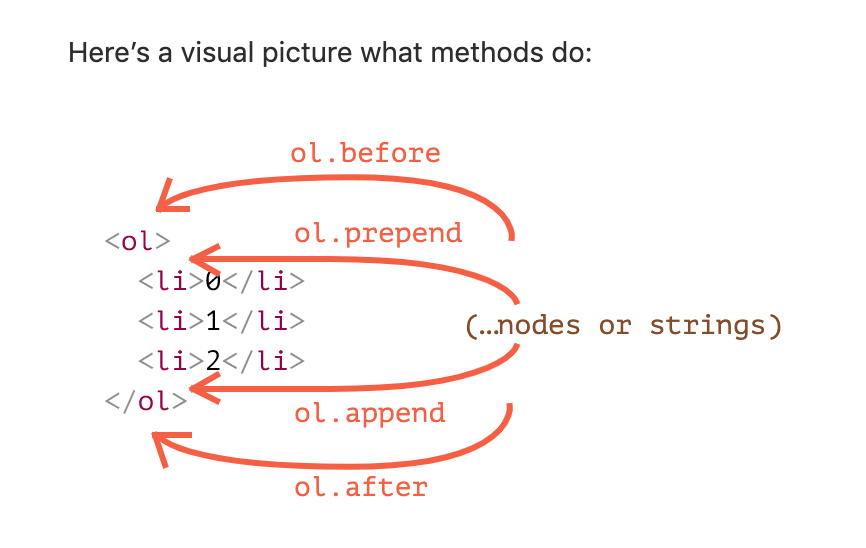
node.append(...nodes or strings)– append nodes or strings at the end ofnode,node.prepend(...nodes or strings)– insert nodes or strings at the beginning ofnode,node.before(...nodes or strings)–- insert nodes or strings beforenode,node.after(...nodes or strings)–- insert nodes or strings afternode,node.replaceWith(...nodes or strings)–- replacesnodewith the given nodes or strings.
insertAdjacentHTML/Text/Element
For that we can use another, pretty versatile method: elem.insertAdjacentHTML(where, html).
The first parameter is a code word, specifying where to insert relative to elem. Must be one of the following:
"beforebegin"– inserthtmlimmediately beforeelem,"afterbegin"– inserthtmlintoelem, at the beginning,"beforeend"– inserthtmlintoelem, at the end,"afterend"– inserthtmlimmediately afterelem.
The second parameter is an HTML string, that is inserted “as HTML”.
Cloning nodes: cloneNode
How to insert one more similar message?
We could make a function and put the code there. But the alternative way would be to clone the existing div and modify the text inside it (if needed).
Sometimes when we have a big element, that may be faster and simpler.
- The call
elem.cloneNode(true)creates a “deep” clone of the element – with all attributes and subelements. If we callelem.cloneNode(false), then the clone is made without child elements.
A word about “document.write”
There’s one more, very ancient method of adding something to a web-page: document.write.
The syntax:
<p>Somewhere in the page...</p><script>document.write('<b>Hello from JS</b>');</script><p>The end</p>
The call to document.write(html) writes the html into page “right here and now”. The html string can be dynamically generated, so it’s kind of flexible. We can use JavaScript to create a full-fledged webpage and write it.
The method comes from times when there was no DOM, no standards… Really old times. It still lives, because there are scripts using it.
In modern scripts we can rarely see it, because of the following important limitation:
**The call to document.write only works while the page is loading.If we call it afterwards, the existing document content is erased.
For instance:
<p>After one second the contents of this page will be replaced...</p><script>// document.write after 1 second// that's after the page loaded, so it erases the existing contentsetTimeout(() => document.write('<b>...By this.</b>'), 1000);</script>
So it’s kind of unusable at “after loaded” stage, unlike other DOM methods we covered above.
Summary
- Methods to create new nodes:
document.createElement(tag)– creates an element with the given tag,document.createTextNode(value)– creates a text node (rarely used),elem.cloneNode(deep)– clones the element, ifdeep==truethen with all descendants.
- Insertion and removal:
node.append(...nodes or strings)– insert intonode, at the end,node.prepend(...nodes or strings)– insert intonode, at the beginning,node.before(...nodes or strings)–- insert right beforenode,node.after(...nodes or strings)–- insert right afternode,node.replaceWith(...nodes or strings)–- replacenode.node.remove()–- remove thenode.
- Text strings are inserted “as text”.
- There are also “old school” methods:
parent.appendChild(node)parent.insertBefore(node, nextSibling)parent.removeChild(node)parent.replaceChild(newElem, node)
- All these methods return
node. - Given some HTML in
html,elem.insertAdjacentHTML(where, html)inserts it depending on the value ofwhere:"beforebegin"– inserthtmlright beforeelem,"afterbegin"– inserthtmlintoelem, at the beginning,"beforeend"– inserthtmlintoelem, at the end,"afterend"– inserthtmlright afterelem.
- Also there are similar methods,
elem.insertAdjacentTextandelem.insertAdjacentElement, that insert text strings and elements, but they are rarely used. - To append HTML to the page before it has finished loading:
document.write(html)
- After the page is loaded such a call erases the document. Mostly seen in old scripts.

若有收获,就点个赞吧
0 人点赞


