Let’s get a more in-depth look at DOM nodes.
In this chapter we’ll see more into what they are and learn their most used properties.
DOM node classes
Different DOM nodes may have different properties. For instance, an element node corresponding to tag <a> has link-related properties, and the one corresponding to <input> has input-related properties and so on. Text nodes are not the same as element nodes. But there are also common properties and methods between all of them, because all classes of DOM nodes form a single hierarchy.
Each DOM node belongs to the corresponding built-in class.
The root of the hierarchy is EventTarget, that is inherited by Node, and other DOM nodes inherit from it.
Here’s the picture, explanations to follow: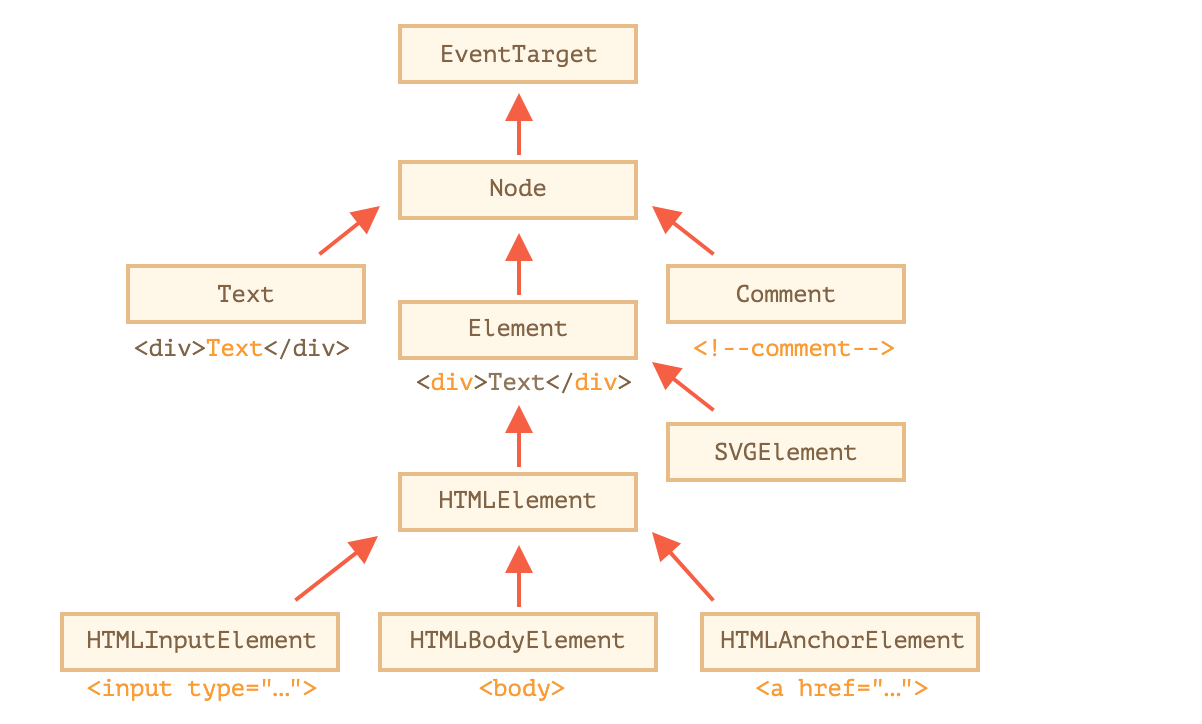
The classes are:
- EventTarget – is the root “abstract” class. Objects of that class are never created. It serves as a base, so that all DOM nodes support so-called “events”, we’ll study them later.
- Node – is also an “abstract” class, serving as a base for DOM nodes. It provides the core tree functionality:
parentNode,nextSibling,childNodesand so on (they are getters). Objects ofNodeclass are never created. But there are concrete node classes that inherit from it, namely:Textfor text nodes,Elementfor element nodes and more exotic ones likeCommentfor comment nodes. - Element – is a base class for DOM elements. It provides element-level navigation like
nextElementSibling,childrenand searching methods likegetElementsByTagName,querySelector. A browser supports not only HTML, but also XML and SVG. TheElementclass serves as a base for more specific classes:SVGElement,XMLElementandHTMLElement. - HTMLElement– is finally the basic class for all HTML elements. It is inherited by concrete HTML elements:
- HTMLInputElement – the class for
<input>elements, - HTMLBodyElement – the class for
<body>elements, - HTMLAnchorElement – the class for
<a>elements, - …and so on, each tag has its own class that may provide specific properties and methods.
- HTMLInputElement – the class for
Tag: nodeName and tagName
Given a DOM node, we can read its tag name from nodeName or tagName properties:
For instance:
alert( document.body.nodeName ); // BODYalert( document.body.tagName ); // BODY
Is there any difference between tagName and nodeName?
Sure, the difference is reflected in their names, but is indeed a bit subtle.
- The
tagNameproperty exists only forElementnodes. - The
nodeNameis defined for anyNode:- for elements it means the same as
tagName. - for other node types (text, comment, etc.) it has a string with the node type.
- for elements it means the same as
outerHTML: full HTML of the element
The outerHTML property contains the full HTML of the element. That’s like innerHTML plus the element itself.
Here’s an example:
<div id="elem">Hello <b>World</b></div><script>alert(elem.outerHTML); // <div id="elem">Hello <b>World</b></div></script>
Beware: unlike innerHTML, writing to outerHTML does not change the element. Instead, it replaces it in the DOM.
Yeah, sounds strange, and strange it is, that’s why we make a separate note about it here. Take a look.
Consider the example:
<div>Hello, world!</div><script>let div = document.querySelector('div');// replace div.outerHTML with <p>...</p>div.outerHTML = '<p>A new element</p>'; // (*)// Wow! 'div' is still the same!alert(div.outerHTML); // <div>Hello, world!</div> (**)</script>
Looks really odd, right?
In the line (*) we replaced div with <p>A new element</p>. In the outer document (the DOM) we can see the new content instead of the <div>. But, as we can see in line (**), the value of the old div variable hasn’t changed!
The outerHTML assignment does not modify the DOM element (the object referenced by, in this case, the variable ‘div’), but removes it from the DOM and inserts the new HTML in its place.
So what happened in div.outerHTML=... is:
divwas removed from the document.- Another piece of HTML
<p>A new element</p>was inserted in its place. divstill has its old value. The new HTML wasn’t saved to any variable.
It’s so easy to make an error here: modify div.outerHTML and then continue to work with div as if it had the new content in it. But it doesn’t. Such thing is correct for innerHTML, but not for outerHTML.
We can write to elem.outerHTML, but should keep in mind that it doesn’t change the element we’re writing to (‘elem’). It puts the new HTML in its place instead. We can get references to the new elements by querying the DOM.
textContent: pure text
The textContent provides access to the text inside the element: only text, minus all <tags>.
For instance:
<div id="news"><h1>Headline!</h1><p>Martians attack people!</p></div><script>// Headline! Martians attack people!alert(news.textContent);</script>
As we can see, only text is returned, as if all <tags> were cut out, but the text in them remained.
In practice, reading such text is rarely needed.
Writing to textContent is much more useful, because it allows to write text the “safe way”**.**
Let’s say we have an arbitrary string, for instance entered by a user, and want to show it.
- With
innerHTMLwe’ll have it inserted “as HTML”, with all HTML tags. - With
textContentwe’ll have it inserted “as text”, all symbols are treated literally.

若有收获,就点个赞吧
0 人点赞


