1.项目地址
https://github.com/GuardFTC/Kafka-test.git
2.创建Topic
如图,创建一个名为multi-thread-topic的Topic,并指定分区为1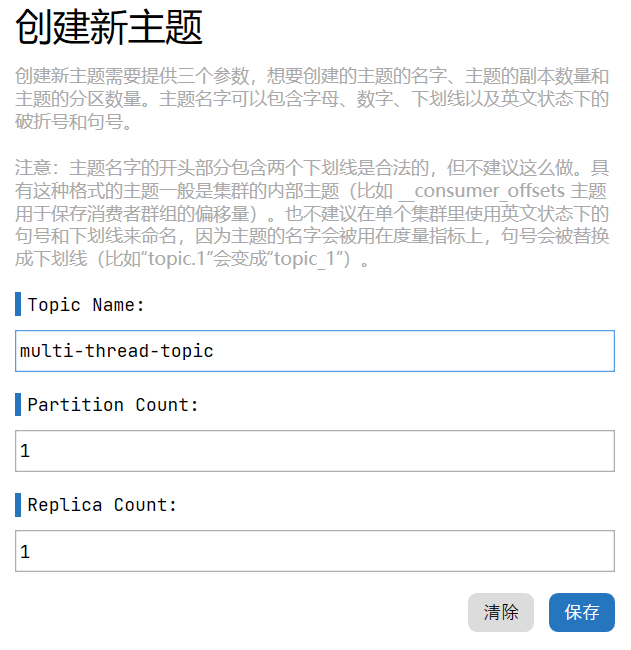
3.创建线程池配置
结合Spring对于线程池的支持,对线程池进行配置
Spring中线程池的任务队列,取决于对于队列容量的配置,当配置>0时,使用LinkedBlackingQueue,当配置=0时,使用SynchronousQueue
import org.springframework.context.annotation.Bean;import org.springframework.context.annotation.Configuration;import org.springframework.scheduling.annotation.EnableAsync;import org.springframework.scheduling.concurrent.ThreadPoolTaskExecutor;import java.util.concurrent.Executor;import java.util.concurrent.ThreadPoolExecutor;/*** @author: 冯铁城 [17615007230@163.com]* @date: 2022-09-13 14:04:56* @describe: 线程池配置*/@Configuration@EnableAsyncpublic class ExecutorConfig {@Bean("kafkaListenerExecutor")public Executor saveDbExecutor() {//1.定义线程池ThreadPoolTaskExecutor executor = new ThreadPoolTaskExecutor();//2.定义核心线程数int cpuCount = Runtime.getRuntime().availableProcessors();executor.setCorePoolSize(cpuCount);//3.最大线程数executor.setMaxPoolSize(cpuCount << 1);//4.设置额外线程存活时间executor.setKeepAliveSeconds(60);//5.队列大小executor.setQueueCapacity(1024);//6.线程池中的线程名前缀executor.setThreadNamePrefix("kafka-listener-");//7.拒绝策略:异常抛出策略executor.setRejectedExecutionHandler(new ThreadPoolExecutor.AbortPolicy());//8.初始化线程池executor.initialize();//9.返回线程池return executor;}}
4.创建线程池任务
使用@Async标签,进行异步方法的配置操作
import lombok.SneakyThrows;import org.apache.kafka.clients.consumer.ConsumerRecord;import org.springframework.scheduling.annotation.Async;import org.springframework.stereotype.Component;import java.util.concurrent.TimeUnit;/*** @author: 冯铁城 [17615007230@163.com]* @date: 2022-09-13 14:11:38* @describe: 多线程消费者逻辑处理类*/@Component@Async("kafkaListenerExecutor")public class MultiThreadListenerService {/*** 处理业务逻辑** @param record 消息*/@SneakyThrows(InterruptedException.class)public void doSomeThing(ConsumerRecord<String, String> record) {//1.模拟业务流程耗时TimeUnit.MILLISECONDS.sleep(1000);//2.控制台打印System.out.println(Thread.currentThread().getName() + "线程消费者_监听获取数据:" + record.value());}}
5.创建异步无返回值任务异常捕捉器
import cn.hutool.core.exceptions.ExceptionUtil;import cn.hutool.log.StaticLog;import org.springframework.aop.interceptor.AsyncUncaughtExceptionHandler;import org.springframework.context.annotation.Configuration;import org.springframework.scheduling.annotation.AsyncConfigurer;import java.lang.reflect.Method;/*** @author: 冯铁城 [17615007230@163.com]* @date: 2022-09-13 14:33:13* @describe: 异步无返回值方法-异常处理*/@Configurationpublic class AsyncExceptionConfig implements AsyncConfigurer {@Overridepublic AsyncUncaughtExceptionHandler getAsyncUncaughtExceptionHandler() {return new SpringAsyncExceptionHandler();}static class SpringAsyncExceptionHandler implements AsyncUncaughtExceptionHandler {@Overridepublic void handleUncaughtException(Throwable throwable, Method method, Object... objects) {StaticLog.error("[异步方法:[{}]出现异常:{}]", method.getName(), ExceptionUtil.getMessage(throwable.getCause()));}}}
6.编写发送结果处理类
import cn.hutool.log.StaticLog;import org.apache.kafka.clients.producer.ProducerRecord;import org.springframework.kafka.core.KafkaProducerException;import org.springframework.kafka.core.KafkaSendCallback;import org.springframework.kafka.support.SendResult;import org.springframework.stereotype.Component;/*** @author: 冯铁城 [17615007230@163.com]* @date: 2022-09-07 16:13:57* @describe: Kafka发布消息回调处理逻辑实现类*/@Componentpublic class KafkaSendCallBackForString implements KafkaSendCallback<String, String> {@Overridepublic void onSuccess(SendResult<String, String> result) {//1.获取消息属性ProducerRecord<String, String> producerRecord = result.getProducerRecord();String topic = producerRecord.topic();Integer partition = producerRecord.partition();String key = producerRecord.key();String value = producerRecord.value();//2.打印日志StaticLog.info(LogTemplateEnum.KAFKA_SEND_SUCCESS_LOG.getTemplate(), topic, partition, key, value);}@Overridepublic void onFailure(KafkaProducerException e) {//1.获取消息属性ProducerRecord<String, String> failedProducerRecord = e.getFailedProducerRecord();String topic = failedProducerRecord.topic();Integer partition = failedProducerRecord.partition();String key = failedProducerRecord.key();String value = failedProducerRecord.value();//2.打印日志StaticLog.error(LogTemplateEnum.KAFKA_SEND_ERROR_LOG.getTemplate(), topic, partition, key, value);//3.异常堆栈信息输出e.printStackTrace();//4.TODO 可进行自定义的异常逻辑,比如重新发送消息等操作}}
import lombok.AllArgsConstructor;import lombok.Getter;/*** @author: 冯铁城 [17615007230@163.com]* @date: 2022-09-07 16:24:20* @describe: 日志模板枚举*/@Getter@AllArgsConstructorpublic enum LogTemplateEnum {/*** Kafka消息发送成功日志模板*/KAFKA_SEND_SUCCESS_LOG("Kafka producer send success! topic:{} partition:{} key:{} value:{}"),/*** Kafka消息发送失败日志模板*/KAFKA_SEND_ERROR_LOG("Kafka producer send error! topic:{} partition:{} key:{} value:{}"),;private final String template;}
7.创建多线程消费者
import com.ftc.multithread.service.MultiThreadListenerService;import lombok.RequiredArgsConstructor;import org.apache.kafka.clients.consumer.ConsumerRecord;import org.springframework.kafka.annotation.KafkaListener;import org.springframework.stereotype.Component;/*** @author: 冯铁城 [17615007230@163.com]* @date: 2022-09-08 16:06:48* @describe: 多线程消费者数据源监听*/@Component@RequiredArgsConstructorpublic class Consumer {private final MultiThreadListenerService multiThreadListenerService;@KafkaListener(topics = {"multi-thread-topic"}, groupId = "multi-thread-group")public void listener(ConsumerRecord<String, String> record) {multiThreadListenerService.doSomeThing(record);}}
8.测试
发送消息
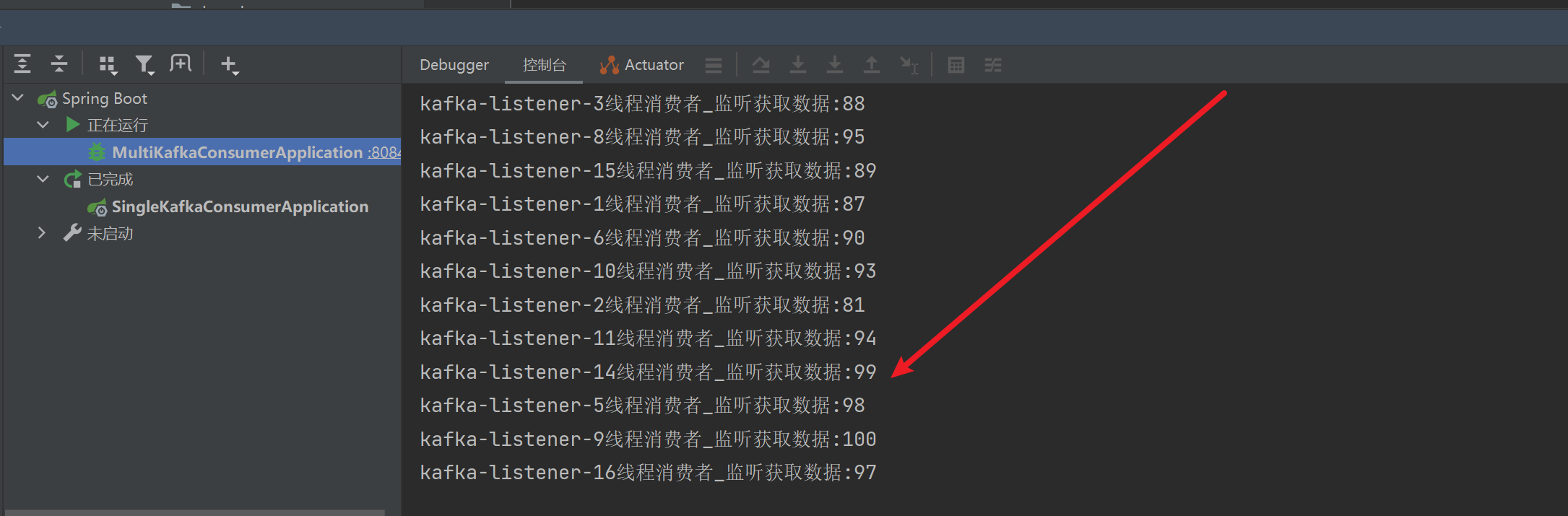
测试,连续发送100条消息
import com.ftc.multithread.config.KafkaSendCallBackForString;import org.junit.jupiter.api.Test;import org.springframework.beans.factory.annotation.Autowired;import org.springframework.boot.test.context.SpringBootTest;import org.springframework.kafka.core.KafkaTemplate;@SpringBootTestclass ProducerTests {@Autowiredprivate KafkaTemplate<String, String> kafkaTemplate;@Autowiredprivate KafkaSendCallBackForString kafkaSendCallBackForString;@Testvoid sendMessage() {//1.循环发送消息for (int i = 1; i <= 100; i++) {kafkaTemplate.send("multi-thread-topic", i + "").addCallback(kafkaSendCallBackForString);}}}
接收消息
9.总结
偏移量的提交
上述多线程消费者,是通过消费者与处理逻辑分开线程进行处理的。并且消费者偏移量的提交机制,采用的是自动提交。
在实际的项目中,有可能遇到一个消息处理耗时超过了自动提交偏移量的频率的情况。这种时候我们可以采用手动提交偏移量的情况。当然,手动提交偏移量,处理的难度,是要远远高于自动提交偏移量的,这个后续遇到的话,我在整理到笔记里面吧
消息的乱序问题
在控制台打印我们可以看到,实际上我们发送消息的顺序是从1~100,但是实际上消息的消费过程是无序的。这就是一个典型的消费者端多线程引起的Kafka乱序问题
关于消息乱序的问题,我们放在下一章笔记处理

若有收获,就点个赞吧
0 人点赞


