Ribbon
https://blog.csdn.net/u011863024/article/details/114298270
Ribbon是什么?
Ribbon是Netflix发布的云中间层服务开源项目,其主要功能是提供客户端实现负载均衡算法。Ribbon客户端组件提供一系列完善的配置项如连接超时,重试等。简单的说,Ribbon是一个客户端负载均衡器,我们可以在配置文件中Load Balancer后面的所有机器,Ribbon会自动的帮助你基于某种规则(如简单轮询,随机连接等)去连接这些机器,我们也很容易使用Ribbon实现自定义的负载均衡算法。
Eureka使用Ribbon时的大致架构 :
SpringCloud之Ribbon入门案例
① 首先引入Ribbon依赖,Ribbon的使用依赖Eureka:
<dependency><groupId>org.springframework.cloud</groupId><artifactId>spring-cloud-starter-eureka</artifactId></dependency><dependency><groupId>org.springframework.cloud</groupId><artifactId>spring-cloud-starter-ribbon</artifactId></dependency>
② 如何使用Ribbon
使用RestTemplate进行Eureka Client(包括服务提供者以及服务消费者,在这里其实是服务消费者使用RestTemplate)之间的通信,为RestTemplate配置类添加@LoadBalanced注解即可,如下所示:
@Bean
@LoadBalanced
  public RestTemplate restTemplate() {
  return new RestTemplate();
}
主程序:
@SpringBootApplication
@EnableEurekaClient
//在启动该微服务的时候就能去加载我们的自定义Ribbon配置类,从而使配置生效
@RibbonClient(name="MICROSERVICECLOUD-DEPT")
public class DeptConsumer80_App{
    public static void main(String[] args){
        SpringApplication.run(DeptConsumer80_App.class, args);
    }
}
③ 如何解决硬编码
使用添加@LoadBalanced注解后的RestTemplate调用服务提供者的接口时,可以使用虚拟IP替代真实IP地址。所谓的虚拟IP就是服务提供者在application.properties或yml文件中配置的spring.application.name属性的值。示例如下:
以前:
@RestController
public class DeptController_Consumer
{
    private static final String REST_URL_PREFIX = "http://localhost:8001"; //需要ip+端口

    @Autowired
    private RestTemplate restTemplate;

    @RequestMapping(value = "/consumer/dept/add")
    public boolean add(Dept dept)
    {
        return restTemplate.postForObject(REST_URL_PREFIX + "/dept/add", dept, Boolean.class);
    }

}
使用Ribbon后:
@RestController
public class DeptController_Consumer
{
    private static final String REST_URL_PREFIX = "http://MICROSERVICECLOUD-DEPT"; //微服务的虚拟id

    @Autowired
    private RestTemplate restTemplate;

    @RequestMapping(value = "/consumer/dept/add")
    public boolean add(Dept dept)
    {
        return restTemplate.postForObject(REST_URL_PREFIX + "/dept/add", dept, Boolean.class);
    }

}
小总结:Ribbon和Eureka整合后Consumer可以直接调用服务而不用再关心ip地址和端口号
微服务(服务提供者)集群搭建:
机器1
server:
  port: 8001

spring:
   application:
    name: microservicecloud-dept
   datasource:
    type: com.alibaba.druid.pool.DruidDataSource
    driver-class-name: org.gjt.mm.mysql.Driver
    url: jdbc:mysql://localhost:3306/cloudDB01
    username: root
    password: 123456

机器2
server:
  port: 8002

spring:
   application:
    name: microservicecloud-dept
   datasource:
    type: com.alibaba.druid.pool.DruidDataSource
    driver-class-name: org.gjt.mm.mysql.Driver
    url: jdbc:mysql://localhost:3306/cloudDB02
    username: root
    password: 123456

机器3
server:
  port: 8003

spring:
   application:
    name: microservicecloud-dept
   datasource:
    type: com.alibaba.druid.pool.DruidDataSource
    driver-class-name: org.gjt.mm.mysql.Driver
    url: jdbc:mysql://localhost:3306/cloudDB03
    username: root
    password: 123456
其中{Spring.application.name}都是一样的,不可以变。<br />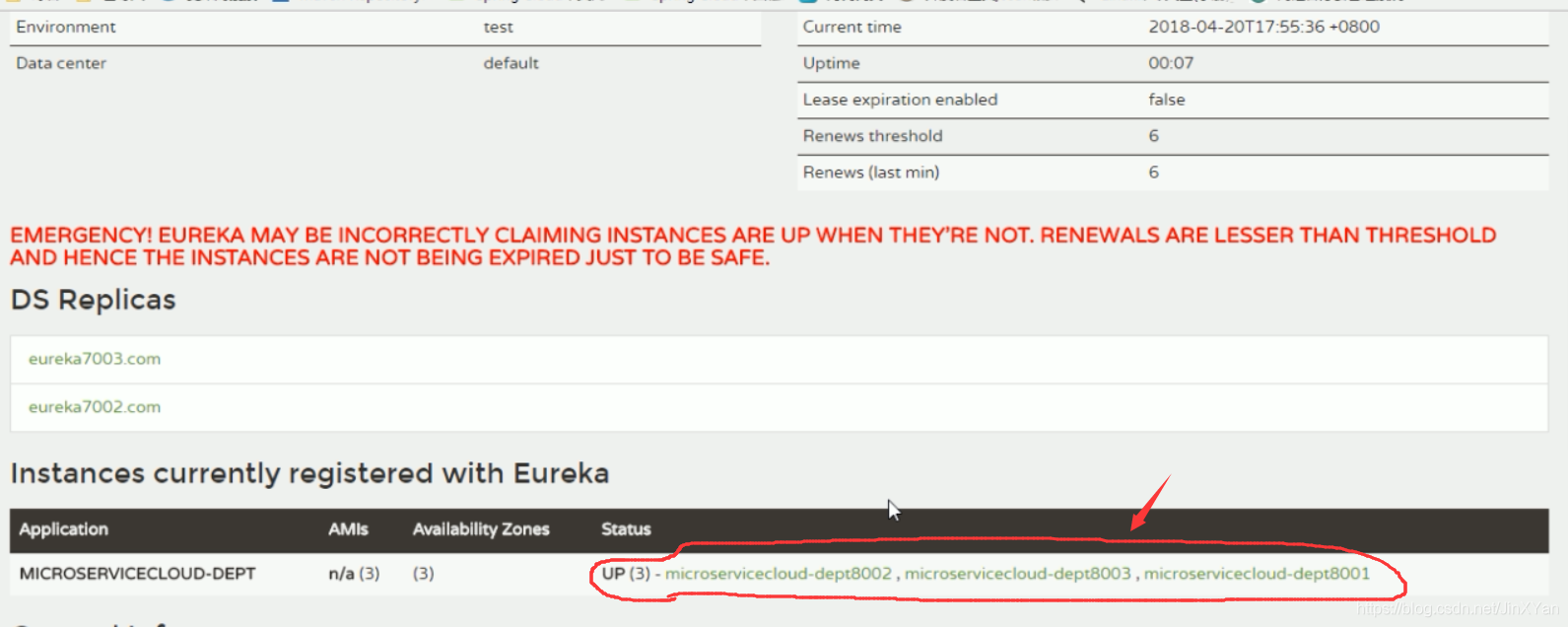<br />Ribbon组件IRule<br />
默认的是RoundBobinRule(轮询)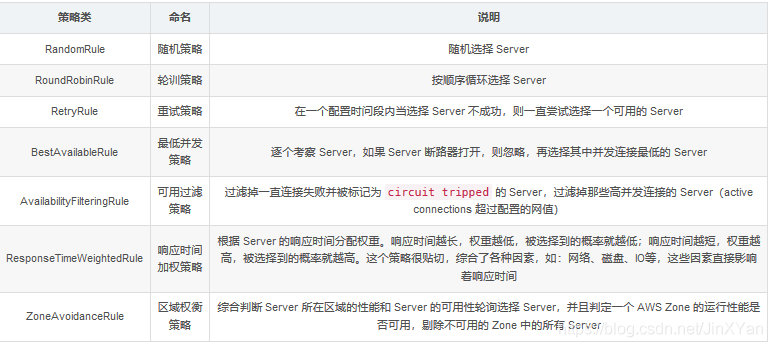
RetryRule
- 1、先按照RoundRobinRule(轮询)的策略获取服务,如果获取的服务失败侧在指定的时间会进行重试,进行获取可用的服务
- 2、如多次获取某个服务失败,这不会再再次获取该服务如(高德地图上某条道路堵车,司机不会走那条道路)=
使用: ``` @Configuration public class ConfigBean //boot —>spring applicationContext.xml —- @Configuration配置 ConfigBean = applicationContext.xml { @Bean @LoadBalanced public RestTemplate getRestTemplate(){
}return new RestTemplate();
@Bean
public IRule myRule(){
    //return new RoundRobinRule();
    //return new RandomRule();//达到的目的,用我们重新选择的随机算法替代默认的轮询。
    return new RetryRule();  //在这里选择负载均衡算法
}
}
自定义负载均衡算法:<br />
所谓的自定义Ribbon Client的主要作用就是使用自定义配置替代Ribbon默认的负载均衡策略,注意:自定义的Ribbon Client是有针对性的,一般一个自定义的Ribbon Client是对一个服务提供者(包括服务名相同的一系列副本)而言的。自定义了一个Ribbon Client 它所设定的负载均衡策略只对某一特定服务名的服务提供者有效,但不能影响服务消费者与别的服务提供者通信所使用的策略。根据官方文档的意思,推荐在 springboot 主程序扫描的包范围之外进行自定义配置类。其实纯代码自定义RibbonClient的话有两种方式:<br />方式一:在springboot主程序扫描的包外定义配置类,然后为springboot主程序添加 [RibbonClient ](/RibbonClient ) 注解引入配置类。 <br />配置类不应该在SpringBoot的包路径下,通过[RibbonClient ](/RibbonClient ) 注解加载:
@Configuration
public class MySelfRule
{
@Bean
public IRule myRule()
{
return new RandomRule_ZY(); // 我自定义为每台机器5次,5次之后在轮询到下一个
}
}
springboot主程序:
@SpringBootApplication @EnableEurekaClient //在启动该微服务的时候就能去加载我们的自定义Ribbon配置类,从而使配置生效 @RibbonClient(name=”MICROSERVICECLOUD-DEPT”,configuration=MySelfRule.class) public class DeptConsumer80_App { public static void main(String[] args) { SpringApplication.run(DeptConsumer80_App.class, args); } }
自定义LoadBalance:
public class RandomRule_ZY extends AbstractLoadBalancerRule{ // total = 0 // 当total==5以后,我们指针才能往下走, // index = 0 // 当前对外提供服务的服务器地址, // total需要重新置为零,但是已经达到过一个5次,我们的index = 1 // 分析:我们5次,但是微服务只有8001 8002 8003 三台,OK?
private int total = 0; // 总共被调用的次数,目前要求每台被调用5次 private int currentIndex = 0; // 当前提供服务的机器号
public Server choose(ILoadBalancer lb, Object key){ if (lb == null) { return null; } Server server = null;
while (server == null) {
    if (Thread.interrupted()) {
        return null;
    }
    List<Server> upList = lb.getReachableServers();  //激活可用的服务
    List<Server> allList = lb.getAllServers();  //所有的服务

    int serverCount = allList.size();
    if (serverCount == 0) {
        return null;
    }

                if(total < 5){
                server = upList.get(currentIndex);
                total++;
                }else {
                total = 0;
                currentIndex++;
                if(currentIndex >= upList.size()){
                  currentIndex = 0;
                }
                }
    if (server == null) {
        Thread.yield();
        continue;
    }

    if (server.isAlive()) {
        return (server);
    }

    // Shouldn't actually happen.. but must be transient or a bug.
    server = null;
    Thread.yield();
}
return server;
} @Override public Server choose(Object key){ return choose(getLoadBalancer(), key); }
@Override public void initWithNiwsConfig(IClientConfig clientConfig){ } }
```

若有收获,就点个赞吧
0 人点赞


