1、创建简单Maven项目,如下

2、删掉src目录
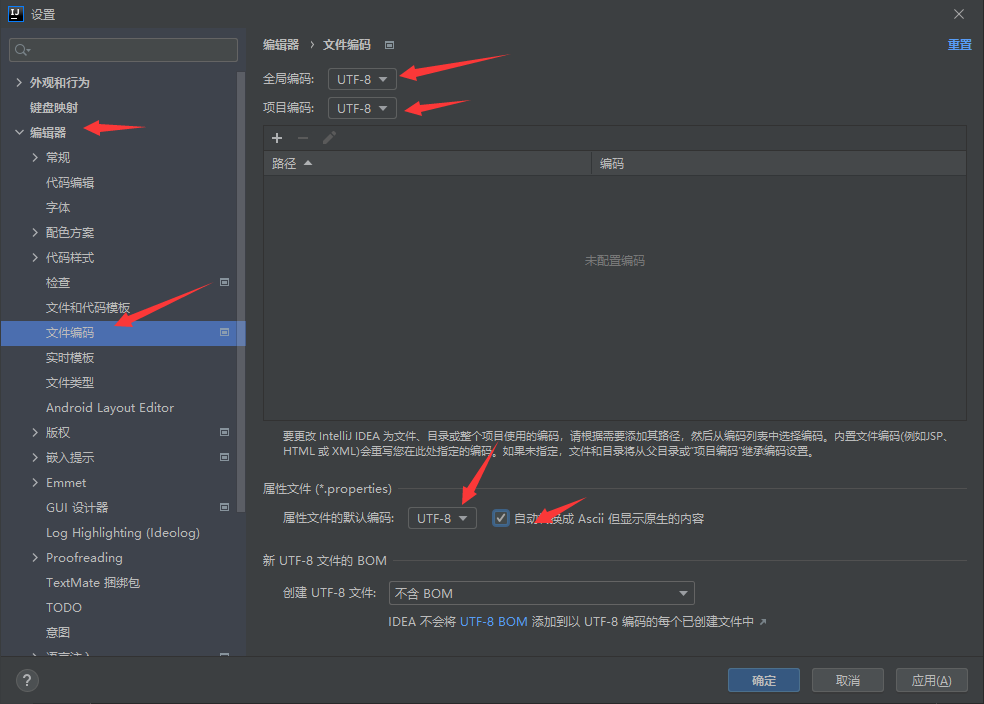
3、修改字符编码,如下
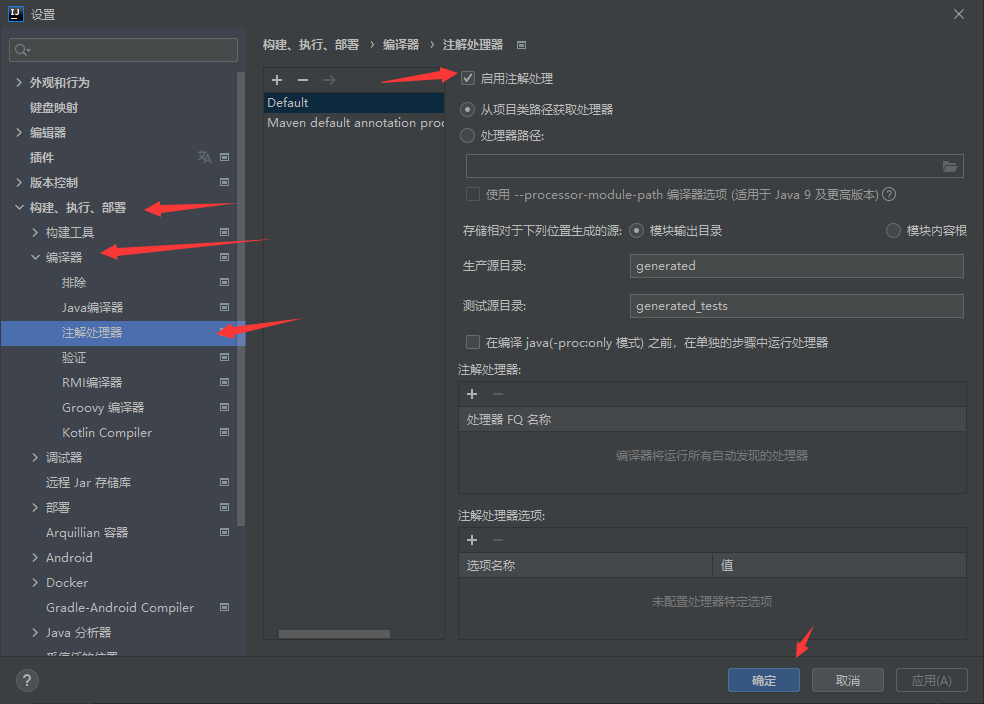
4、开启注解处理,如下
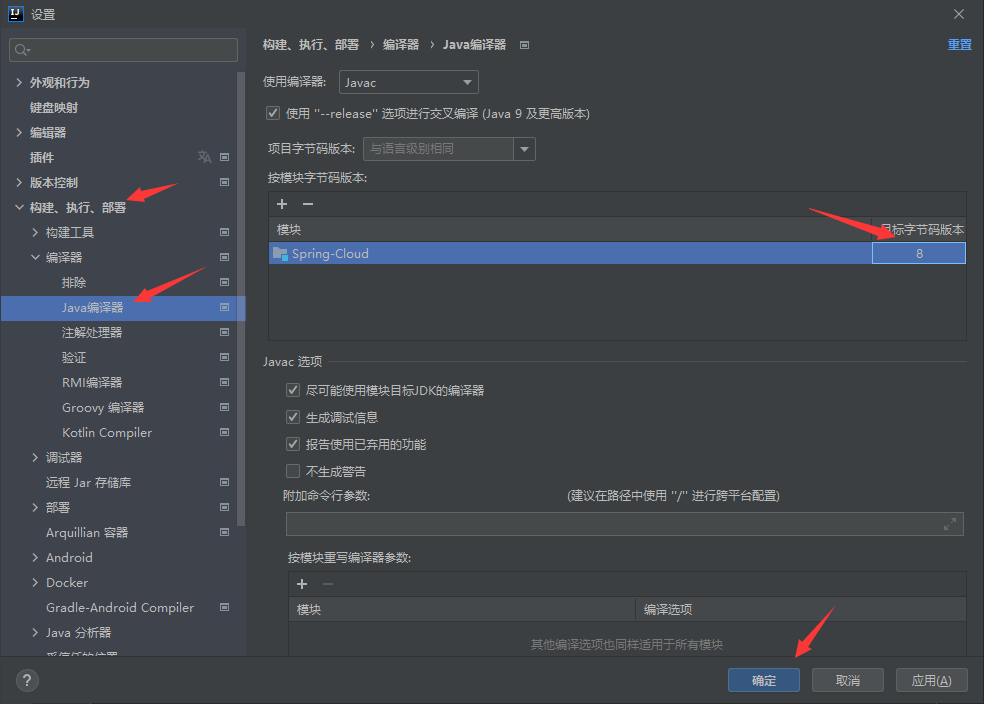
5、选择编译版本,如下
6、编辑 pom.xml文件
<?xml version="1.0" encoding="UTF-8"?><project xmlns="http://maven.apache.org/POM/4.0.0" xmlns:xsi="http://www.w3.org/2001/XMLSchema-instance"xsi:schemaLocation="http://maven.apache.org/POM/4.0.0 https://maven.apache.org/xsd/maven-4.0.0.xsd"><modelVersion>4.0.0</modelVersion><groupId>com.wyx</groupId><artifactId>Spring-Cloud</artifactId><version>0.0.1-SNAPSHOT</version><packaging>pom</packaging><properties><project.build.sourceEmcoding>UTF-8</project.build.sourceEmcoding><maven.compiler.source>1.8</maven.compiler.source><maven.compiler.target>1.8</maven.compiler.target><!--对应的版本--><spring.boot.dependencies.version>2.4.3</spring.boot.dependencies.version><spring.cloud.dependencies.version>2020.0.2</spring.cloud.dependencies.version><spring.cloud.alibaba.dependencies.version>2.2.1.RELEASE</spring.cloud.alibaba.dependencies.version><mysql.version>8.0.23</mysql.version><druid.version>1.2.5</druid.version><druid.spring.boot.version>1.2.5</druid.spring.boot.version><log4j.version>1.2.17</log4j.version><junit.version>4.13</junit.version><lombok.version>1.18.20</lombok.version><mybatis.spring.boot.version>2.1.4</mybatis.spring.boot.version></properties><dependencyManagement><dependencies><!--SpringBoot 依赖--><dependency><groupId>org.springframework.boot</groupId><artifactId>spring-boot-dependencies</artifactId><version>${spring.boot.dependencies.version}</version><type>pom</type><scope>import</scope></dependency><!--Spring Cloud 依赖--><dependency><groupId>org.springframework.cloud</groupId><artifactId>spring-cloud-dependencies</artifactId><version>${spring.cloud.dependencies.version}</version><type>pom</type><scope>import</scope></dependency><!--Spring Cloud Alibaba 依赖--><dependency><groupId>com.alibaba.cloud</groupId><artifactId>spring-cloud-alibaba-dependencies</artifactId><version>${spring.cloud.alibaba.dependencies.version}</version><type>pom</type><scope>import</scope></dependency><!--Mysql 连接驱动--><dependency><groupId>mysql</groupId><artifactId>mysql-connector-java</artifactId><version>${mysql.version}</version></dependency><!--druid 依赖--><dependency><groupId>com.alibaba</groupId><artifactId>druid</artifactId><version>${druid.version}</version></dependency><!--Spring Boot 启动器--><dependency><groupId>com.alibaba</groupId><artifactId>druid-spring-boot-starter</artifactId><version>${druid.spring.boot.version}</version></dependency><!--Lombok 依赖--><dependency><groupId>org.projectlombok</groupId><artifactId>lombok</artifactId><version>${lombok.version}</version></dependency><!--log4j 依赖--><dependency><groupId>log4j</groupId><artifactId>log4j</artifactId><version>${log4j.version}</version></dependency><!--junit 单元测试 依赖--><dependency><groupId>junit</groupId><artifactId>junit</artifactId><version>${junit.version}</version></dependency><!--Mybatis-spring-boot 启动器--><dependency><groupId>org.mybatis.spring.boot</groupId><artifactId>mybatis-spring-boot-starter</artifactId><version>${mybatis.spring.boot.version}</version></dependency></dependencies></dependencyManagement><build><plugins><plugin><groupId>org.springframework.boot</groupId><artifactId>spring-boot-maven-plugin</artifactId><version>2.4.4</version><configuration><fork>true</fork><addResources>true</addResources></configuration></plugin></plugins></build></project>
创建实体类API
1、在父工程下创建一个空maven项目

springboot扫描文件```@ComponentScan(basePackages = {"com.spring.*"})```,由此springboot启动类的包必须是项目下的父路径,其他类的包路径必须是其子路径。
即其他所有模块的包路径是springboot启动类的子路径

若有收获,就点个赞吧
0 人点赞


