Hystrix之服务熔断理论
断路器,相当于保险丝。
熔断机制概述
熔断机制是应对雪崩效应的一种微服务链路保护机制。当扇出链路的某个微服务出错不可用或者响应时间太长时,会进行服务的降级,进而熔断该节点微服务的调用,快速返回错误的响应信息。当检测到该节点微服务调用响应正常后,恢复调用链路。
在Spring Cloud框架里,熔断机制通过Hystrix实现。Hystrix会监控微服务间调用的状况,当失败的调用到一定阈值,缺省是5秒内20次调用失败,就会启动熔断机制。熔断机制的注解是@HystrixCommand。
服务降级====>>(达到失败率errorThresholdPercentage)服务熔断====>>慢慢恢复调用链路
hystrix参数如下
hystrix.command.default和hystrix.threadpool.default中的default为默认CommandKeyCommand PropertiesExecution相关的属性的配置:hystrix.command.default.execution.isolation.strategy 隔离策略,默认是Thread, 可选Thread|Semaphorehystrix.command.default.execution.isolation.thread.timeoutInMilliseconds 命令执行超时时间,默认1000mshystrix.command.default.execution.timeout.enabled 执行是否启用超时,默认启用truehystrix.command.default.execution.isolation.thread.interruptOnTimeout 发生超时是是否中断,默认truehystrix.command.default.execution.isolation.semaphore.maxConcurrentRequests 最大并发请求数,默认10,该参数当使用ExecutionIsolationStrategy.SEMAPHORE策略时才有效。如果达到最大并发请求数,请求会被拒绝。理论上选择semaphore size的原则和选择thread size一致,但选用semaphore时每次执行的单元要比较小且执行速度快(ms级别),否则的话应该用thread。semaphore应该占整个容器(tomcat)的线程池的一小部分。Fallback相关的属性这些参数可以应用于Hystrix的THREAD和SEMAPHORE策略hystrix.command.default.fallback.isolation.semaphore.maxConcurrentRequests 如果并发数达到该设置值,请求会被拒绝和抛出异常并且fallback不会被调用。默认10hystrix.command.default.fallback.enabled 当执行失败或者请求被拒绝,是否会尝试调用hystrixCommand.getFallback() 。默认trueCircuit Breaker相关的属性hystrix.command.default.circuitBreaker.enabled 用来跟踪circuit的健康性,如果未达标则让request短路。默认truehystrix.command.default.circuitBreaker.requestVolumeThreshold 一个rolling window内最小的请求数。如果设为20,那么当一个rolling window的时间内(比如说1个rolling window是10秒)收到19个请求,即使19个请求都失败,也不会触发circuit break。默认20hystrix.command.default.circuitBreaker.sleepWindowInMilliseconds 触发短路的时间值,当该值设为5000时,则当触发circuit break后的5000毫秒内都会拒绝request,也就是5000毫秒后才会关闭circuit。默认5000hystrix.command.default.circuitBreaker.errorThresholdPercentage错误比率阀值,如果错误率>=该值,circuit会被打开,并短路所有请求触发fallback。默认50hystrix.command.default.circuitBreaker.forceOpen 强制打开熔断器,如果打开这个开关,那么拒绝所有request,默认falsehystrix.command.default.circuitBreaker.forceClosed 强制关闭熔断器 如果这个开关打开,circuit将一直关闭且忽略circuitBreaker.errorThresholdPercentageMetrics相关参数hystrix.command.default.metrics.rollingStats.timeInMilliseconds 设置统计的时间窗口值的,毫秒值,circuit break 的打开会根据1个rolling window的统计来计算。若rolling window被设为10000毫秒,则rolling window会被分成n个buckets,每个bucket包含success,failure,timeout,rejection的次数的统计信息。默认10000hystrix.command.default.metrics.rollingStats.numBuckets 设置一个rolling window被划分的数量,若numBuckets=10,rolling window=10000,那么一个bucket的时间即1秒。必须符合rolling window % numberBuckets == 0。默认10hystrix.command.default.metrics.rollingPercentile.enabled 执行时是否enable指标的计算和跟踪,默认truehystrix.command.default.metrics.rollingPercentile.timeInMilliseconds 设置rolling percentile window的时间,默认60000hystrix.command.default.metrics.rollingPercentile.numBuckets 设置rolling percentile window的numberBuckets。逻辑同上。默认6hystrix.command.default.metrics.rollingPercentile.bucketSize 如果bucket size=100,window=10s,若这10s里有500次执行,只有最后100次执行会被统计到bucket里去。增加该值会增加内存开销以及排序的开销。默认100hystrix.command.default.metrics.healthSnapshot.intervalInMilliseconds 记录health 快照(用来统计成功和错误绿)的间隔,默认500msRequest Context 相关参数hystrix.command.default.requestCache.enabled 默认true,需要重载getCacheKey(),返回null时不缓存hystrix.command.default.requestLog.enabled 记录日志到HystrixRequestLog,默认trueCollapser Properties 相关参数hystrix.collapser.default.maxRequestsInBatch 单次批处理的最大请求数,达到该数量触发批处理,默认Integer.MAX_VALUEhystrix.collapser.default.timerDelayInMilliseconds 触发批处理的延迟,也可以为创建批处理的时间+该值,默认10hystrix.collapser.default.requestCache.enabled 是否对HystrixCollapser.execute() and HystrixCollapser.queue()的cache,默认trueThreadPool 相关参数线程数默认值10适用于大部分情况(有时可以设置得更小),如果需要设置得更大,那有个基本得公式可以follow:requests per second at peak when healthy × 99th percentile latency in seconds + some breathing room每秒最大支撑的请求数 (99%平均响应时间 + 缓存值)比如:每秒能处理1000个请求,99%的请求响应时间是60ms,那么公式是:(0.060+0.012)基本得原则时保持线程池尽可能小,他主要是为了释放压力,防止资源被阻塞。当一切都是正常的时候,线程池一般仅会有1到2个线程激活来提供服务hystrix.threadpool.default.coreSize 并发执行的最大线程数,默认10hystrix.threadpool.default.maxQueueSize BlockingQueue的最大队列数,当设为-1,会使用SynchronousQueue,值为正时使用LinkedBlcokingQueue。该设置只会在初始化时有效,之后不能修改threadpool的queue size,除非reinitialising thread executor。默认-1。hystrix.threadpool.default.queueSizeRejectionThreshold 即使maxQueueSize没有达到,达到queueSizeRejectionThreshold该值后,请求也会被拒绝。因为maxQueueSize不能被动态修改,这个参数将允许我们动态设置该值。if maxQueueSize == -1,该字段将不起作用hystrix.threadpool.default.keepAliveTimeMinutes 如果corePoolSize和maxPoolSize设成一样(默认实现)该设置无效。如果通过plugin(https://github.com/Netflix/Hystrix/wiki/Plugins)使用自定义实现,该设置才有用,默认1.hystrix.threadpool.default.metrics.rollingStats.timeInMilliseconds 线程池统计指标的时间,默认10000hystrix.threadpool.default.metrics.rollingStats.numBuckets 将rolling window划分为n个buckets,默认10
服务熔断demo
1.StudentServiceImpl
@Slf4j@Service//@DefaultProperties(defaultFallback = "payment_Global_FallbackMethod") // 全局服务降级public class StudentServiceImpl extends ServiceImpl<StudentMapper, StudentEntity> implements StudentService {@Autowiredprivate BizClient bizClient;// 服务降级/* @HystrixCommand(fallbackMethod = "paymentTimeOutFallbackMethod",commandProperties = {@HystrixProperty(name="execution.isolation.thread.timeoutInMilliseconds",value="1500")})*/// @HystrixCommand//用全局的fallback方法@Overridepublic String istimeout(Integer time) {// int a = 1/0;List<StudentEntity> re = bizClient.timeout(time);log.info("{}",re);return re.toString();}//善后方法 HystrixCommandpublic String paymentTimeOutFallbackMethod(Integer time){return "你好已超时或出错了,请稍后再试,o(╥﹏╥)o";}// 下面是全局fallback方法public String payment_Global_FallbackMethod(){return "Global异常处理信息,请稍后再试,/(ㄒoㄒ)/~~";}// 服务熔断@HystrixCommand(fallbackMethod = "timeoutCircuitBreaker_fallback",commandProperties = {@HystrixProperty(name = "circuitBreaker.enabled",value = "true"),// 是否开启断路器 默认true@HystrixProperty(name = "circuitBreaker.requestVolumeThreshold",value = "10"),// 请求次数@HystrixProperty(name = "circuitBreaker.sleepWindowInMilliseconds",value = "10000"), // 时间窗口期@HystrixProperty(name = "circuitBreaker.errorThresholdPercentage",value = "60"),// 失败率达到多少后跳闸})@Overridepublic String timeoutCircuitBreaker(Integer time) {if(time < 0) {throw new RuntimeException("******time 不能负数");}String serialNumber = IdUtil.simpleUUID();return Thread.currentThread().getName()+"\t"+"调用成功,流水号: " + serialNumber;}public String timeoutCircuitBreaker_fallback(Integer time) {return "time 不能负数,请稍后再试,/(ㄒoㄒ)/~~ time: " + time;}}
2.controller
// hystrix 服务熔断@GetMapping("timeout2/{time}")public String timeout2(@PathVariable("time") Integer time) throws InterruptedException {Long cur = System.currentTimeMillis();String re = studentService.timeoutCircuitBreaker(time);Long las = System.currentTimeMillis();log.info("耗时:{}", las-cur);return re;}
服务熔断总结
熔断类型
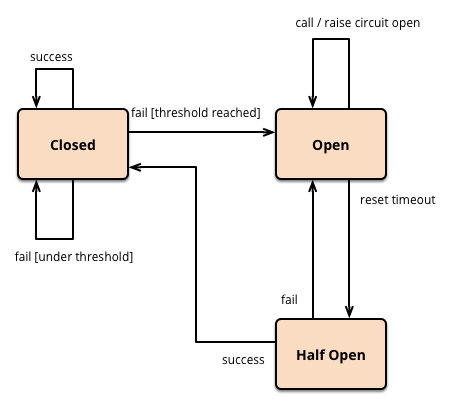
- 熔断打开:请求不再进行调用当前服务,内部设置时钟一般为MTTR(平均故障处理时间),当打开时长达到所设时钟则进入半熔断状态。
- 熔断关闭:熔断关闭不会对服务进行熔断。
- 熔断半开:部分请求根据规则调用当前服务,如果请求成功且符合规则则认为当前服务恢复正常,关闭熔断。
官网断路器流程图 
官网步骤
The precise way that the circuit opening and closing occurs is as follows:1.Assuming the volume across a circuit meets a certain threshold : HystrixCommandProperties.circuitBreakerRequestVolumeThreshold()2.And assuming that the error percentage, as defined above exceeds the error percentage defined in : HystrixCommandProperties.circuitBreakerErrorThresholdPercentage()3.Then the circuit-breaker transitions from CLOSED to OPEN.4.While it is open, it short-circuits all requests made against that circuit-breaker.5.After some amount of time (HystrixCommandProperties.circuitBreakerSleepWindowInMilliseconds()), the next request is let through. If it fails, the command stays OPEN for the sleep window. If it succeeds, it transitions to CLOSED and the logic in 1) takes over again.
涉及到断路器的三个重要参数:
- 快照时间窗:断路器确定是否打开需要统计一些请求和错误数据,而统计的时间范围就是快照时间窗,默认为最近的10秒。
- 请求总数阀值:在快照时间窗内,必须满足请求总数阀值才有资格熔断。默认为20,意味着在10秒内,如果该hystrix命令的调用次数不足20次7,即使所有的请求都超时或其他原因失败,断路器都不会打开。
- 错误百分比阀值:当请求总数在快照时间窗内超过了阀值,比如发生了30次调用,如果在这30次调用中,有15次发生了超时异常,也就是超过50%的错误百分比,在默认设定50%阀值情况下,这时候就会将断路器打开。
断路器开启或者关闭的条件
到达以下阀值,断路器将会开启:
当满足一定的阀值的时候(默认10秒内超过20个请求次数)
- 当失败率达到一定的时候(默认10秒内超过50%的请求失败)
- 当开启的时候,所有请求都不会进行转发
- 一段时间之后(默认是5秒),这个时候断路器是半开状态,会让其中一个请求进行转发。如果成功,断路器会关闭,若失败,继续开启。
断路器打开之后
1:再有请求调用的时候,将不会调用主逻辑,而是直接调用降级fallback。通过断路器,实现了自动地发现错误并将降级逻辑切换为主逻辑,减少响应延迟的效果。
2:原来的主逻辑要如何恢复呢?
对于这一问题,hystrix也为我们实现了自动恢复功能。
当断路器打开,对主逻辑进行熔断之后,hystrix会启动一个休眠时间窗,在这个时间窗内,降级逻辑是临时的成为主逻辑,当休眠时间窗到期,断路器将进入半开状态,释放一次请求到原来的主逻辑上,如果此次请求正常返回,那么断路器将继续闭合,主逻辑恢复,如果这次请求依然有问题,断路器继续进入打开状态,休眠时间窗重新计时。
ALL配置
@HystrixCommand(fallbackMethod = "fallbackMethod",groupKey = "strGroupCommand",commandKey = "strCommand",threadPoolKey = "strThreadPool",commandProperties = {// 设置隔离策略,THREAD 表示线程池 SEMAPHORE:信号池隔离@HystrixProperty(name = "execution.isolation.strategy", value = "THREAD"),// 当隔离策略选择信号池隔离的时候,用来设置信号池的大小(最大并发数)@HystrixProperty(name = "execution.isolation.semaphore.maxConcurrentRequests", value = "10"),// 配置命令执行的超时时间@HystrixProperty(name = "execution.isolation.thread.timeoutinMilliseconds", value = "10"),// 是否启用超时时间@HystrixProperty(name = "execution.timeout.enabled", value = "true"),// 执行超时的时候是否中断@HystrixProperty(name = "execution.isolation.thread.interruptOnTimeout", value = "true"),// 执行被取消的时候是否中断@HystrixProperty(name = "execution.isolation.thread.interruptOnCancel", value = "true"),// 允许回调方法执行的最大并发数@HystrixProperty(name = "fallback.isolation.semaphore.maxConcurrentRequests", value = "10"),// 服务降级是否启用,是否执行回调函数@HystrixProperty(name = "fallback.enabled", value = "true"),// 是否启用断路器@HystrixProperty(name = "circuitBreaker.enabled", value = "true"),// 该属性用来设置在滚动时间窗中,断路器熔断的最小请求数。例如,默认该值为 20 的时候,如果滚动时间窗(默认10秒)内仅收到了19个请求, 即使这19个请求都失败了,断路器也不会打开。@HystrixProperty(name = "circuitBreaker.requestVolumeThreshold", value = "20"),// 该属性用来设置在滚动时间窗中,表示在滚动时间窗中,在请求数量超过 circuitBreaker.requestVolumeThreshold 的情况下,如果错误请求数的百分比超过50, 就把断路器设置为 "打开" 状态,否则就设置为 "关闭" 状态。@HystrixProperty(name = "circuitBreaker.errorThresholdPercentage", value = "50"),// 该属性用来设置当断路器打开之后的休眠时间窗。 休眠时间窗结束之后,会将断路器置为 "半开" 状态,尝试熔断的请求命令,如果依然失败就将断路器继续设置为 "打开" 状态,如果成功就设置为 "关闭" 状态。@HystrixProperty(name = "circuitBreaker.sleepWindowinMilliseconds", value = "5000"),// 断路器强制打开@HystrixProperty(name = "circuitBreaker.forceOpen", value = "false"),// 断路器强制关闭@HystrixProperty(name = "circuitBreaker.forceClosed", value = "false"),// 滚动时间窗设置,该时间用于断路器判断健康度时需要收集信息的持续时间@HystrixProperty(name = "metrics.rollingStats.timeinMilliseconds", value = "10000"),// 该属性用来设置滚动时间窗统计指标信息时划分"桶"的数量,断路器在收集指标信息的时候会根据设置的时间窗长度拆分成多个 "桶" 来累计各度量值,每个"桶"记录了一段时间内的采集指标。// 比如 10 秒内拆分成 10 个"桶"收集这样,所以 timeinMilliseconds 必须能被 numBuckets 整除。否则会抛异常@HystrixProperty(name = "metrics.rollingStats.numBuckets", value = "10"),// 该属性用来设置对命令执行的延迟是否使用百分位数来跟踪和计算。如果设置为 false, 那么所有的概要统计都将返回 -1。@HystrixProperty(name = "metrics.rollingPercentile.enabled", value = "false"),// 该属性用来设置百分位统计的滚动窗口的持续时间,单位为毫秒。@HystrixProperty(name = "metrics.rollingPercentile.timeInMilliseconds", value = "60000"),// 该属性用来设置百分位统计滚动窗口中使用 “ 桶 ”的数量。@HystrixProperty(name = "metrics.rollingPercentile.numBuckets", value = "60000"),// 该属性用来设置在执行过程中每个 “桶” 中保留的最大执行次数。如果在滚动时间窗内发生超过该设定值的执行次数,// 就从最初的位置开始重写。例如,将该值设置为100, 滚动窗口为10秒,若在10秒内一个 “桶 ”中发生了500次执行,// 那么该 “桶” 中只保留 最后的100次执行的统计。另外,增加该值的大小将会增加内存量的消耗,并增加排序百分位数所需的计算时间。@HystrixProperty(name = "metrics.rollingPercentile.bucketSize", value = "100"),// 该属性用来设置采集影响断路器状态的健康快照(请求的成功、 错误百分比)的间隔等待时间。@HystrixProperty(name = "metrics.healthSnapshot.intervalinMilliseconds", value = "500"),// 是否开启请求缓存@HystrixProperty(name = "requestCache.enabled", value = "true"),// HystrixCommand的执行和事件是否打印日志到 HystrixRequestLog 中@HystrixProperty(name = "requestLog.enabled", value = "true"),},threadPoolProperties = {// 该参数用来设置执行命令线程池的核心线程数,该值也就是命令执行的最大并发量@HystrixProperty(name = "coreSize", value = "10"),// 该参数用来设置线程池的最大队列大小。当设置为 -1 时,线程池将使用 SynchronousQueue 实现的队列,否则将使用 LinkedBlockingQueue 实现的队列。@HystrixProperty(name = "maxQueueSize", value = "-1"),// 该参数用来为队列设置拒绝阈值。 通过该参数, 即使队列没有达到最大值也能拒绝请求。// 该参数主要是对 LinkedBlockingQueue 队列的补充,因为 LinkedBlockingQueue 队列不能动态修改它的对象大小,而通过该属性就可以调整拒绝请求的队列大小了。@HystrixProperty(name = "queueSizeRejectionThreshold", value = "5"),})public String doSomething() {...}

若有收获,就点个赞吧
0 人点赞


