1 php拓展所在位置
可以到php.ini中查看ext的存放位置
php/ext文件中存放的后缀为dll(动态链接库)的文件为php的拓展组件。
2 查看phpinfo
php -i // 输出php信息,等同于phpinfophp -r 'phpinfo();' // 命令行执行code
使用phpinfo()函数查看PHP的版本信息,这会决定扩展文件版本
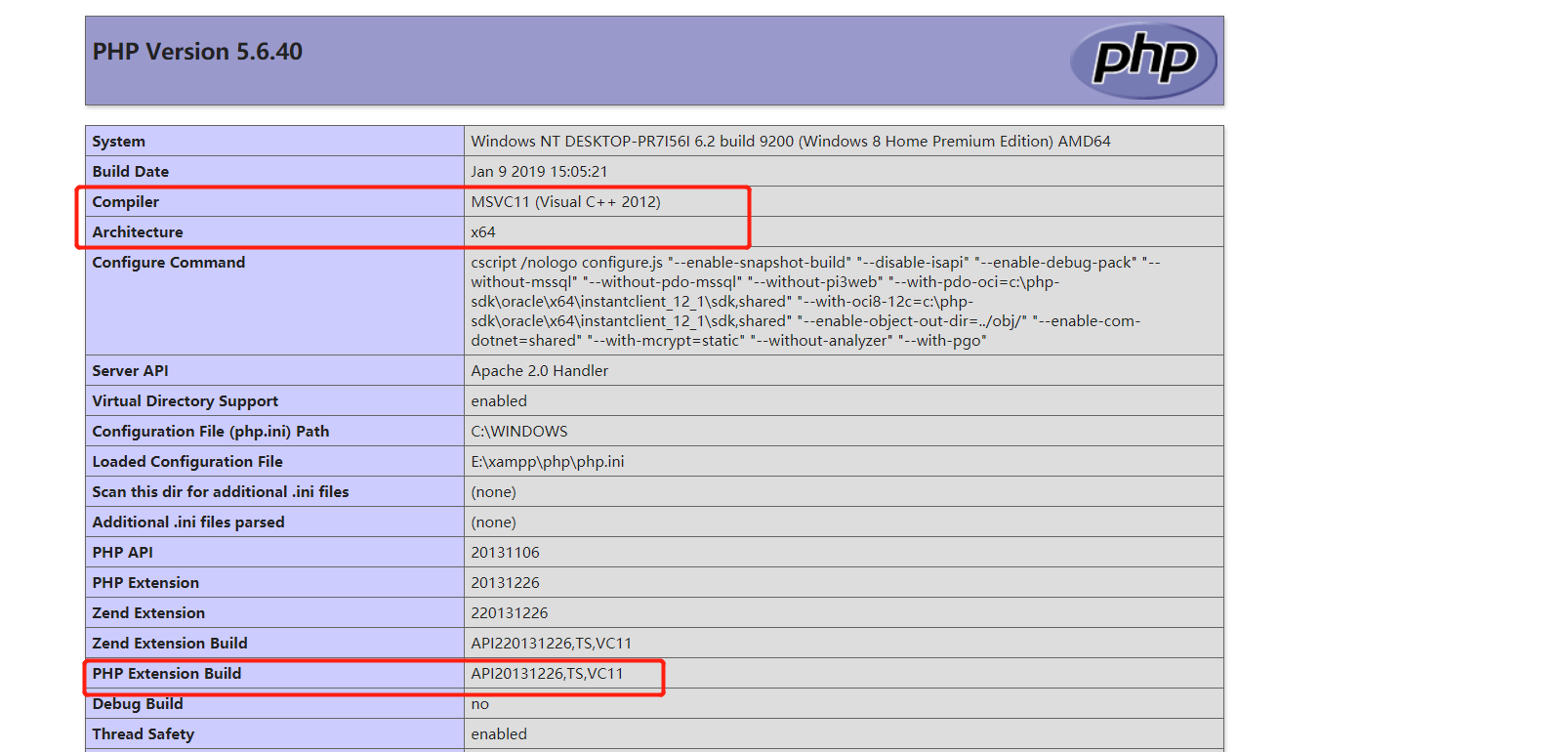
其中,第一个是VC的版本为11,第二个是64位的,第三个参数api版本号,安装的组件是TS(即线程安全)的,VC版本为11
3 安装redis
3.1 找对应的redis.dll和igbinary.dll
igbinary是安装redis的前提即依赖
在mac上也是需要igbinary的,linux这类的操作系统可以通过brew安装php,自带pecl,使用pecl安装拓展,它是php第三方拓展库
dll即动态链接库,是C语言编写的,已经编译好之后的库。而在linux上,多采用二进制源码编译的方式,得到so后缀的文件
http://windows.php.net/downloads/pecl/releases/redis/2.2.7/
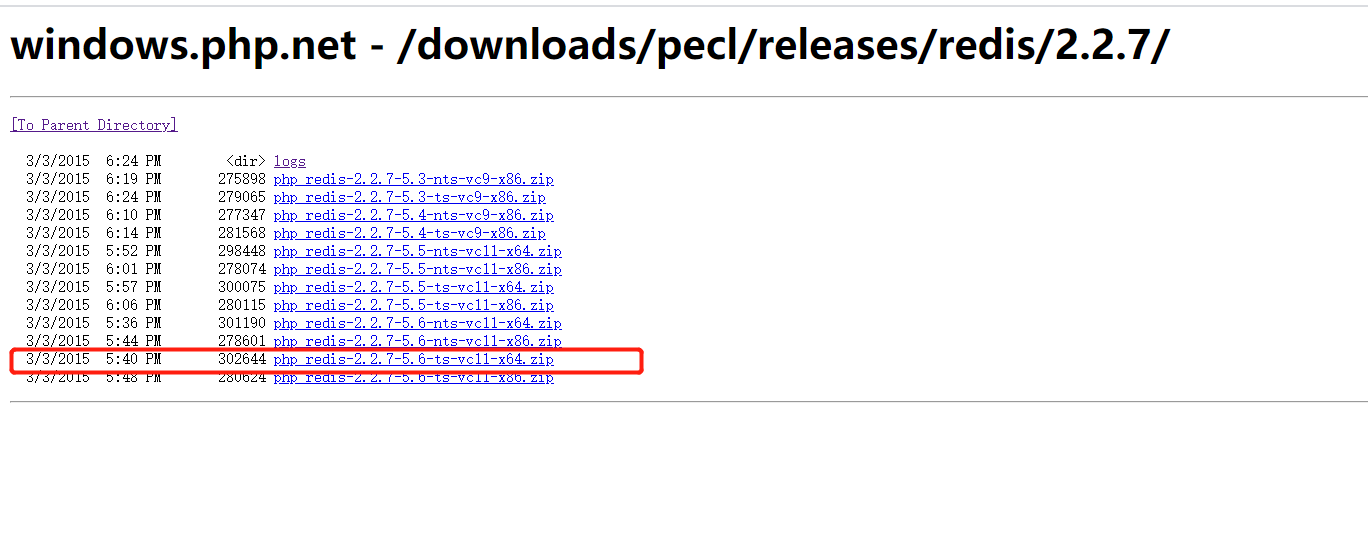
http://windows.php.net/downloads/pecl/releases/igbinary/2.0.1/

3.2 修改php.ini
[Redis];php_redisextension=php_igbinary.dllextension=php_redis.dll
注意:extension=php_igbinary.dll要放在extension=php_redis.dll前,否则不会生效。
在mac中,还需要重启php-fpm,有时候它会自动平滑重启,有时候需要自己重启。
ps aux|grep php-fpm // 查看进程号kill -USR2 php-fpm.pid的绝对路径或者PID号php --ri redis // 查看拓展配置信息以便确定重启成功php -m // 查看所有的拓展
3.3 纠错
出现
Unable to load dynamic library 'f:\php\ext\php_redis.dll' - 找不到指定的模块。
或者
Gracefully shutting down php-fpm . doneStarting php-fpm [16-Jan-2014 12:46:26] NOTICE: PHP message: PHP Warning: PHP Startup: memcache: Unable to initialize moduleModule compiled with module API=20090626PHP compiled with module API=20100525These options need to matchin Unknown on line 0done
即可能是下载的时候疏忽了,没用下载到对应php版本的拓展,即版本不匹配,重新下载吧。
4 安装kafka拓展
安装kafka集群:https://www.yuque.com/u21438008/nd8ycn/urfi5m
php手册介绍:php需在7以上。https://arnaud.le-blanc.net/php-rdkafka-doc/phpdoc/rdkafka.requirements.html
函数:https://arnaud.le-blanc.net/php-rdkafka-doc/phpdoc/index.html
安装方式:
https://arnaud.le-blanc.net/php-rdkafka-doc/phpdoc/rdkafka.installation.windows.html
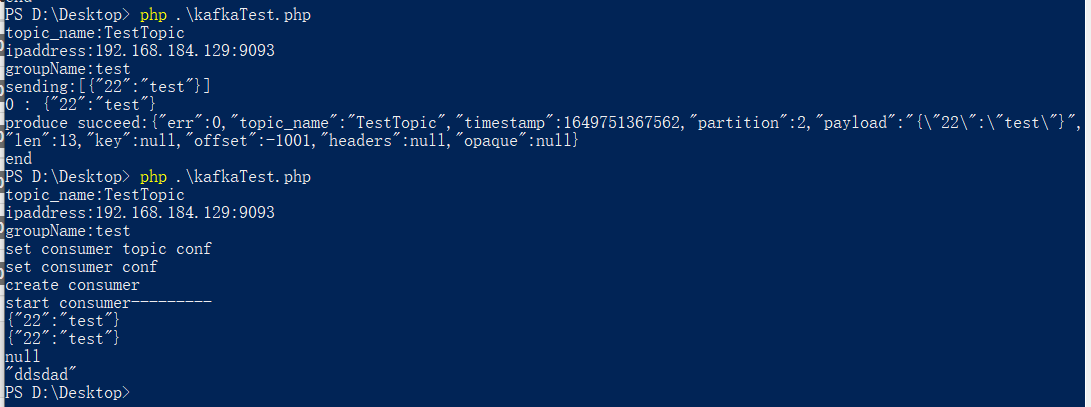
<?phpclass KafkaHelper {private $topicName = '';private $ipAddress = '';private $groupName = '';// 生产者配置private $conf = null;// 生产者topic配置(感觉抽离出来是多topic)private $topicConf = null;// 生产者private $producer = null;// 发送操作对象(感觉抽离出来是多topic)private $producerTopic = null;//// 消费者配置private $consumerConf = null;// 消费者topic 配置private $consumerTopicConf = null;// 消费者private $consumer = null;// 消费操作对象private $consumerTopic = null;// 初始话设置相关配置信息public function __construct($topicName = '', $ipAddress = '', $groupName = ''){$this->topicName = $topicName;echo "topic_name:" . $topicName . "\n";$this->ipAddress = $ipAddress;echo "ipaddress:" . $ipAddress . "\n";$this->groupName = $groupName;echo "groupName:" . $groupName . "\n";}// https://github.com/edenhill/librdkafka/blob/master/CONFIGURATION.mdpublic function setConf($conf = null){if (!$conf) {$conf = new \RdKafka\Conf();$conf->set('log_level', (string) LOG_DEBUG);$conf->set('metadata.broker.list', $this->ipAddress);$conf->setDrMsgCb(function ($kafka, $msg) {if ($msg->err) {// message permanently failed to be deliveredecho "produce failed:" . json_encode($msg) . "\n";} else {// message successfully deliveredecho "produce succeed:" . json_encode($msg) . "\n";}});$this->conf = $conf;} else {if (!($conf instanceof \RdKafka\Conf)) {throw new \Exception('传入的配置类应为: \Rdkafka\conf');}$this->conf = $conf;}return $this;}public function setTopicConf($topicConf = null){if (!$topicConf) {$topicConf = new \Rdkafka\TopicConf();$topicConf->set('request.required.acks', 0);$this->topicConf = $topicConf;} else {if (!($topicConf instanceof \Rdkafka\TopicConf)) {throw new \Exception('传入的配置类应为: \Rdkafka\TopicConf');}$this->topicConf = $topicConf;}return $this;}public function createProducer(){$this->producer = new \RdKafka\Producer($this->conf);// $this->producer->addBrokers($this->ipAddress);$this->producerTopic = $this->producer->newTopic($this->topicName, $this->topicConf);return $this;}// 二维数组public function send($data = []){if (empty($data)) {return '数据不能为空';}echo "sending:". json_encode($data) ."\n";try {foreach ($data as $key => $val) {echo "$key : ". json_encode($val) ."\n";$this->producerTopic->produce(RD_KAFKA_PARTITION_UA, 0, json_encode($val, JSON_UNESCAPED_UNICODE));// LogHelper::log('发送kafka数据:'.json_encode($val, JSON_UNESCAPED_UNICODE), 'kafka_producer');}$times = 0;while ($this->producer->getOutQLen() > 0) {// LogHelper::log($this->rk->getOutQLen(), 'kafka_producer');if ($times++ > 10) {// LogHelper::log('投递kafka超时:','kafka_producer');throw new \Exception('消息超时');}$this->producer->poll(300);}echo "end\n";return true;} catch (\Exception $e) {echo 'errormsg:' . $e->getMessage() . "\n";// LogHelper::log('投递kafka异常:'.$e->getMessage(),'kafka_producer');return false;}}// create consumerConf. You should call ConsumerTopicConf() first.public function setConsumerConf($consumerConf = null){echo "set consumer conf\n";if (!$consumerConf) {$consumerConf = new \RdKafka\Conf();// 配置groud.id 具有相同 group.id 的consumer 将会处理不同分区的消息,所以同一个组内的消费者数量如果订阅了一个topic, 那么消费者进程的数量多于 多于这个topic 分区的数量是没有意义的。$consumerConf->set('group.id', $this->groupName);//添加 kafka集群服务器地址$consumerConf->set('metadata.broker.list', $this->ipAddress);$consumerConf->setDefaultTopicConf($this->consumerTopicConf);// 消费成功的回调$consumerConf->setConsumeCb(function ($msg) {echo "consume succeed:". json_encode($msg) ."\n";});$this->consumerConf = $consumerConf;} else {if (!($consumerConf instanceof \RdKafka\Conf)) {throw new \Exception('传入的配置类应为: \Rdkafka\Conf');}$this->consumerConf = $consumerConf;}return $this;}// 设置消ConsumerTopicConf,无需其他配合public function setConsumerTopicConf($consumerTopicConf = null){echo "set consumer topic conf\n";if (!$consumerTopicConf) {$consumerTopicConf = new \RdKafka\TopicConf();////当没有初始偏移量时,从哪里开始读取 'smallest': start from the beginning 'latest' 读取最新的数据$consumerTopicConf->set('auto.offset.reset', 'smallest');//设置自动记录上次读取到的位置//$topicConf->set('auto.commit.enable', true);// Set the configuration to use for subscribed/assigned topics$this->consumerTopicConf = $consumerTopicConf;} else {if (!($consumerTopicConf instanceof \Rdkafka\TopicConf)) {throw new \Exception('传入的配置类应为: \Rdkafka\TopicConf');}$this->consumerTopicConf = $consumerTopicConf;}return $this;}public function createConsumer(){echo "create consumer \n";// 使用RdkafkaConsumer()貌似就能自动消费所有Partition;Consumer()就需要指定哪个Partition,然后其他的Partition消费不到$consumer = new \RdKafka\KafkaConsumer($this->consumerConf);// $consumer = new \RdKafka\Consumer($this->consumerConf);$this->consumer = $consumer;// 让消费者订阅log 主题$consumer->subscribe([$this->topicName]);// $this->consumTopic = $this->consumer->newTopic($this->topicName, $this->consumerTopicConf);return $this;}public function startConsume(){echo "start consumer---------" . "\n";// $consumerTopic = $this->consumTopic;$consumer = $this->consumer;try {//解决 kafka在遇到PHP fatalerrorr不退出的问题。$handleShutdown = function () use ($consumer) {$consumer->unsubscribe();};register_shutdown_function($handleShutdown);} catch (\Exception $e) {$consumer && $consumer->unsubscribe();}// 消费// $consumerTopic->consumeStart(0, RD_KAFKA_OFFSET_STORED);while (true) {try {// 原参数1000// $message = $consumerTopic->consume(0, 120*10000);$message = $consumer->consume(1000);// 返回消费结果switch ($message->err) {// 正常消费case RD_KAFKA_RESP_ERR_NO_ERROR:// LogHelper::log('message:kafka信息:' . json_encode($message), $this->logFile);// self::stdOutLineF('message:kafka信息:' . json_encode($message));if (!is_null($message)) {$data = json_decode($message->payload,true);$this->handleData($data); // 处理数据}break;case RD_KAFKA_RESP_ERR__PARTITION_EOF:// LogHelper::log($message->err . " | No more messages; will wait for more", $this->logFile);// self::stdOutLineF($message->err . " | No more messages; will wait for more");break;case RD_KAFKA_RESP_ERR__TIMED_OUT:break;default:throw new \Exception($message->errstr(), $message->err);break;}} catch (\Exception $e) {// self::stdOutLineF("Kafka Stop Error:".$e->getMessage());// LogHelper::log('Kafka Stop Error:' . $e->getMessage(), $this->logFile);$consumer->unsubscribe();// $consumerTopic->consumeStop(0, RD_KAFKA_OFFSET_STORED);echo "出错了\n";}}}// json_decode后的数据public function handleData($data){echo json_encode($data) . "\n";}}$ipAddress = '192.168.184.129:9093';$topicName = 'TestTopic';$group = 'test';$kafka = new KafKaHelper($topicName, $ipAddress, $group);// $data = [['22' => 'test']];// $kafka->setConf()->setTopicConf()->createProducer()->send($data);//$kafka->setConsumerTopicConf()->setConsumerConf()->createConsumer()->startConsume();

若有收获,就点个赞吧
0 人点赞


