Java Io原理
IO流用来处理设备之间的数据传输,Java程序中,对于数据的输入/输出操作 都是以“流”的方式进行的。java.io包下提供了各种“流”类的接口,用以获取不同种类的数据,并通过标准的方法输入或输出数据。
对于计算机来说,数据都是以二进制形式读出或写入的。我们可以把文件想象为一个桶,我们可以通过管道将桶里的水抽出来。这里的管道也就相当于Java中的流。流的本质是一种有序的数据集合,有数据源和目的地。 流的分类
按照流的方向(输出输入都是站在程序所在内存的角度划分的) 输入流:只能从中读数据 输出流:只能向文件中写数据
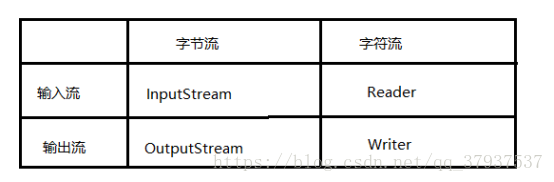
输入:读取外部数据(磁盘、光盘等存储设备的数据)到程序(内存)中。
输出:将程序(内存)数据输出到磁盘、光盘等存储设备中
按照流的操作单元
字节流
InputStream OutputStream
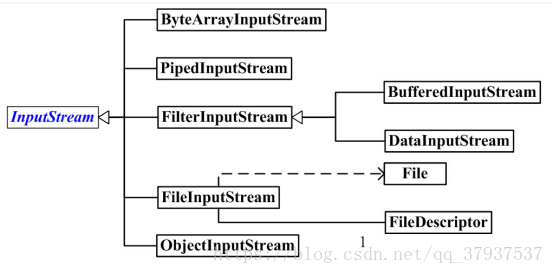
将数据解释为原始的二进制数据
读写均为字节数据
二进制数据不需要编码和解码,比文本Io效率更高
可移植(与主句编码方式无关)
2,字符流
Reader Writer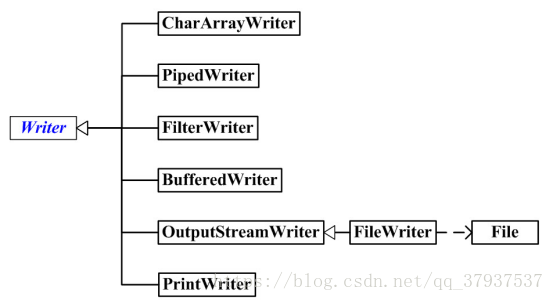
字符流将原始数据解析成一种字符
文本数据存储 依赖文件编码方式,它输入输出需要编码解码
3,节点流
从具体介质读写数据的类
4,处理流
对节点流进行包装进行特定的处理
字节与字符的区别
A,读写单位不同,字节流以字节为单位(一个字节为8bit位),字符流以字符为单位
B,操作对象不同,字节流可以处理任何数据 字符流只能处理字符相关类型数据
字节转换为字符方法:编码表(建立字符与字节的映射关系) ASCII(借助一个字 节存储数据,一个字节的7个bit位)
GBK:主要处理中文,借助两个字节存储数据) utf-8(对Unicode编码格式的优 化,一个字节存储
Unicode:2个字节,但不是处理中文的
解码、编码类
charSet
URLEncode,URLDecode 网页交互相关编码解码类
3,按照角色划分
节点流: 程序直接连接到实际的数据源 InputStream
处理流: 对一个已存在的流进行封装 BufferInputStream
案例:
public class FileInputOutputStreamTest {//使用字节流FileInputStream处理文件,可能出现乱码@Testpublic void testFileInputStream(){FileInputStream fis=null;try {//1.造文件File file=new File("test.text");//2.造流fis=new FileInputStream(file);//3.读数据byte [] buffer =new byte[5];int len;//每次读取记录读取字节的个数while ((len=fis.read(buffer))!=-1){String str=new String(buffer,0,len);System.out.println(str);}} catch (FileNotFoundException e) {e.printStackTrace();} catch (IOException e) {e.printStackTrace();}finally {if (fis !=null){try {fis.close();} catch (IOException e) {e.printStackTrace();}}}}}
public class FileReaderWriterTest {public static void main(String[] args) {File file =new File("hello.text");//相对于当前工程System.out.println(file.getAbsolutePath());File file1=new File("javaSE/hello.text");System.out.println(file1.getAbsolutePath());}@Testpublic void test() throws IOException {FileReader fileReader=null;try {//1.先指定需要操作的文件File file=new File("test.text");//相当于当前的model//2.提供具体的流fileReader=new FileReader(file);/*方式一://数据文件的读入//read():返回读入的一个字符,如果达到末尾,返回-1int read = fileReader.read();while (read !=-1){System.out.print((char)read);read=fileReader.read();//这样才能遍历所有的字符相当于i++}*///方式二:int data;while ((data=fileReader.read()) != -1){System.out.print((char) data);}} catch (FileNotFoundException e) {e.printStackTrace();} catch (IOException e) {e.printStackTrace();}finally {if (fileReader !=null){fileReader.close();//释放资源}}}//read的升级操作@Testpublic void testFileReader1() throws IOException {//1.File类的实例化//2.FileReader流的实例化//3.读入操作//资源关闭FileReader fileReader=null;try {//1.先指定需要操作的文件File file=new File("test.text");//相当于当前的model//2.提供具体的流fileReader=new FileReader(file);char [] cbuf=new char[5];int len;while ((len=fileReader.read(cbuf)) !=-1){//方式一://错误的写法// for(int i = 0;i < cbuf.length;i++){// System.out.print(cbuf[i]);// }//正确的写法// for(int i = 0;i < len;i++){// System.out.print(cbuf[i]);// }//方式二://错误的写法,对应着方式一的错误的写法// String str = new String(cbuf);// System.out.print(str);//正确的写法String str = new String(cbuf,0,len);System.out.print(str);}} catch (FileNotFoundException e) {e.printStackTrace();} catch (IOException e) {e.printStackTrace();}finally {if (fileReader !=null){fileReader.close();//释放资源}}}/*把内存中的数据写入硬盘里。说明:1.输出操作:对应的file可以不存在,并不会报异常2.File对应硬盘中文件如果不存在,在输出过程中,会自动创建这个文件对应硬盘中文件如果存在:如果流使用的构造器是:FileWriter(file,false) / FileWriter(file):对原有文件的覆盖如果流使用的构造器是:FileWriter(file,true):不会对原有文件覆盖,而是在原有文件基础上追加内容*/@Testpublic void testFileWriter(){FileWriter fileWrite=null;try {//1.提供file类的对象,指定写出到文件File file=new File("test.text");//2.提供FileWriter对象,用户数据的写出fileWrite=new FileWriter(file);//3.写出操作fileWrite.write("你好啊");fileWrite.write("很搞笑!");} catch (IOException e) {e.printStackTrace();}finally {if(fileWrite !=null){try {fileWrite.close();} catch (IOException e) {e.printStackTrace();}}}}@Testpublic void testFileReaderFileWriter(){FileReader fr = null;FileWriter fw = null;try {//1.创建File类的对象,指明读入和写出的文件File srcFile = new File("test.text");File destFile = new File("test2.text");//不能使用字符流来处理图片等字节数据// File srcFile = new File("手机.jpg");// File destFile = new File("手机1.jpg");//2.创建输入流和输出流的对象fr = new FileReader(srcFile);fw = new FileWriter(destFile);//3.数据的读入和写出操作char[] cbuf = new char[5];int len;//记录每次读入到cbuf数组中的字符的个数while((len = fr.read(cbuf)) != -1){//每次写出len个字符fw.write(cbuf,0,len);}} catch (IOException e) {e.printStackTrace();} finally {//4.关闭流资源//方式一:// try {// if(fw != null)// fw.close();// } catch (IOException e) {// e.printStackTrace();// }finally{// try {// if(fr != null)// fr.close();// } catch (IOException e) {// e.printStackTrace();// }// }//方式二:try {if(fw != null)fw.close();} catch (IOException e) {e.printStackTrace();}try {if(fr != null)fr.close();} catch (IOException e) {e.printStackTrace();}}}}
处理流之一:缓存流的使用:
/**
• Created with IntelliJ IDEA.
• User: 郭金荣
• Date: 2020/5/12 0012
• Time: 09:21
• E-mail:1460595002@qq.com
• 类说明:
•
• 处理流之一:缓存流的使用
• 1.缓存流:
• BufferedInputStream
• BufferedOutputStream
• BufferedReader
• BufferedWriter
• 2.作用:提供流的读取,写入的速度
• 提高读写的速度的原因:内部提供了一个缓存区
• 3.处理流,就是”套接“在已有的流的基础上
*/
public class BufferedTest {
//    实现非文本复制
@Test
public void BufferedStreamTest(){
BufferedInputStream bis=null;
BufferedOutputStream bos=null;

    try {
        //1.造文件
        File srcFile=new File("手机.jpg");
        File destFile=new File("手机3.jpg");
        //2.造流
        //2.1造节点流
        FileInputStream fis=new FileInputStream((srcFile));
        FileOutputStream fos=new FileOutputStream((destFile));
        //2.2造缓存流
        bis=new BufferedInputStream(fis);
        bos=new BufferedOutputStream(fos);

        //3.复制的细节:读取、写入
        byte[] buffer=new byte[10];
        int len;//记录长度
        while ((len=bis.read(buffer))!=-1){

            bos.write(buffer,0,len);

            bos.flush();//刷新缓存区
        }
    } catch (FileNotFoundException e) {
        e.printStackTrace();
    } catch (IOException e) {
        e.printStackTrace();
    }finally {
        //资源关闭
        //先关外层流,在关闭内层流
        if (bos !=null){
            try {
                bos.close();
            } catch (IOException e) {
                e.printStackTrace();
            }
        }

        if (bis !=null){
            try {
                bis.close();
            } catch (IOException e) {
                e.printStackTrace();
            }
        }
    }
    //说明:关闭外层流的同时,内层流也会自动的进行关闭。关于内层流的关闭,我们可以省略.
//        fos.close();
//        fis.close();
}
//    使用BuffereReader 和BufferedWriter实现文本文件的赋值

@Test
public void testBufferedReaderBufferedWriter(){
    BufferedReader br=null;
    BufferedWriter bw=null;

    try {
        //创建文件和相应的流
        br=new BufferedReader(new FileReader("dbcp.txt"));
        bw=new BufferedWriter(new FileWriter("dbcp1.txt"));

        char [] buffer= new char[1024];
        int len;
        while ((len=br.read(buffer)) != -1){
            bw.write(buffer);
        }

    } catch (FileNotFoundException e) {
        e.printStackTrace();
    } catch (IOException e) {
        e.printStackTrace();
    }finally {
        //关闭资源吧
        if (br !=null){
            try {
                br.close();
            } catch (IOException e) {
                e.printStackTrace();
            }
            if (bw !=null){
                try {
                    bw.close();
                } catch (IOException e) {
                    e.printStackTrace();
                }
            }
        }
    }
}
}
处理流之二:转换流的使用
/**
• 处理流之二:转换流的使用
• 1.转换流:属于字符流
• InputStreamReader:将一个字节的输入流转换为字符的输入流
• OutputStreamWriter:将一个字符的输出流转换为字节的输出流
•
• 2.作用:提供字节流与字符流之间的转换
•
•
a. 解码:字节、字节数组  --->字符数组、字符串
• 编码:字符数组、字符串 ---> 字节、字节数组
•
•
• 4.字符集
*ASCII:美国标准信息交换码。
用一个字节的7位可以表示。
ISO8859-1:拉丁码表。欧洲码表
用一个字节的8位表示。
GB2312:中国的中文编码表。最多两个字节编码所有字符
GBK:中国的中文编码表升级,融合了更多的中文文字符号。最多两个字节编码
Unicode:国际标准码,融合了目前人类使用的所有字符。为每个字符分配唯一的字符码。所有的文字都用两个字节来表示。
UTF-8:变长的编码方式,可用1-4个字节来表示一个字符。
•
• */


public class InputStreamReaderTest {
/*
此时处理异常的话,仍然应该使用try-catch-finally
InputStreamReader的使用,实现字节的输入流到字符的输入流的转换
*/
@Test
public void test1() throws IOException {

//
 FileInputStream fis=new FileInputStream("dbcp.txt");
InputStreamReader isr=new InputStreamReader(fis);//使用系统默认的字符集
InputStreamReader isr=new InputStreamReader(fis,"UTF-8");//使用系统默认的字符集
char [] buffer=new char[10];
   int len;
   while ((len=isr.read(buffer))!=-1){
       String sr=new String(buffer,0,len);
       System.out.println(sr);
   }

   isr.close();
}

    /*
此时处理异常的话,仍然应该使用try-catch-finally

综合使用InputStreamReader和OutputStreamWriter
 */

@Test
public void test2() throws IOException {
    //1.造文件、造流
    File file1=new File("dbcp.txt");
    File file2=new File("dbcp_gbk.txt");

    FileInputStream fis=new FileInputStream(file1);
    FileOutputStream fos=new FileOutputStream(file2);

    InputStreamReader isr = new InputStreamReader(fis, "UTF-8");
    OutputStreamWriter osw=new OutputStreamWriter(fos,"UTF-8");

    //2.读写过程
    char [] buffer=new char[10];
    int len;
    while ((len=isr.read(buffer)) !=-1){
        osw.write(buffer,0,len);
    }

    //3.关闭资源
    isr.close();
    osw.close();
}
    }
System.in:标准的输入流,默认从键盘输入 System.out:标准的输出流,默认从控制台输出
public class OtherStreamTest {
/*
1.标准的输入、输出流
1.1
System.in:标准的输入流,默认从键盘输入
System.out:标准的输出流,默认从控制台输出
1.2
System类的setIn(InputStream is) / setOut(PrintStream ps)方式重新指定输入和输出的流。

1.3练习:
从键盘输入字符串,要求将读取到的整行字符串转成大写输出。然后继续进行输入操作,
直至当输入“e”或者“exit”时,退出程序。

方法一:使用Scanner实现,调用next()返回一个字符串
方法二:使用System.in实现。System.in  --->  转换流 ---> BufferedReader的readLine()

 */

@Test
public void test1(){
    BufferedReader br=null;
    try {
        InputStreamReader isr=new InputStreamReader(System.in);
        br=new BufferedReader(isr);
        while (true){
            System.out.println("请输入字符串:");
           String  data=br.readLine();
            if ("e".equalsIgnoreCase(data) || "exit".equalsIgnoreCase(data)) {
                System.out.println("程序结束");
                break;
            }

            String upperCase = data.toUpperCase();
            System.out.println(upperCase);

        }
    } catch (IOException e) {
        e.printStackTrace();
    }
}


/*
2. 打印流:PrintStream 和PrintWriter

2.1 提供了一系列重载的print() 和 println()
2.2 练习:


 */

@Test
public void test2() {
    PrintStream ps = null;
    try {
        FileOutputStream fos = new FileOutputStream(new File("D:\\IO\\text.txt"));
        // 创建打印输出流,设置为自动刷新模式(写入换行符或字节 '\n' 时都会刷新输出缓冲区)
        ps = new PrintStream(fos, true);
        if (ps != null) {// 把标准输出流(控制台输出)改成文件
            System.setOut(ps);
        }


        for (int i = 0; i <= 255; i++) { // 输出ASCII字符
            System.out.print((char) i);
            if (i % 50 == 0) { // 每50个数据一行
                System.out.println(); // 换行
            }
        }


    } catch (FileNotFoundException e) {
        e.printStackTrace();
    } finally {
        if (ps != null) {
            ps.close();
        }
    }

}

/*
3. 数据流
3.1 DataInputStream 和 DataOutputStream
3.2 作用:用于读取或写出基本数据类型的变量或字符串

练习:将内存中的字符串、基本数据类型的变量写出到文件中。

注意:处理异常的话,仍然应该使用try-catch-finally.
 */
@Test
public void test3() throws IOException {
    //1.
    DataOutputStream dos = new DataOutputStream(new FileOutputStream("data.txt"));
    //2.
    dos.writeUTF("刘建辰");
    dos.flush();//刷新操作,将内存中的数据写入文件
    dos.writeInt(23);
    dos.flush();
    dos.writeBoolean(true);
    dos.flush();
    //3.
    dos.close();


}
/*
将文件中存储的基本数据类型变量和字符串读取到内存中,保存在变量中。

注意点:读取不同类型的数据的顺序要与当初写入文件时,保存的数据的顺序一致!

 */
@Test
public void test4() throws IOException {
    //1.
    DataInputStream dis = new DataInputStream(new FileInputStream("data.txt"));
    //2.
    String name = dis.readUTF();
    int age = dis.readInt();
    boolean isMale = dis.readBoolean();

    System.out.println("name = " + name);
    System.out.println("age = " + age);
    System.out.println("isMale = " + isMale);

    //3.
    dis.close();

}
}
对象流的使用:
1.ObjectInputStream 和 ObjectOutputStream
2.作用:用于存储和读取基本数据类型数据或对象的处理流。它的强大之处就是可以把Java中的对象写入到数据源中,也能把对象从数据源中还原回来。
3.要想一个java对象是可序列化的,需要:
需要实现接口:Serializable
当前类提供一个全局常量:serialVersionUID
除了当前Person类需要实现Serializable接口之外,还必须保证其内部所有属性, 也必须是可序列化的。(默认情况下,基本数据类型可序列化)
补充:ObjectOutputStream和ObjectInputStream不能序列化static和transient修饰的成员变量
//需要实现接口:Serializable
public class Person implements Serializable {
public static final long serialVersionUID = 475463534532L;

private String name;
private int age;
private int id;
private Accout accout;

public Person(String name, int age, int id, Accout accout) {
    this.name = name;
    this.age = age;
    this.id = id;
    this.accout = accout;
}
}
class Accout implements Serializable{
public static final long serialVersionUID = 475463534532L;
private double balance;

@Override
public String toString() {
    return "Accout{" +
            "balance=" + balance +
            '}';
}

public static long getSerialVersionUID() {
    return serialVersionUID;
}

public double getBalance() {
    return balance;
}

public void setBalance(double balance) {
    this.balance = balance;
}
}
随机存取文件流:
1、什么是 随机访问文件流 RandomAccessFile?
该类的实例支持读取和写入随机访问文件。 随机访问文件的行为类似于存储在文件系统中的大量字节。 有一种游标,或索引到隐含的数组,称为文件指针 ; 输入操作读取从文件指针开始的字节,并使文件指针超过读取的字节。 如果在读/写模式下创建随机访问文件,则输出操作也可用; 输出操作从文件指针开始写入字节,并将文件指针提前到写入的字节。 写入隐式数组的当前端的输出操作会导致扩展数组。 文件指针可以通过读取getFilePointer方法和由设置seek方法。
通俗来讲:我们以前讲的 IO 字节流,包装流等都是按照文件内容的顺序来读取和写入的。而这个随机访问文件流我们可以再文件的任意地方写入数据,也可以读取任意地方的字节。
我们查看 底层源码,可以看到:
public class RandomAccessFile implements DataOutput, DataInput, Closeable {
}
实现了 DataOutput类,DataInput类,那么这两个类是什么呢?
2、数据流:DataOutput,DataInput
①、DataOutput:提供将数据从任何Java基本类型转换为一系列字节,并将这些字节写入二进制流。 还有一种将String转换为modified UTF-8格式(这种格式会在写入的数据之前默认增加两个字节的长度)并编写结果字节系列的功能。
②、DataInput:提供从二进制流读取字节并从其中重建任何Java原语类型的数据。 还有,为了重建设施String从数据modified UTF-8格式。
下面我们以其典型实现:DataOutputSteam、DataInputStream 来看看它的用法:
//数据输出流
File file = new File("io"+File.separator+"a.txt");
DataOutputStream dop = new DataOutputStream(new FileOutputStream(file));
//写入三种类型的数据
dop.write(65);
dop.writeChar('哥');
dop.writeUTF("帅锅");
dop.close();
//数据输入流
    DataInputStream dis = new DataInputStream(new FileInputStream(file));
    System.out.println(dis.read());  //65
    System.out.println(dis.readChar()); //哥
    System.out.println(dis.readUTF());  //帅锅
    dis.close();
RandomAccessFile随机存取数据案例:
    /**
• RandomAccessFile的使用
• 1.RandomAccessFile直接继承于java.lang.Object类,实现了DataInput和DataOutput接口
• 2.RandomAccessFile既可以作为一个输入流,又可以作为一个输出流
•
• 3.如果RandomAccessFile作为输出流时,写出到的文件如果不存在,则在执行过程中自动创建。
• 如果写出到的文件存在,则会对原有文件内容进行覆盖。(默认情况下,从头覆盖)
•
•
a. 可以通过相关的操作,实现RandomAccessFile“插入”数据的效果
•
*/
public class RandomAccessFileTest {
@Test
public void test1(){
RandomAccessFile raf1=null;
RandomAccessFile raf2=null;
//r:输入   rw:输出
try {
raf1=new RandomAccessFile(new File("行李箱.jpg"),"r");
raf2=new RandomAccessFile(new File("行李箱3.jpg"),"rw");
//2.
        byte[] buffer=new byte[1024];
        int len;
        while ((len=raf1.read(buffer))!=-1){
            raf2.write(buffer,0,len);
        }

    } catch (FileNotFoundException e) {
        e.printStackTrace();
    } catch (IOException e) {
        e.printStackTrace();
    }finally {
        if (raf1 !=null){
            try {
                raf1.close();
            } catch (IOException e) {
                e.printStackTrace();
            }
        }

        if (raf2!=null){
            try {
                raf2.close();
            } catch (IOException e) {
                e.printStackTrace();
            }
        }
    }
}

//使用RandomAccessFile实现文件内容替换
@Test
public void test2() throws IOException {
    RandomAccessFile raf1=new RandomAccessFile("dbcp.txt","rw");
    raf1.seek(3);//将指针调到角标为3的位置
    raf1.write("jinronga".getBytes());
    raf1.close();
}
/*
使用RandomAccessFile实现数据的插入效果
 */

@Test
public void test() throws IOException {
    RandomAccessFile raf1=new RandomAccessFile("data.txt","rw");
    raf1.seek(3);//将指针调到角标为3的位置
    //保存指针3后面的所有数据到StringBuilder中
    StringBuilder builder=new StringBuilder((int) new File("dbcp_gbk.txt").length());
    byte[] buffer=new byte[20];
    int len;
    while ((len=raf1.read(buffer))!=-1){
        builder.append(new String(buffer,0,len));
    }
    //调回指针,写入“xyz”
    raf1.seek(3);
    raf1.write("xyz".getBytes());

    //将StringBuilder中的数据写入到文件中
    raf1.write(builder.toString().getBytes());
    raf1.close();
}
}
NIO2:常用使用方法:
import org.junit.Test;
import java.io.File;
import java.nio.file.Path;
import java.nio.file.Paths;
/**
•
a. jdk 7.0 时,引入了 Path、Paths、Files三个类。
• 2.此三个类声明在:java.nio.file包下。
• 3.Path可以看做是java.io.File类的升级版本。也可以表示文件或文件目录,与平台无关
•
• 4.如何实例化Path:使用Paths.
• static Path get(String first, String … more) : 用于将多个字符串串连成路径
• static Path get(URI uri): 返回指定uri对应的Path路径
•
*/
public class PathTest {
//如何使用Paths实例化Path
@Test
public void test1() {
    Path path1 = Paths.get("d:\\nio\\hello.txt");//new File(String filepath)

    Path path2 = Paths.get("d:\\", "nio\\hello.txt");//new File(String parent,String filename);

    System.out.println(path1);
    System.out.println(path2);

    Path path3 = Paths.get("d:\\", "nio");
    System.out.println(path3);
}

//Path中的常用方法
@Test
public void test2() {
    Path path1 = Paths.get("d:\\", "nio\\nio1\\nio2\\hello.txt");
    Path path2 = Paths.get("hello.txt");
    //        String toString() : 返回调用 Path 对象的字符串表示形式
System.out.println(path1);
//        boolean startsWith(String path) : 判断是否以 path 路径开始
System.out.println(path1.startsWith("d:\nio"));
//        boolean endsWith(String path) : 判断是否以 path 路径结束
System.out.println(path1.endsWith("hello.txt"));
//        boolean isAbsolute() : 判断是否是绝对路径
System.out.println(path1.isAbsolute() + "~");
System.out.println(path2.isAbsolute() + "~");
//        Path getParent() :返回Path对象包含整个路径,不包含 Path 对象指定的文件路径
System.out.println(path1.getParent());
System.out.println(path2.getParent());
//        Path getRoot() :返回调用 Path 对象的根路径
System.out.println(path1.getRoot());
System.out.println(path2.getRoot());
//        Path getFileName() : 返回与调用 Path 对象关联的文件名
System.out.println(path1.getFileName() + "~");
System.out.println(path2.getFileName() + "~");
//        int getNameCount() : 返回Path 根目录后面元素的数量
//        Path getName(int idx) : 返回指定索引位置 idx 的路径名称
for (int i = 0; i < path1.getNameCount(); i++) {
System.out.println(path1.getName(i) + "*");
}
//        Path toAbsolutePath() : 作为绝对路径返回调用 Path 对象
System.out.println(path1.toAbsolutePath());
System.out.println(path2.toAbsolutePath());
//        Path resolve(Path p) :合并两个路径,返回合并后的路径对应的Path对象
Path path3 = Paths.get("d:\", "nio");
Path path4 = Paths.get("nioo\hi.txt");
path3 = path3.resolve(path4);
System.out.println(path3);
//        File toFile(): 将Path转化为File类的对象
File file = path1.toFile();//Path--->File的转换
                           Path newPath = file.toPath();//File--->Path的转换
}
         }

若有收获,就点个赞吧
0 人点赞


