创建线程方式一:继承Thread
1、同时执行,cpu决定交替执行
//创建线程方式一:继承Thread类,重写run方法,调用start开启线程public class TestThread1 extends Thread{@Overridepublic void run() {//run方法线程体for (int i = 0; i <200 ; i++) {System.out.println("我在学习java呢!"+i);}}public static void main(String[] args) {//main线程主线程//创建一个线程对象TestThread1 testThread1 = new TestThread1();//调用start()方法开启线程testThread1.start();for (int i = 0; i <1000 ; i++) {System.out.println("我在看p站呢哈哈哈哈哈"+i);}}}
2、练习Thread,实现多线程同步下载图片
//练习Thread,实现多线程同步下载图片public class TestThread2 extends Thread{private String url;private String name;public TestThread2(String url,String name){this.url=url;this.name=name;}@Overridepublic void run() {WebDownLoader webDownLoader = new WebDownLoader();webDownLoader.downloader(url,name);System.out.println("下载的文件名:"+name);}public static void main(String[] args) {TestThread2 t1 = new TestThread2("http://www.zto56.com/images/page/recruit-xuanjiang.png", "1.jpg");TestThread2 t2 = new TestThread2("http://www.zto56.com/images/page/recruit-xuanjiang.png", "2.jpg");TestThread2 t3= new TestThread2("http://www.zto56.com/images/page/recruit-xuanjiang.png", "3.jpg");t1.start();t2.start();t3.start();}}//下载器class WebDownLoader{//下载方法public void downloader(String url,String name){try {//将url链接变成一个文件FileUtils.copyURLToFile(new URL(url),new File(name));} catch (IOException e) {e.printStackTrace();System.out.println("IO异常,downloader方法出现问题!");}}}
创建线程方式二:实现Runnable接口:
//创建线程方式2:实现Runnable接口,重写run方法,执行线程需要丢入Thread中public class TestThread3 implements Runnable{@Overridepublic void run() {for (int i = 0; i <200 ; i++) {System.out.println("我在学习java呢"+i);}}public static void main(String[] args) {TestThread3 t1 = new TestThread3();//执行线程new Thread(t1).start();for (int i = 0; i <1000 ; i++) {System.out.println("我在看bilibili呢"+i);}}}
总结:
继承Thread类:
子类继承Thread类具备多线程能力
启动线程:子类对象.start()
不建议使用:避免OOP单继承的局限性
实现Runnable接口:
实现接口Runnble具备多线程的能力
启动线程:传入目标对象+Thread对象.start()
推荐使用:避免了单继承的局限性,灵活方便,方便同一个对象多个线程使用
初始并发问题:
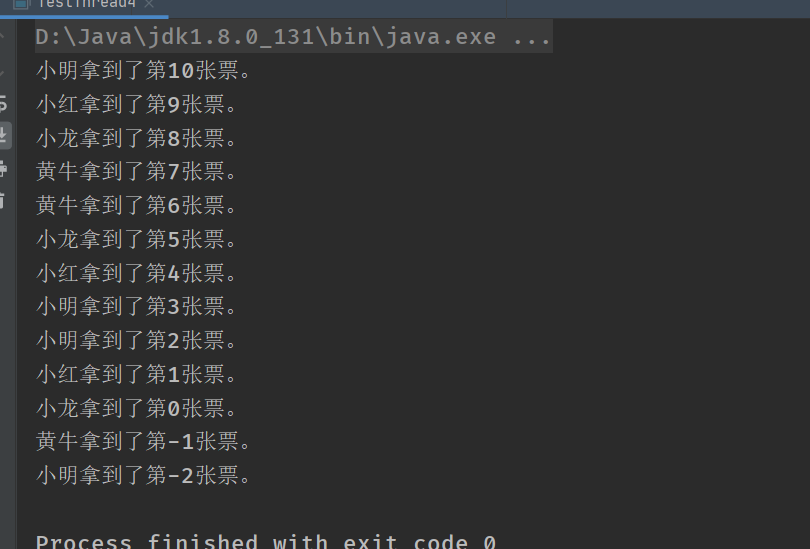
//多个线程同时操作同一个对象//抢火车票的例子public class TestThread4 implements Runnable{//票数private int ticketNums=10;@Overridepublic void run() {while (true){if (ticketNums<=0){break;}//模拟演示try {Thread.sleep(200);} catch (InterruptedException e) {e.printStackTrace();}System.out.println(Thread.currentThread().getName()+"拿到了第"+ticketNums--+"张票。");}}public static void main(String[] args) {TestThread4 t1=new TestThread4();new Thread(t1,"小明").start();new Thread(t1,"小红").start();new Thread(t1,"小龙").start();new Thread(t1,"黄牛").start();}}
发现问题:多个线程操作同一个对象下,线程不安全,数据紊乱数据被破坏!
模拟龟兔赛跑:兔子走十步就停下休息,乌龟不休息
胜利者乌龟!
//模拟龟兔赛跑
public class Race implements Runnable{
private static String winner;//胜利者


@Override
public void run() {
    for (int i = 0; i <= 100; i++) {
        //模拟兔子休息
        if (Thread.currentThread().getName().equals("兔子")&&i%10==0){

            try {
                Thread.sleep(200);
            } catch (InterruptedException e) {
                e.printStackTrace();
            }
        }

        //判断比赛是否结束
        boolean flag=gameOver(i);
        if (flag){
            break;
        }

        System.out.println(Thread.currentThread().getName()+"跑了"+i+"步");
    }
}

//判断是否完成比赛
private boolean gameOver(int steps){
    //判断是否有胜利者
    if (winner !=null){
        return true;
    }else {
        if (steps>=100){
            winner=Thread.currentThread().getName();
            System.out.println("winner is"+winner);
        return true;
        }
    }
    return false;
}

public static void main(String[] args) {
    Race race = new Race();

    new Thread(race,"兔子").start();
    new Thread(race,"乌龟").start();
}
}
创建线程方式三:实现Callable接口:
public class TestCallable implements Callable {
private  String name;
private String url;
public TestCallable(String name ,String url){
    this.name=name;
    this.url=url;
}

@Override
public Boolean call() {
    WebDownLoader webDownLoader = new WebDownLoader();
    webDownLoader.downloader(url,name);

    System.out.println("文件下载中"+name);
    return true;
}

public static void main(String[] args) throws ExecutionException, InterruptedException {
    TestThread2 t1 = new TestThread2("7.jpg", "http://www.zto56.com/images/page/recruit-xuanjiang.png");
    TestThread2 t2 = new TestThread2("8.jpg", "http://www.zto56.com/images/page/recruit-xuanjiang.png");
    TestThread2 t3 = new TestThread2("9.jpg", "http://www.zto56.com/images/page/recruit-xuanjiang.png");


    //创建执行服务
    ExecutorService ser = Executors.newFixedThreadPool(3);

    //执行代码
    Future<Boolean> r1 = (Future<Boolean>) ser.submit(t1);
    Future<Boolean> r2 = (Future<Boolean>) ser.submit(t2);
    Future<Boolean> r3 = (Future<Boolean>) ser.submit(t3);

    //获取结果
    Boolean rs1 = r1.get();
    Boolean rs2 = r2.get();
    Boolean rs3 = r3.get();

    //关闭服务
    ser.shutdown();


}
}
//下载器
class WebDownLoader1{
//下载方法
public void downloader(String url,String name){

    try {
        FileUtils.copyURLToFile(new URL(url),new File(name));
    } catch (IOException e) {
        e.printStackTrace();
        System.out.println("IO异常,downloader出错了!");
    }
}
    }

若有收获,就点个赞吧
0 人点赞


