1、Cookie、Session
1.1、会话
会话:用户打开一个浏览器,点击了很多超链接,访问多个web资源,关闭浏览器,这个过程可以称之为会话;
有状态会话:一个同学来过教室,下次再来教室,我们会知道这个同学,曾经来过,称之为有状态会话;
你能怎么证明你是旅商的学生?
你
- 发票 西开给你发票
- 学校登记 旅商标记你来过了
一个网站,怎么证明你来过?
客户端 服务端
- 客户端技术 (响应,请求)
session
- 服务器技术,利用这个技术,可以保存用户的会话信息? 我们可以把信息或者数据放在Session中!
常见常见:网站登录之后,你下次不用再登录了,第二次访问直接就上去了!
1.3、Cookie
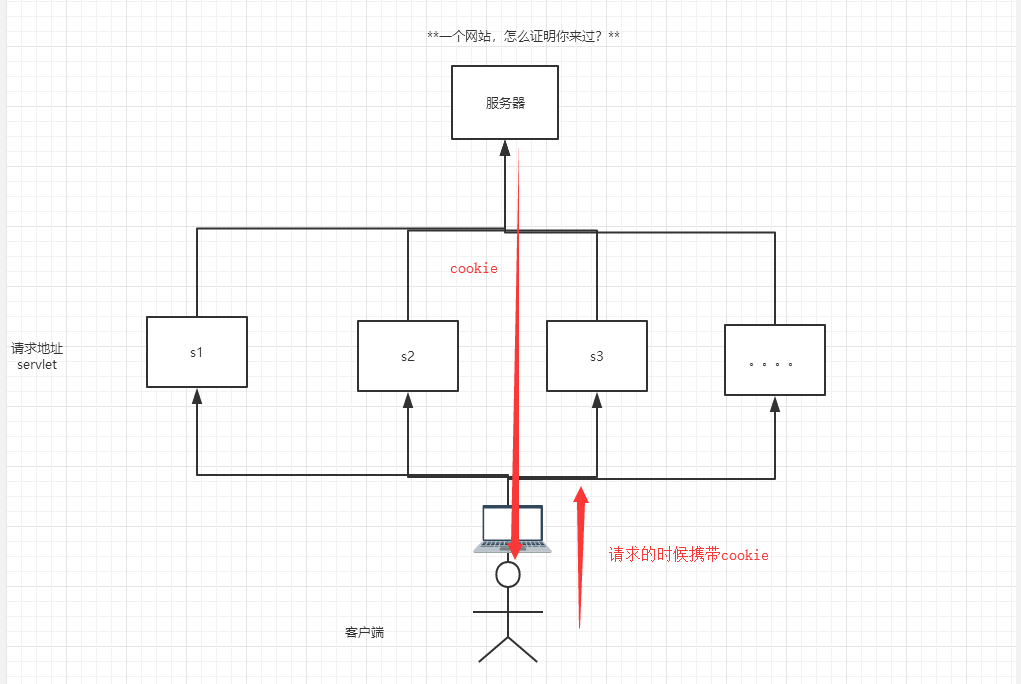
- 从请求中拿到cookie信息
- 服务器响应给客户端cookie
Cookie[] cookies = req.getCookies(); //获得Cookie
cookie.getName(); //获得cookie中的key
cookie.getValue(); //获得cookie中的vlaue
new Cookie(“lastLoginTime”, System.currentTimeMillis()+””); //新建一个cookie
cookie.setMaxAge(246060); //设置cookie的有效期
resp.addCookie(cookie); //响应给客户端一个cookie
cookie:一般会保存在本地的 用户目录下 appdata;
一个网站cookie是否存在上限!聊聊细节问题
- 一个Cookie只能保存一个信息;
- 一个web站点可以给浏览器发送多个cookie,最多存放20个cookie;
- Cookie大小有限制4kb;
- 300个cookie浏览器上限
删除Cookie;
- 不设置有效期,关闭浏览器,自动失效;
- 设置有效期时间为 0 ;
编码解码:
URLEncoder.encode(“金融啊”,”utf-8”)
URLDecoder.decode(cookie.getValue(),”UTF-8”)
1.4、Session(重点)
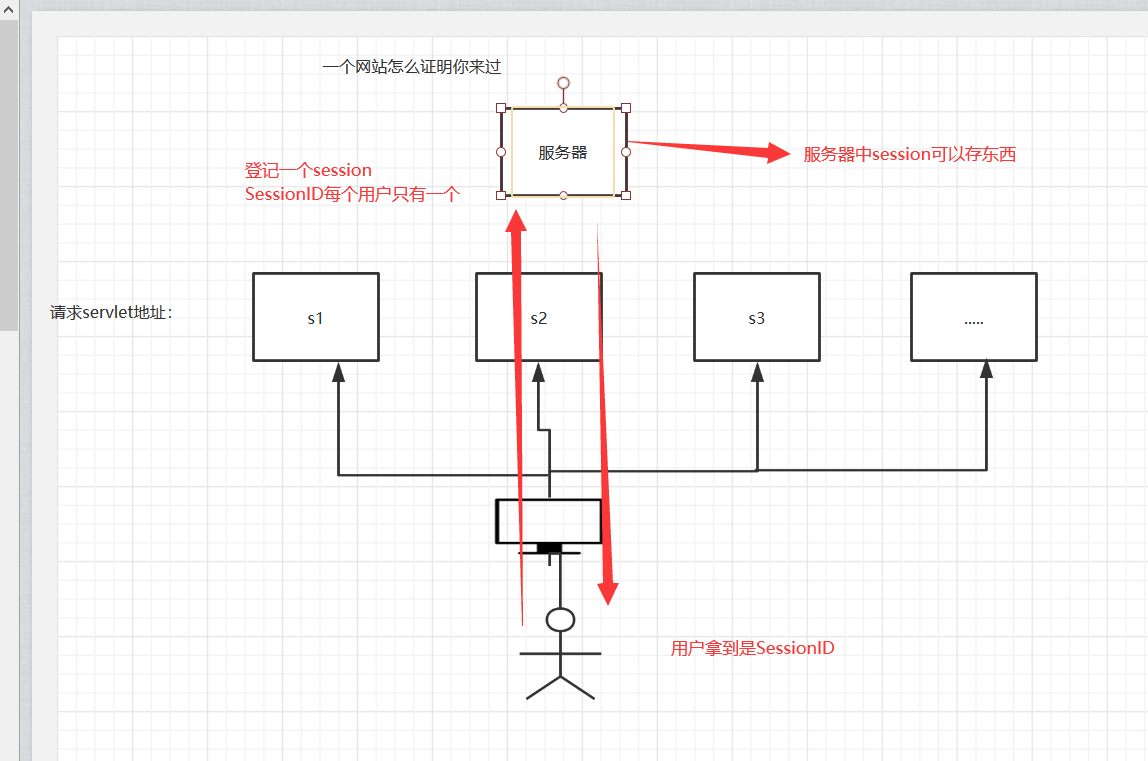
什么是session:服务器给每个用户(浏览器)创建一个 session对象;
一个session独占一个浏览器,只要浏览器没有关闭,这个session就存在;
用户登录之后,整个网站都可以访问!—>保存用户信息;保存购物车的功能…
使用session
public class Person {String name;String gender;public Person(String name, String gender) {this.name = name;this.gender = gender;}public Person() {}@Overridepublic String toString() {return "Person{" +"name='" + name + '\'' +", gender='" + gender + '\'' +'}';}}
**
public class SessionDemo extends HttpServlet {@Overrideprotected void doGet(HttpServletRequest req, HttpServletResponse resp) throws ServletException, IOException {//解决乱码的问题req.setCharacterEncoding("UTF-8");resp.setCharacterEncoding("UTF-8");//浏览器支持的格式resp.setContentType("text/html;charset=utf-8");//得到sessionHttpSession session = req.getSession();//往serssion放东西session.setAttribute("name","nicai");//往serssion放东西session.setAttribute("person",new Person("金融啊","男"));//获取session的idString sessionId = session.getId();//判断session是否创建if (session.isNew()){resp.getWriter().print("创建session它的id是:"+sessionId);}else {resp.getWriter().print("session的id是:"+sessionId);}//Session创建的时候做了什么事情;// Cookie cookie = new Cookie("JSESSIONID",sessionId);// resp.addCookie(cookie);}@Overrideprotected void doPost(HttpServletRequest req, HttpServletResponse resp) throws ServletException, IOException {doGet(req, resp);}}
获取Session的person
public class SessionDemo02 extends HttpServlet {@Overrideprotected void doGet(HttpServletRequest req, HttpServletResponse resp) throws ServletException, IOException {//解决乱码的问题req.setCharacterEncoding("UTF-8");resp.setCharacterEncoding("UTF-8");//浏览器支持的格式resp.setContentType("text/html;charset=utf-8");//得到sessionHttpSession session = req.getSession();//获取namePerson person = (Person) session.getAttribute("person");System.out.println(person.toString());}@Overrideprotected void doPost(HttpServletRequest req, HttpServletResponse resp) throws ServletException, IOException {doGet(req, resp);}}
摧毁session: 手动注销Session
public class SessionDemo03 extends HttpServlet {
    @Override
    protected void doGet(HttpServletRequest req, HttpServletResponse resp) throws ServletException, IOException {
        //解决乱码的问题
        req.setCharacterEncoding("UTF-8");
        resp.setCharacterEncoding("UTF-8");
        //浏览器支持的格式
        resp.setContentType("text/html;charset=utf-8");
        //得到session
        HttpSession session = req.getSession();
            session.removeAttribute("person");
            //手动注销Session
            session.invalidate();
    }
    @Override
    protected void doPost(HttpServletRequest req, HttpServletResponse resp) throws ServletException, IOException {
      doGet(req, resp);
    }
}
设置Session的默认失效时间
Session会自动的过期:web.xml配置
<!--    设置session默认的失效世间-->
    <session-config>
<!--        1分钟失效以分钟为单位-->
        <session-timeout>1</session-timeout>
    </session-config>

若有收获,就点个赞吧
0 人点赞


