第2章 Elasticsearch入门
04-入门-环境准备 官方网址
官方文档
Elasticsearch 7.8.0下载页面
Windows 版的 Elasticsearch 压缩包,解压即安装完毕,解压后的 Elasticsearch 的目录结构如下 :
| 目录 | 含义 |
|---|---|
| bin | 可执行脚本目录 |
| config | 配置目录 |
| jdk | 内置 JDK 目录 |
| lib | 类库 |
| logs | 日志目录 |
| modules | 模块目录 |
| plugins | 插件目录 |
解压后,进入 bin 文件目录,点击 elasticsearch.bat 文件启动 ES 服务 。
注意: 9300 端口为 Elasticsearch 集群间组件的通信端口, 9200 端口为浏览器访问的 http协议 RESTful 端口。
打开浏览器,输入地址: http://localhost:9200,测试返回结果,返回结果如下:
{"name" : "MS-NWJIYAINGWOQ","cluster_name" : "elasticsearch","cluster_uuid" : "SWHoLyZiTAWFqQQ6EwH4Ng","version" : {"number" : "7.8.0","build_flavor" : "default","build_type" : "zip","build_hash" : "757314695644ea9a1dc2fecd26d1a43856725e65","build_date" : "2020-06-14T19:35:50.234439Z","build_snapshot" : false,"lucene_version" : "8.5.1","minimum_wire_compatibility_version" : "6.8.0","minimum_index_compatibility_version" : "6.0.0-beta1"},"tagline" : "You Know, for Search"}
05-入门-RESTful & JSON
REST 指的是一组架构约束条件和原则。满足这些约束条件和原则的应用程序或设计就是 RESTful。 Web 应用程序最重要的 REST 原则是,客户端和服务器之间的交互在请求之间是无状态的。从客户端到服务器的每个请求都必须包含理解请求所必需的信息。如果服务器在请求之间的任何时间点重启,客户端不会得到通知。此外,无状态请求可以由任何可用服务器回答,这十分适合云计算之类的环境。客户端可以缓存数据以改进性能。
在服务器端,应用程序状态和功能可以分为各种资源。资源是一个有趣的概念实体,它向客户端公开。资源的例子有:应用程序对象、数据库记录、算法等等。每个资源都使用 URI(Universal Resource Identifier) 得到一个唯一的地址。所有资源都共享统一的接口,以便在客户端和服务器之间传输状态。使用的是标准的 HTTP 方法,比如 GET、 PUT、 POST 和DELETE。
在 REST 样式的 Web 服务中,每个资源都有一个地址。资源本身都是方法调用的目 标,方法列表对所有资源都是一样的。这些方法都是标准方法,包括 HTTP GET、 POST、PUT、 DELETE,还可能包括 HEAD 和 OPTIONS。简单的理解就是,如果想要访问互联网上的资源,就必须向资源所在的服务器发出请求,请求体中必须包含资源的网络路径, 以及对资源进行的操作(增删改查)。
REST 样式的 Web 服务若有返回结果,大多数以JSON字符串形式返回。
06-入门-Postman客户端工具
如果直接通过浏览器向 Elasticsearch 服务器发请求,那么需要在发送的请求中包含 HTTP 标准的方法,而 HTTP 的大部分特性且仅支持 GET 和 POST 方法。所以为了能方便地进行客户端的访问,可以使用 Postman 软件Postman 是一款强大的网页调试工具,提供功能强大的 Web API 和 HTTP 请求调试。
软件功能强大,界面简洁明晰、操作方便快捷,设计得很人性化。 Postman 中文版能够发送任何类型的 HTTP 请求 (GET, HEAD, POST, PUT…),不仅能够表单提交,且可以附带任意类型请求体。
07-入门-倒排索引
正排索引(传统)
| id | content |
|---|---|
| 1001 | my name is zhang san |
| 1002 | my name is li si |
倒排索引
| keyword | id |
|---|---|
| name | 1001, 1002 |
| zhang | 1001 |
Elasticsearch 是面向文档型数据库,一条数据在这里就是一个文档。 为了方便大家理解,我们将 Elasticsearch 里存储文档数据和关系型数据库 MySQL 存储数据的概念进行一个类比
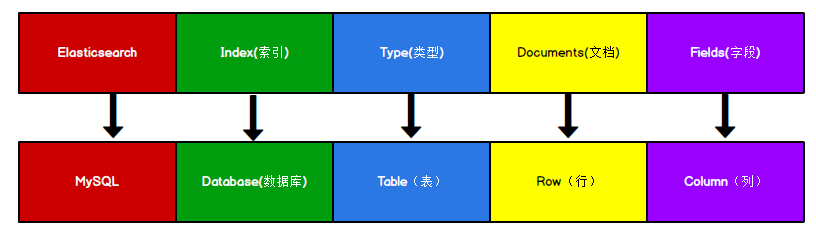
ES 里的 Index 可以看做一个库,而 Types 相当于表, Documents 则相当于表的行。这里 Types 的概念已经被逐渐弱化, Elasticsearch 6.X 中,一个 index 下已经只能包含一个type, Elasticsearch 7.X 中, Type 的概念已经被删除了。
08-入门-HTTP-索引-创建
对比关系型数据库,创建索引就等同于创建数据库。
在 Postman 中,向 ES 服务器发 PUT 请求 : http://127.0.0.1:9200/shopping
请求后,服务器返回响应:
{
    "acknowledged": true,//响应结果
    "shards_acknowledged": true,//分片结果
    "index": "shopping"//索引名称
}
后台日志:
[2021-04-22T21:27:15,779][INFO ][o.e.c.m.MetadataCreateIndexService] [MS-NWJIYAINGWOQ] [shopping] creating index, cause [api], templates [], shards [1]/[1], mappings []
如果重复发 PUT 请求 : http://127.0.0.1:9200/shopping 添加索引,会返回错误信息 :
{
    "error": {
        "root_cause": [
            {
                "type": "resource_already_exists_exception",
                "reason": "index [shopping/VE7aYpzIS7qBlsXm4zIsEA] already exists",
                "index_uuid": "VE7aYpzIS7qBlsXm4zIsEA",
                "index": "shopping"
            }
        ],
        "type": "resource_already_exists_exception",
        "reason": "index [shopping/VE7aYpzIS7qBlsXm4zIsEA] already exists",
        "index_uuid": "VE7aYpzIS7qBlsXm4zIsEA",
        "index": "shopping"
    },
    "status": 400
}
09-入门-HTTP-索引-查询 & 删除
查看所有索引 在 Postman 中,向 ES 服务器发 GET 请求 : http://127.0.0.1:9200/_cat/indices?v
这里请求路径中的_cat 表示查看的意思, indices 表示索引,所以整体含义就是查看当前 ES服务器中的所有索引,就好像 MySQL 中的 show tables 的感觉,服务器响应结果如下 :
health status index    uuid                   pri rep docs.count docs.deleted store.size pri.store.size
yellow open   shopping VE7aYpzIS7qBlsXm4zIsEA   1   1          0            0       208b           208b
| 表头 | 含义 |
|---|---|
| health | 当前服务器健康状态: green(集群完整) yellow(单点正常、集群不完整) red(单点不正常) |
| status | 索引打开、关闭状态 |
| index | 索引名 |
| uuid | 索引统一编号 |
| pri | 主分片数量 |
| rep | 副本数量 |
| docs.count | 可用文档数量 |
| docs.deleted | 文档删除状态(逻辑删除) |
| store.size | 主分片和副分片整体占空间大小 |
| pri.store.size | 主分片占空间大小 |
查看单个索引
在 Postman 中,向 ES 服务器发 GET 请求 : http://127.0.0.1:9200/shopping
{
    "shopping": {//索引名
        "aliases": {},//别名
        "mappings": {},//映射
        "settings": {//设置
            "index": {//设置 - 索引
                "creation_date": "1619098035554",//设置 - 索引 - 创建时间
                "number_of_shards": "1",//设置 - 索引 - 主分片数量
                "number_of_replicas": "1",//设置 - 索引 - 主分片数量
                "uuid": "VE7aYpzIS7qBlsXm4zIsEA",//设置 - 索引 - 主分片数量
                "version": {//设置 - 索引 - 主分片数量
                    "created": "7080099"
                },
                "provided_name": "shopping"//设置 - 索引 - 主分片数量
            }
        }
    }
}
删除索引
在 Postman 中,向 ES 服务器发 DELETE 请求 : http://127.0.0.1:9200/shopping
返回结果如下:
{
    "acknowledged": true
}
再次查看所有索引,GET http://127.0.0.1:9200/_cat/indices?v,返回结果如下:
health status index uuid pri rep docs.count docs.deleted store.size pri.store.size
成功删除。
10-入门-HTTP-文档-创建(Put & Post)
假设索引已经创建好了,接下来我们来创建文档,并添加数据。这里的文档可以类比为关系型数据库中的表数据,添加的数据格式为 JSON 格式
在 Postman 中,向 ES 服务器发 POST 请求 : http://127.0.0.1:9200/shopping/_doc,请求体JSON内容为:
{
    "title":"小米手机",
    "category":"小米",
    "images":"http://www.gulixueyuan.com/xm.jpg",
    "price":3999.00
}
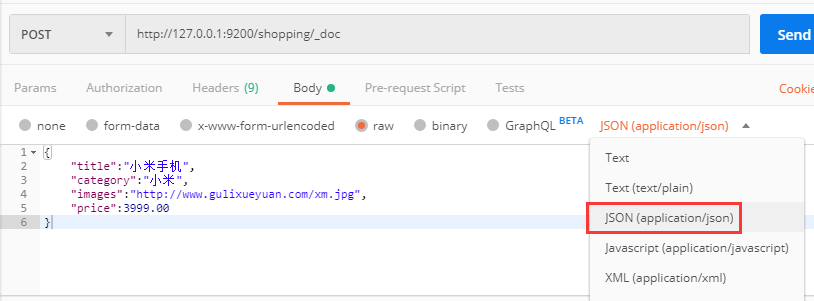
注意,此处发送请求的方式必须为 POST,不能是 PUT,否则会发生错误 。
返回结果:
{
    "_index": "shopping",//索引
    "_type": "_doc",//类型-文档
    "_id": "ANQqsHgBaKNfVnMbhZYU",//唯一标识,可以类比为 MySQL 中的主键,随机生成
    "_version": 1,//版本
    "result": "created",//结果,这里的 create 表示创建成功
    "_shards": {//
        "total": 2,//分片 - 总数
        "successful": 1,//分片 - 总数
        "failed": 0//分片 - 总数
    },
    "_seq_no": 0,
    "_primary_term": 1
}
上面的数据创建后,由于没有指定数据唯一性标识(ID),默认情况下, ES 服务器会随机生成一个。
如果想要自定义唯一性标识,需要在创建时指定: http://127.0.0.1:9200/shopping/_doc/1,请求体JSON内容为:
{
    "title":"小米手机",
    "category":"小米",
    "images":"http://www.gulixueyuan.com/xm.jpg",
    "price":3999.00
}
返回结果如下:
{
    "_index": "shopping",
    "_type": "_doc",
    "_id": "1",//<------------------自定义唯一性标识
    "_version": 1,
    "result": "created",
    "_shards": {
        "total": 2,
        "successful": 1,
        "failed": 0
    },
    "_seq_no": 1,
    "_primary_term": 1
}
此处需要注意:如果增加数据时明确数据主键,那么请求方式也可以为 PUT。
11-入门-HTTP-查询-主键查询 & 全查询
查看文档时,需要指明文档的唯一性标识,类似于 MySQL 中数据的主键查询
在 Postman 中,向 ES 服务器发 GET 请求 : http://127.0.0.1:9200/shopping/_doc/1 。
返回结果如下:
{
    "_index": "shopping",
    "_type": "_doc",
    "_id": "1",
    "_version": 1,
    "_seq_no": 1,
    "_primary_term": 1,
    "found": true,
    "_source": {
        "title": "小米手机",
        "category": "小米",
        "images": "http://www.gulixueyuan.com/xm.jpg",
        "price": 3999.00
    }
}
查找不存在的内容,向 ES 服务器发 GET 请求 :http://127.0.0.1:9200/shopping/_doc/1001。
返回结果如下:
{
    "_index": "shopping",
    "_type": "_doc",
    "_id": "1001",
    "found": false
}
查看索引下所有数据,向 ES 服务器发 GET 请求 : http://127.0.0.1:9200/shopping/_search。
返回结果如下
{
    "took": 97,
    "timed_out": false,
    "_shards": {
        "total": 1,
        "successful": 1,
        "skipped": 0,
        "failed": 0
    },
    "hits": {
        "total": {
            "value": 2,
            "relation": "eq"
        },
        "max_score": 1.0,
        "hits": [
            {
                "_index": "shopping",
                "_type": "_doc",
                "_id": "VfjT-XgBBOOH0UmYMzl1",
                "_score": 1.0,
                "_source": {
                    "title": "小米手机",
                    "category": "小米",
                    "images": "http://www.gulixueyuan.com/xm.jpg",
                    "price": 3999.00
                }
            },
            {
                "_index": "shopping",
                "_type": "_doc",
                "_id": "1",
                "_score": 1.0,
                "_source": {
                    "title": "小米手机",
                    "category": "小米",
                    "images": "http://www.gulixueyuan.com/xm.jpg",
                    "price": 3999.00
                }
            }
        ]
    }
}
12-入门-HTTP-全量修改 & 局部修改 & 删除
全量修改 和新增文档一样,输入相同的 URL 地址请求,如果请求体变化,会将原有的数据内容覆盖
在 Postman 中,向 ES 服务器发 POST 请求 : http://127.0.0.1:9200/shopping/_doc/1
请求体JSON内容为: 12-入门-HTTP-全量修改 & 局部修改 & 删除 全量修改 和新增文档一样,输入相同的 URL 地址请求,如果请求体变化,会将原有的数据内容覆盖
在 Postman 中,向 ES 服务器发 POST 请求 : http://127.0.0.1:9200/shopping/_doc/1
请求体JSON内容为:
{
    "title":"华为手机",
    "category":"华为",
    "images":"http://www.gulixueyuan.com/hw.jpg",
    "price":1999.00
}
修改成功后,服务器响应结果:
{
    "_index": "shopping",
    "_type": "_doc",
    "_id": "1",
    "_version": 2,
    "result": "updated",//<-----------updated 表示数据被更新
    "_shards": {
        "total": 2,
        "successful": 1,
        "failed": 0
    },
    "_seq_no": 2,
    "_primary_term": 1
}
局部修改
修改数据时,也可以只修改某一给条数据的局部信息
在 Postman 中,向 ES 服务器发 POST 请求 : http://127.0.0.1:9200/shopping/_update/1。
请求体JSON内容为:
{
    "doc": {
        "title":"小米手机",
        "category":"小米"
    }
}
返回结果如下:
{
    "_index": "shopping",
    "_type": "_doc",
    "_id": "1",
    "_version": 4,
    "result": "updated",//<-----------updated 表示数据被更新
    "_shards": {
        "total": 2,
        "successful": 1,
        "failed": 0
    },
    "_seq_no": 4,
    "_primary_term": 1
}
在 Postman 中,向 ES 服务器发 GET请求 : http://127.0.0.1:9200/shopping/_doc/1,查看修改内容:
删除
删除一个文档不会立即从磁盘上移除,它只是被标记成已删除(逻辑删除)。
在 Postman 中,向 ES 服务器发 DELETE 请求 : http://127.0.0.1:9200/shopping/_doc/1
返回结果:
{
    "_index": "shopping",
    "_type": "_doc",
    "_id": "1",
    "_version": 4,
    "result": "deleted",//<---删除成功
    "_shards": {
        "total": 2,
        "successful": 1,
        "failed": 0
    },
    "_seq_no": 4,
    "_primary_term": 1
}
在 Postman 中,向 ES 服务器发 GET请求 : http://127.0.0.1:9200/shopping/_doc/1,查看是否删除成功:
{
    "_index": "shopping",
    "_type": "_doc",
    "_id": "1",
    "found": false
}
13-入门-HTTP-条件查询 & 分页查询 & 查询排序
条件查询
假设有以下文档内容,(在 Postman 中,向 ES 服务器发 GET请求 : http://127.0.0.1:9200/shopping/_search):
{
    "took": 5,
    "timed_out": false,
    "_shards": {
        "total": 1,
        "successful": 1,
        "skipped": 0,
        "failed": 0
    },
    "hits": {
        "total": {
            "value": 6,
            "relation": "eq"
        },
        "max_score": 1,
        "hits": [
            {
                "_index": "shopping",
                "_type": "_doc",
                "_id": "ANQqsHgBaKNfVnMbhZYU",
                "_score": 1,
                "_source": {
                    "title": "小米手机",
                    "category": "小米",
                    "images": "http://www.gulixueyuan.com/xm.jpg",
                    "price": 3999
                }
            },
            {
                "_index": "shopping",
                "_type": "_doc",
                "_id": "A9R5sHgBaKNfVnMb25Ya",
                "_score": 1,
                "_source": {
                    "title": "小米手机",
                    "category": "小米",
                    "images": "http://www.gulixueyuan.com/xm.jpg",
                    "price": 1999
                }
            },
            {
                "_index": "shopping",
                "_type": "_doc",
                "_id": "BNR5sHgBaKNfVnMb7pal",
                "_score": 1,
                "_source": {
                    "title": "小米手机",
                    "category": "小米",
                    "images": "http://www.gulixueyuan.com/xm.jpg",
                    "price": 1999
                }
            },
            {
                "_index": "shopping",
                "_type": "_doc",
                "_id": "BtR6sHgBaKNfVnMbX5Y5",
                "_score": 1,
                "_source": {
                    "title": "华为手机",
                    "category": "华为",
                    "images": "http://www.gulixueyuan.com/xm.jpg",
                    "price": 1999
                }
            },
            {
                "_index": "shopping",
                "_type": "_doc",
                "_id": "B9R6sHgBaKNfVnMbZpZ6",
                "_score": 1,
                "_source": {
                    "title": "华为手机",
                    "category": "华为",
                    "images": "http://www.gulixueyuan.com/xm.jpg",
                    "price": 1999
                }
            },
            {
                "_index": "shopping",
                "_type": "_doc",
                "_id": "CdR7sHgBaKNfVnMbsJb9",
                "_score": 1,
                "_source": {
                    "title": "华为手机",
                    "category": "华为",
                    "images": "http://www.gulixueyuan.com/xm.jpg",
                    "price": 1999
                }
            }
        ]
    }
}
URL带参查询
查找category为小米的文档,在 Postman 中,向 ES 服务器发 GET请求 : http://127.0.0.1:9200/shopping/_search?q=category:小米,返回结果如下:
{
    "took": 94,
    "timed_out": false,
    "_shards": {
        "total": 1,
        "successful": 1,
        "skipped": 0,
        "failed": 0
    },
    "hits": {
        "total": {
            "value": 3,
            "relation": "eq"
        },
        "max_score": 1.3862942,
        "hits": [
            {
                "_index": "shopping",
                "_type": "_doc",
                "_id": "ANQqsHgBaKNfVnMbhZYU",
                "_score": 1.3862942,
                "_source": {
                    "title": "小米手机",
                    "category": "小米",
                    "images": "http://www.gulixueyuan.com/xm.jpg",
                    "price": 3999
                }
            },
            {
                "_index": "shopping",
                "_type": "_doc",
                "_id": "A9R5sHgBaKNfVnMb25Ya",
                "_score": 1.3862942,
                "_source": {
                    "title": "小米手机",
                    "category": "小米",
                    "images": "http://www.gulixueyuan.com/xm.jpg",
                    "price": 1999
                }
            },
            {
                "_index": "shopping",
                "_type": "_doc",
                "_id": "BNR5sHgBaKNfVnMb7pal",
                "_score": 1.3862942,
                "_source": {
                    "title": "小米手机",
                    "category": "小米",
                    "images": "http://www.gulixueyuan.com/xm.jpg",
                    "price": 1999
                }
            }
        ]
    }
}
上述为URL带参数形式查询,这很容易让不善者心怀恶意,或者参数值出现中文会出现乱码情况。为了避免这些情况,我们可用使用带JSON请求体请求进行查询。
请求体带参查询 接下带JSON请求体,还是查找category为小米的文档,在 Postman 中,向 ES 服务器发 GET请求 : http://127.0.0.1:9200/shopping/_search,附带JSON体如下:
{
    "query":{
        "match":{
            "category":"小米"
        }
    }
}
返回结果如下:
{
    "took": 3,
    "timed_out": false,
    "_shards": {
        "total": 1,
        "successful": 1,
        "skipped": 0,
        "failed": 0
    },
    "hits": {
        "total": {
            "value": 3,
            "relation": "eq"
        },
        "max_score": 1.3862942,
        "hits": [
            {
                "_index": "shopping",
                "_type": "_doc",
                "_id": "ANQqsHgBaKNfVnMbhZYU",
                "_score": 1.3862942,
                "_source": {
                    "title": "小米手机",
                    "category": "小米",
                    "images": "http://www.gulixueyuan.com/xm.jpg",
                    "price": 3999
                }
            },
            {
                "_index": "shopping",
                "_type": "_doc",
                "_id": "A9R5sHgBaKNfVnMb25Ya",
                "_score": 1.3862942,
                "_source": {
                    "title": "小米手机",
                    "category": "小米",
                    "images": "http://www.gulixueyuan.com/xm.jpg",
                    "price": 1999
                }
            },
            {
                "_index": "shopping",
                "_type": "_doc",
                "_id": "BNR5sHgBaKNfVnMb7pal",
                "_score": 1.3862942,
                "_source": {
                    "title": "小米手机",
                    "category": "小米",
                    "images": "http://www.gulixueyuan.com/xm.jpg",
                    "price": 1999
                }
            }
        ]
    }
}
带请求体方式的查找所有内容
查找所有文档内容,也可以这样,在 Postman 中,向 ES 服务器发 GET请求 : http://127.0.0.1:9200/shopping/_search,附带JSON体如下:
{
    "query":{
        "match_all":{}
    }
}
则返回所有文档内容:
{
    "took": 2,
    "timed_out": false,
    "_shards": {
        "total": 1,
        "successful": 1,
        "skipped": 0,
        "failed": 0
    },
    "hits": {
        "total": {
            "value": 6,
            "relation": "eq"
        },
        "max_score": 1,
        "hits": [
            {
                "_index": "shopping",
                "_type": "_doc",
                "_id": "ANQqsHgBaKNfVnMbhZYU",
                "_score": 1,
                "_source": {
                    "title": "小米手机",
                    "category": "小米",
                    "images": "http://www.gulixueyuan.com/xm.jpg",
                    "price": 3999
                }
            },
            {
                "_index": "shopping",
                "_type": "_doc",
                "_id": "A9R5sHgBaKNfVnMb25Ya",
                "_score": 1,
                "_source": {
                    "title": "小米手机",
                    "category": "小米",
                    "images": "http://www.gulixueyuan.com/xm.jpg",
                    "price": 1999
                }
            },
            {
                "_index": "shopping",
                "_type": "_doc",
                "_id": "BNR5sHgBaKNfVnMb7pal",
                "_score": 1,
                "_source": {
                    "title": "小米手机",
                    "category": "小米",
                    "images": "http://www.gulixueyuan.com/xm.jpg",
                    "price": 1999
                }
            },
            {
                "_index": "shopping",
                "_type": "_doc",
                "_id": "BtR6sHgBaKNfVnMbX5Y5",
                "_score": 1,
                "_source": {
                    "title": "华为手机",
                    "category": "华为",
                    "images": "http://www.gulixueyuan.com/xm.jpg",
                    "price": 1999
                }
            },
            {
                "_index": "shopping",
                "_type": "_doc",
                "_id": "B9R6sHgBaKNfVnMbZpZ6",
                "_score": 1,
                "_source": {
                    "title": "华为手机",
                    "category": "华为",
                    "images": "http://www.gulixueyuan.com/xm.jpg",
                    "price": 1999
                }
            },
            {
                "_index": "shopping",
                "_type": "_doc",
                "_id": "CdR7sHgBaKNfVnMbsJb9",
                "_score": 1,
                "_source": {
                    "title": "华为手机",
                    "category": "华为",
                    "images": "http://www.gulixueyuan.com/xm.jpg",
                    "price": 1999
                }
            }
        ]
    }
}
查询指定字段
如果你想查询指定字段,在 Postman 中,向 ES 服务器发 GET请求 : http://127.0.0.1:9200/shopping/_search,附带JSON体如下:
{
    "query":{
        "match_all":{}
    },
    "_source":["title"]
}
返回结果如下:
{
    "took": 5,
    "timed_out": false,
    "_shards": {
        "total": 1,
        "successful": 1,
        "skipped": 0,
        "failed": 0
    },
    "hits": {
        "total": {
            "value": 6,
            "relation": "eq"
        },
        "max_score": 1,
        "hits": [
            {
                "_index": "shopping",
                "_type": "_doc",
                "_id": "ANQqsHgBaKNfVnMbhZYU",
                "_score": 1,
                "_source": {
                    "title": "小米手机"
                }
            },
            {
                "_index": "shopping",
                "_type": "_doc",
                "_id": "A9R5sHgBaKNfVnMb25Ya",
                "_score": 1,
                "_source": {
                    "title": "小米手机"
                }
            },
            {
                "_index": "shopping",
                "_type": "_doc",
                "_id": "BNR5sHgBaKNfVnMb7pal",
                "_score": 1,
                "_source": {
                    "title": "小米手机"
                }
            },
            {
                "_index": "shopping",
                "_type": "_doc",
                "_id": "BtR6sHgBaKNfVnMbX5Y5",
                "_score": 1,
                "_source": {
                    "title": "华为手机"
                }
            },
            {
                "_index": "shopping",
                "_type": "_doc",
                "_id": "B9R6sHgBaKNfVnMbZpZ6",
                "_score": 1,
                "_source": {
                    "title": "华为手机"
                }
            },
            {
                "_index": "shopping",
                "_type": "_doc",
                "_id": "CdR7sHgBaKNfVnMbsJb9",
                "_score": 1,
                "_source": {
                    "title": "华为手机"
                }
            }
        ]
    }
}
分页查询
在 Postman 中,向 ES 服务器发 GET请求 : http://127.0.0.1:9200/shopping/_search,附带JSON体如下:
{
    "query":{
        "match_all":{}
    },
    "from":0,
    "size":2
}
返回结果如下:
{
    "took": 1,
    "timed_out": false,
    "_shards": {
        "total": 1,
        "successful": 1,
        "skipped": 0,
        "failed": 0
    },
    "hits": {
        "total": {
            "value": 6,
            "relation": "eq"
        },
        "max_score": 1,
        "hits": [
            {
                "_index": "shopping",
                "_type": "_doc",
                "_id": "ANQqsHgBaKNfVnMbhZYU",
                "_score": 1,
                "_source": {
                    "title": "小米手机",
                    "category": "小米",
                    "images": "http://www.gulixueyuan.com/xm.jpg",
                    "price": 3999
                }
            },
            {
                "_index": "shopping",
                "_type": "_doc",
                "_id": "A9R5sHgBaKNfVnMb25Ya",
                "_score": 1,
                "_source": {
                    "title": "小米手机",
                    "category": "小米",
                    "images": "http://www.gulixueyuan.com/xm.jpg",
                    "price": 1999
                }
            }
        ]
    }
}
查询排序
如果你想通过排序查出价格最高的手机,在 Postman 中,向 ES 服务器发 GET请求 : http://127.0.0.1:9200/shopping/_search,附带JSON体如下:
{
    "query":{
        "match_all":{}
    },
    "sort":{
        "price":{
            "order":"desc"
        }
    }
}
返回结果如下:
{
    "took": 96,
    "timed_out": false,
    "_shards": {
        "total": 1,
        "successful": 1,
        "skipped": 0,
        "failed": 0
    },
    "hits": {
        "total": {
            "value": 6,
            "relation": "eq"
        },
        "max_score": null,
        "hits": [
            {
                "_index": "shopping",
                "_type": "_doc",
                "_id": "ANQqsHgBaKNfVnMbhZYU",
                "_score": null,
                "_source": {
                    "title": "小米手机",
                    "category": "小米",
                    "images": "http://www.gulixueyuan.com/xm.jpg",
                    "price": 3999
                },
                "sort": [
                    3999
                ]
            },
            {
                "_index": "shopping",
                "_type": "_doc",
                "_id": "A9R5sHgBaKNfVnMb25Ya",
                "_score": null,
                "_source": {
                    "title": "小米手机",
                    "category": "小米",
                    "images": "http://www.gulixueyuan.com/xm.jpg",
                    "price": 1999
                },
                "sort": [
                    1999
                ]
            },
            {
                "_index": "shopping",
                "_type": "_doc",
                "_id": "BNR5sHgBaKNfVnMb7pal",
                "_score": null,
                "_source": {
                    "title": "小米手机",
                    "category": "小米",
                    "images": "http://www.gulixueyuan.com/xm.jpg",
                    "price": 1999
                },
                "sort": [
                    1999
                ]
            },
            {
                "_index": "shopping",
                "_type": "_doc",
                "_id": "BtR6sHgBaKNfVnMbX5Y5",
                "_score": null,
                "_source": {
                    "title": "华为手机",
                    "category": "华为",
                    "images": "http://www.gulixueyuan.com/xm.jpg",
                    "price": 1999
                },
                "sort": [
                    1999
                ]
            },
            {
                "_index": "shopping",
                "_type": "_doc",
                "_id": "B9R6sHgBaKNfVnMbZpZ6",
                "_score": null,
                "_source": {
                    "title": "华为手机",
                    "category": "华为",
                    "images": "http://www.gulixueyuan.com/xm.jpg",
                    "price": 1999
                },
                "sort": [
                    1999
                ]
            },
            {
                "_index": "shopping",
                "_type": "_doc",
                "_id": "CdR7sHgBaKNfVnMbsJb9",
                "_score": null,
                "_source": {
                    "title": "华为手机",
                    "category": "华为",
                    "images": "http://www.gulixueyuan.com/xm.jpg",
                    "price": 1999
                },
                "sort": [
                    1999
                ]
            }
        ]
    }
}
14-入门-HTTP-多条件查询 & 范围查询
多条件查询 假设想找出小米牌子,价格为3999元的。(must相当于数据库的&&)
在 Postman 中,向 ES 服务器发 GET请求 : http://127.0.0.1:9200/shopping/_search,附带JSON体如下
{
    "query":{
        "bool":{
            "must":[{
                "match":{
                    "category":"小米"
                }
            },{
                "match":{
                    "price":3999.00
                }
            }]
        }
    }
}
返回结果如下:
{
    "took": 134,
    "timed_out": false,
    "_shards": {
        "total": 1,
        "successful": 1,
        "skipped": 0,
        "failed": 0
    },
    "hits": {
        "total": {
            "value": 1,
            "relation": "eq"
        },
        "max_score": 2.3862944,
        "hits": [
            {
                "_index": "shopping",
                "_type": "_doc",
                "_id": "ANQqsHgBaKNfVnMbhZYU",
                "_score": 2.3862944,
                "_source": {
                    "title": "小米手机",
                    "category": "小米",
                    "images": "http://www.gulixueyuan.com/xm.jpg",
                    "price": 3999
                }
            }
        ]
    }
}
假设想找出小米和华为的牌子。(should相当于数据库的||)
在 Postman 中,向 ES 服务器发 GET请求 : http://127.0.0.1:9200/shopping/_search,附带JSON体如下:
{
    "query":{
        "bool":{
            "should":[{
                "match":{
                    "category":"小米"
                }
            },{
                "match":{
                    "category":"华为"
                }
            }]
        },
        "filter":{
            "range":{
                "price":{
                    "gt":2000
                }
            }
        }
    }
}
返回结果如下:
{
    "took": 8,
    "timed_out": false,
    "_shards": {
        "total": 1,
        "successful": 1,
        "skipped": 0,
        "failed": 0
    },
    "hits": {
        "total": {
            "value": 6,
            "relation": "eq"
        },
        "max_score": 1.3862942,
        "hits": [
            {
                "_index": "shopping",
                "_type": "_doc",
                "_id": "ANQqsHgBaKNfVnMbhZYU",
                "_score": 1.3862942,
                "_source": {
                    "title": "小米手机",
                    "category": "小米",
                    "images": "http://www.gulixueyuan.com/xm.jpg",
                    "price": 3999
                }
            },
            {
                "_index": "shopping",
                "_type": "_doc",
                "_id": "A9R5sHgBaKNfVnMb25Ya",
                "_score": 1.3862942,
                "_source": {
                    "title": "小米手机",
                    "category": "小米",
                    "images": "http://www.gulixueyuan.com/xm.jpg",
                    "price": 1999
                }
            },
            {
                "_index": "shopping",
                "_type": "_doc",
                "_id": "BNR5sHgBaKNfVnMb7pal",
                "_score": 1.3862942,
                "_source": {
                    "title": "小米手机",
                    "category": "小米",
                    "images": "http://www.gulixueyuan.com/xm.jpg",
                    "price": 1999
                }
            },
            {
                "_index": "shopping",
                "_type": "_doc",
                "_id": "BtR6sHgBaKNfVnMbX5Y5",
                "_score": 1.3862942,
                "_source": {
                    "title": "华为手机",
                    "category": "华为",
                    "images": "http://www.gulixueyuan.com/xm.jpg",
                    "price": 1999
                }
            },
            {
                "_index": "shopping",
                "_type": "_doc",
                "_id": "B9R6sHgBaKNfVnMbZpZ6",
                "_score": 1.3862942,
                "_source": {
                    "title": "华为手机",
                    "category": "华为",
                    "images": "http://www.gulixueyuan.com/xm.jpg",
                    "price": 1999
                }
            },
            {
                "_index": "shopping",
                "_type": "_doc",
                "_id": "CdR7sHgBaKNfVnMbsJb9",
                "_score": 1.3862942,
                "_source": {
                    "title": "华为手机",
                    "category": "华为",
                    "images": "http://www.gulixueyuan.com/xm.jpg",
                    "price": 1999
                }
            }
        ]
    }
}
范围查询
假设想找出小米和华为的牌子,价格大于2000元的手机。
在 Postman 中,向 ES 服务器发 GET请求 : http://127.0.0.1:9200/shopping/_search,附带JSON体如下:
{
    "query":{
        "bool":{
            "should":[{
                "match":{
                    "category":"小米"
                }
            },{
                "match":{
                    "category":"华为"
                }
            }],
            "filter":{
                "range":{
                    "price":{
                        "gt":2000
                    }
                }
            }
        }
    }
}
返回结果如下:
{
    "took": 72,
    "timed_out": false,
    "_shards": {
        "total": 1,
        "successful": 1,
        "skipped": 0,
        "failed": 0
    },
    "hits": {
        "total": {
            "value": 1,
            "relation": "eq"
        },
        "max_score": 1.3862942,
        "hits": [
            {
                "_index": "shopping",
                "_type": "_doc",
                "_id": "ANQqsHgBaKNfVnMbhZYU",
                "_score": 1.3862942,
                "_source": {
                    "title": "小米手机",
                    "category": "小米",
                    "images": "http://www.gulixueyuan.com/xm.jpg",
                    "price": 3999
                }
            }
        ]
    }
}
15-入门-HTTP-全文检索 & 完全匹配 & 高亮查询 全文检索 这功能像搜索引擎那样,如品牌输入“小华”,返回结果带回品牌有“小米”和华为的。
在 Postman 中,向 ES 服务器发 GET请求 : http://127.0.0.1:9200/shopping/_search,附带JSON体如下
{
    "query":{
        "match":{
            "category" : "小华"
        }
    }
}
返回结果如下:
{
    "took": 7,
    "timed_out": false,
    "_shards": {
        "total": 1,
        "successful": 1,
        "skipped": 0,
        "failed": 0
    },
    "hits": {
        "total": {
            "value": 6,
            "relation": "eq"
        },
        "max_score": 0.6931471,
        "hits": [
            {
                "_index": "shopping",
                "_type": "_doc",
                "_id": "ANQqsHgBaKNfVnMbhZYU",
                "_score": 0.6931471,
                "_source": {
                    "title": "小米手机",
                    "category": "小米",
                    "images": "http://www.gulixueyuan.com/xm.jpg",
                    "price": 3999
                }
            },
            {
                "_index": "shopping",
                "_type": "_doc",
                "_id": "A9R5sHgBaKNfVnMb25Ya",
                "_score": 0.6931471,
                "_source": {
                    "title": "小米手机",
                    "category": "小米",
                    "images": "http://www.gulixueyuan.com/xm.jpg",
                    "price": 1999
                }
            },
            {
                "_index": "shopping",
                "_type": "_doc",
                "_id": "BNR5sHgBaKNfVnMb7pal",
                "_score": 0.6931471,
                "_source": {
                    "title": "小米手机",
                    "category": "小米",
                    "images": "http://www.gulixueyuan.com/xm.jpg",
                    "price": 1999
                }
            },
            {
                "_index": "shopping",
                "_type": "_doc",
                "_id": "BtR6sHgBaKNfVnMbX5Y5",
                "_score": 0.6931471,
                "_source": {
                    "title": "华为手机",
                    "category": "华为",
                    "images": "http://www.gulixueyuan.com/xm.jpg",
                    "price": 1999
                }
            },
            {
                "_index": "shopping",
                "_type": "_doc",
                "_id": "B9R6sHgBaKNfVnMbZpZ6",
                "_score": 0.6931471,
                "_source": {
                    "title": "华为手机",
                    "category": "华为",
                    "images": "http://www.gulixueyuan.com/xm.jpg",
                    "price": 1999
                }
            },
            {
                "_index": "shopping",
                "_type": "_doc",
                "_id": "CdR7sHgBaKNfVnMbsJb9",
                "_score": 0.6931471,
                "_source": {
                    "title": "华为手机",
                    "category": "华为",
                    "images": "http://www.gulixueyuan.com/xm.jpg",
                    "price": 1999
                }
            }
        ]
    }
}
完全匹配
在 Postman 中,向 ES 服务器发 GET请求 : http://127.0.0.1:9200/shopping/_search,附带JSON体如下:
返回结果如下:
{
    "took": 2,
    "timed_out": false,
    "_shards": {
        "total": 1,
        "successful": 1,
        "skipped": 0,
        "failed": 0
    },
    "hits": {
        "total": {
            "value": 3,
            "relation": "eq"
        },
        "max_score": 0.6931471,
        "hits": [
            {
                "_index": "shopping",
                "_type": "_doc",
                "_id": "BtR6sHgBaKNfVnMbX5Y5",
                "_score": 0.6931471,
                "_source": {
                    "title": "华为手机",
                    "category": "华为",
                    "images": "http://www.gulixueyuan.com/xm.jpg",
                    "price": 1999
                }
            },
            {
                "_index": "shopping",
                "_type": "_doc",
                "_id": "B9R6sHgBaKNfVnMbZpZ6",
                "_score": 0.6931471,
                "_source": {
                    "title": "华为手机",
                    "category": "华为",
                    "images": "http://www.gulixueyuan.com/xm.jpg",
                    "price": 1999
                }
            },
            {
                "_index": "shopping",
                "_type": "_doc",
                "_id": "CdR7sHgBaKNfVnMbsJb9",
                "_score": 0.6931471,
                "_source": {
                    "title": "华为手机",
                    "category": "华为",
                    "images": "http://www.gulixueyuan.com/xm.jpg",
                    "price": 1999
                }
            }
        ]
    }
}
高亮查询
在 Postman 中,向 ES 服务器发 GET请求 : http://127.0.0.1:9200/shopping/_search,附带JSON体如下:
{
    "query":{
        "match_phrase":{
            "category" : "为"
        }
    },
    "highlight":{
        "fields":{
            "category":{}//<----高亮这字段
        }
    }
}
返回结果如下:
{
    "took": 100,
    "timed_out": false,
    "_shards": {
        "total": 1,
        "successful": 1,
        "skipped": 0,
        "failed": 0
    },
    "hits": {
        "total": {
            "value": 3,
            "relation": "eq"
        },
        "max_score": 0.6931471,
        "hits": [
            {
                "_index": "shopping",
                "_type": "_doc",
                "_id": "BtR6sHgBaKNfVnMbX5Y5",
                "_score": 0.6931471,
                "_source": {
                    "title": "华为手机",
                    "category": "华为",
                    "images": "http://www.gulixueyuan.com/xm.jpg",
                    "price": 1999
                },
                "highlight": {
                    "category": [
                        "华<em>为</em>"//<------高亮一个为字。
                    ]
                }
            },
            {
                "_index": "shopping",
                "_type": "_doc",
                "_id": "B9R6sHgBaKNfVnMbZpZ6",
                "_score": 0.6931471,
                "_source": {
                    "title": "华为手机",
                    "category": "华为",
                    "images": "http://www.gulixueyuan.com/xm.jpg",
                    "price": 1999
                },
                "highlight": {
                    "category": [
                        "华<em>为</em>"
                    ]
                }
            },
            {
                "_index": "shopping",
                "_type": "_doc",
                "_id": "CdR7sHgBaKNfVnMbsJb9",
                "_score": 0.6931471,
                "_source": {
                    "title": "华为手机",
                    "category": "华为",
                    "images": "http://www.gulixueyuan.com/xm.jpg",
                    "price": 1999
                },
                "highlight": {
                    "category": [
                        "华<em>为</em>"
                    ]
                }
            }
        ]
    }
}
16-入门-HsTP-聚合查询
聚合允许使用者对 es 文档进行统计分析,类似与关系型数据库中的 group by,当然还有很多其他的聚合,例如取最大值max、平均值avg等等。
接下来按price字段进行分组:
在 Postman 中,向 ES 服务器发 GET请求 : http://127.0.0.1:9200/shopping/_search,附带JSON体如下:
    "aggs":{//聚合操作
        "price_group":{//名称,随意起名
            "terms":{//分组
                "field":"price"//分组字段
            }
        }
    }
}
返回结果如下:
{
    "took": 63,
    "timed_out": false,
    "_shards": {
        "total": 1,
        "successful": 1,
        "skipped": 0,
        "failed": 0
    },
    "hits": {
        "total": {
            "value": 6,
            "relation": "eq"
        },
        "max_score": 1,
        "hits": [
            {
                "_index": "shopping",
                "_type": "_doc",
                "_id": "ANQqsHgBaKNfVnMbhZYU",
                "_score": 1,
                "_source": {
                    "title": "小米手机",
                    "category": "小米",
                    "images": "http://www.gulixueyuan.com/xm.jpg",
                    "price": 3999
                }
            },
            {
                "_index": "shopping",
                "_type": "_doc",
                "_id": "A9R5sHgBaKNfVnMb25Ya",
                "_score": 1,
                "_source": {
                    "title": "小米手机",
                    "category": "小米",
                    "images": "http://www.gulixueyuan.com/xm.jpg",
                    "price": 1999
                }
            },
            {
                "_index": "shopping",
                "_type": "_doc",
                "_id": "BNR5sHgBaKNfVnMb7pal",
                "_score": 1,
                "_source": {
                    "title": "小米手机",
                    "category": "小米",
                    "images": "http://www.gulixueyuan.com/xm.jpg",
                    "price": 1999
                }
            },
            {
                "_index": "shopping",
                "_type": "_doc",
                "_id": "BtR6sHgBaKNfVnMbX5Y5",
                "_score": 1,
                "_source": {
                    "title": "华为手机",
                    "category": "华为",
                    "images": "http://www.gulixueyuan.com/xm.jpg",
                    "price": 1999
                }
            },
            {
                "_index": "shopping",
                "_type": "_doc",
                "_id": "B9R6sHgBaKNfVnMbZpZ6",
                "_score": 1,
                "_source": {
                    "title": "华为手机",
                    "category": "华为",
                    "images": "http://www.gulixueyuan.com/xm.jpg",
                    "price": 1999
                }
            },
            {
                "_index": "shopping",
                "_type": "_doc",
                "_id": "CdR7sHgBaKNfVnMbsJb9",
                "_score": 1,
                "_source": {
                    "title": "华为手机",
                    "category": "华为",
                    "images": "http://www.gulixueyuan.com/xm.jpg",
                    "price": 1999
                }
            }
        ]
    },
    "aggregations": {
        "price_group": {
            "doc_count_error_upper_bound": 0,
            "sum_other_doc_count": 0,
            "buckets": [
                {
                    "key": 1999,
                    "doc_count": 5
                },
                {
                    "key": 3999,
                    "doc_count": 1
                }
            ]
        }
    }
}
上面返回结果会附带原始数据的。若不想要不附带原始数据的结果,在 Postman 中,向 ES 服务器发 GET请求 : http://127.0.0.1:9200/shopping/_search,附带JSON体如下:
    "aggs":{
        "price_group":{
            "terms":{
                "field":"price"
            }
        }
    },
    "size":0
}
返回结果如下:
{
    "took": 60,
    "timed_out": false,
    "_shards": {
        "total": 1,
        "successful": 1,
        "skipped": 0,
        "failed": 0
    },
    "hits": {
        "total": {
            "value": 6,
            "relation": "eq"
        },
        "max_score": null,
        "hits": []
    },
    "aggregations": {
        "price_group": {
            "doc_count_error_upper_bound": 0,
            "sum_other_doc_count": 0,
            "buckets": [
                {
                    "key": 1999,
                    "doc_count": 5
                },
                {
                    "key": 3999,
                    "doc_count": 1
                }
            ]
        }
    }
}
若想对所有手机价格求平均值。
在 Postman 中,向 ES 服务器发 GET请求 : http://127.0.0.1:9200/shopping/_search,附带JSON体如下:
{
    "aggs":{
        "price_avg":{//名称,随意起名
            "avg":{//求平均
                "field":"price"
            }
        }
    },
    "size":0
}
返回结果如下:
{
    "took": 14,
    "timed_out": false,
    "_shards": {
        "total": 1,
        "successful": 1,
        "skipped": 0,
        "failed": 0
    },
    "hits": {
        "total": {
            "value": 6,
            "relation": "eq"
        },
        "max_score": null,
        "hits": []
    },
    "aggregations": {
        "price_avg": {
            "value": 2332.3333333333335
        }
    }
}
17-入门-HTTP-映射关系
有了索引库,等于有了数据库中的 database。
接下来就需要建索引库(index)中的映射了,类似于数据库(database)中的表结构(table)。
创建数据库表需要设置字段名称,类型,长度,约束等;索引库也一样,需要知道这个类型下有哪些字段,每个字段有哪些约束信息,这就叫做映射(mapping)。
先创建一个索引:
# PUT http://127.0.0.1:9200/user
返回结果:
{
    "acknowledged": true,
    "shards_acknowledged": true,
    "index": "user"
}
创建映射
# PUT http://127.0.0.1:9200/user/_mapping

{
    "properties": {
        "name":{
            "type": "text",
            "index": true
        },
        "sex":{
            "type": "keyword",
            "index": true
        },
        "tel":{
            "type": "keyword",
            "index": false
        }
    }
}
返回结果如下:
{
    "acknowledged": true
}
查询映射
#GET http://127.0.0.1:9200/user/_mapping
返回结果如下:
{
    "user": {
        "mappings": {
            "properties": {
                "name": {
                    "type": "text"
                },
                "sex": {
                    "type": "keyword"
                },
                "tel": {
                    "type": "keyword",
                    "index": false
                }
            }
        }
    }
}
增加数据
#PUT http://127.0.0.1:9200/user/_create/1001
{
    "name":"小米",
    "sex":"男的",
    "tel":"1111"
}
返回结果如下:
{
    "_index": "user",
    "_type": "_doc",
    "_id": "1001",
    "_version": 1,
    "result": "created",
    "_shards": {
        "total": 2,
        "successful": 1,
        "failed": 0
    },
    "_seq_no": 0,
    "_primary_term": 1
}
查找name含有”小“数据:
#GET http://127.0.0.1:9200/user/_search
{
    "query":{
        "match":{
            "name":"小"
        }
    }
}
返回结果如下:
{
    "took": 495,
    "timed_out": false,
    "_shards": {
        "total": 1,
        "successful": 1,
        "skipped": 0,
        "failed": 0
    },
    "hits": {
        "total": {
            "value": 1,
            "relation": "eq"
        },
        "max_score": 0.2876821,
        "hits": [
            {
                "_index": "user",
                "_type": "_doc",
                "_id": "1001",
                "_score": 0.2876821,
                "_source": {
                    "name": "小米",
                    "sex": "男的",
                    "tel": "1111"
                }
            }
        ]
    }
}
查找sex含有”男“数据:
#GET http://127.0.0.1:9200/user/_search
{
    "query":{
        "match":{
            "sex":"男"
        }
    }
}
返回结果如下:
{
    "took": 1,
    "timed_out": false,
    "_shards": {
        "total": 1,
        "successful": 1,
        "skipped": 0,
        "failed": 0
    },
    "hits": {
        "total": {
            "value": 0,
            "relation": "eq"
        },
        "max_score": null,
        "hits": []
    }
}
找不想要的结果,只因创建映射时”sex”的类型为”keyword”。
“sex”只能完全为”男的“,才能得出原数据。
#GET http://127.0.0.1:9200/user/_search
{
    "query":{
        "match":{
            "sex":"男的"
        }
    }
}
返回结果如下:
{
    "took": 2,
    "timed_out": false,
    "_shards": {
        "total": 1,
        "successful": 1,
        "skipped": 0,
        "failed": 0
    },
    "hits": {
        "total": {
            "value": 1,
            "relation": "eq"
        },
        "max_score": 0.2876821,
        "hits": [
            {
                "_index": "user",
                "_type": "_doc",
                "_id": "1001",
                "_score": 0.2876821,
                "_source": {
                    "name": "小米",
                    "sex": "男的",
                    "tel": "1111"
                }
            }
        ]
    }
}
查询电话
# GET http://127.0.0.1:9200/user/_search
{
    "query":{
        "match":{
            "tel":"11"
        }
    }
}
返回结果如下:
{
    "error": {
        "root_cause": [
            {
                "type": "query_shard_exception",
                "reason": "failed to create query: Cannot search on field [tel] since it is not indexed.",
                "index_uuid": "ivLnMfQKROS7Skb2MTFOew",
                "index": "user"
            }
        ],
        "type": "search_phase_execution_exception",
        "reason": "all shards failed",
        "phase": "query",
        "grouped": true,
        "failed_shards": [
            {
                "shard": 0,
                "index": "user",
                "node": "4P7dIRfXSbezE5JTiuylew",
                "reason": {
                    "type": "query_shard_exception",
                    "reason": "failed to create query: Cannot search on field [tel] since it is not indexed.",
                    "index_uuid": "ivLnMfQKROS7Skb2MTFOew",
                    "index": "user",
                    "caused_by": {
                        "type": "illegal_argument_exception",
                        "reason": "Cannot search on field [tel] since it is not indexed."
                    }
                }
            }
        ]
    },
    "status": 400
}
报错只因创建映射时”tel”的”index”为false。

若有收获,就点个赞吧
0 人点赞


