- nacos注册与获取服务
- 服务配置中心
- http://cloud-payment-service">消费者将要去访问的微服务名称(注册成功进nacos的微服务提供者)
service-url:
nacos-user-service: http://cloud-payment-service
nacos注册与获取服务
修改cloud-provider-payment配置
修改pom.xml,添加下面代码
修改application.yml
server:
port: 8001 #服务端口
spring:
application:
name: cloud-payment-service #服务名
datasource:
type: com.alibaba.druid.pool.DruidDataSource #当前数据源操作类型
driver-class-name: com.mysql.cj.jdbc.Driver #数据库驱动包
url: jdbc:mysql://localhost:3306/my?characterEncoding=utf8&useSSL=false&serverTimezone=UTC&rewriteBatchedStatements=true
username: root
password: 123654
cloud:
nacos:
discovery:
server-addr: 172.18.0.2:30000 #配置Nacos地址
management:
endpoints:
web:
exposure:
include: ‘*’
devtools:
restart:
enabled: true #是否支持热部署
mybatis:
mapper-locations: classpath:mapper/*.xml
type-aliases-package: com.gf.springcloud.entities #所有entity别名所在包
修改cloud-consumer-order配置
修改pom.xml,添加下面代码
修改application.yml
server:
port: 8001 #服务端口
spring:
application:
name: cloud-order-consumer #服务名
cloud:
nacos:
discovery:
server-addr: 172.18.0.2:30000 #配置Nacos地址
management:
endpoints:
web:
exposure:
include: ‘*’
devtools:
restart:
enabled: true #是否支持热部署
修改OrderController
package com.gf.springcloud.controller;
import com.gf.springcloud.entities.Payment;
import com.gf.springcloud.common.CommonResult;
import lombok.extern.slf4j.Slf4j;
import org.springframework.beans.factory.annotation.Value;
import org.springframework.cloud.context.config.annotation.RefreshScope;
import org.springframework.web.bind.annotation.GetMapping;
import org.springframework.web.bind.annotation.PathVariable;
import org.springframework.web.bind.annotation.ResponseBody;
import org.springframework.web.bind.annotation.RestController;
import org.springframework.web.client.RestTemplate;
import javax.annotation.Resource;
@Slf4j
@RestController
public class OrderController {
@Resource<br /> private RestTemplate restTemplate;@Value("${service-url.nacos-user-service}")<br /> private String serverURL;@GetMapping("/consumer/payment/create")<br /> public CommonResult<Payment> create(Payment payment){return restTemplate.postForObject(serverURL+"/payment/create", payment, CommonResult.class);<br /> }@GetMapping("/consumer/payment/get/{id}")<br /> public CommonResult<Payment> getPayment(@PathVariable("id") Long id){<br /> return restTemplate.getForObject(serverURL+"/payment/get/"+id, CommonResult.class);<br /> }@GetMapping(value = "/consumer/payment/nacos/{id}")<br /> public String paymentInfo(@PathVariable("id") Long id)<br /> {<br /> return restTemplate.getForObject(serverURL+"/payment/nacos/"+id,String.class);<br /> }
}
测试
启动cloud-provider-payment启动两个服务测试负载,一个正常启动,一个修改端口启动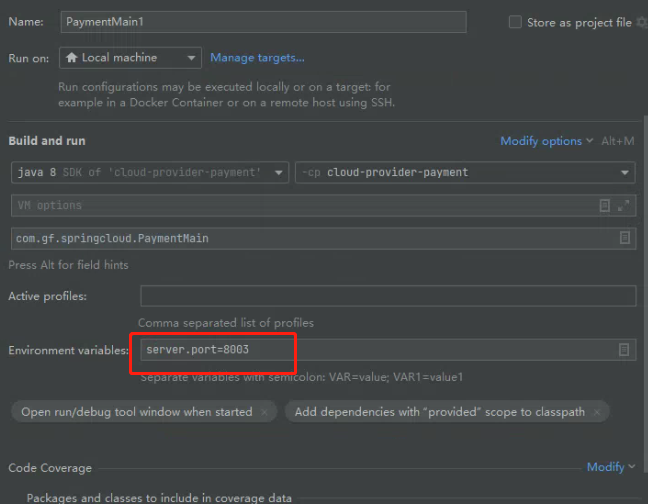
启动cloud-consumer-order
启动后在nacos后台可以看到两个服务,其中cloud-provider-payment有两个实例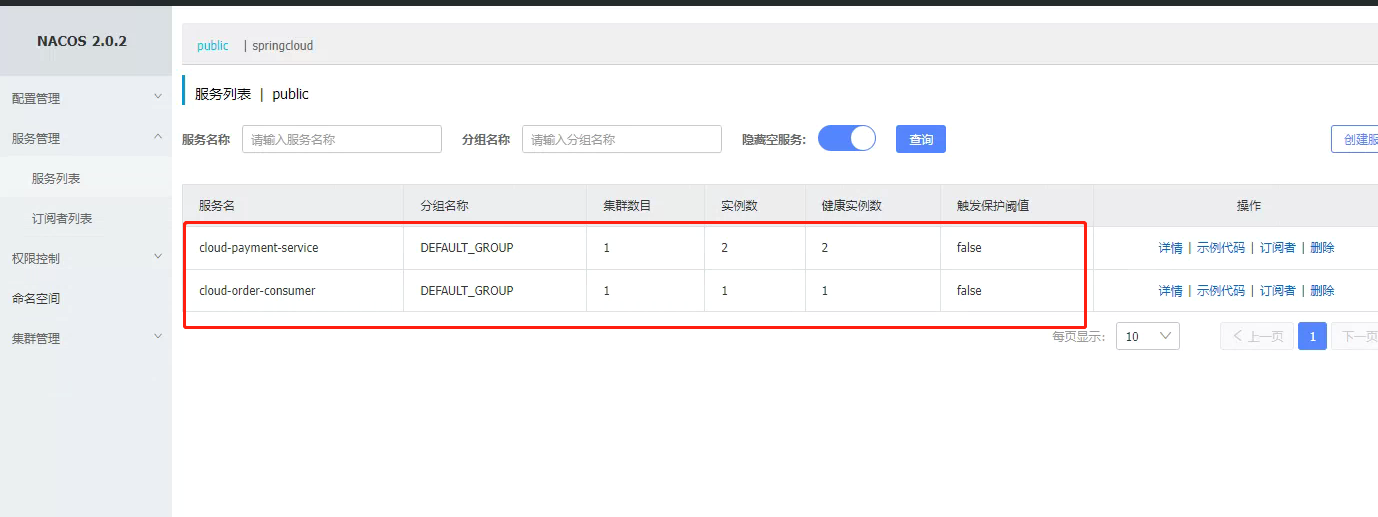
访问http://localhost:8002/consumer/payment/nacos/1
刷新页面可以看到端口在8001和8003切换,因为这里的负载均衡使用了轮询。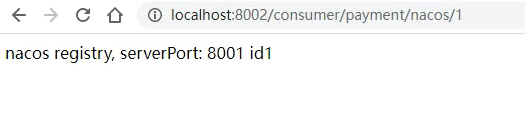
服务配置中心
创建”命名空间”
先在nacos后台创建”命名空间”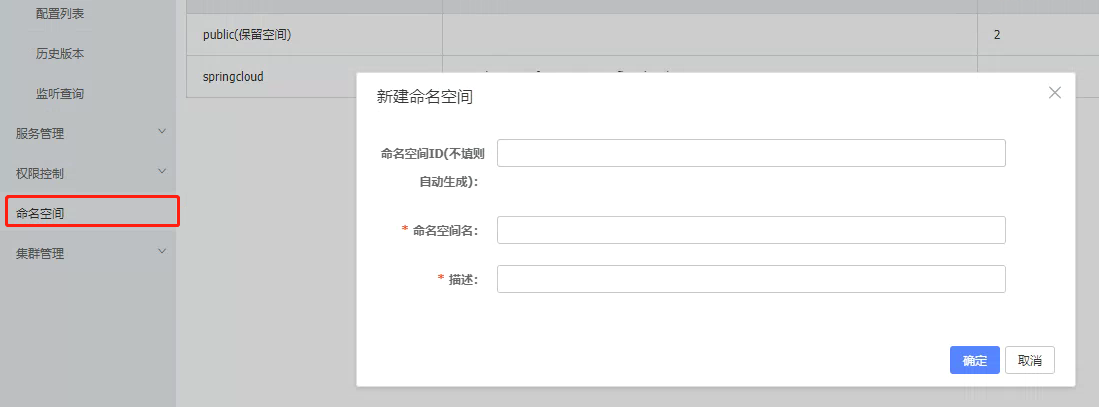
创建后会生成“命名空间ID”用于下面的配置
修改项目
以cloud-consumer-order为例,修改pom.xml
修改application.yml
spring:
profiles:
active: dev # 表示开发环境
#active: test # 表示测试环境
#active: info
消费者将要去访问的微服务名称(注册成功进nacos的微服务提供者)
service-url:
nacos-user-service: http://cloud-payment-service
devtools:
restart:
enabled: true #是否支持热部署
mybatis:
mapper-locations: classpath:mapper/*.xml
type-aliases-package: com.gf.springcloud.entities #所有entity别名所在包
创建bootstrap.yml
server:
port: 8002 #服务端口
spring:
application:
name: cloud-order-consumer
cloud:
nacos:
discovery:
server-addr: 172.18.0.2:30000 #配置Nacos地址
config:
server-addr: 172.18.0.2:30000 #Nacos作为配置中心地址
file-extension: yaml #指定yaml格式的配置
group: DEV_GROUP
namespace: 4767b840-979f-4807-9996-1cfb5ed638ba # 上面生成的命名空间ID
在OrderController添加方法用于测试
@Value(“${config.info}”)
private String configInfo;
@GetMapping(“/config/info”)
@ResponseBody
public String getConfigInfo() {
return configInfo;
}
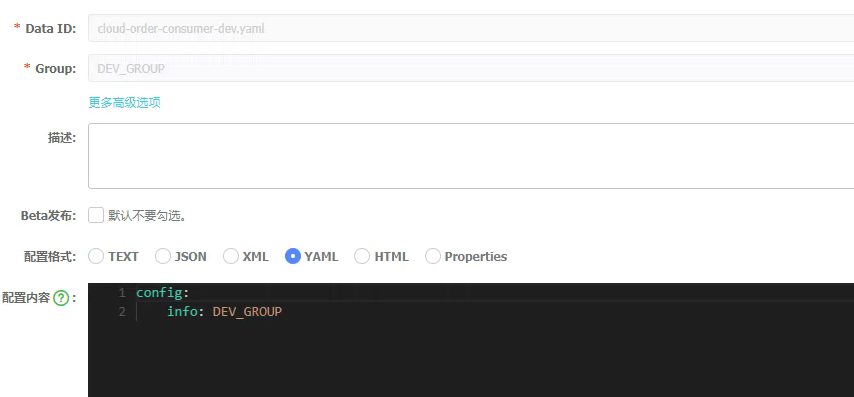
在nacos后台添加配置文件
DataId的规则
${prefix}-${spring-profile.active}.${file-extension}
- prefix默认为spring.application.name的值,也可以通过配置项spring.cloud.nacos.config.prefix来配置。
- spring.profile.active即为当前环境对应的 profile,详情可以参考 Spring Boot文档。注意:当spring.profile.active为空时,对应的连接符 - 也将不存在,datald 的拼接格式变成${prefix}.${file-extension}
- file-exetension为配置内容的数据格式,可以通过配置项spring .cloud.nacos.config.file-extension来配置。目前只支持properties和yaml类型。
- 通过Spring Cloud 原生注解@RefreshScope实现配置自动更新。
测试
启动 cloud-order-consumer,访问http://localhost:8002/config/info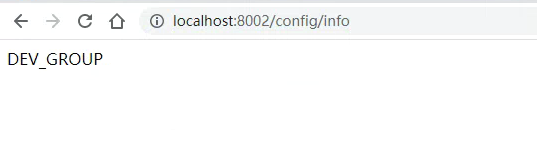

若有收获,就点个赞吧
0 人点赞


